Deployment Reports
Deployment reports is the read-only history of your department's deployments. Use it for printable reports, roster manifests, daily time reports, documents, and CSV/JSON exports for the strike teams, mutual-aid crews and contract work you sent. It also keeps older external resource orders (IROC, EMAC, CIFFC) readable, including orders that were never linked to a deployment.
Nothing can be created or changed here. To create a deployment, record an external order, update fills, store a new order snapshot or close out an order, use Workforce & Business Ops → Deployments. See External orders on that page.
External orders used to be created and edited under Records → Manage → Deployments. Old bookmarks to the create page (/User/RecordDeployments/New) now open New external order in Workforce & Business Ops. The former Records write URLs are no longer accepted. In the Records queue, opening a Deployment (External Order) record goes to its read-only report, and new or edit goes to the deployment workspace. Generic record edits and bulk actions on those records are refused.
Where to find it
- Sidebar: Records → Deployment reports.
- All records → Manage → Deployment reports.
- From a deployment page in Workforce & Business Ops: the Deployment reports header button.
Every department member can open the page. Administrators and holders of Manage deployments see every deployment; everyone else sees the deployments they are rostered on. The same department and roster rules apply as in the operational screens. External orders keep their own Records visibility checks.
Turning it on
Deployment reports needs only the Records.System flag. It does not require Operations.Deployments: if a department turns operational deployments off, its retained reports stay readable. Downloads marked Export records below need the Export records permission.
Deployment reports list
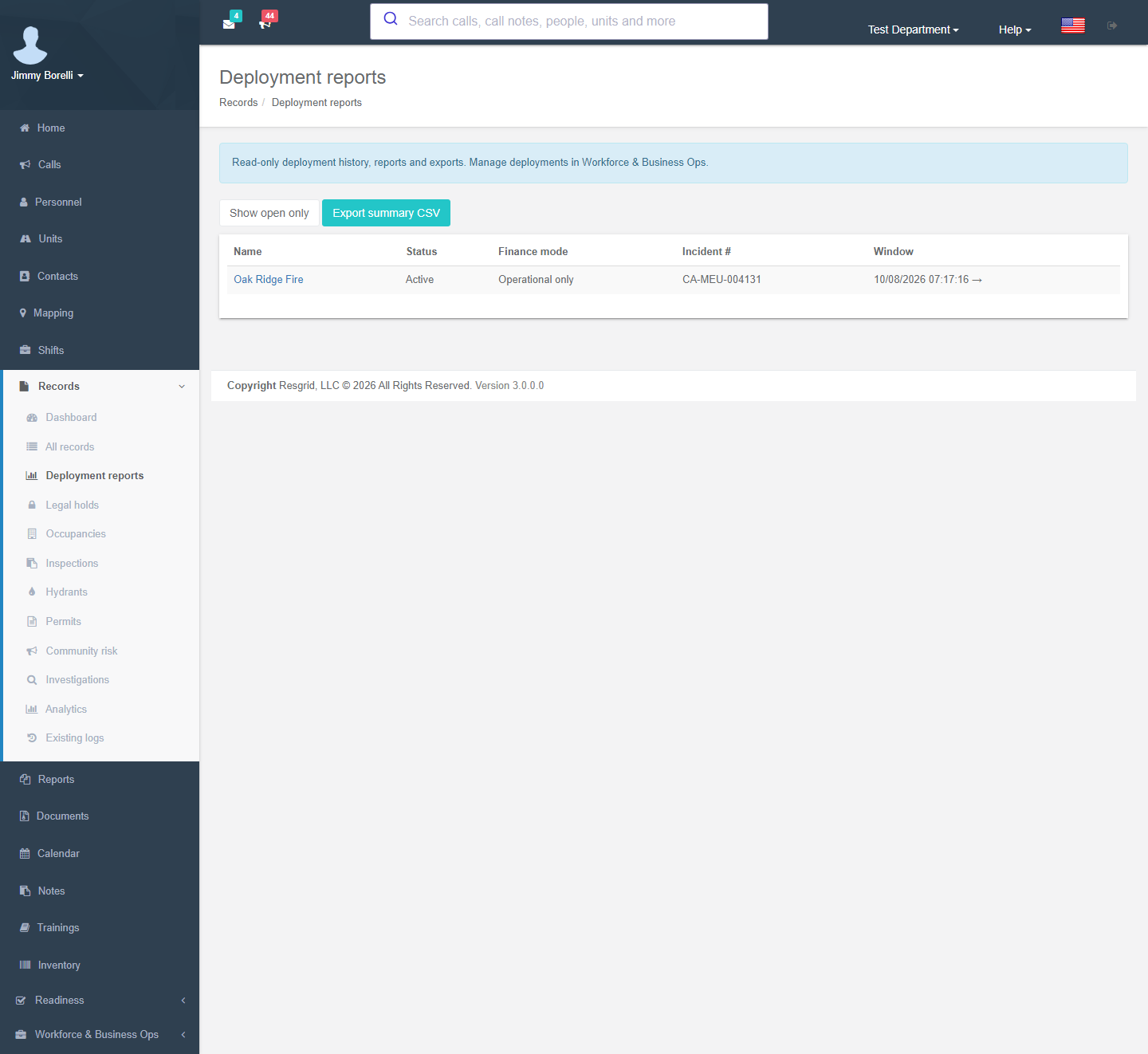
The page opens with the notice Read-only deployment history, reports and exports. Manage deployments in Workforce & Business Ops.
| Element | Meaning |
|---|---|
| Show open only / Show all | All deployments, including completed and cancelled ones, are listed by default. |
| Export summary CSV | Export records. One row per deployment, read across every page of results. |
| Deployments table | Name (opens the report), Status, Finance mode, Incident #, Window. 50 per page. |
| External orders | Older external orders that are not linked to a deployment you can see: Resource order #, Name (incident) and Status. Click an order number to open its report. |
Deployment report
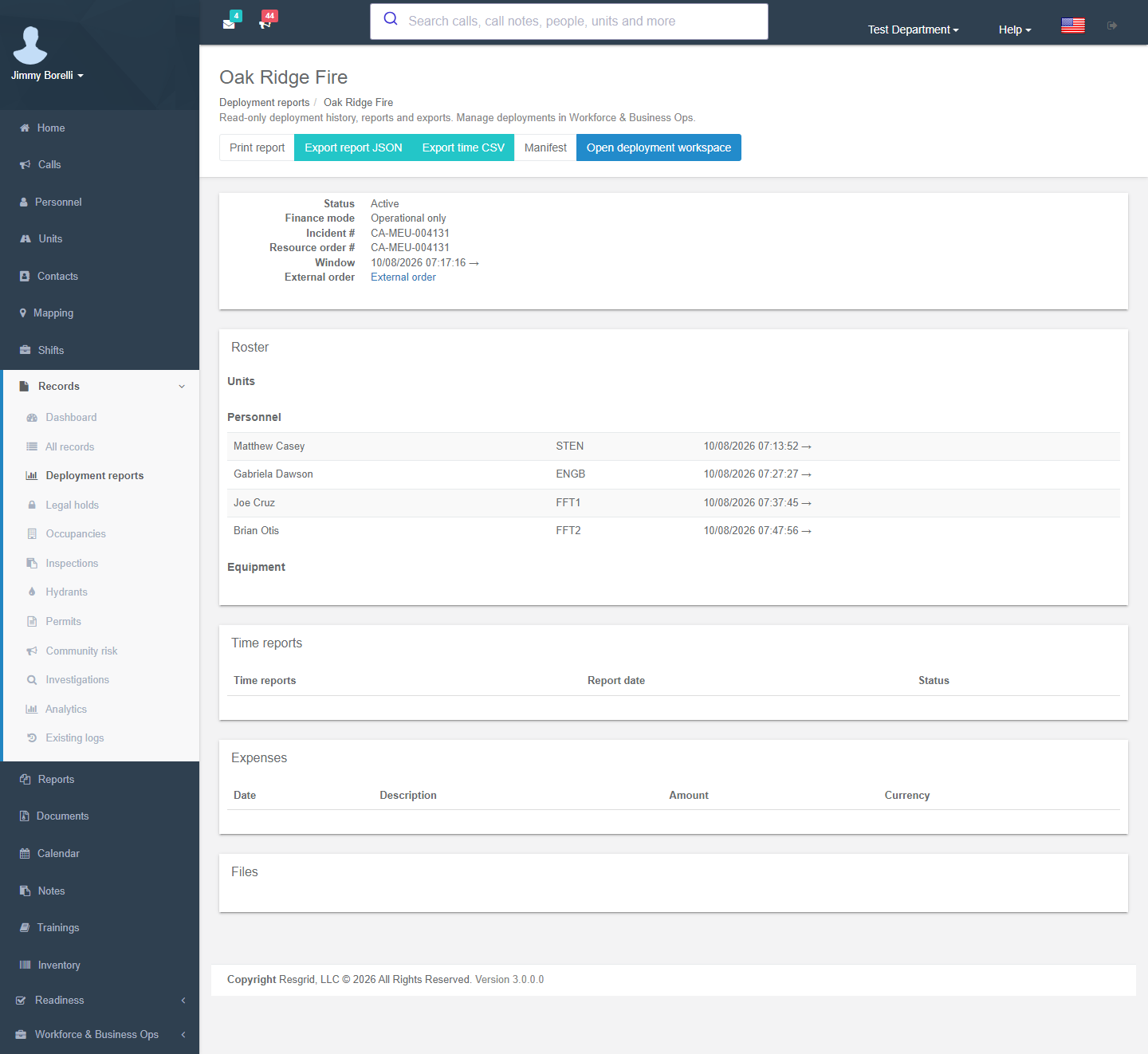
| Element | Meaning |
|---|---|
| Print report | Opens a standalone, print-friendly copy (roster, time-report links, expenses grouped by currency, document links). |
| Export report JSON | Export records. Deployment identifiers, roster, time reports with entries, and expenses. Protected notes and document contents are deliberately left out. |
| Export time CSV | Export records. Every time entry on the deployment. |
| Manifest | Renders the roster manifest without filing it as a new document on the deployment. |
| Open deployment workspace | Managers only. Opens the deployment in Workforce & Business Ops. |
| Summary | Status, finance mode, incident #, resource order #, window and a link to the External order report. |
| Roster | Units with call sign, personnel with certification code, and equipment, each with added → removed (or issued → returned) times. |
| Time reports | Report number (opens the rendered DTR), report date and status. |
| Expenses | Date, description, amount, currency, with a total per currency. |
| Files | The deployment's documents. A download is checked against the owning deployment before any file is returned. |
External order report
This is the read-only view of an order and its Fills. It shows the same order panel and fill table as the workspace order page, without any buttons that change the order.
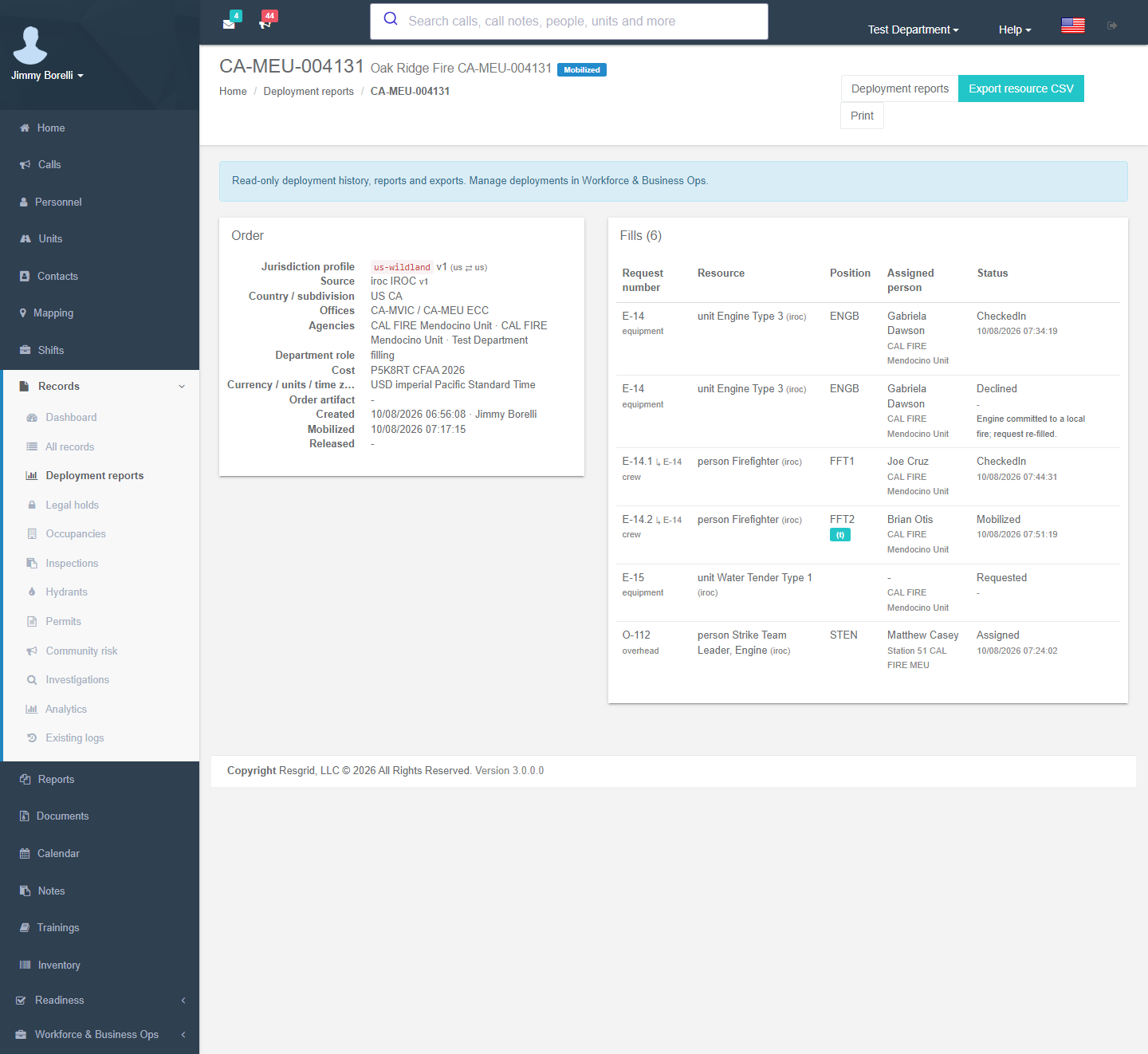
| Element | Meaning |
|---|---|
| Deployment reports | Opens the linked deployment's report, when one exists and you can see it. |
| Export resource CSV | Export records. One row per fill: order, incident, request, resource, position, user, unit, status, and mobilized / checked-in / released / returned times. |
| Prints the page. | |
| Order artifact | Downloads the stored order document. |
CSV exports protect against spreadsheet formula injection: a cell that starts with =, +, - or @ is prefixed with an apostrophe. Times are exported in UTC (ISO 8601).
Setup examples
| Department | Use |
|---|---|
| Wildland / type 3 IMT | Finance/admin unit prints the deployment report and exports the time CSV for the incident cost package after demobilization. |
| State EMA | Export summary CSV each quarter for the EMAC reimbursement tracker; resource CSV per mission order for the after-action report. |
| Municipal fire | Records staff answer reimbursement or public-records questions from the report without needing Manage deployments; exports are limited to holders of Export records. |
| Department that stopped using deployments | Turn Operations.Deployments off; the reports and older orders stay readable here. |
Technical reference
| Item | Value |
|---|---|
| Routes | /User/RecordDeployments/{Index,Report,Print,Details,Manifest,TimeReport,Attachment,Artifact,ForRecord}; exports ExportSummary, Export (JSON), ExportTimeEntries, ExportOrders (resource CSV). GET only, with no POST actions. New redirects to /User/DeploymentOrders/New. |
| Operational screens | /User/Deployments/*, /User/DeploymentOrders/*, /User/RecordDeploymentConnectors/*; see Deployments |
| Model | Deployment and its roster, time reports, expenses and attachments; RmsExternalOrder, RmsExternalOrderFill, RmsExternalOrderSnapshot |
| Permissions | Records view (every member); Export records for CSV/JSON; Manage deployments (118) to see every deployment instead of only your own, and for Open deployment workspace |
| Flag | Records.System (reports stay available when Operations.Deployments is off) |
| API (read) | GET api/v4/RecordDeployments/{List,Get,GetForRecord,Artifact}. External-order commands moved to POST api/v4/DeploymentOrders/{Create,AddFill,TransitionFill,Snapshot,Closeout} with the same request/response shapes; the former RecordDeployments command URLs are no longer accepted. |