Chat, Assistant & Moderation
Resgrid includes a realtime chat system — direct messages, group chats, department and station channels, and per-incident channels — plus an Assistant (chatbot) that answers questions and takes actions in plain language, and a moderation console for administrators. Chat is available on the web and in all four mobile apps (Responder, Unit, Dispatch, Incident Command) with the same channels and history.
Feature flag: Chat.System (free for all plans; used for staged rollout). If chat is missing, ask your administrator or Resgrid support to enable it.
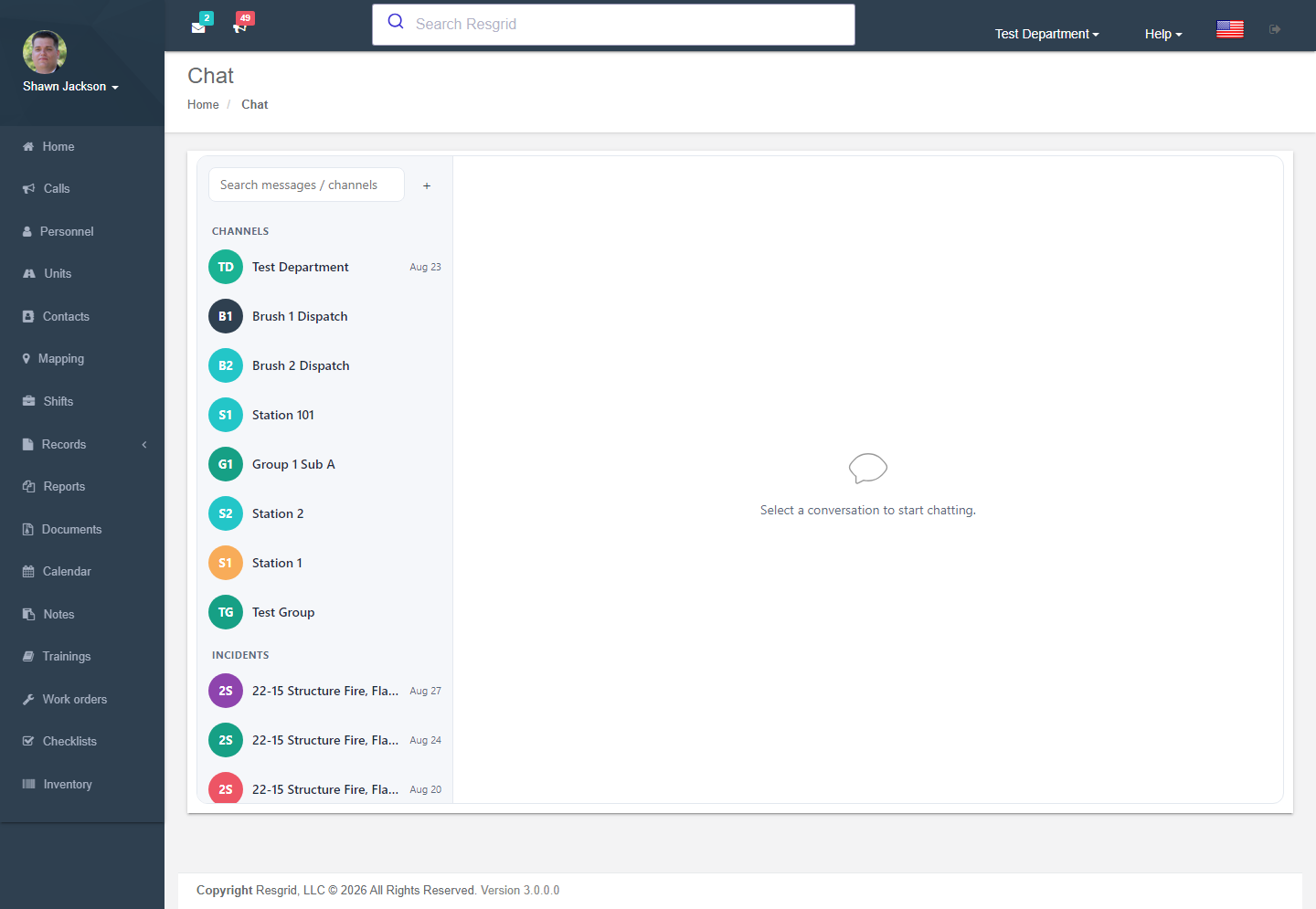
Where to find it
- Chat bubble at the bottom-right of every web page opens a floating chat panel.
- Profile dropdown → Chat opens the full-page chat.
- ✨ Assistant button next to the chat bubble opens the Assistant drawer.
- Department dropdown → Chat Moderation (department and group administrators).
Channels
| Channel type | Who is in it | Created by |
|---|---|---|
| Department channel | Everyone in the department | Automatically |
| Station / group channels | Members of that station or group | Automatically for every group |
| Direct messages | You and one other member — or a unit (the unit's crew receives it) | Anyone |
| Group chats | An ad-hoc set of members | Anyone |
| Custom channels | Rules by group, role or user (any rule matching admits the member) | Administrators |
| Incident channels | Everyone dispatched to a call; plus one channel per command-board lane and a Command channel restricted to the Incident Commander and active incident role holders | Automatically on call creation; archived on close |
| Assistant | You and the Assistant | Automatically |
Identities: people, units ("Engine 6" — the human sender is always recorded for audit), the Incident Commander role, and the Assistant.
Messaging features
- Text, emoji, images (attachments are scanned), GIFs (safe-for-work rating enforced), link previews, shared locations.
- Threads (reply in thread, optionally also send to channel), reactions, @mentions, pins.
- Urgent messages with per-user acknowledgement — a unit audience expands to its crew; any crew member's acknowledgement satisfies the unit. Urgent messages override mute when the department setting allows.
- Read / delivered indicators, typing and presence.
- Push notifications follow the per-app routing matrix: mentions, DMs and urgent messages push; channel chatter does not push to a channel you have open on screen.
- Muting per channel; message editing with history; moderator deletion leaves a tombstone.
The Assistant
The Assistant is a conversational helper inside chat (and, when configured, over SMS and other messaging platforms). It understands commands such as "set me responding", "who is on shift tonight?", "what calls are active?", "page Station 2", and — when allowed — "dispatch Engine 1 to the structure fire on Pine Ridge". Anything it does not recognise as a command is answered by a guard-railed language model that only has access to your department's data through Resgrid's own permissions.
The Assistant conversation is text only: attachments, reactions, pins and threads are disabled there.
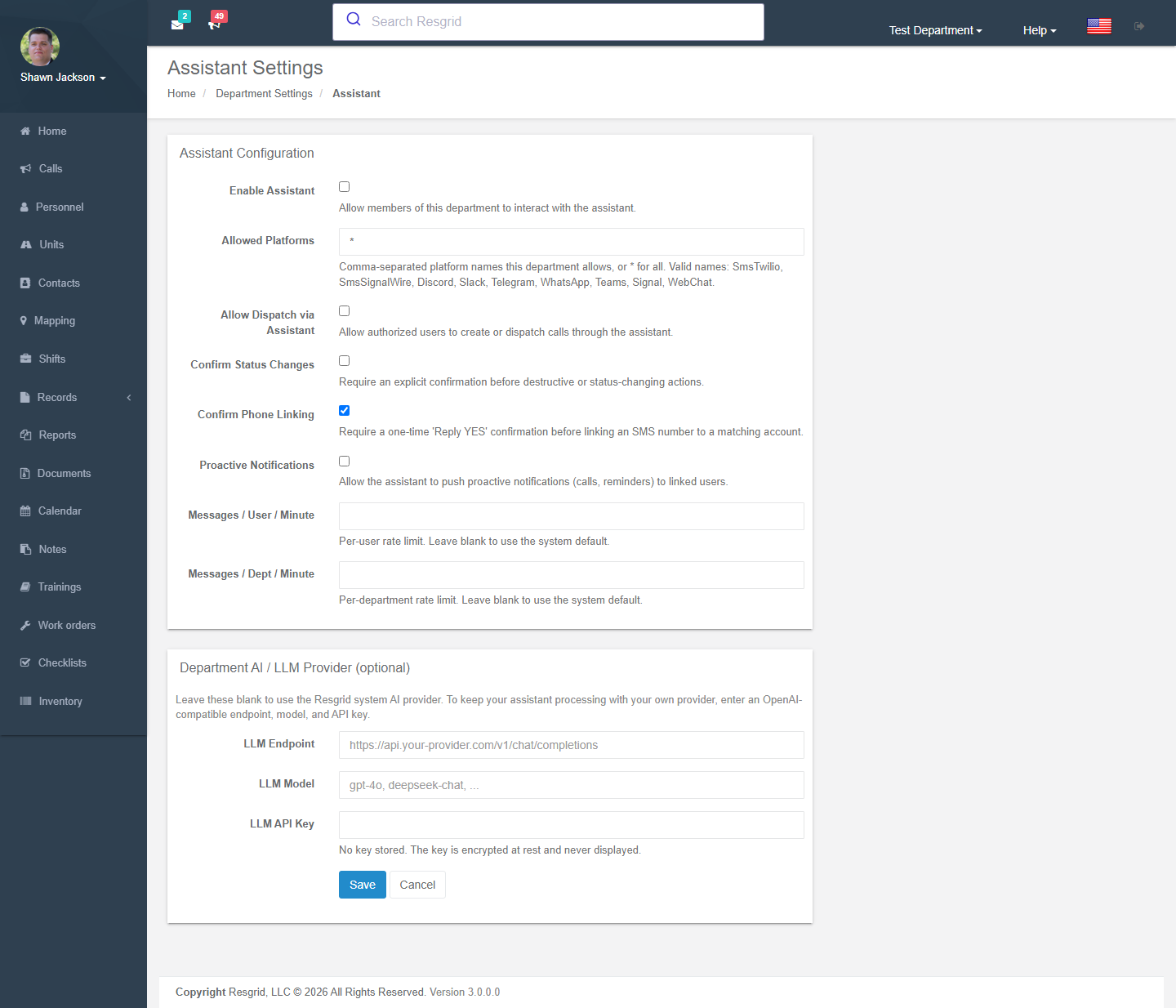
Assistant settings
Department dropdown → Assistant (administrators):
| Setting | Meaning |
|---|---|
| Enable Assistant | Allow members of this department to use the Assistant. |
| Allowed platforms | Comma-separated: WebChat, SmsTwilio, SmsSignalWire, Discord, Slack, Telegram, WhatsApp, Teams, Signal — or * for all. |
| Allow dispatch via Assistant | Authorized users may create or dispatch calls through it. |
| Confirm status changes | Require an explicit confirmation before destructive or status-changing actions. |
| Confirm phone linking | Require a one-time Reply YES before linking an SMS number to a matching account. |
| Proactive notifications | Let the Assistant push calls and reminders to linked users. |
| Messages / user / minute, Messages / dept / minute | Rate limits (blank = system default). |
| Department AI / LLM provider | Optional OpenAI-compatible endpoint, model and API key so the Assistant runs on your provider. The key is encrypted at rest and never displayed. |
Moderation
Department dropdown → Chat Moderation. Department administrators see the whole department; group administrators see their group's channels.
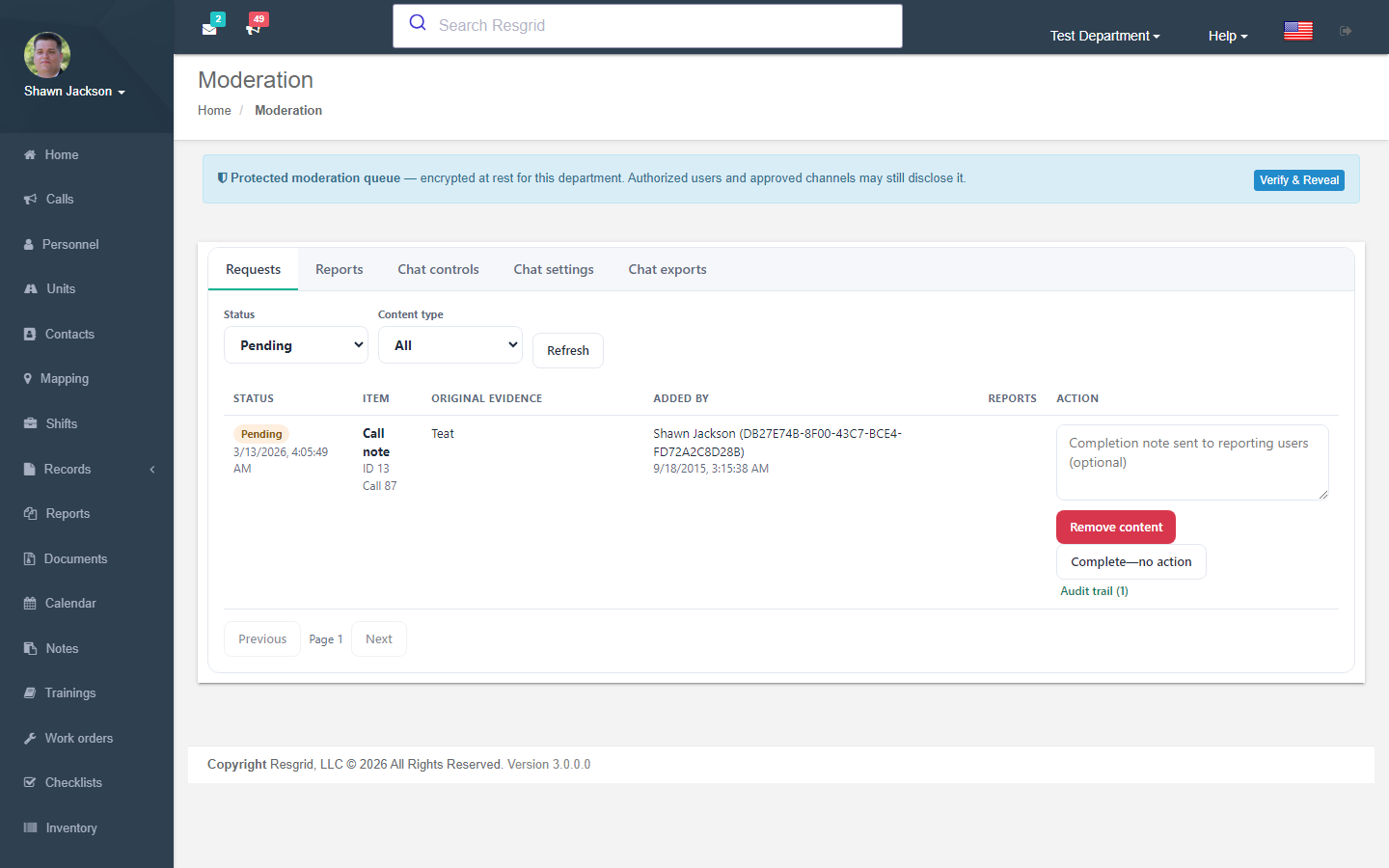
| Tab | What it does |
|---|---|
| Requests | Pending reports from members (reason: inappropriate content, harassment, spam, sensitive information, policy violation, other). Open one to see the item, the original evidence (retained even if the author edits or deletes), and the audit trail. Remove content or Complete — no action, optionally with a note sent to the reporters. |
| Reports | Search new and completed requests by the user who added the content or who reported it, content type and date. |
| Chat controls | Mute or ban a user in a channel, lock / unlock or archive a channel, delete messages. Every action is written to an immutable moderation log mirrored to the department audit log. |
| Chat settings | Allow image attachments, allow GIFs, allow location sharing, urgent messages override mute, Assistant enabled, message retention (days, 0 = forever), maximum attachment size (MB). |
| Chat exports | Request a ZIP export (JSON + CSV transcripts including identities, edit history and the moderation log) for a date range — for records requests, HR or legal. Downloads are audited. |
Members report a message from its menu (Report for moderation) and can check the report's status afterwards. Reports can also be raised on internal messages, call notes and call images.
Records integration
Selected incident-channel messages can be captured as evidence on a Record (see Records → Evidence) — the capture is a checksummed snapshot, so later edits or deletions do not change what was preserved.
Setup examples
| Department | Suggested setup |
|---|---|
| Volunteer fire | Keep department + station channels; encourage DMs to units for on-scene coordination; retention 365 days; Assistant enabled with Confirm status changes on. |
| EMS | Disable image attachments in channels where PHI could appear, or enrol in ADP; retention 30 days; incident channels for handoff notes. |
| Emergency management / EOC | Custom channels per ESF with role rules; urgent messages for activations; export transcripts after each activation for the after-action file. |
| Security / business | Custom channels per client site by group rule; GIFs off; moderation delegated to site supervisors as group admins. |
Technical reference
| Item | Value |
|---|---|
| Controllers | ChatController (Index; Chatbot redirects to Index), ModerationController, ChatbotSettingsController |
| Web components | rg-chat, rg-assistant, rg-chat-page, rg-chatbot, rg-chat-moderation (Areas/User/Apps) |
| Feature flags | Chat.System; Chatbot.TwilioTextIntegration routes inbound SMS through the Assistant pipeline |
| Realtime | Eventing hub ChatEvent (RabbitMQ topic); presence TTL configurable in ChatConfig |
| API | api/v4/Chat/*, api/v4/Chatbot/SendChatMessage |
| Workers | Chatbot message logic, retention purge, export ZIP builder |
| Data | Migrations M0104–M0109; ChatModerationActions mirrored to AuditLog |
| Design | int-Coordination/docs/architecture/chat-system-design.md |