Units
A unit is anything that responds as one thing and has a status of its own: an engine, ambulance, ladder, brush truck, command vehicle, patrol car, delivery van, a SAR team, a hazmat team, a drone. Units have a type, a station, optional roles (seats) that people are assigned to, a live status (Available, Responding, On scene, Out of service …), GPS position from the Unit app or a hardware tracker, and their own logs and equipment.
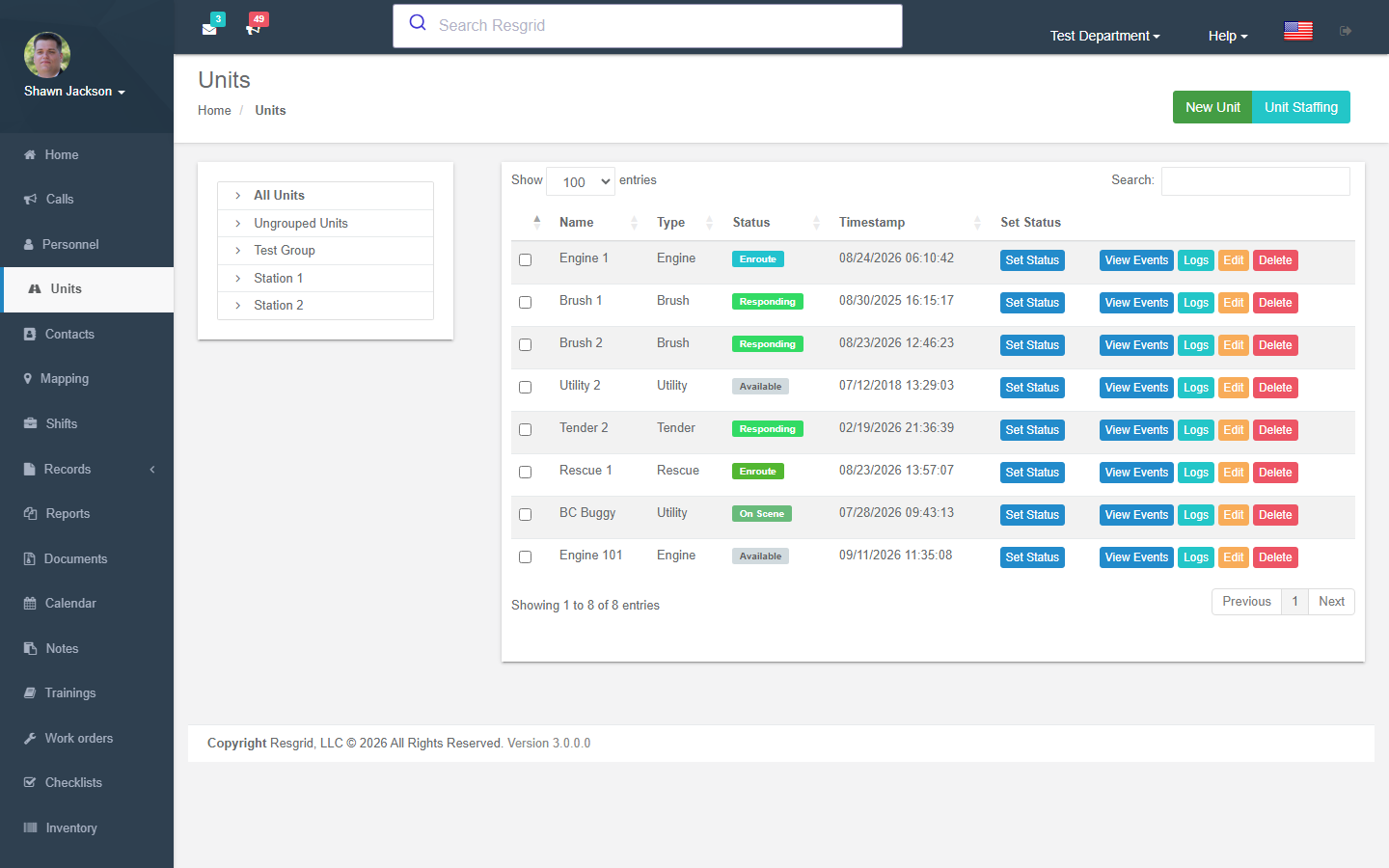
Where to find it
Left menu → Units. Units are listed by station/group with type, current state and timestamp. Buttons: Events, Logs, Edit, Delete; select several to set status at once (only units sharing the same status set can be selected together). Unit Staffing and New Unit are in the toolbar.
Creating a unit
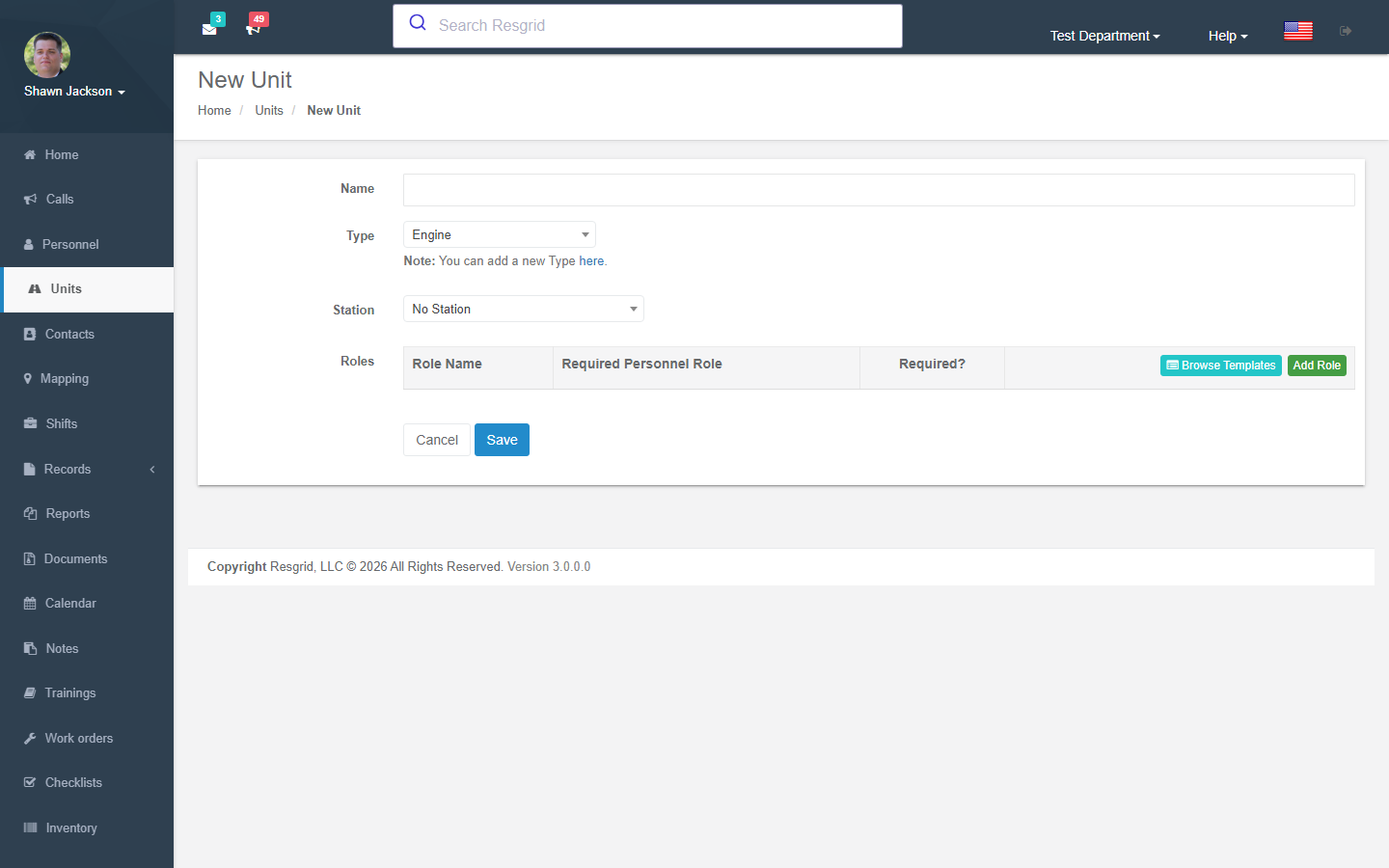
| Field | Notes |
|---|---|
| Name | Engine 1, Medic 12, Patrol 3, Team Alpha. |
| Type | From your unit types. Type decides which custom statuses apply and is used by run cards and coverage minimums. |
| Station / group | Where it is based. Units can also be un-grouped. |
| Unit roles | Seats that can be staffed: Driver, Officer, Firefighter, Paramedic, Navigator. Mark a role required so the unit shows as partially staffed until it is filled. |
| Custom fields | Any User Defined Fields configured for units (VIN, radio ID, capacity …). |
Adding is blocked when the plan's unit limit is reached.
Unit status
Set a unit's status from the list, the Dashboard, the Unit app or the API. Statuses come from the default set — Available, Delayed, Unavailable, Committed, Out of Service — or, more usually, from custom unit statuses defined per unit type (Responding, On Scene, Transporting, At Hospital, Returning …). A status can require a destination (a station or an active call) and carries an optional note and location. Statuses drive dispatch availability, the map, Big Board and reports.
Unit staffing
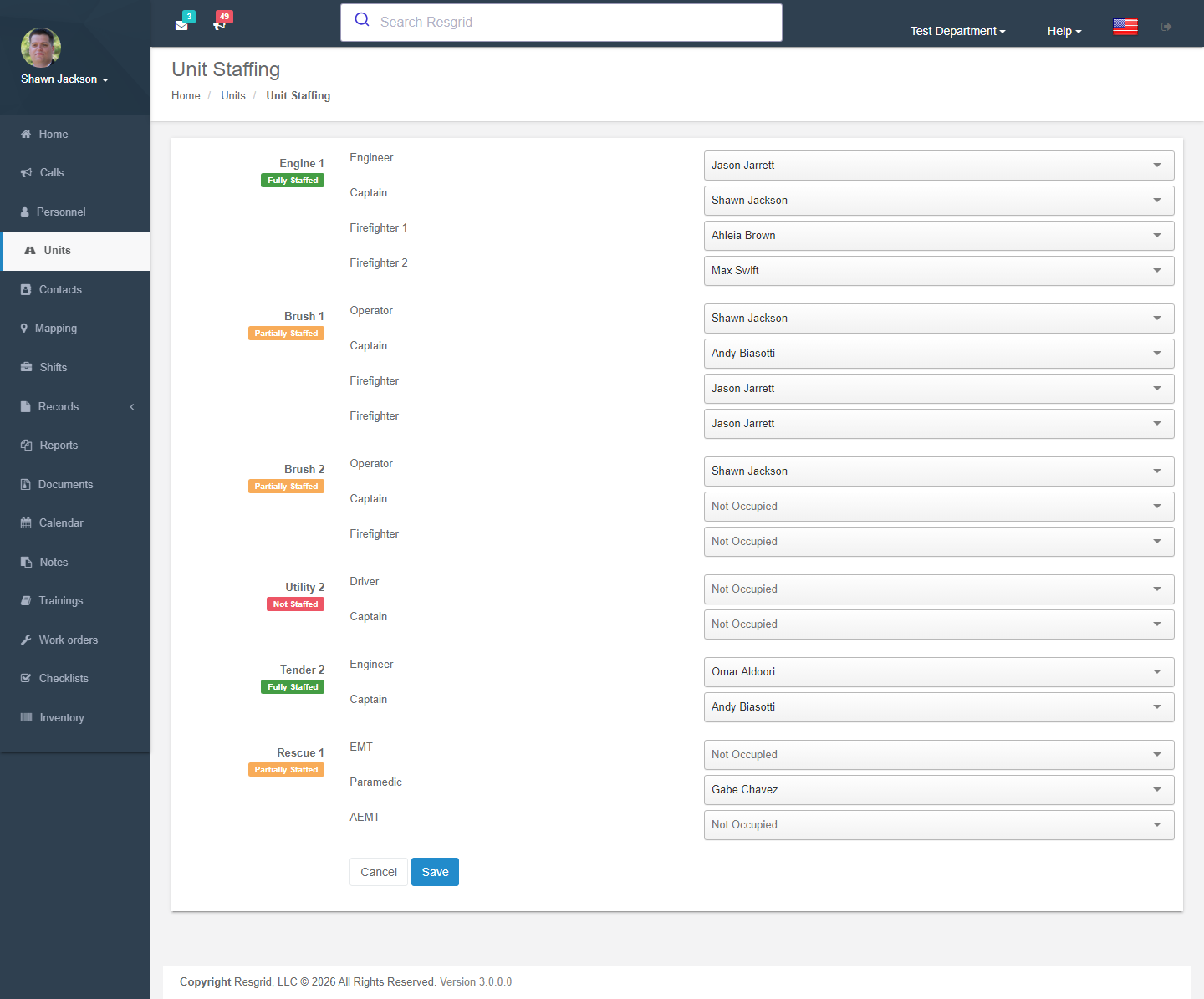
Unit Staffing assigns people to unit roles for the shift or day — who is driving Engine 1, who is the officer. Staffing is what the Unit app shows as the crew, what checklists route to, and what the minimum staffing gate uses in run cards. Members are searched by name; only active members appear.
Unit logs and events
- Logs — narrative entries for the unit (mileage, maintenance notes, activity). After Records activation these become Unit activity records in Records.
- Events — every status, staffing and location change; Generate report prints it; administrators can clear all statuses for a unit.
Equipment, checklists and tracking
From a unit you also reach its equipment (everything issued to it in Inventory), its checklists (target type Unit), its work orders, its certifications & inspections (registration, insurance, pump and ladder tests, DOT inspections — see Certifications) and its hardware GPS tracking bindings.
Setup examples
| Department | Units and roles |
|---|---|
| Fire | Engine (Driver, Officer, FF ×2), Ladder, Rescue, Tender, Brush, Chief (Officer). One unit type per apparatus kind so statuses fit. |
| EMS | Medic units (Driver/EMT, Attendant/Paramedic), Supervisor; statuses Responding / On scene / Transporting / At hospital / Available. |
| SAR | Teams as units (Team Leader, Navigator, Medic, Searchers), UTVs and K9 as units. |
| Emergency management | EOC sections as units are not recommended — use groups; units for MCVs, trailers, generators that move. |
| Security | Patrol vehicles and foot posts as units with a single Officer role; statuses On patrol / At post / Responding / Break. |
| Delivery / transit | One unit per vehicle with Driver role; statuses Loading / En route / Delivering / Returning. |
| Industrial ERT | Brigade engine, hazmat trailer, rescue truck; roles per certification. |
Technical reference
| Item | Value |
|---|---|
| Controller | UnitsController, UnitTrackingController |
| Routes | /User/Units/{Index,NewUnit,EditUnit,DeleteUnit,UnitStaffing,AddLog,ViewLogs,ViewEvents} (?unitId=) |
| Policies | Unit_View/Create/Update/Delete + CanUserViewUnit, CanUserEditUnit |
| Permissions | ViewGroupUnits, CanSeeUnitLocations |
| Data endpoints | GetUnitsList, GetUnits, GetUnitsForGroup?groupId=, GetUnitsAndRolesForGroup, GetUnitsForCallGrid?callLat=&callLong= (ETA), GetUnitEvents?UnitId=, SetUnitState, SetUnitStateWithDest, SetUnitStateForMultiple, GetUnitStatusHtmlForDropdown, GetPersonnelForUnitStaffingJson?search= |
| Events | UnitAddedEvent, UnitStatusEvent, AuditEvent |
| Legacy | UnitLog writes are blocked after Records activation (use Unit activity records) |
| API | api/v4/Units/*, api/v4/UnitStatus/*, api/v4/UnitLocation/* |