Dashboard templates
Dashboard templates let a department administrator decide what the home dashboard looks like for members who have not customized their own. Build a board once — the widgets, their sizes, order and settings — and give it to everyone, or to the members holding one personnel role or belonging to one group. Members can still customize; a template only sets their starting point.
Only department administrators can see, create, edit or delete templates. There is no separate permission to delegate it. The page needs the new dashboard (Dashboard.Modern) to be useful — while the flag is off, members see the classic dashboard and templates have no effect.
Where to find it
On the home dashboard: ⋯ (More dashboard options) → Dashboard templates, or go to /User/Dashboard/Templates.
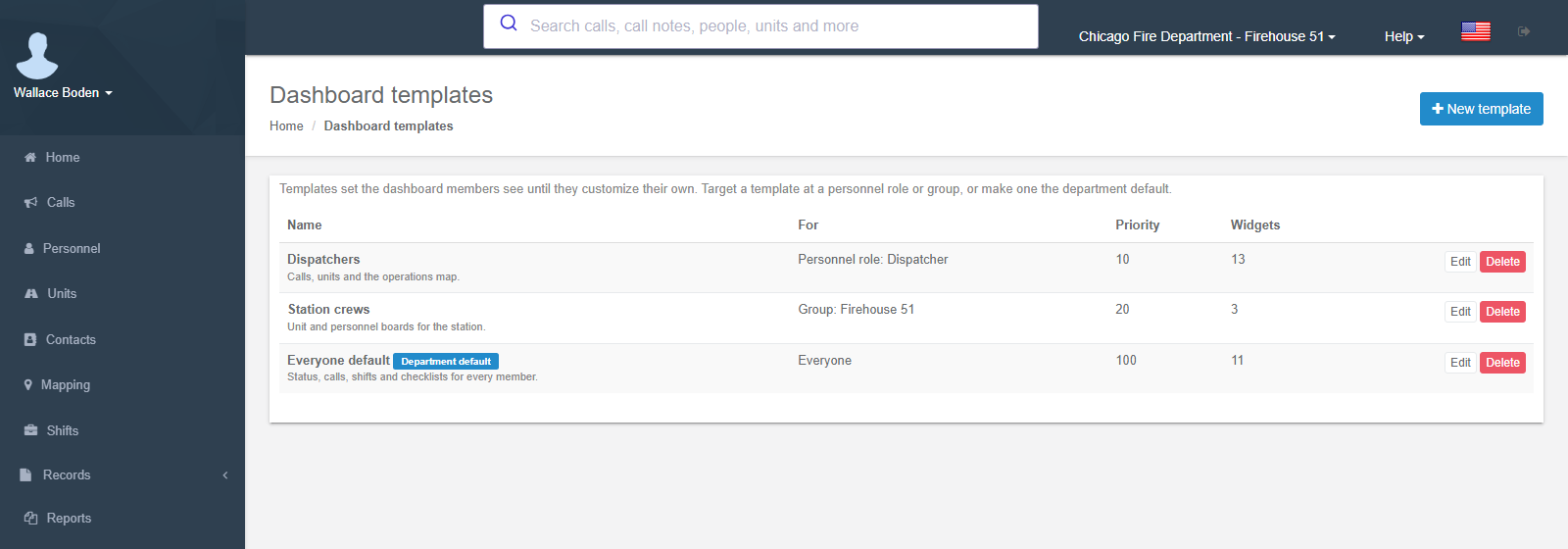
The list shows each template's Name (with the Department default label on the one marked as default, and its description), For (Everyone, Personnel role: … or Group: …), Priority and the number of Widgets, with Edit and Delete. With no templates yet, members see the built-in default for their role — see Built-in defaults.
Creating or editing a template
New template (or Edit) opens the template editor: the dashboard itself, in template mode, with a panel of template details above the board and the bar Editing a dashboard template. with Add widget, Back to templates and Save template.
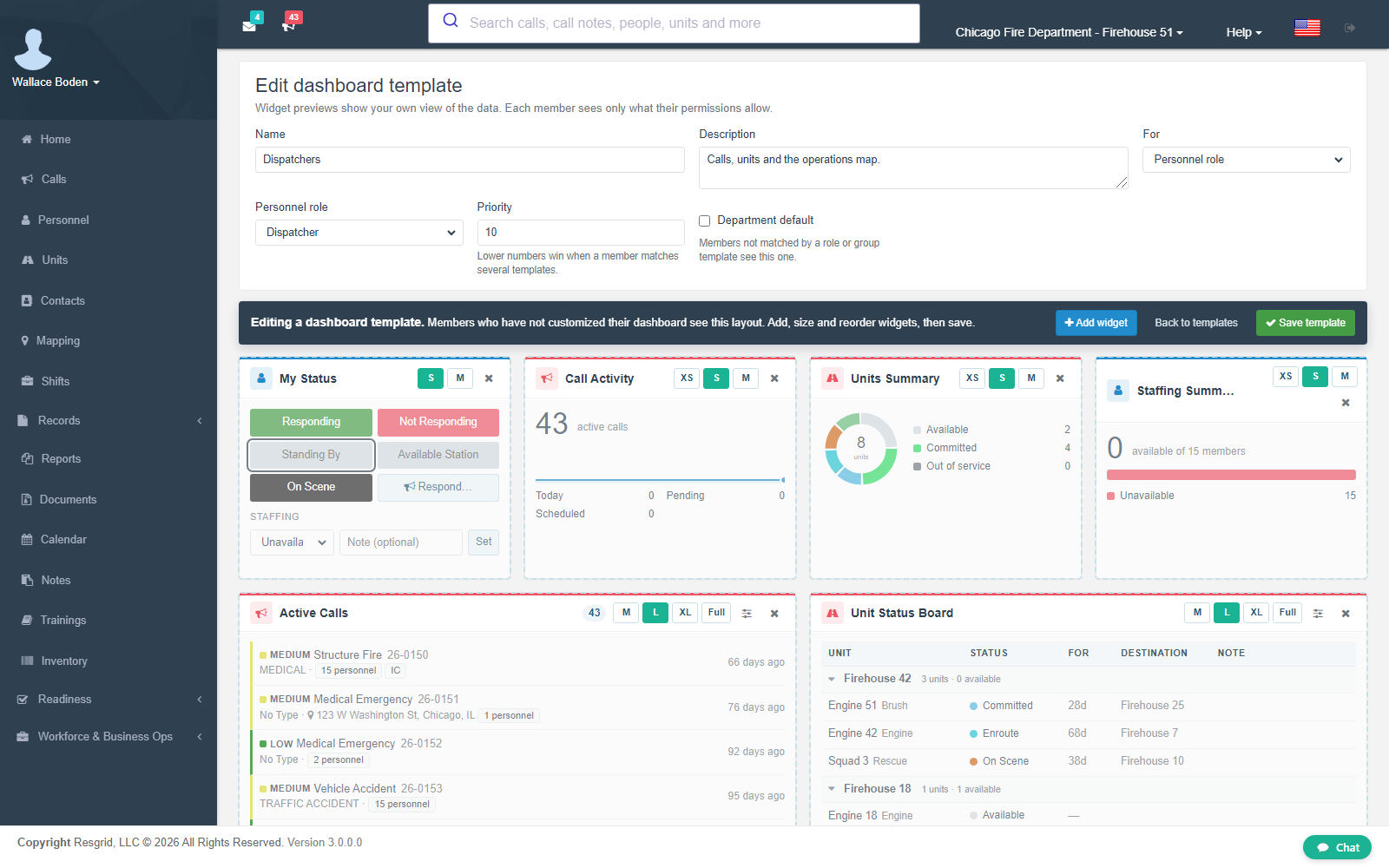
| Field | What to enter |
|---|---|
| Name | Required. What admins see in the list (Dispatchers, Station 2 crews, Everyone default). |
| Description | Optional note for other admins — who it is for, what it emphasizes. |
| For | Everyone, Personnel role (pick the role) or Group (pick the group or station). |
| Priority | A number. Lower numbers win when a member matches several templates. |
| Department default | Members not matched by a role or group template see this one. Only one template can be the default; ticking it on another template moves the label. |
Then build the board exactly as a member would (Customizing): add widgets from the gallery, drag them into order, choose sizes and open each widget's Settings. A new template starts from the built-in administrator board; remove what the audience does not need.
- Widget previews show your own view of the data. Each member sees only what their permissions allow. A widget a member cannot use (no permission, module off, no add-on) is simply left out of their board, and the remaining widgets close up.
- The gallery offers the widgets you can use, plus locked add-on cards. Put add-on widgets on a template only when the department holds the add-on.
- A template holds up to 40 widgets; a department can keep up to 25 templates.
Save template saves it. Back to templates returns to the list without saving.
How members pick templates up
A member's board is chosen in this order: their own saved board → the first matching role or group template (lowest priority number, then name) → the department default template → the built-in default for their audience. See Department defaults.
- Members who have never customized see template changes the next time they open or refresh the dashboard — editing a template updates all of them at once. Changing someone's role or group changes which template they get straight away.
- Members who have customized keep their own board. They get the current template with Customize → Reset to department default, and a new board they add (⋯ → Add board) also starts from it.
- Deleting a template does not change anyone's saved board; members who were following it see the next matching template or the built-in default (Delete this template? Members who have not customized their dashboard will see the next matching template or the built-in default.).
- A template aimed at a personnel role or group that is later deleted matches nobody (the list shows ? in For). Edit it to pick another target, or delete it.
Audit
Every template save and delete is recorded in Resgrid's system audit trail as DashboardTemplateChanged (system audit type 47), with the action (saved or deleted), the template id and name, the department, the admin and their IP address. These entries are kept for Resgrid support and operators; they are not listed on the department's Audit Logs page.
Setup examples
| Department | Templates |
|---|---|
| Volunteer fire | One Everyone default: My Status, Active Calls, Upcoming Events, Checklists Due, My Certifications, Personnel Status Board. |
| Career fire / EMS | Dispatcher role (priority 10): Call Activity, Active Calls (XL), Unit Status Board, Operations Map, Awaiting Resources, Pending & Scheduled. Company officer role (priority 20): Today's Shifts, Shift Approvals, Checklist Compliance, Unit Status Board filtered to the station. Members: the built-in default. |
| Combination department | One template per station group with the Unit Status Board and Personnel Status Board filtered to that station, plus an Everyone default for members without a station. |
| SAR / CERT | Everyone default with Staffing Summary, Personnel Status Board (hide unavailable), Weather Alerts, Upcoming Events; a Team leaders role template adding Communication Tests and Certification Expiry. |
| Emergency management | EOC group template: Active Incidents, Incident Desk per desk, Check-in Queue, Incident Costs, Coordination Boards (Incident Back Office add-on). |
| Private security | Site supervisors role template: Active Calls, Unit Status Board grouped by type, Shift Approvals, Inventory Alerts. |
Technical reference
| Item | Value |
|---|---|
| Routes | /User/Dashboard/Templates (list), /User/Dashboard/EditTemplate?id= (editor — rg-dashboard with mode="template"), GET /User/Dashboard/TemplateTargets (roles and groups), POST /User/Dashboard/SaveTemplate, POST /User/Dashboard/DeleteTemplate |
| Access | Department admins (IsUserDepartmentAdmin); everyone else gets 401. Targets are re-checked as belonging to the department on save |
| Table | DepartmentDashboardTemplates — Name, Description, Audience (0 everyone, 1 personnel role, 2 group), TargetId, Priority, IsDefault (at most one per department, enforced by a filtered / partial unique index), LayoutJson, SchemaVersion, created / updated by and on (migration M0307) |
| Resolution | DashboardService — user board → role/group template by priority → default template → built-in audience default; templates cached per department and invalidated on every save or delete |
| Audit | SystemAuditTypes.DashboardTemplateChanged (47) |
| Flag | Dashboard.Modern |