Deployments
A deployment records the units, personnel and equipment you sent somewhere: a strike team on a wildland assignment, an engine under contract at a film shoot, a crew loaned through EMAC, a medical team at a festival. It holds the roster, one daily time report (DTR) per day, expenses with receipts, files and a manifest. Depending on its finance mode, it feeds nothing beyond the record, a Cal OES MARS claim, or a customer invoice through Contractor Billing.
This is also where you create and run external resource orders (IROC, EMAC, CIFFC or a local order). Creating an order creates its linked deployment and opens it. As the order's fills are accepted, mobilized and released, the deployment's roster and status follow. Plans and Admin Assist call this free capability Deployment Finance.
Where to find it
Menu: Workforce & Business Ops → Deployments. Administrators and holders of Manage deployments see every deployment, along with the External orders, Create from external order and New Deployment buttons. Everyone else sees My Deployments: the deployments they are rostered on, where they can file time.
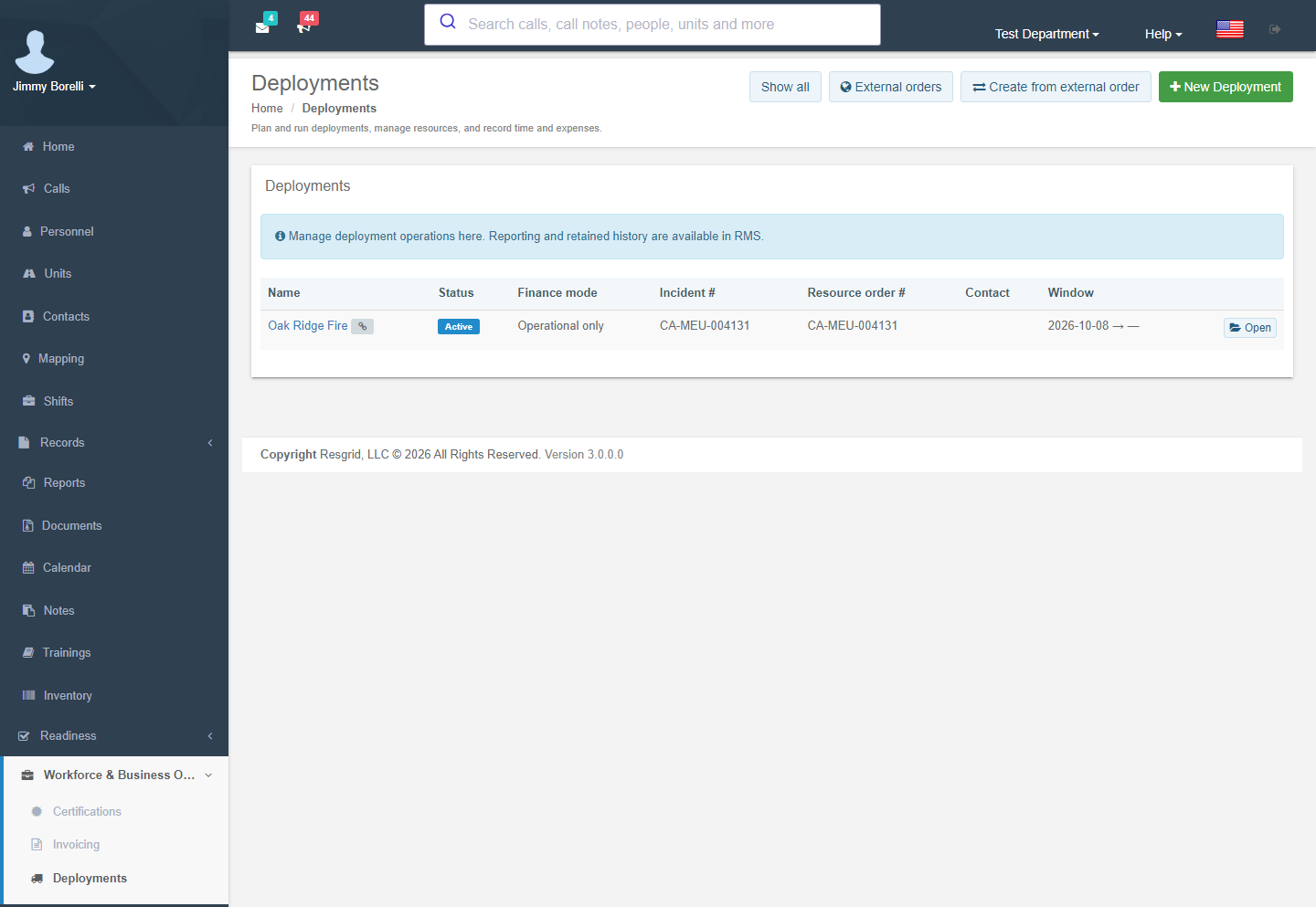
Create and change deployments and external orders on this page. Records → Deployment reports shows the same deployments read-only, with printable reports, manifests, time reports, documents and CSV/JSON exports, and it keeps older external orders readable. The Deployment reports button on a deployment page opens its report.
Turning it on
| Switch | Needed for |
|---|---|
Operations.Deployments flag (free, no add-on) | The Deployments menu and every operational screen. |
Records.System flag and an activated Records module | External orders. The order, its fills, artifacts, record identity, audit history and retention stay in Records storage. Creating or changing an order also requires the Create records permission. Without Records, Create from external order says the Records system is not enabled. |
| Business Ops add-on | The Billing tab (Contractor Billing) and Cal OES MARS. The Internal cost tab needs the Workforce entitlement (Field Costing). |
Installation config RecordsConnectorConfig.Enabled | External connectors (off by default). |
Creating a deployment
| Start from | When |
|---|---|
| New Deployment | Anything you organize yourself. |
| External orders → New external order | A resource order arrives from IROC, EMAC, CIFFC or a local system. Record the order and its first fill. Create deployment then creates the linked deployment, prefills the roster from accepted fills and opens it. See External orders. |
| Create from external order | An external order exists but has no deployment yet (for example, an order recorded before external orders moved to this page). Pick the order, choose the finance mode and contact, and optionally tick Prefill the roster from accepted fills and Also create a call. Orders that already have a deployment are not offered. |
| Bid → Schedule deployment call | Contract work. The deployment wizard creates the call, the deployment and the roster in one step. |
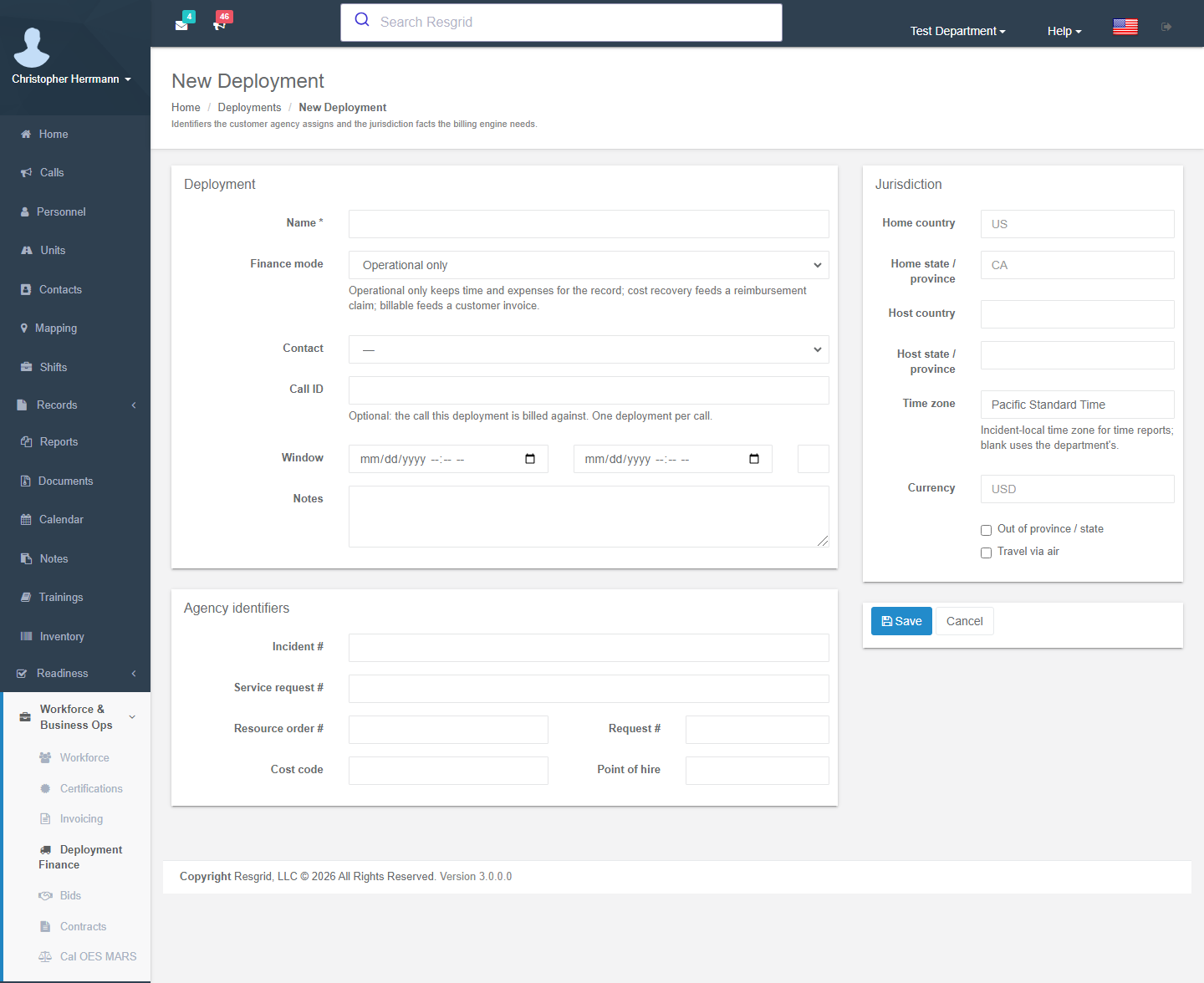
| Field group | Fields |
|---|---|
| Deployment | Name; Finance mode: Operational only (time and expenses for the record), Cost recovery (feeds a reimbursement claim such as Cal OES MARS) or Billable (feeds a customer invoice); Contact (the customer or requesting agency); Call # (optional, one deployment per call); Window start/end and Max days; notes. |
| Agency identifiers | Incident number, service request number, resource order #, request #, cost code, point of hire: whatever the ordering agency (VIPR, FEMA, BCWS, Cal OES) assigns. These print on time reports and invoices. A deployment created from an external order copies the order number, incident number, cost code, host country / subdivision, time zone and currency from the order. |
| Jurisdiction | Home and host country / state-province; time zone (incident-local time for time reports; blank uses the department's); currency; Out of province / state and Travel via air, which drive the per-diem and travel rules in the rate schedule. |
Statuses: Planned → Standby → Active → Demobilizing → Completed (or Cancelled). Change them from the deployment page. A deployment linked to an external order also advances on its own as the fills move (see How the order drives the deployment). Workflows fire on Deployment Created and Deployment Status Changed.
External orders
An external order is the request from the ordering system, plus the fills: the requests your department fills with people, units, crews or equipment. The ordering system stays authoritative. The order document is stored as an immutable, checksummed snapshot, and nothing is ever written back.
External orders list
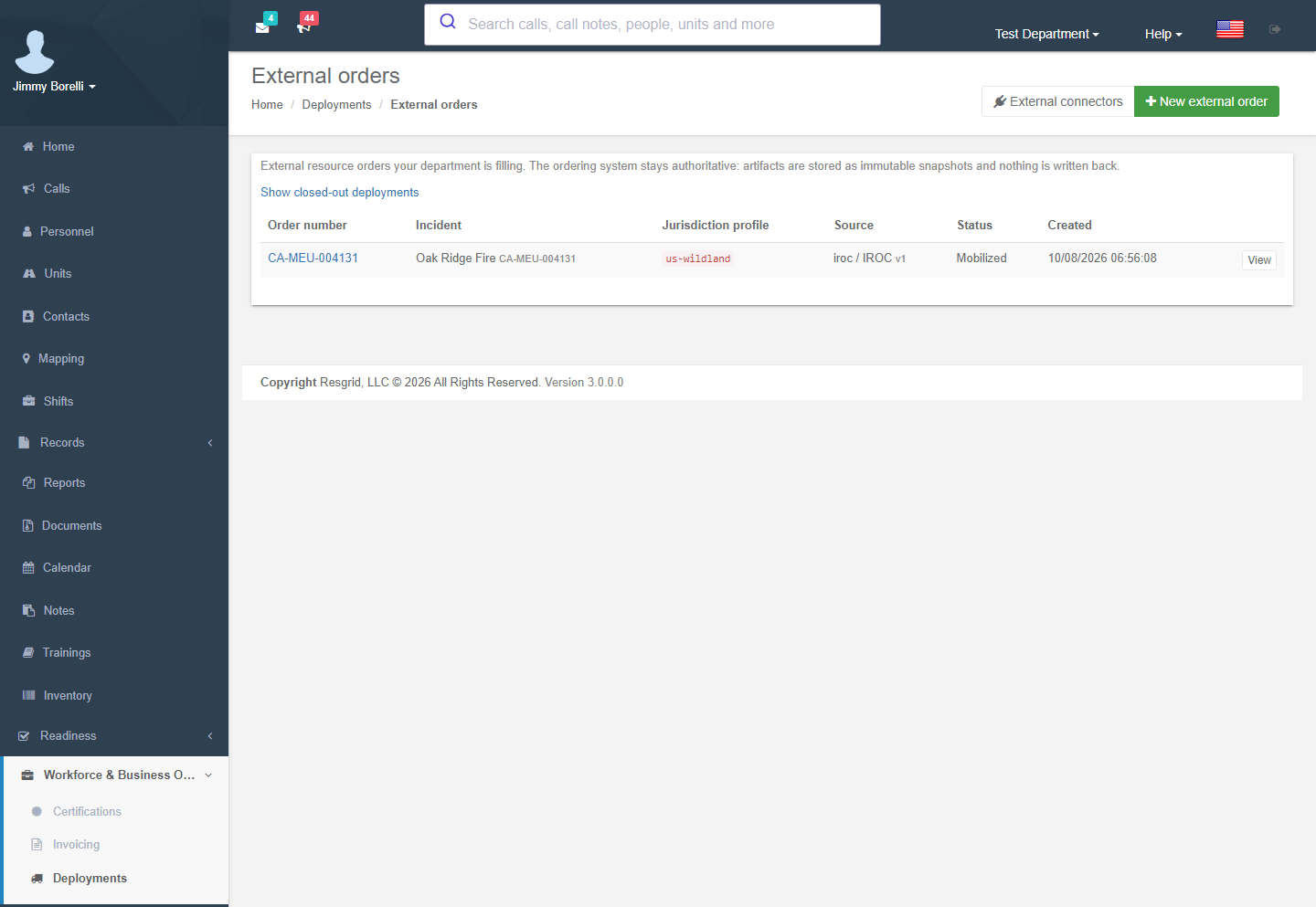
Deployments → External orders lists open orders. Use Show closed-out deployments to include closed ones. Columns: Order number, Incident, Jurisdiction profile (a plug icon means Maintained by a connector), Source, Status (Open, Mobilized, Released, ClosedOut) and Created. New external order needs Create records. External connectors is shown to department administrators.
New external order
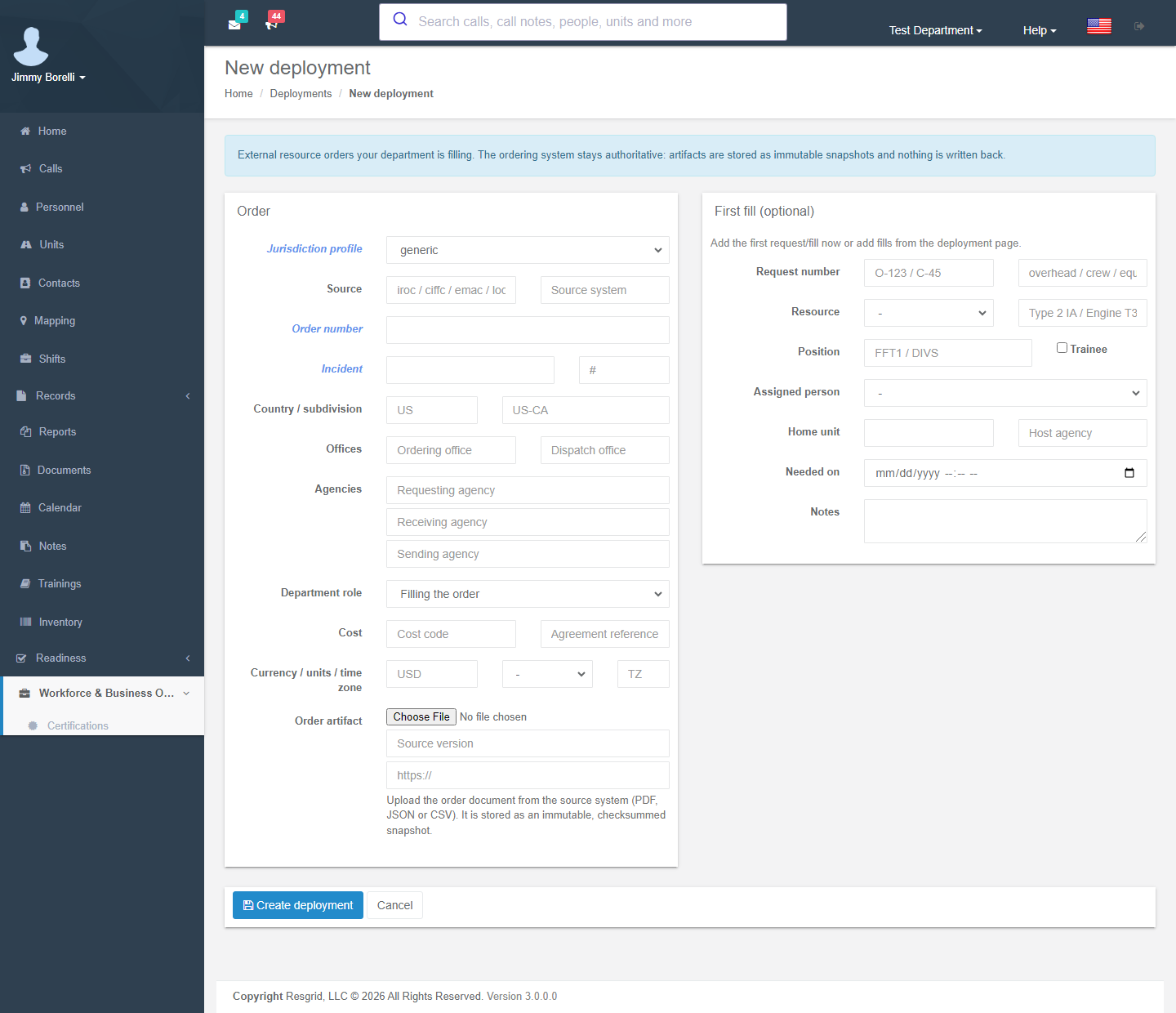
| Field group | Contents |
|---|---|
| Order | Jurisdiction profile (required); Source scheme (iroc / ciffc / emac / local) and source system; Order number and Incident (required) with incident #; Country / subdivision; Offices (ordering and dispatch office). |
| Agencies | Requesting, receiving and sending agency; the Department role: Filling the order, Requesting resources or Hosting incident. |
| Cost | Cost code and agreement reference; Currency / units / time zone. |
| Order artifact | Upload the order document (PDF, JSON or CSV) from the source system, with a source version and an optional https:// link back to the source. It is stored as an immutable, checksummed snapshot. |
| First fill (optional) | Request number and category; resource kind (person, unit, crew, equipment) and type; position and Trainee; Assigned person; home unit and host agency; Needed on; notes. |
Create deployment records the order, creates the linked deployment and opens its page. If the order is saved but linking fails, submitting the same form again reuses that order instead of creating a duplicate.
The order page
Open an order from the list, or from the External order row on its deployment page.
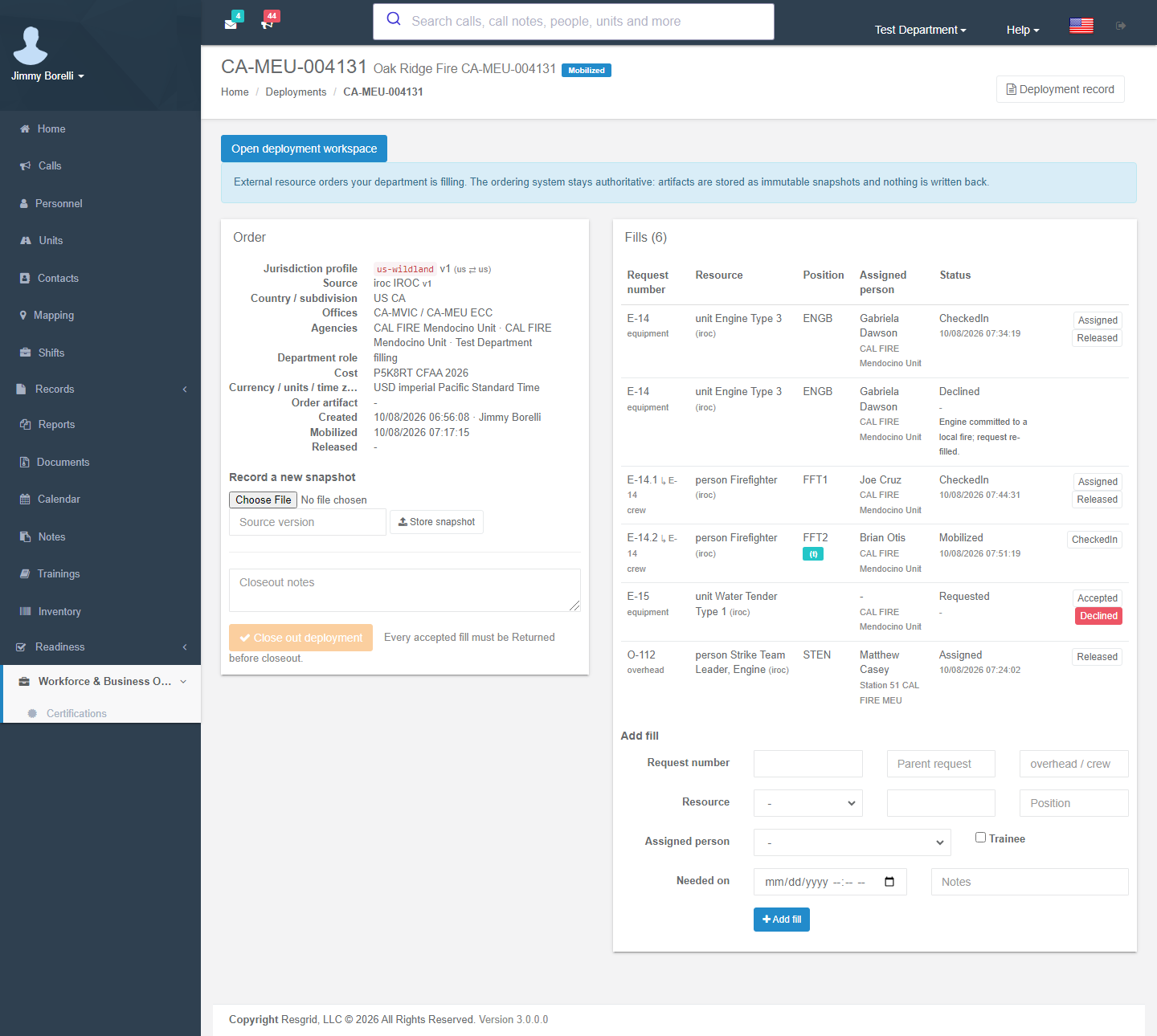
| Element | Meaning |
|---|---|
| Open deployment workspace | Opens the linked deployment. If the order has none yet (for example, an older order), this creates the deployment, brings the roster and status up to date with the fills, and opens it. |
| Deployment record | The order's read-only record in Records → Deployment reports. |
| Order artifact | Downloads the current order document. |
| Order panel | Profile, source, location, offices, agencies, department role, cost, currency, artifact checksum, created / mobilized / released (and closed-out) times. |
| Record a new snapshot | Upload the updated order document with its source version, then Store snapshot. The previous snapshot is kept and superseded. |
| Fills table | Request number (↳ parent request), resource, position ((t) for trainee), assigned person with home unit and host agency, and status with its time. Each row has buttons for the next allowed status. |
| Add fill | Request number, parent request, category, resource kind and type, position, assigned person, Trainee, Needed on, notes. |
| Close out deployment | Optional closeout notes, then confirm. The button stays disabled until the order has at least one fill and every fill that was not declined is Returned. Decline any request you will not fill. After closeout, fills can no longer change. |
Fill statuses move forward one step at a time:
| From | Next |
|---|---|
| Requested | Accepted or Declined (you are asked for a reason) |
| Accepted | Mobilized |
| Mobilized | CheckedIn |
| CheckedIn | Assigned or Released |
| Assigned | Released |
| Released | Demobilized |
| Demobilized | Returned |
How the order drives the deployment
| On the order | On the deployment |
|---|---|
| A fill is accepted (through Assigned) with an assigned person or unit | The person or unit joins the roster (the fill's position becomes the certification code). Active roster entries are not duplicated, and removed entries stay in history. |
| Any fill Accepted | Status at least Standby. |
| Any fill Mobilized or later | Active. |
| Every fill that was not declined is Released or later | Demobilizing. |
| Order closed out | Completed. |
The deployment's status only moves forward. It is never set back to an earlier status, even if a fill is corrected.
An agency release does not mean the resource has returned home. Setting a linked deployment to Completed on its page closes the external order through the same audited closeout. The same rule as Close out deployment applies: completion is refused (Every resource must return home before the deployment can be completed.) while any fill that was not declined is short of Returned, and it is refused for an order with no fills or only declined fills. It is also refused if you do not have Records permission to close the order.
External connectors
Deployments → External orders → External connectors (department administrators) reads orders automatically from a source that serves the Resgrid Mutual-Aid Order Feed v1 (JSON). Screen-scraping and inferred updates are not supported.
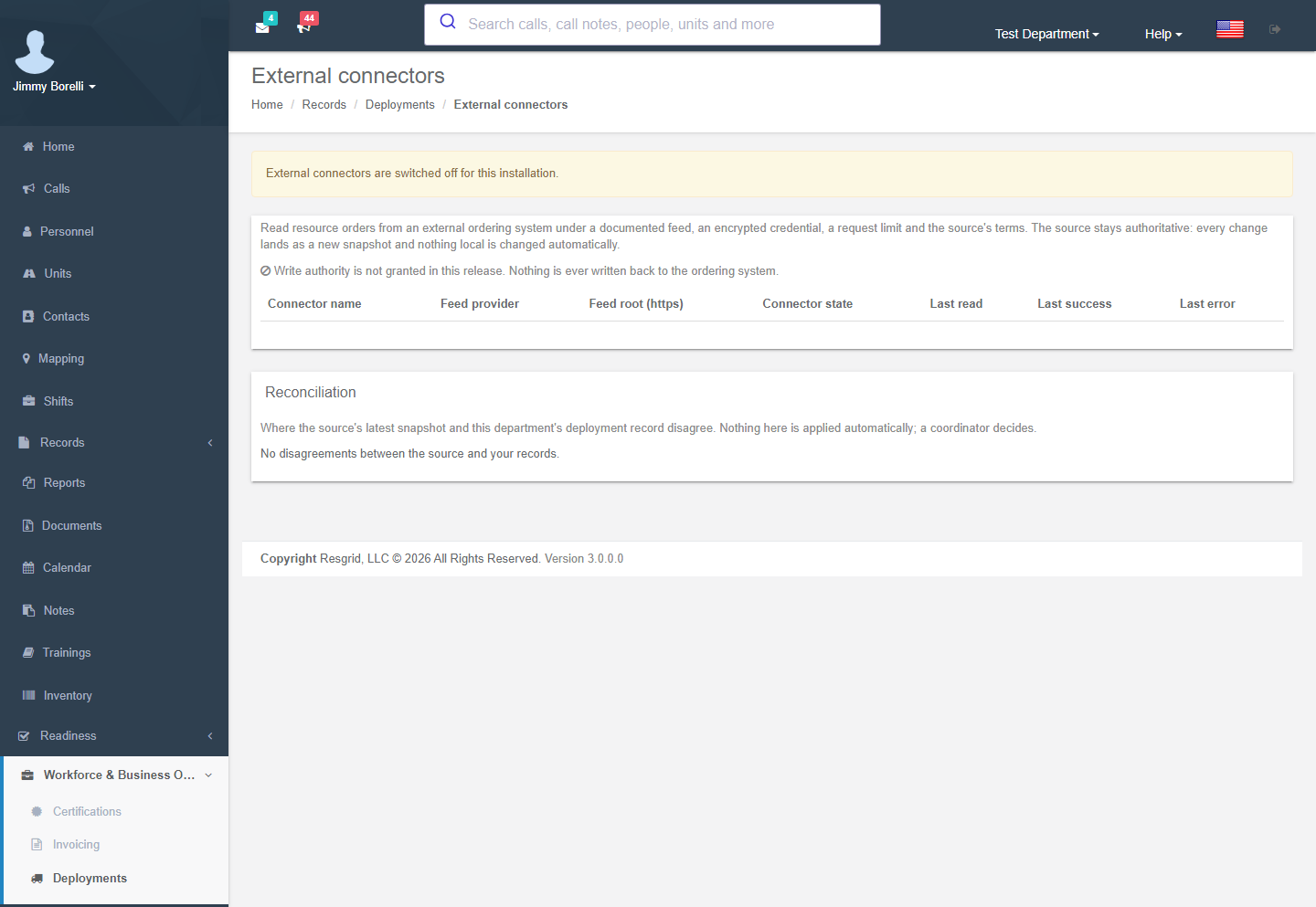
| Setting | Notes |
|---|---|
| Connector name / Feed provider / Source system / Feed root (https) | Where to read. |
| Credential kind / Header name / Credential | Encrypted at rest and never shown again. Leave the credential blank to keep the stored one. |
| Read authority granted | Write authority is not granted in this release. Nothing is ever written back. |
| Poll interval (minutes) / Requests per hour | Request limits. |
| Source terms | Acknowledge the source's terms before the connector can be enabled. |
| Inbound push endpoint / Inbound token | For sources that push. The token is shown once; Issue a new inbound token replaces it. |
Every read lands as a new snapshot. Reconciliation lists where the source and your record disagree (for example, Source released the order, but a fill is not yet returned or Request exists in the source but not locally). A coordinator decides what to do; nothing is applied automatically. Read feed now polls on demand, and the Run log shows each poll's outcome and counts. Deleting a connector keeps the orders it imported and their snapshots. Feed fixtures were built from published IROC, CIFFC and EMAC documentation, not from live integrations, so verify the feed against your ordering system.
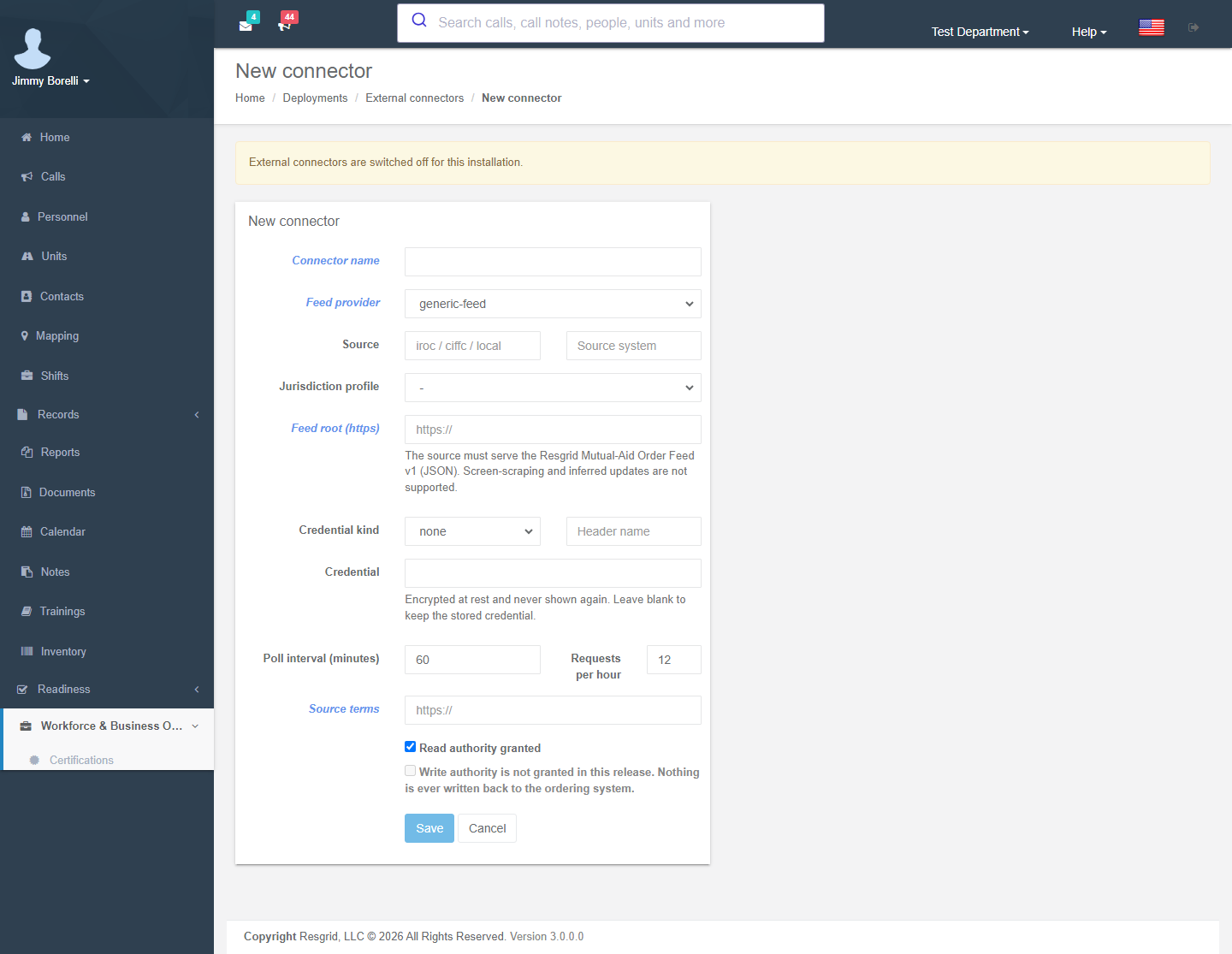
The deployment page
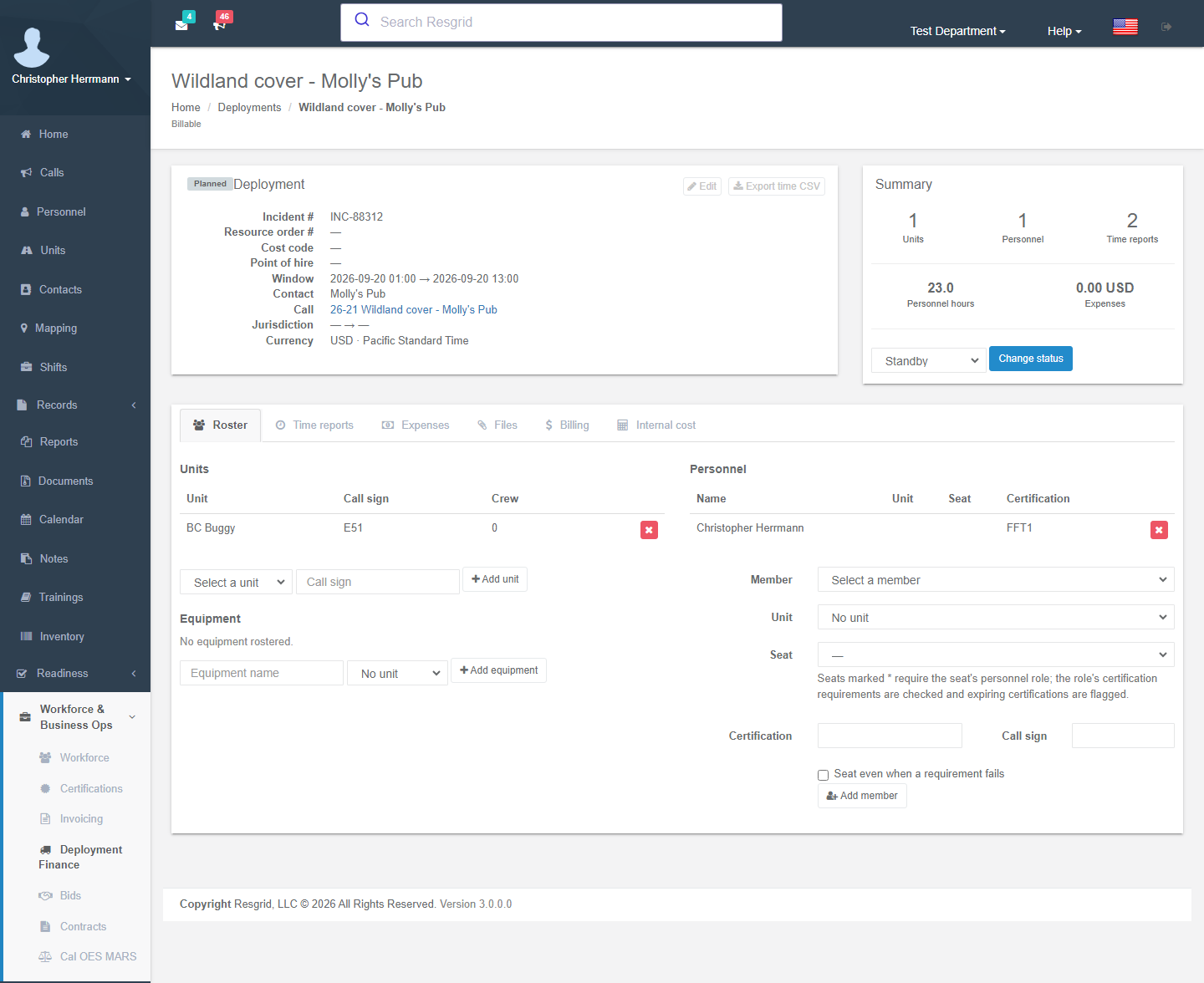
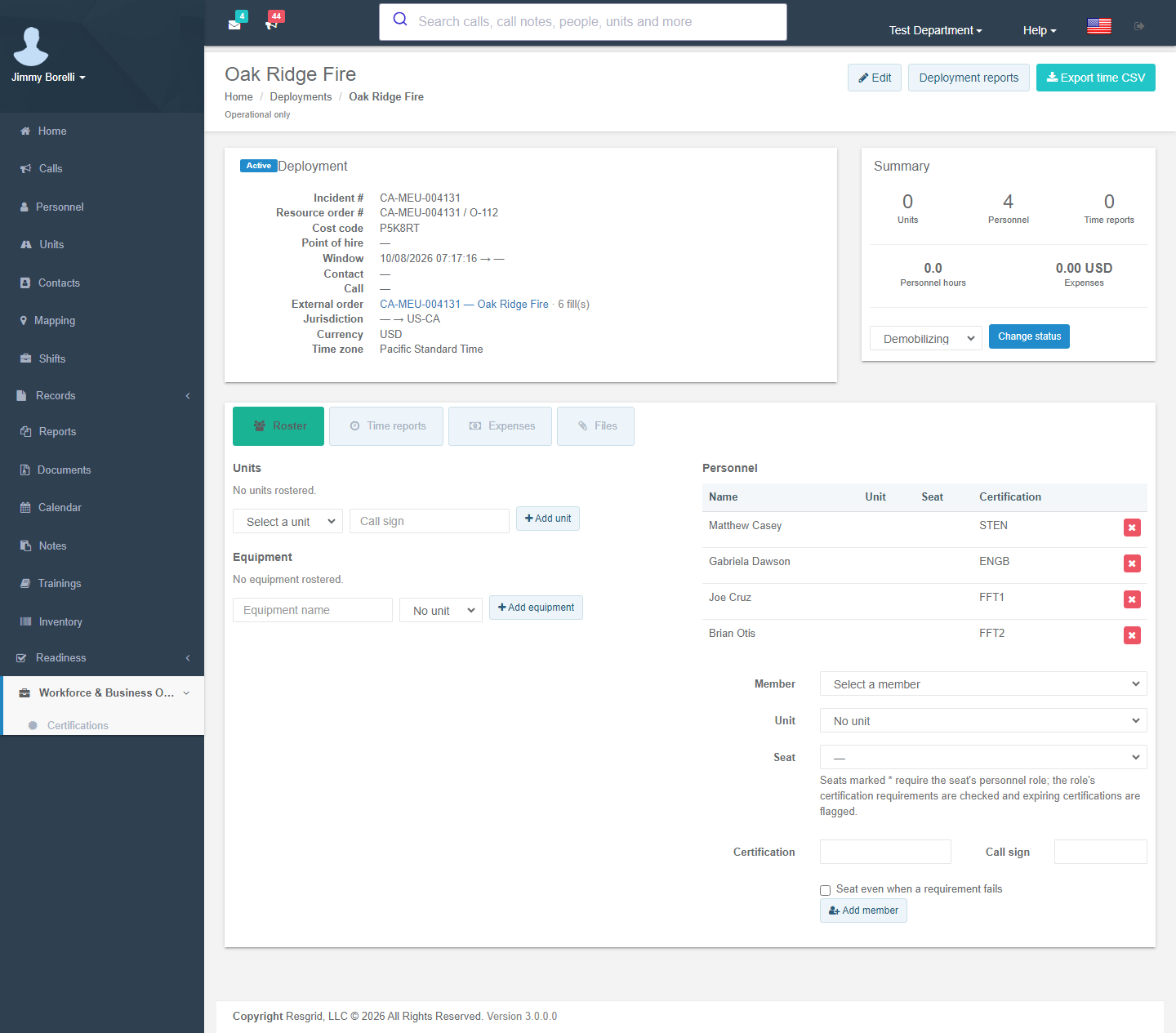
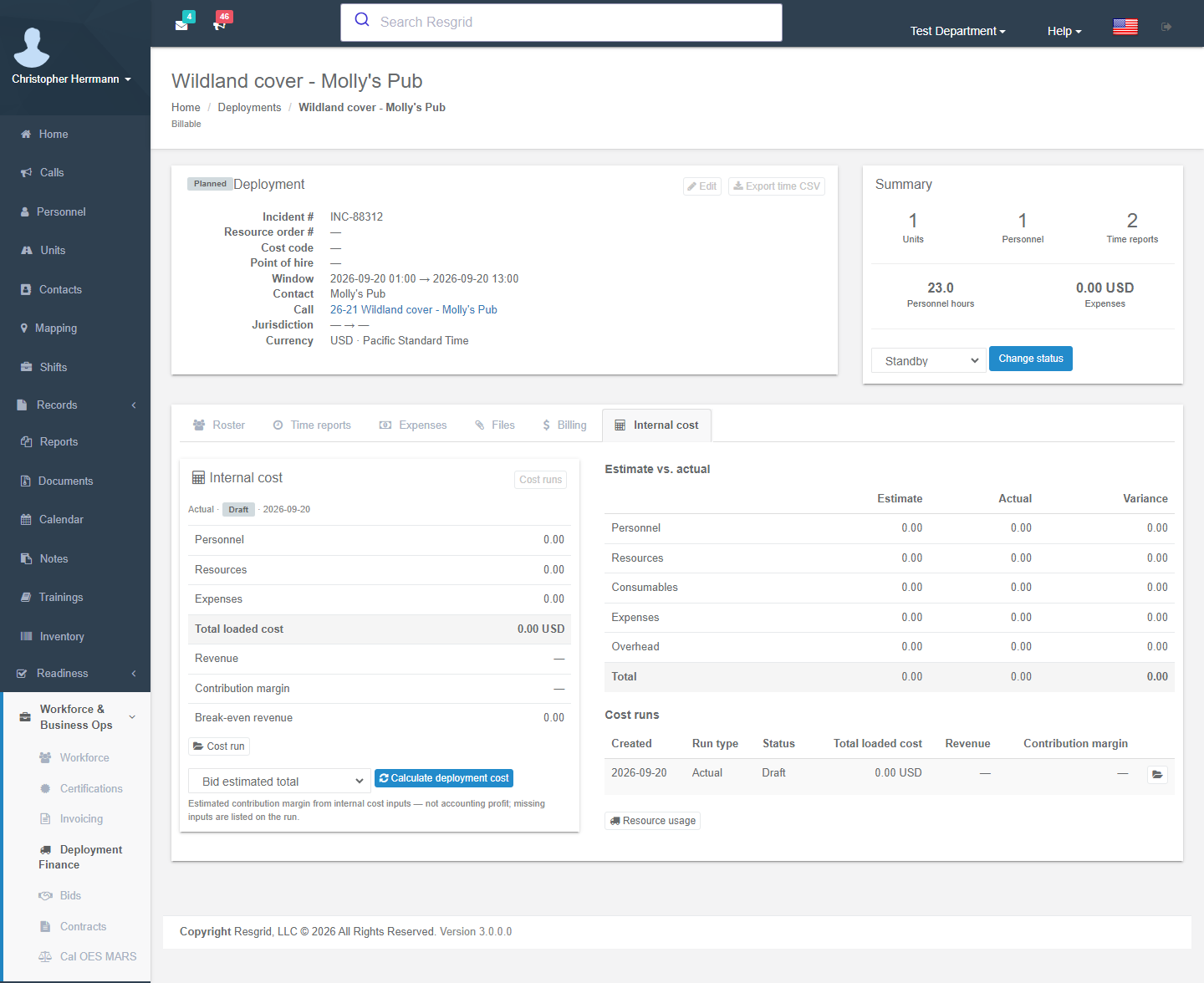
The header shows Edit, Deployment reports (the read-only report in Records, shown when you can view records and Records is on) and Export time CSV. The detail panel shows the identifiers, window, contact, call and External order. For managers the order links to the order page; for others it links to the read-only order report. The Summary cards count units, personnel, time reports, personnel hours and expenses. Tabs:
Roster
- Units: pick a unit and an optional call sign. The crew column shows how many seats are filled; this is the crew size that contract rates key on.
- Equipment: free-text items or inventory assets, issued to a unit or on their own, with Return when they come back.
- Personnel: pick a member, a seat and a certification code (which contract rate entry the person bills under). A seat is a unit role; seats marked * require that personnel role and check its certification requirements, and expiring certifications are flagged. Seat even when a requirement fails deliberately overrides a failed check and is audited.
On a deployment linked to an external order, accepted fills seat their people and units automatically (see above). You can still add or remove roster entries by hand.
Time reports
There is one daily time report per day (New time report with the report date). Entries are prefilled from the roster with a default window you adjust.
Each report takes the department's next time report number: a plain count shown as #3, or the format set under Document numbering (for example DTR-{YYYY}-{SEQ}, DTR-2026-0003). The same number appears on the report, its PDF and file name, the time CSV, invoice line descriptions and in the Responder, Unit, IC and Dispatch apps.
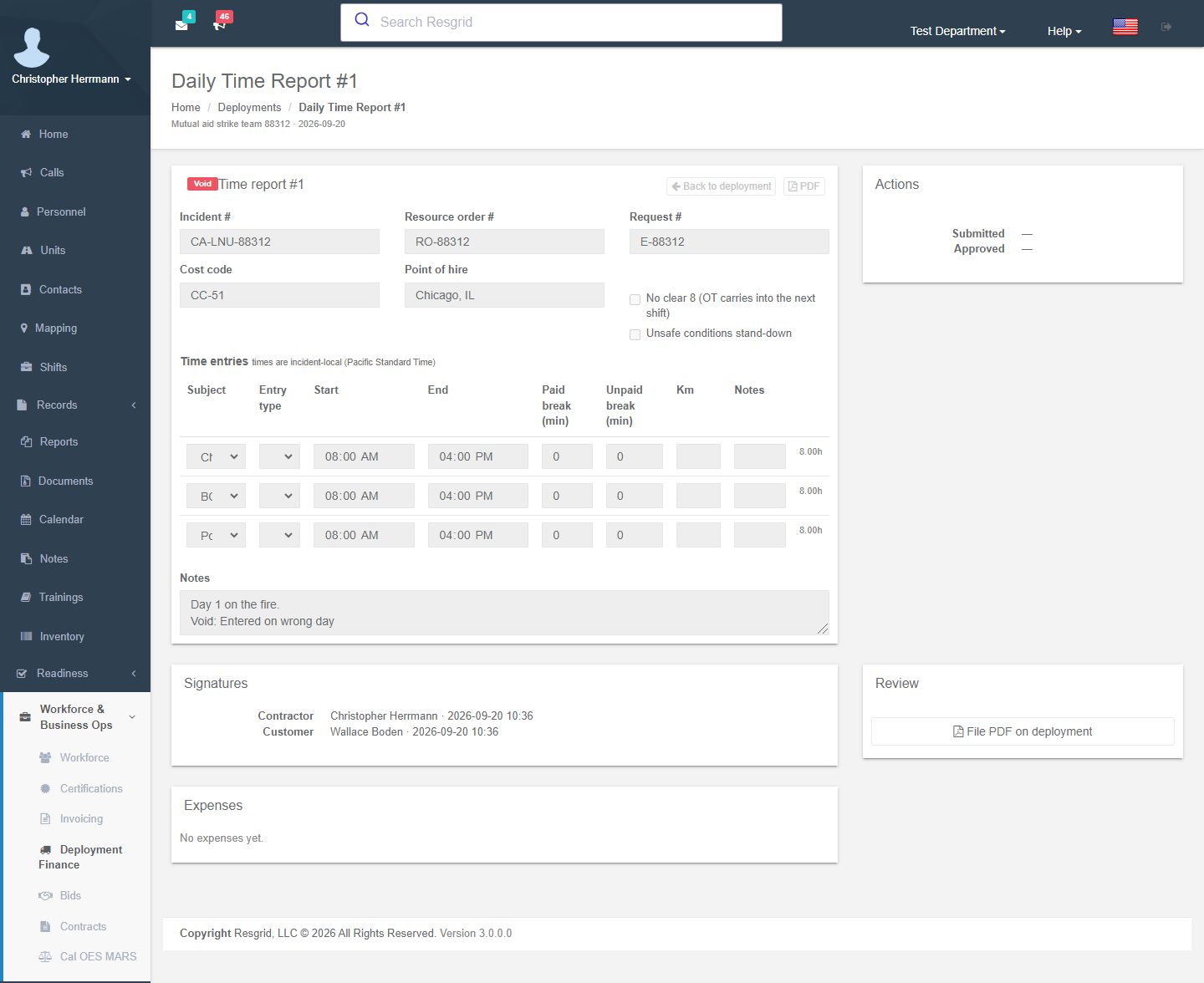
| Element | Meaning |
|---|---|
| Header | Incident, resource order, request, cost code and point of hire, copied from the deployment. Two flags feed the billing policy: No clear 8 (overtime carries into the next shift) and Unsafe conditions stand-down. |
| Time entries | Subject (person, unit or equipment), entry type (Deployment, Standby, Travel), start and end (incident-local), paid and unpaid break minutes, km, notes. A subject cannot appear twice on the same report, and only one report exists per day. |
| Signatures | Sign as contractor, and the customer signer name: the agency representative who signed the paper DTR. |
| Expenses | Expenses attached to this day. |
| Actions | Save; Save and submit (entries lock once approved); Approve (needs Approve time reports); Void with a reason (kept for the record, dropped from billing); PDF; File PDF on deployment (stores the PDF under Files). |
Report statuses: Draft → Submitted → Approved → Billed (set by the billing engine), or Void. Crews can create and submit their own DTRs from the mobile apps; approval happens on the web. Export time CSV on the deployment page downloads every entry.
Expenses
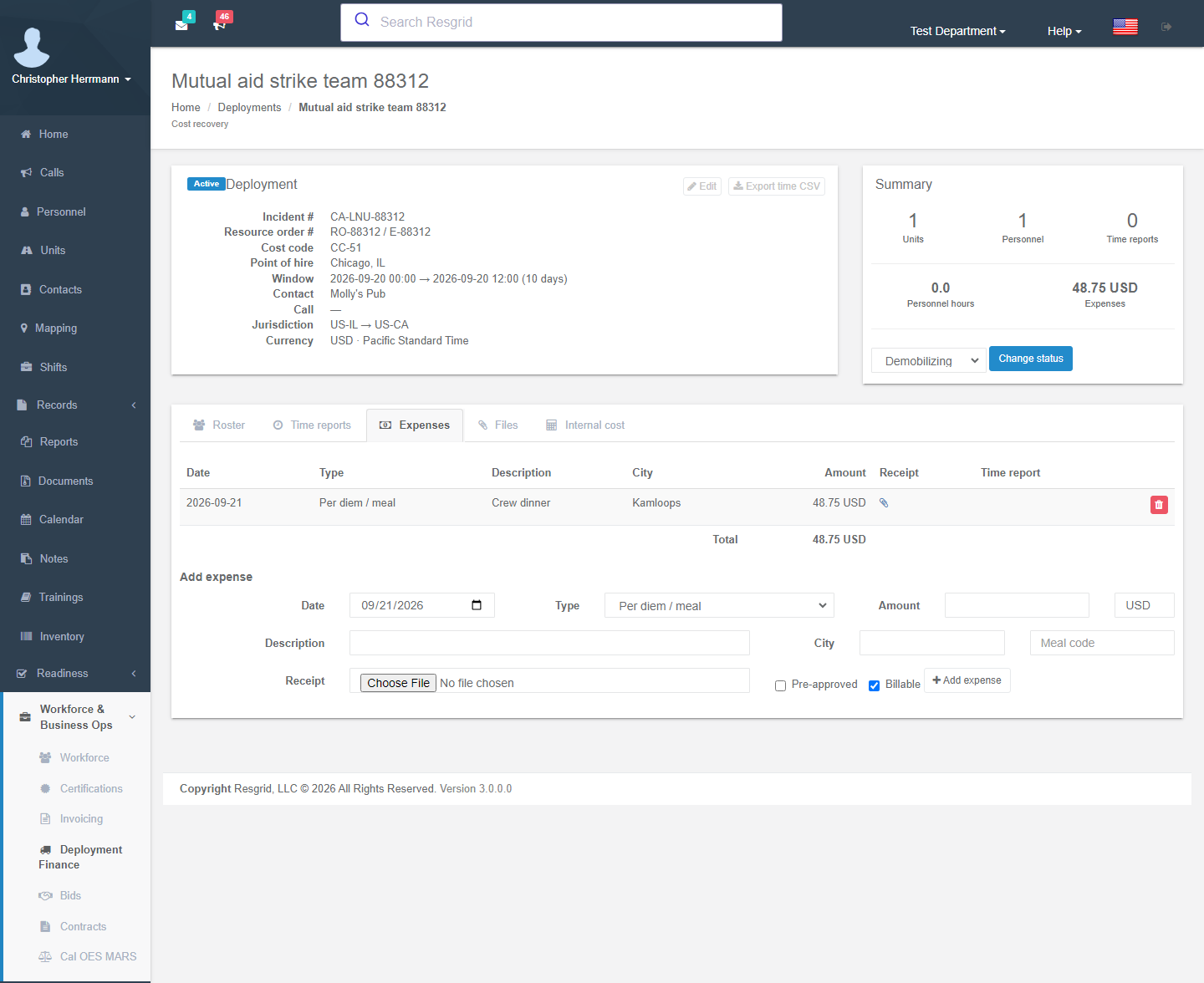
Each expense has a date; a type (Per-diem meal, Accommodation, Private accommodation, Ferry, Fuel, Supply restock, Other); amount and currency; description; city; a meal code (B/L/D for per-diem windows); a receipt upload; and Pre-approved and Billable checkboxes. Billable expenses pass through to the invoice. Receipts go into the invoice packet and the MARS evidence packet.
Files
Upload files by type: receipts, signed service request, time-report PDFs, manifest, certifications, external order, signed or paper F-42, ICS-213 approvals, crew rotation approvals, loss/damage, MARS evidence and invoices. Preview manifest renders the roster manifest; File manifest PDF stores it.
Billing (billable deployments, Business Ops add-on)
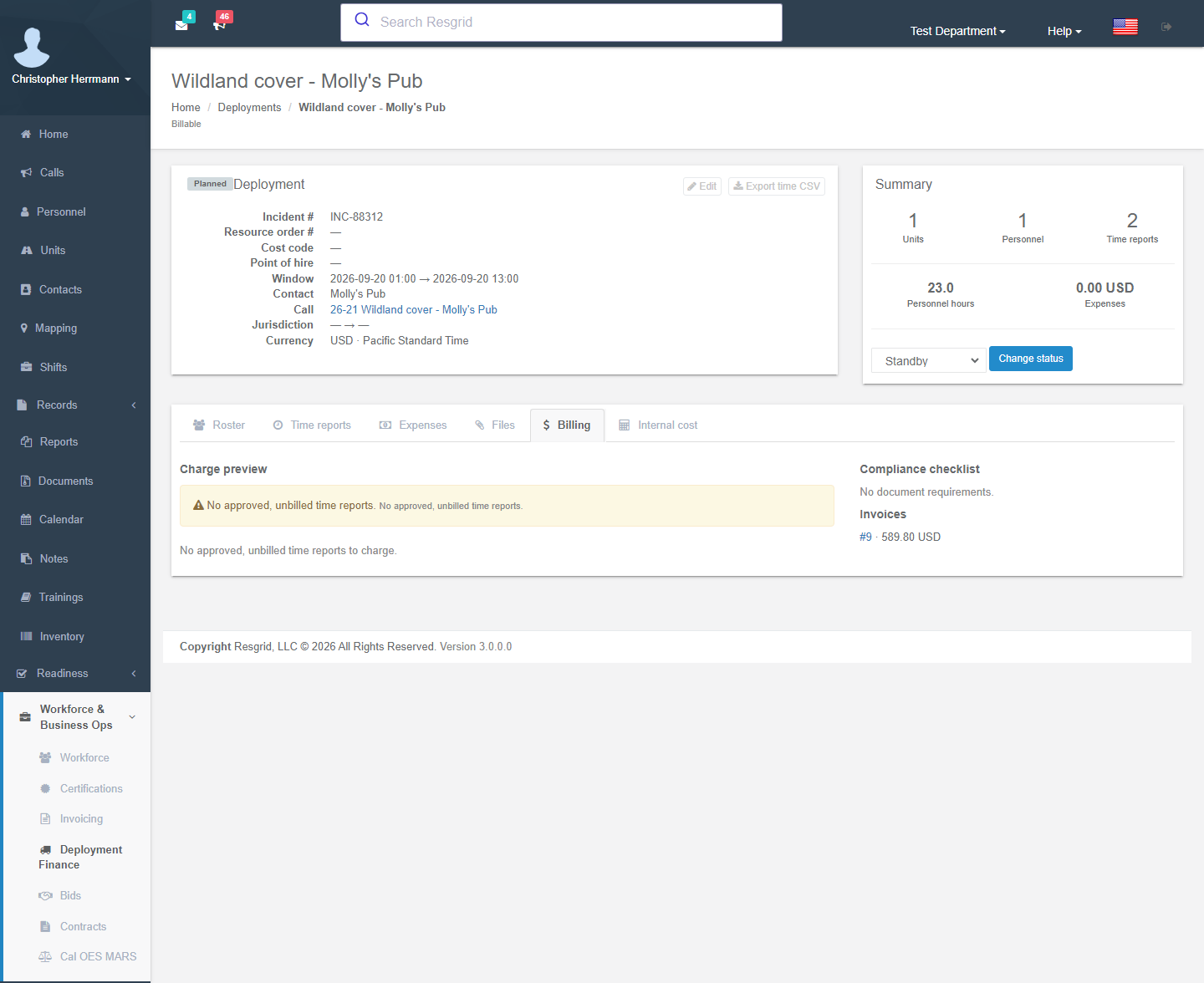
Charge preview, compliance checklist, invoices and Generate invoice. See Contractor Billing.
Internal cost (Workforce entitlement)
Estimated versus actual internal cost, and the cost runs for this deployment. See Field Costing.
Reminders and workflows
Once a day, the deployment-finance reminder worker sends department administrators a digest. It lists billable deployments whose approved time reports have gone unbilled for more than 21 days, and completed deployments with any unbilled report. It never generates or sends an invoice. Workflow triggers: Deployment Created / Status Changed / Roster Changed / Expense Added / Attachment Added and Time Report Created / Submitted / Approved / Voided.
Setup examples
| Organization | Finance mode | Notes |
|---|---|---|
| Municipal fire, strike team | Cost recovery | New external order from the IROC or state order with one fill per crew member; the roster fills in as fills are accepted. DTRs per day. Cal OES F-42 from the deployment (California), or the DTR PDFs for an EMAC / state reimbursement package. Mark fills Returned when the crew is home, then complete the deployment. |
| Wildland contractor | Billable | Wizard from an accepted bid; seats keyed on NWCG codes; DTRs signed by the agency rep each day; generate the invoice and packet weekly. |
| Private ambulance, event medical | Billable | Manual deployment linked to the standby call; crews file time in the Responder app; expenses for supplies. |
| SAR / CERT | Operational only | Mission deployments for after-action documentation; hours per volunteer for grant reporting via the time CSV export. |
| State EMA | Cost recovery | External orders with role Requesting resources for EMAC missions received, or Hosting incident for incoming teams; snapshots each time the mission order is amended. |
| Security company, event | Billable | One deployment per event contract; guard hours per DTR; supervisor premium from the rate schedule. |
| Industrial ERT, plant turnaround | Operational only or Cost recovery | Internal chargeback: time CSV plus a cost run. |
Technical reference
| Item | Value |
|---|---|
| Routes (deployments) | /User/Deployments/{Index,New,Edit,View?tab=roster\|time\|expenses\|files\|billing\|costs,FromExternalOrder,TimeReport}; POST SetStatus, AddUnit/RemoveUnit, AddPersonnel/RemovePersonnel, AddEquipment/ReturnEquipment, NewTimeReport, SaveTimeReport, SignTimeReport, ApproveTimeReport, VoidTimeReport, SaveExpense, UploadAttachment, GenerateManifest, ExportTimeEntries, GenerateInvoice |
| Routes (external orders) | /User/DeploymentOrders/{Index,New,Details,Artifact,ForRecord}; POST New, Link (open deployment workspace), AddFill, Transition, Snapshot, Closeout. Connectors: /User/RecordDeploymentConnectors/{Index,New,Edit} |
| Model | Deployment (finance mode, status, identifiers, jurisdiction, RmsExternalOrderId), DeploymentUnit, DeploymentPersonnel (RmsExternalOrderFillId), DeploymentEquipment, DeploymentTimeReport (pre-numbered per department), DeploymentTimeEntry, DeploymentExpense, DeploymentAttachment; external orders RmsExternalOrder, RmsExternalOrderFill, RmsExternalOrderSnapshot, RmsExternalOrderConnector |
| Permissions | Manage deployments (118), Approve time reports (119), both defaulting to department administrators. Rostered members see their own deployments and file DTRs without either. External orders also need Create records to create or change them. Connectors are for department administrators only. |
| Flags | Operations.Deployments (free); Records.System plus Records activation for external orders and Create from external order; installation config RecordsConnectorConfig.Enabled for connectors |
| Worker | 32 DeploymentFinanceReminderLogic, daily |
| Time zones | DTR times are incident-local (Deployment.LocalTimeZoneId, otherwise the department zone) and stored in UTC |
| Data protection | Deployment.Notes is the only ADP-protected field (revealed on view/edit). DTRs, expenses and attachments are not protected because customers read them. |
| API | api/v4/Deployments/*, api/v4/TimeReports/* (mobile DTR capture). External-order commands: POST api/v4/DeploymentOrders/{Create,AddFill,TransitionFill,Snapshot,Closeout}. These require Manage deployments and Create records; Create also creates the linked deployment, and TransitionFill / Closeout bring it up to date. Request and response shapes match the former Records command URLs, which are no longer accepted. Reads stay at GET api/v4/RecordDeployments/{List,Get,GetForRecord,Artifact}. |
| Feed contract | docs/architecture/rms-mutual-aid-order-feed-v1.md (Core repository) |