Dashboard
The Dashboard is the home page after you sign in: the live roster with everyone's status and staffing, your own quick-action buttons, and the department's vital signs. Officers and dispatchers keep it open on a station screen; members use it to set themselves available or responding.
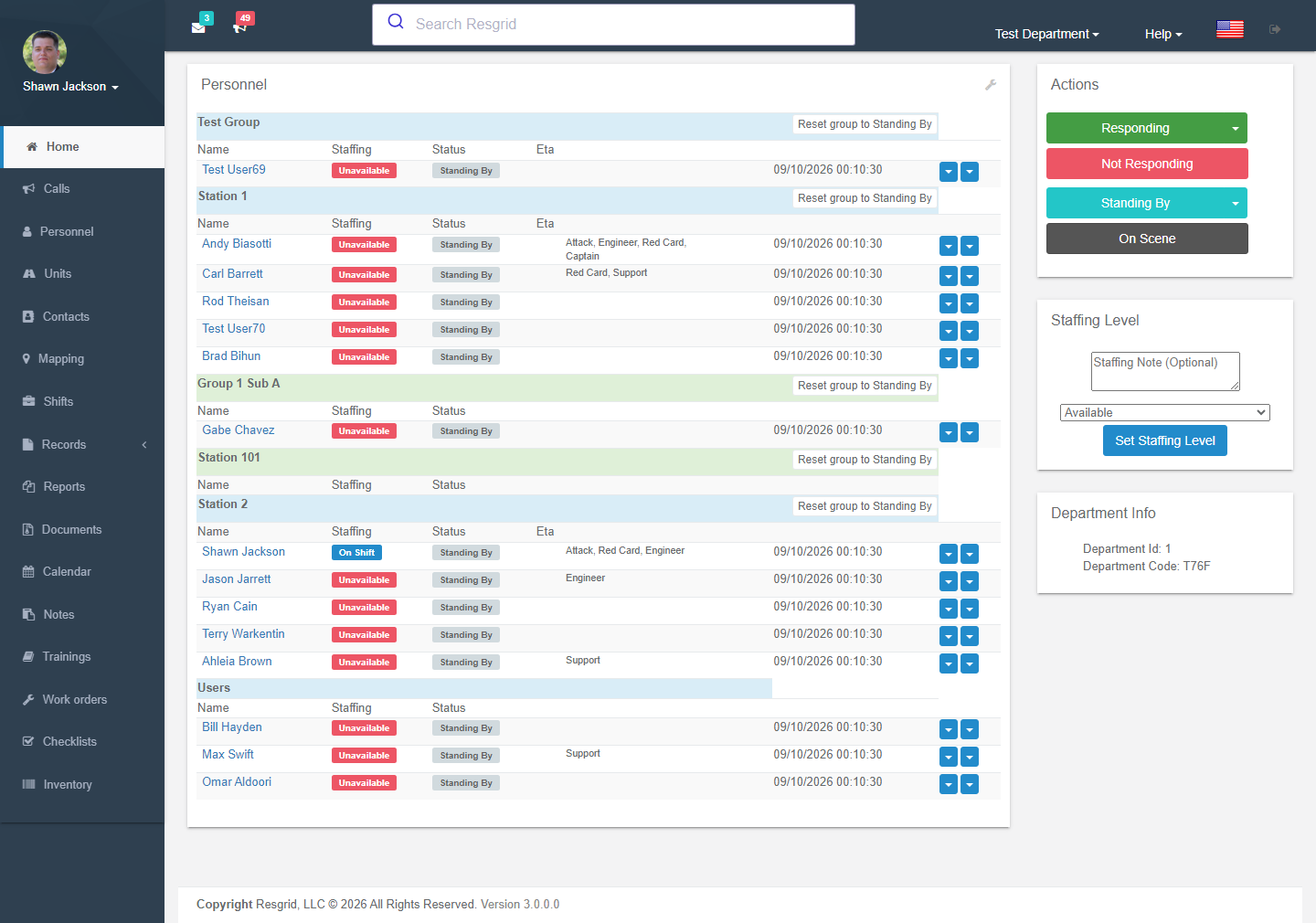
What is on it
| Panel | What it shows |
|---|---|
| Personnel | Every member you are allowed to see, grouped by station/group (or sorted by name — Department Settings → Sorting). Each row: name, staffing (Available / Unavailable / On shift …), status (Standing by / Responding / On scene …), ETA, roles, the time of the last change, and two dropdowns to change the person's status or staffing. Reset group to Standing By clears a group after an incident. |
| Actions | Your own status buttons — Responding, Not responding, Standing by, On scene, or your department's custom statuses. Statuses that need a destination (a station or an active call) open a picker. |
| Staffing level | Set your own staffing with an optional note. |
| Department info | Department ID and code (members need the code to join from the apps), text-to-call number, plan warnings. |
| Top bar | Unread messages and active-call counts; the active-calls icon lists the top calls with quick links. |
Everything updates in real time through the eventing hub — no refresh needed.
Personnel status vs staffing
| Status ("what am I doing right now") | Staffing ("can I be counted on") | |
|---|---|---|
| Defaults | Standing By, Not Responding, Responding, On Scene, Available Station, Responding to Station, Responding to Scene | Available, Delayed, Unavailable, Committed, On Shift |
| Custom | Custom personnel statuses — colour, text, whether a destination is required, whether it counts as responding | Custom staffing levels |
| Changed by | The member (apps, web, text, Assistant), officers with permission, dispatch (auto-set on shift dispatch), scheduled status changes | The member, officers, staffing schedules, the daily staffing reset in Department Settings |
Tip: staffing feeds availability counts and low-availability notifications; status feeds the call page and the Big Board.
Editing profiles from the dashboard
Clicking a name opens the person; administrators can edit the profile (name, email, phone numbers and carrier, group and roles, addresses, language, time zone, notification options, department admin / disabled / hidden flags). See Personnel and Profile & Account.
Tutorial and setup report
First-time administrators see a dashboard tutorial overlay; Help → Setup report lists what is still unconfigured (no units, no stations, unverified contacts …).

Setup tips
| Department | Tip |
|---|---|
| Volunteer fire / EMS | Sort personnel by group so each station sees its own people first; enable the daily staffing reset to Available at 06:00 so stale Unavailable flags clear. |
| Career | Members rarely touch status manually — shifts and unit staffing drive it; consider hiding the Actions panel for non-responders by permission. |
| SAR / CERT | Staffing is the key signal (who can deploy this week); ask members to set it from the Responder app. |
| Security / business | Custom statuses such as On patrol, At post, Break; staffing reset at shift boundaries. |
Technical reference
| Item | Value |
|---|---|
| Controller | HomeController (Dashboard, GetUserStatusTable, UserActionsPartial, PersonnelActionButtonsPartial, EditUserProfile) |
| Actions | SetCustomAction, SetCustomUserAction, SetCustomStaffing, SetStateForUser, SetActionForUser, UserRespondingToStation?stationId=, UserRespondingToCall?callId=, ResetAllToStandingBy, ResetGroupToStandingBy?groupId= |
| Realtime | resgrid.common.signalr subscribes to personnel/unit/call events from the eventing hub |
| Visibility | Authorization visibility matrix (CanUserViewPersonViaMatrixAsync); PII gated by ViewPersonalInfo |
| Partials | _TopIconsPartial (unread counts), _TopUpgradePartial, _SetupWizard, GetSubscriptionLimitWarning |