Authoring Records
This page covers the day-to-day work of writing, finishing and correcting records: run reports after a call, training records, work and meeting records, unit activity, and any department-designed form. NERIS incident reports have their own page — see NERIS incident reports.
Creating a record
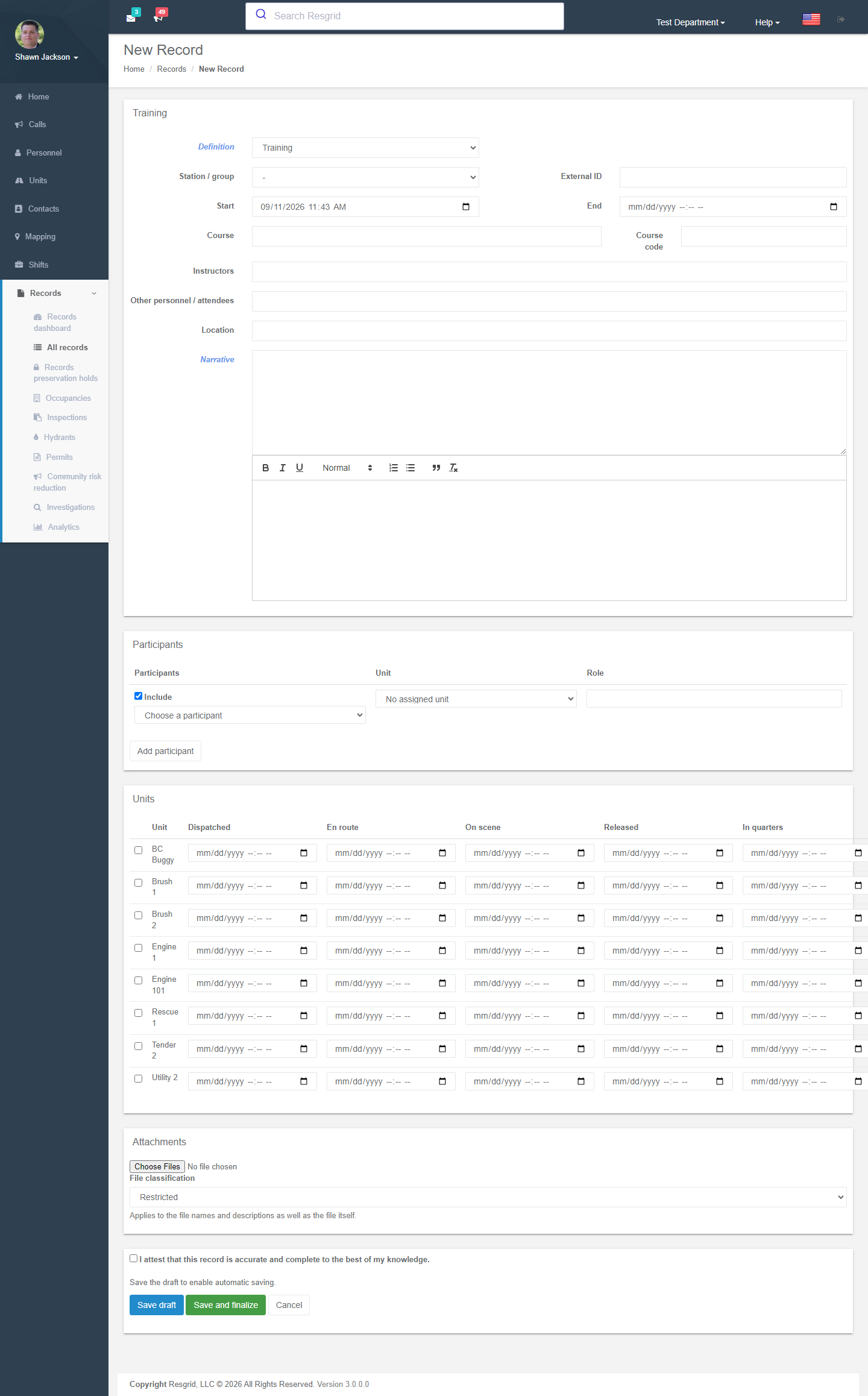
Records → All records → New Record, then choose the definition (record type). Some types can also be started from elsewhere:
- From a call — View call → Records offers Run and the NERIS incident report pre-linked to that call.
- From a unit — Units → Logs starts a Unit activity record.
- From the Responder / Unit / Incident Command / Dispatch apps when Field Records is enabled for that app.
Built-in (locked) record types
| Type | Number prefix | Typical use | Notable fields |
|---|---|---|---|
| Run | RUN | The department's report of a response. | Call link (with a call snapshot), narrative, participants with roles, units with dispatched / en-route / on-scene / released / in-quarters times, other agencies, attachments. |
| Training | TRN | A drill, class or course. | Course, course code, instructors, location, start/end, participants, other personnel. |
| Work | WRK | Station or equipment work detail. | Narrative, participants, units, station/group. |
| Meeting | MTG | Business, officers', committee meetings. | Meeting type, facilitator, location, attendees. |
| Coroner | COR | Coroner / medical-examiner notification (restricted class). | Case number, body location, pronounced deceased by, investigator, initial report / condition, cause. |
| Callback | CBK | Personnel called back to duty. | Contact name/number, destination, participants. |
| Unit activity | UNT | One unit's activity for a call or period (replaces Unit Logs). One record per unit per call. | Unit, activity time, narrative, crew. |
Locked types cannot be redesigned, but you can add department fields to them with User Defined Fields (entity type Record, scoped to a definition). UDF values are stored, printed and reportable but are never included in a standardized export.
Filling in the form
- Station / group anchors the record for group-scoped visibility and per-group numbering.
- Call — choose an active or archived call. If a record of the same type already exists for that call you will see a duplicate warning and must give a reason for a second one (or the definition may allow only one).
- Historical calls — for a past incident that was never dispatched through Resgrid, save the draft and use Create a call for this run: it creates a closed call (dispatching nobody) and links it.
- Participants — add members with a role and the unit they were on; the unit defaults from their current assignment.
- Narrative is required on most types.
- Attachments — files are virus-scanned; each file has a classification (Restricted or Unrestricted operational content) that also covers its name and description. Photo location metadata is stripped on upload unless the definition keeps it.
- Fields marked with a lock are restricted and visible only to members with View restricted records.
- Department definitions may show or require fields as you type (rules).
Save draft keeps working; drafts autosave and can be resumed from any device. Save and finalize writes the immutable revision in one step (Quick entry preset).
Review, approval and finalization
The definition's lifecycle preset decides the path:
| Preset | Path | Who does what |
|---|---|---|
| Quick entry | Draft → Finalized | The author, holding Create and Finalize records. Fastest — preserves the speed of the old Logs flow. |
| Review required | Draft → Ready for review → Finalized (or → Returned → Draft) | Author submits for review; a member with Review records finalizes or returns for correction with a reason code. Review due hours drive the overdue queue. |
| Approval / acknowledgement | Draft → Ready for review → Approved → Finalized | Adds an approver (with Approve records) who may not be the author. |
At finalization the author may be asked to attest (I attest that this record is accurate and complete…) and, for some definitions, to sign.
After finalization
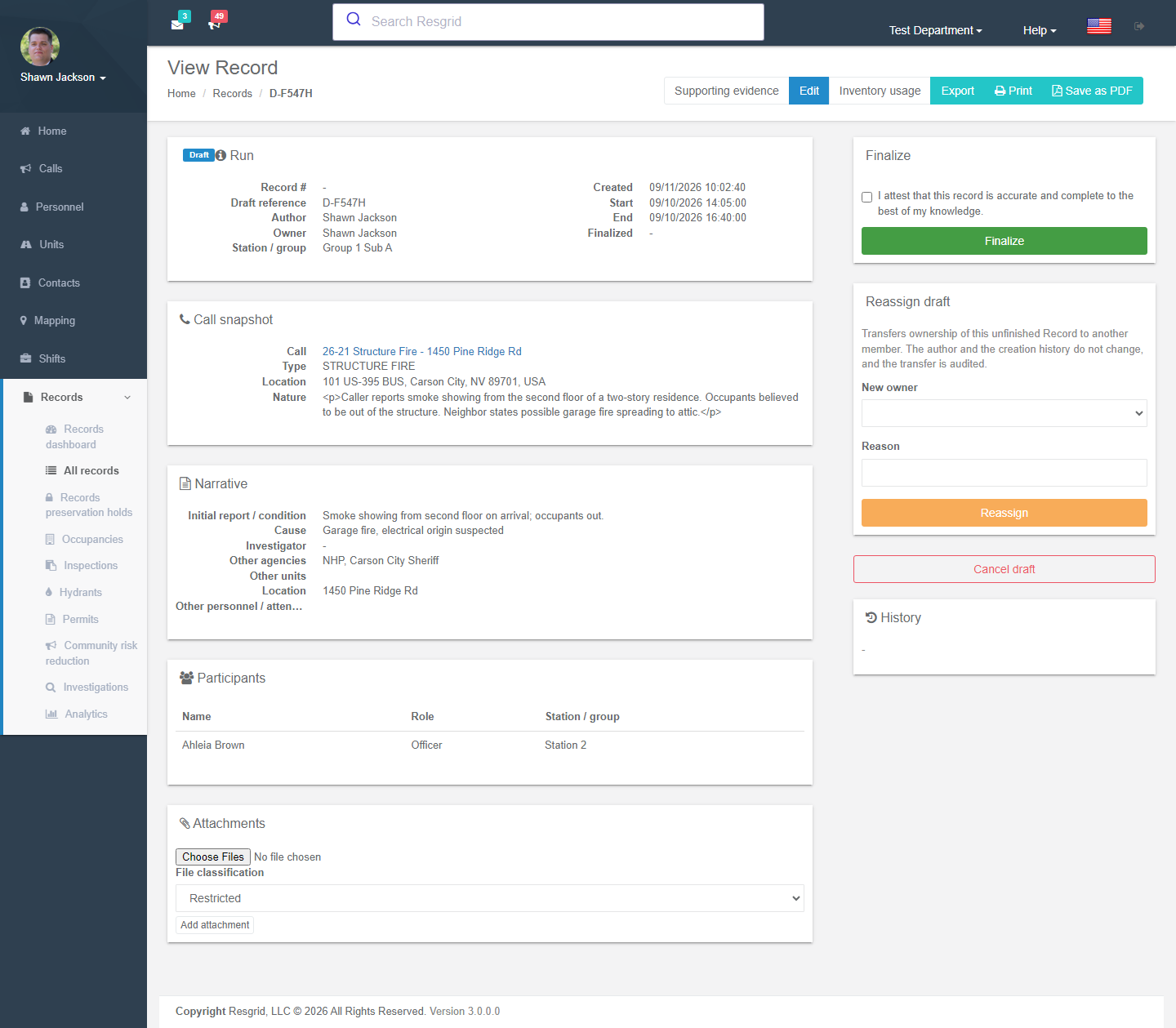
The details page shows the record as it stands, the call snapshot (the call as it was when linked), participants, units, attachments and the History of revisions with checksum, transition and actor. From it you can:
| Action | Effect |
|---|---|
| View revision / Compare with previous | Opens a specific revision, or a side-by-side diff (restricted fields show values withheld if you lack access). |
| Print / Save as PDF | Uses the department print layout and the pinned revision. Prints carry a provenance footer (printed by / on, layout version). |
| Export | JSON of the revision. |
| Amend | Opens an amendment draft. The last finalized revision stays authoritative until the amendment is finalized; Abandon amendment discards it. |
| Void | Marks the record invalid with a reason code and text. Terminal. |
| Reassign | Transfers ownership of an unfinished record to another member (audited; author and history unchanged). |
| Cancel draft | Abandons an unfinished record and releases its number. |
Evidence
Records can capture evidence from other modules as bounded, checksummed snapshots that never change (a correction is a new capture):
| Evidence source | What is captured |
|---|---|
| Dispatch decision | The run-card activation and recommendations recorded for the call. |
| Unit tracking fixes | Up to 24 GPS fixes per unit for up to 20 units in a window of at most 24 hours. |
| Certifications at the incident time | Qualification status of chosen personnel (certificate numbers and files stay in Certifications). |
| Supplies and controlled substances used | Inventory consumption already recorded against the call. |
| Promoted incident messages | Selected chat messages (with thread replies) from an incident channel. |
| Readiness at the time of the call | The Checklists readiness packet. |
| Module projection | A bounded snapshot from another module: personnel check-in, resource summary, qualifications, command summary. |
Open the record → Evidence, choose the source, give a reason (required on official records) and Capture. Draft captures become part of the signed revision; a verified manifest can be downloaded for each artifact.
Protected data
When the department is enrolled in Advanced Data Protection, narrative, participant and other classified fields are stored encrypted. The page shows a Protected record banner; press Verify and open to reveal them for the session. Saving a form also needs verification, so verify before editing.
Tips
- Finalize promptly — the accountability report and reminders are driven by open records.
- Use Return for correction with a clear reason code instead of editing someone else's draft.
- Never finalize with placeholder text; amendments are visible forever in history.
- Restricted attachments (photos of victims, PII documents) must be classified Restricted at upload.
Technical reference
| Item | Value |
|---|---|
| Routes | /User/Records/New?definitionKey=&callId=, /User/Records/Edit/{id}, /User/Records/Details/{id}, /User/Records/Revision/{id}?revisionId=, /User/Records/Diff/{id}?from=&to=, /User/Records/Print/{id}, /User/Records/Export/{id}, /User/Records/NewRunCall/{id}, /User/RecordEvidence/Index?recordId=&recordKind=, /User/RecordDocuments/{Revision,Export,Diff,PrintDiff} |
| Cardinality | Single authoritative per call (NERIS), Multiple per call (Run, Work, Coroner, Callback, department definitions), One per subject per call (Unit activity). Enforced on create; void/cancel releases the slot. |
| Concurrency | Drafts use ETag merge; a stale save shows This record was changed by someone else…. |
| Attachments | Scanned by the scanning provider before they are readable; RmsAttachment.Classification controls visibility. |