Custom Statuses
Custom statuses replace the built-in status words with your own. There are three sets: personnel statuses (Responding, On scene, Available at station …), staffing levels (Available, On duty, Off duty, Light duty …) and unit statuses per unit type (En route, On scene, Transporting, Out of service …). Each status has a colour, whether it needs a destination (a station or a call), what it counts as (responding / available), and how it looks on the apps and the Big Board.
Department menu → Custom Statuses. Start from a template (fire, EMS, SAR, security …) and adjust.
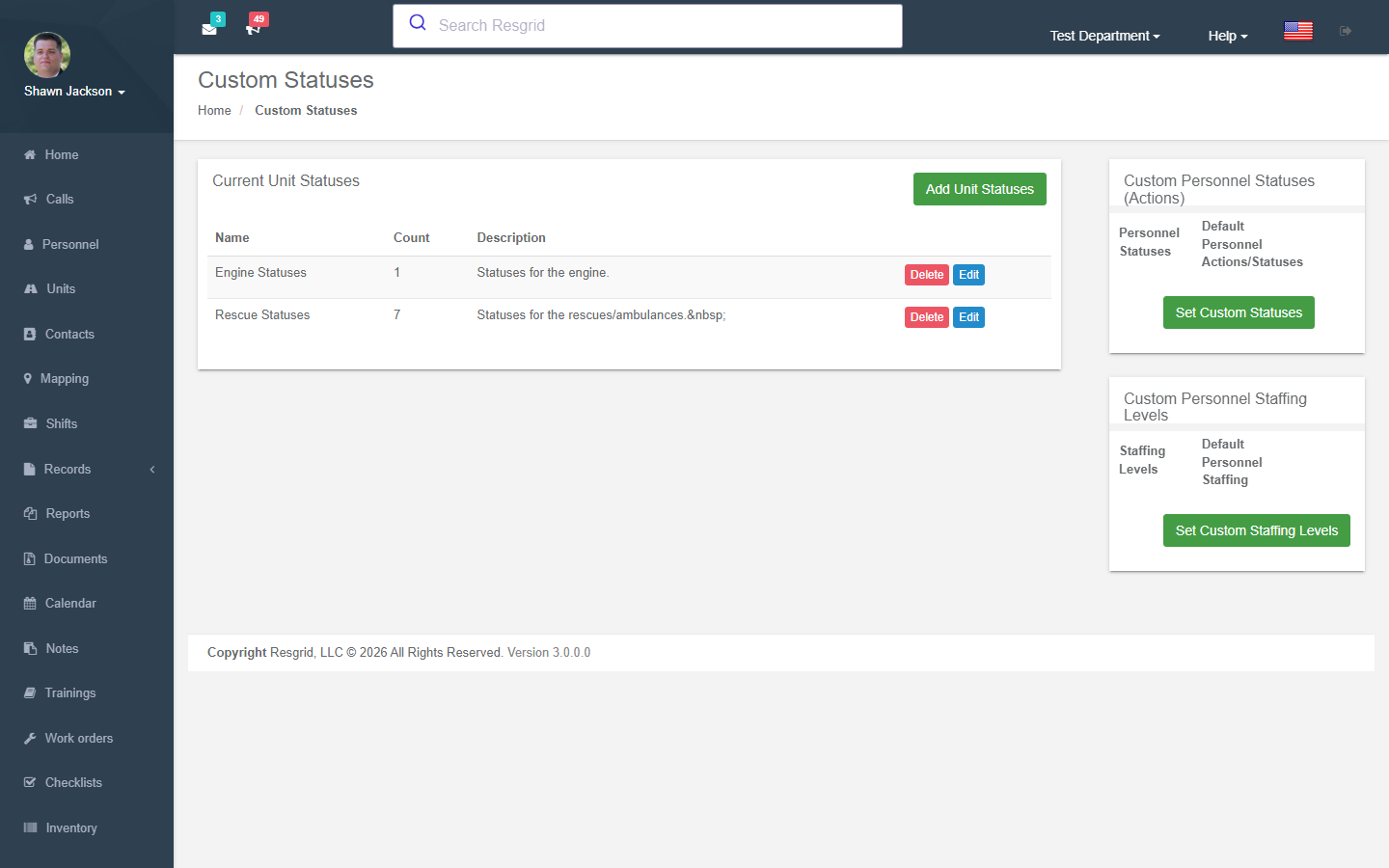
Overview
Authorization: CustomStates_View policy
The index page displays all custom states organized into three categories:
- Unit States — Custom operational statuses for units
- Personnel Status — Custom action/response statuses for personnel
- Personnel Staffing — Custom availability/staffing levels for personnel
Custom State Categories
Unit States
Define custom operational statuses for units (replaces default statuses like Available, Responding, On Scene, etc.).
Personnel Status
Define custom response/action statuses for personnel (replaces default statuses like Standing By, Responding, On Scene, etc.).
Personnel Staffing
Define custom availability levels for personnel (replaces default levels like Available, Delayed, Unavailable, etc.).
Creating Custom States
Authorization: CustomStates_Create policy
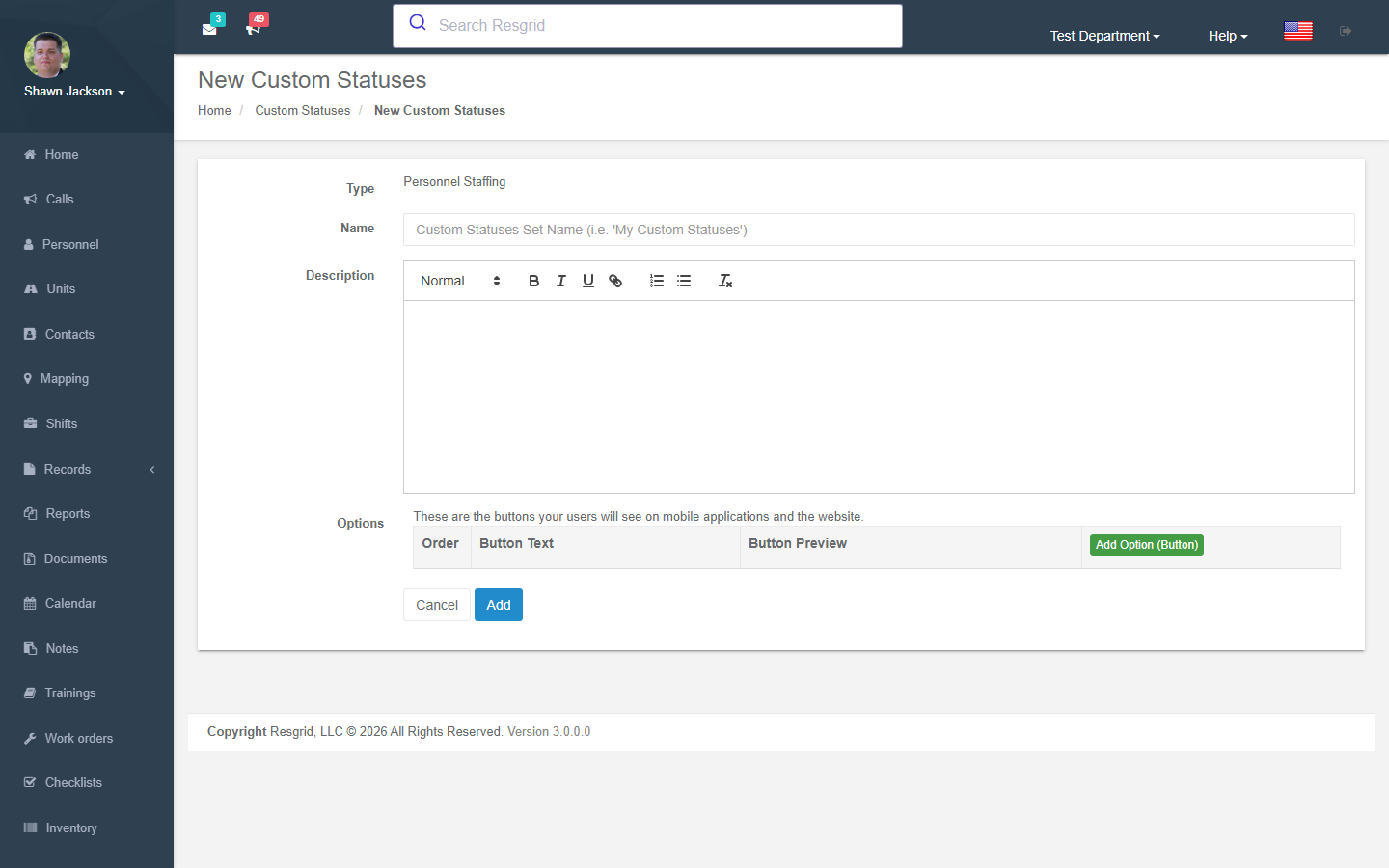
State Set Configuration
| Field | Required | Description |
|---|---|---|
| Name | Yes | State set name |
| Description | No | State set description |
| Type | Yes | Unit, Personnel, or Staffing |
State Details (Options/Buttons)
Each state set contains multiple detail options. At least one is required.
| Field | Description |
|---|---|
| Button Text | Display text on status buttons |
| Button Color | Background color (hex) |
| Text Color | Foreground color (hex, default #000000) |
| Order | Display order |
| Base Type | Mapping to a standard status for system behavior |
| GPS Required | Whether GPS location is required when setting this status |
| Note Type | Type of note required (None, Optional, Required) |
| Detail Type | Destination type (None, Calls, Stations, CallsAndStations) |
Detail Type Behavior
The Detail Type determines what destination options appear when a user selects this status:
| Detail Type | Behavior |
|---|---|
| None | No destination selection |
| Calls | Dropdown of active calls |
| Stations | Dropdown of station groups |
| CallsAndStations | Dropdown of both calls and stations |
Editing Custom States
Authorization: CustomStates_Update policy + CanUserModifyCustomStatusAsync runtime check
Editing State Sets
Modify the state set name, description, and all detail options. Handles both existing detail IDs (update) and new details (create).
Editing Individual Details
The EditDetail action allows editing a single state detail option for fine-grained control.
Creates AuditEvent (CustomStatusUpdated / CustomStatusDetailUpdated).
Deleting Custom States
Authorization: CustomStates_Delete policy + CanUserModifyCustomStatusAsync runtime check
Creates AuditEvent (CustomStatusRemoved).
Default Fallback Statuses
When no custom states are defined, the system provides built-in defaults:
Default Personnel Statuses
| ID | Status |
|---|---|
| 0 | Standing By |
| 1 | Not Responding |
| 2 | Responding |
| 3 | On Scene |
| 4 | Available Station |
| 5 | Responding to Station |
| 6 | Responding to Scene |
Default Personnel Staffing Levels
| ID | Level |
|---|---|
| 0 | Available |
| 1 | Delayed |
| 2 | Unavailable |
| 3 | Committed |
| 4 | On Shift |
Default Unit Statuses
13 built-in statuses from Available through Enroute.
Setup examples
| Department type | How to set it up |
|---|---|
| Volunteer fire | Personnel: Standing by, Responding to station, Responding to scene, On scene, Available at station, Not responding. Staffing: Available, Unavailable, On call. Units (Engine/Ladder/Rescue): In quarters, En route, On scene, Available, Out of service. |
| EMS | Units (Medic): Available, En route, On scene, Transporting, At hospital, Returning, Out of service; personnel: On duty / Off duty. |
| SAR | Personnel: Available, Responding to CP, At CP, Deployed in field, Returned; units (Team): Staging, Searching, Found, Returning. |
| Emergency management | Personnel: EOC activated, Remote, Off; units minimal. |
| Security | Personnel: On patrol, At post, Responding, Break, Off duty; units (Patrol): Available, Responding, On site, Out of service. |
| Delivery / transit | Units (Vehicle): Loading, En route, Delivering, Returning, Off duty. |
Technical reference
CustomStatusesController; routes /User/CustomStatuses/{Index,Templates,New,Edit,EditDetail,Delete}?type=1|2|3; model CustomState / CustomStateDetail (DetailType: none / station / call destination); JSON endpoints GetPersonnelStatusesForDepartment, GetPersonnelStaffingLevelsForDepartment, GetUnitStatusesLevelsForDepartment?unitTypeId=.
JSON API Endpoints
These endpoints are consumed by views throughout the application for building dynamic status dropdowns:
| Endpoint | Purpose |
|---|---|
GetPersonnelStatusesForDepartment | Personnel statuses (custom or default) |
GetPersonnelStaffingLevelsForDepartment | Staffing levels (custom or default) |
GetUnitStatusesLevelsForDepartment | Unit statuses for a specific unit type |
GetUnitStatusesLevelsForDepartmentCombined | All unit statuses combined across types |
All endpoints support an includeAny parameter to add an "Any" option to the list.
Interactions with Other Modules
| Module | Interaction |
|---|---|
| Dashboard | Custom statuses and staffing levels displayed on main dashboard |
| Units | Custom unit states define unit status options |
| Dispatch | Custom statuses shown during dispatch operations |
| Reports | Custom state names resolved in all reports |
| Mapping | Status colors used for map markers |
| Notifications | Custom states used for availability alert configuration |
| Department Settings | Suppressed staffing levels reference custom states |