NERIS Incident Reports
NERIS (National Emergency Response Information System) is the US national fire-incident reporting standard that replaced NFIRS on 2026-01-31. Resgrid keeps one authoritative incident report per call, starts it from the dispatched call so most facts are prefilled with their source recorded, validates it against the pinned NERIS contract, and (when enabled) submits it to NERIS and tracks the destination's answer.
You can still author and finalize incident reports for your own records. Submission simply stays off (NERIS submission is not enabled for this department).
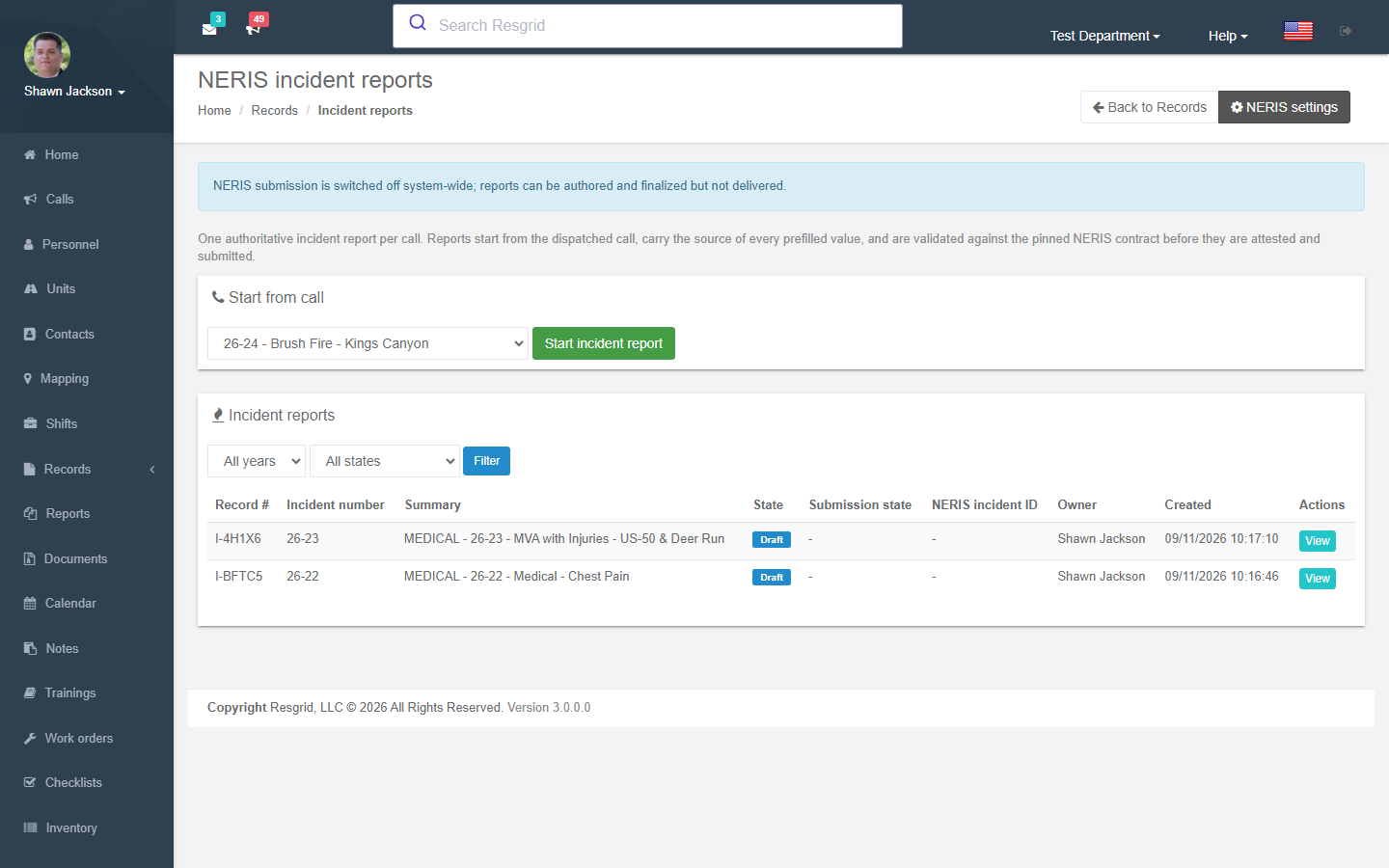
Where to find it
Records → All records → Incident reports (or the Incident reports tile on the dashboard). The queue lists reports by year and state: Incomplete, Awaiting review, Submitted, Accepted, Rejected, Corrected.
Starting a report
- Start from call — choose an active or closed call. Only closed calls that do not already have a report are offered; if the call already has one you are taken to it.
- The report opens prefilled from the call: dispatch times (created, answered, received at dispatch, unit dispatched / en route / on scene / cleared), address, coordinates, dispatch incident code and determinant, units and their NERIS unit IDs, and the NERIS incident type from the call-type crosswalk.
- Every prefilled value carries its provenance — Dispatch, App, Derived, Imported — and if you correct it the original stays beside the corrected value.
You can also start one from View call → Incident report in Dispatch.
Working through the report
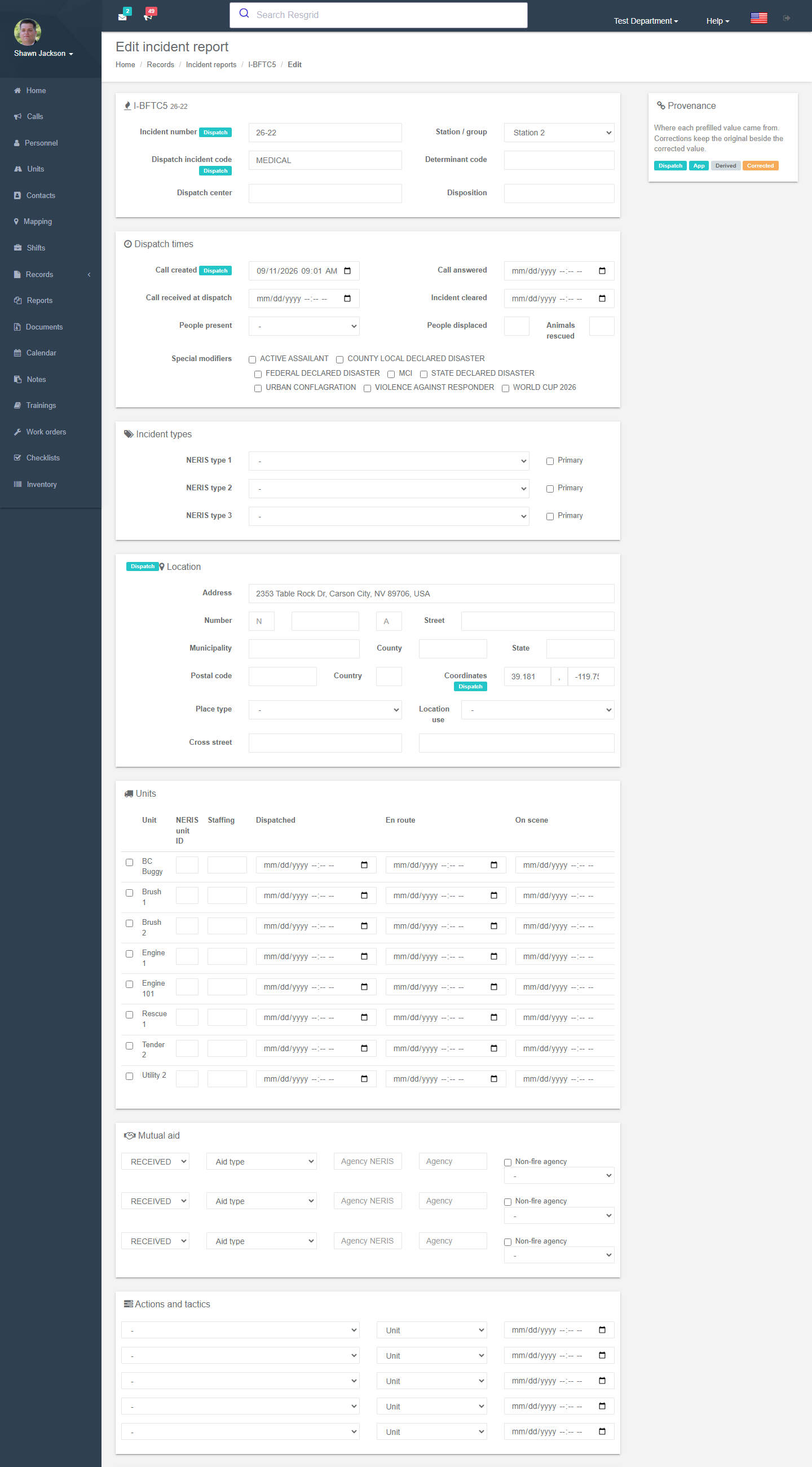
The form follows the NERIS sections:
| Section | Content |
|---|---|
| Dispatch times & center | Call created / answered / received, incident cleared, dispatch center, determinant code, dispatch incident code. |
| Incident types | Primary and secondary NERIS type codes; special modifiers. Choosing types opens the conditional sections that apply. |
| Location | Street number, street, municipality, county, state, postal code, country, place type, location use, cross street, coordinates. |
| Units & responses | Per unit: NERIS unit ID, staffing, response mode, dispatched / en route / staged / on scene / canceled en route / cleared. |
| Mutual aid | Direction, aid type, agency and its NERIS ID, non-fire agencies. |
| Actions & tactics | Tactic, unit, time; impediment and outcome narratives. |
| Disposition & people | Disposition, people present, displaced, animals rescued. |
| Casualties & rescues | Civilian / firefighter casualties, injuries, fatalities, cause, action at the time; rescue type, mode, path, elevation. |
| Conditional sections | Fire detail, structure-fire location and origin, outdoor fire, hazardous situation, chemical / product released, medical (patient care), alarms and suppression systems, electrical / power-generation / CSST / home-oxygen hazards, battery involvement … shown only when the incident types require them. |
| Exposures, properties, vehicles | Exposed items, property details (construction, storeys, sprinklers, year built, values and losses), vehicles (make, model, VIN, plate, body style, powertrain). |
| Resources | Department-only resource notes — kept on the department record, never sent to NERIS. |
| Department custom fields | User Defined Fields you attached to the NERIS definition. Captured and printed, never transmitted. |
| Attachments | Files with restricted / unrestricted classification. |
Save and validate runs the NERIS rules locally and lists validation issues by severity, rule and source. Errors block finalization; warnings do not. Validate with NERIS sends a validation-only request to the destination when the profile is configured.
Review and attestation
Incident reports follow the Review required or Approval preset configured in Records settings. The officer submits for review; the reviewer finalizes or returns for correction. Finalization records the attestations (signer, signed on).
Submitting to NERIS
When the department's NERIS settings are configured and Enable NERIS submission is on:
- Submit to NERIS queues the finalized revision. With Submit automatically when a report is finalized on, this happens at finalize.
- The Submission panel shows state (Queued → In flight → Accepted / Rejected / Failed / Superseded), attempts, queued/sent/completed times, the destination status, issues and the payload that was sent.
- Rejected — correct the fields and Correct and resubmit; a new revision and idempotency key are created and earlier responses remain in the exchange history.
- Submission history and recovery lets an administrator bind an unsent submission, verify an existing destination filing by its identifier, or record a verified absence after NERIS support confirms nothing was created.
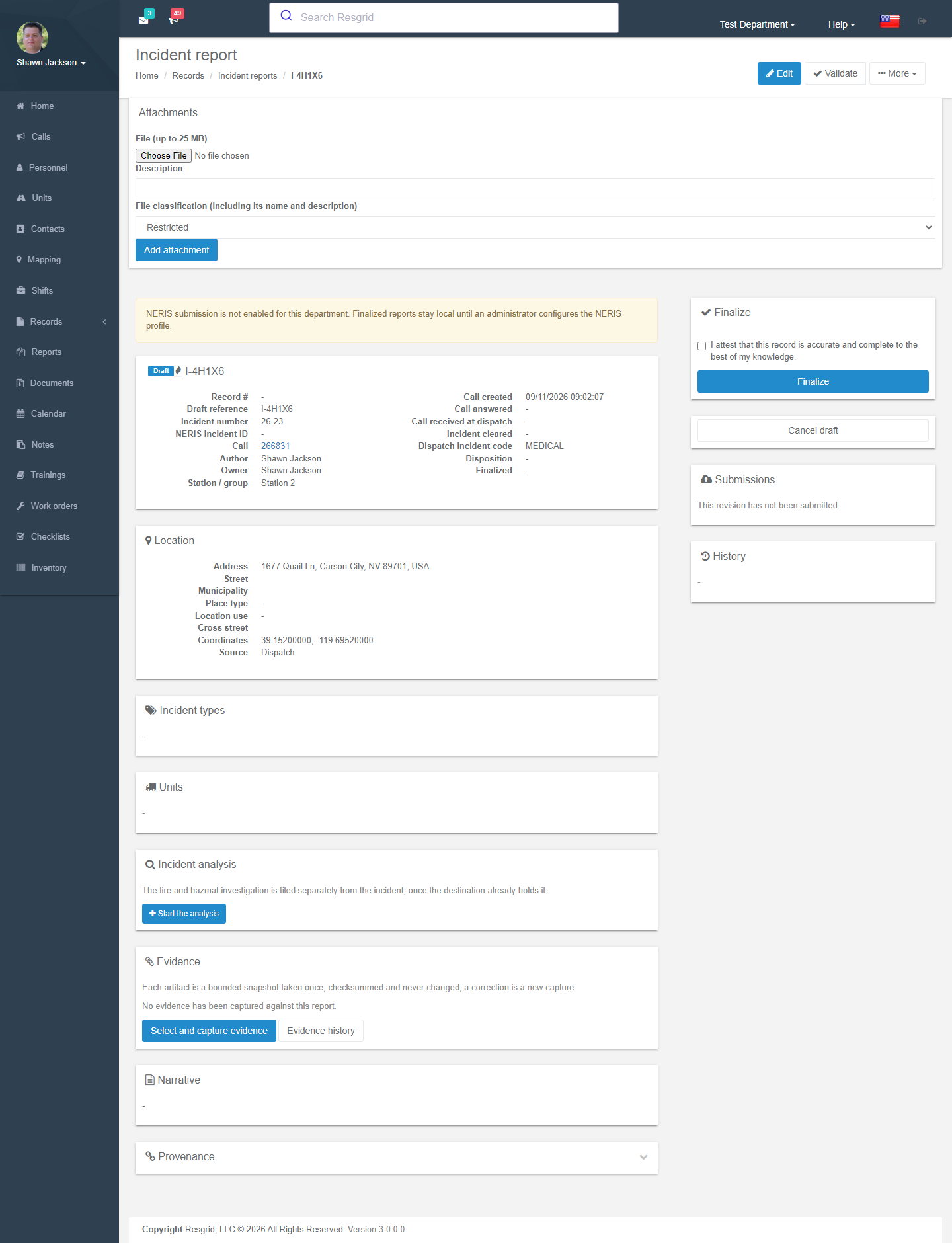
Incident analysis
For fire and hazmat incidents NERIS takes a separate incident analysis (cause, origin, spread, investigation findings) filed after the incident itself is accepted. Open the analysis from the report; it has its own lifecycle and is queued automatically once the incident has a NERIS ID. Analyses waiting for that ID appear on the dashboard as Analyses awaiting filing.
NFIRS (historical) view
NFIRS view on a report shows how the retired NFIRS Basic Module fields would be populated from the data you hold, and which NERIS fact carries each one. It is read-only and exists for departments that still receive NFIRS-shaped requests from insurers or states.
NERIS settings
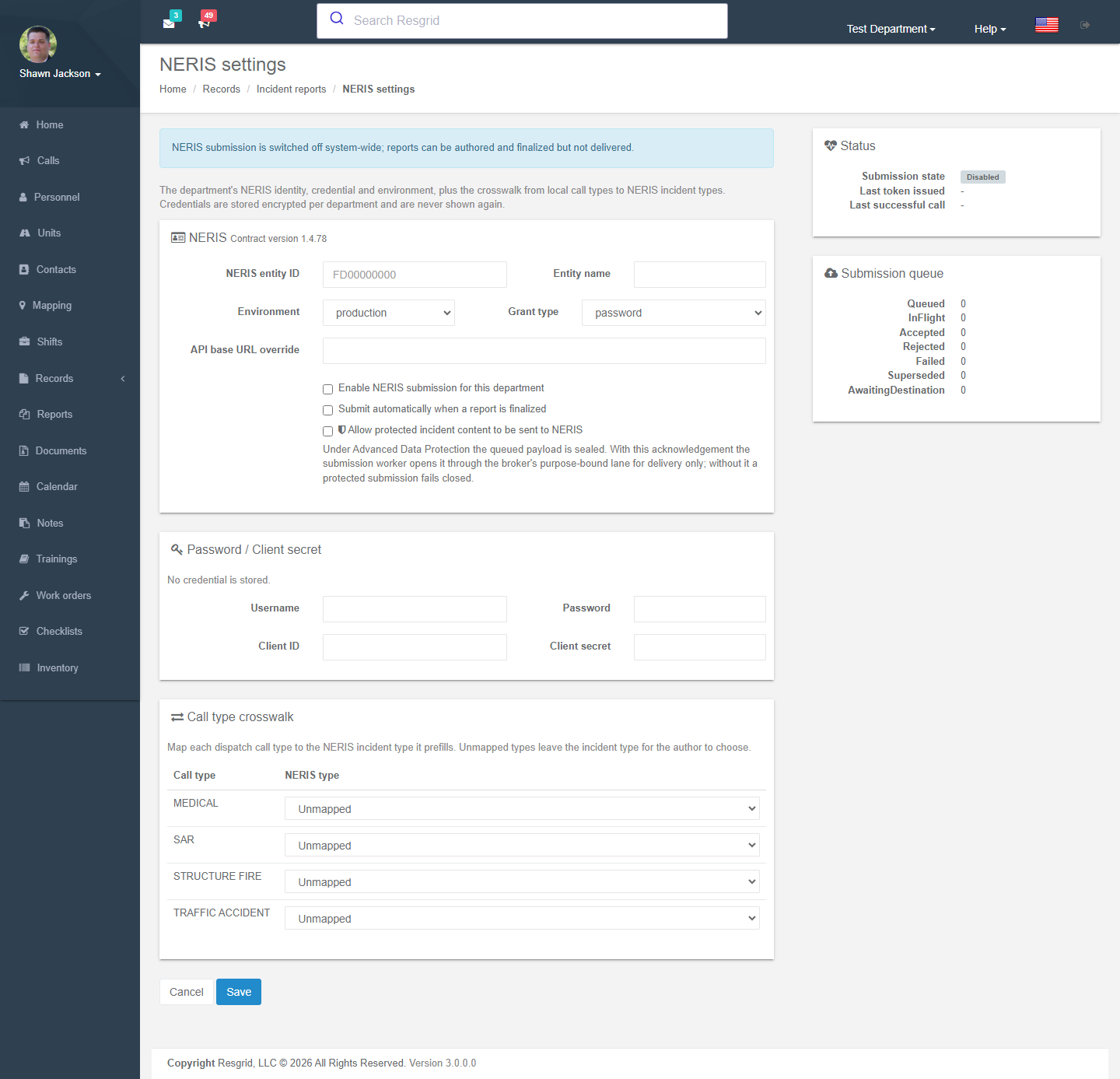
Records → Manage → Incident report settings (administrators):
| Setting | Notes |
|---|---|
| NERIS entity ID / Entity name | Your department's NERIS identity. |
| Environment / API base URL override | Production or test environment. |
| Grant type, Username/Password or Client ID/Secret | Stored encrypted per department and never shown again. Leave blank to keep the stored credential. |
| Enable NERIS submission for this department | Master switch. |
| Submit automatically when a report is finalized | Otherwise an officer presses Submit to NERIS. |
| Allow protected incident content to be sent to NERIS | Required under Advanced Data Protection; without it protected submissions fail closed. |
| Call type crosswalk | Map each dispatch call type to the NERIS incident type it prefills. Unmapped types leave the incident type for the author to choose — the dashboard reports coverage. |
| Status | Contract version, last token issued, last successful call, last error, submission queue counts. |
Self-hosted operators can switch NERIS off system-wide (NERIS submission is switched off system-wide).
Setup examples
| Department | Recommended configuration |
|---|---|
| US career / combination fire | Map every call type in the crosswalk; Review required preset with the shift officer as reviewer; auto-submit on finalize; review due 24 h so incomplete reports show on the dashboard next shift. |
| US volunteer fire | Same crosswalk; Quick entry if the chief writes all reports, otherwise Review required with officers as reviewers; auto-submit off until the first few reports are checked. |
| Fire-based EMS | Medical incident types map to the patient-care section; keep patient detail in restricted fields; ADP recommended. |
| Non-US | Leave NERIS disabled; use incident reports as the department's own standardized incident record, or design a department definition instead. |
Technical reference
| Item | Value |
|---|---|
| Routes | /User/IncidentReports/{Index,ForCall,Details,Edit,Settings,Payload,ExchangeHistory,ContractSchema,NfirsLegacy,EvidenceManifest,Attachment}, /User/IncidentAnalysis/{Details,Edit}, /User/RecordSubmissions/Details?submissionId= |
| Definition key | system.neris-incident (single authoritative per call) |
| Provider | Resgrid.Providers.Neris — contract pinned per department profile; submission worker delivers queued revisions with idempotency keys |
| Permissions | SubmitRecords (56) for submission; standard lifecycle permissions otherwise |
| Workflow | RecordFinalized / RecordAmended events carry the safe projection; NERIS acceptance/rejection is visible on the record and dashboard |