Records Settings
Records → Manage → Settings (department administrators). Changes apply prospectively and are audited.
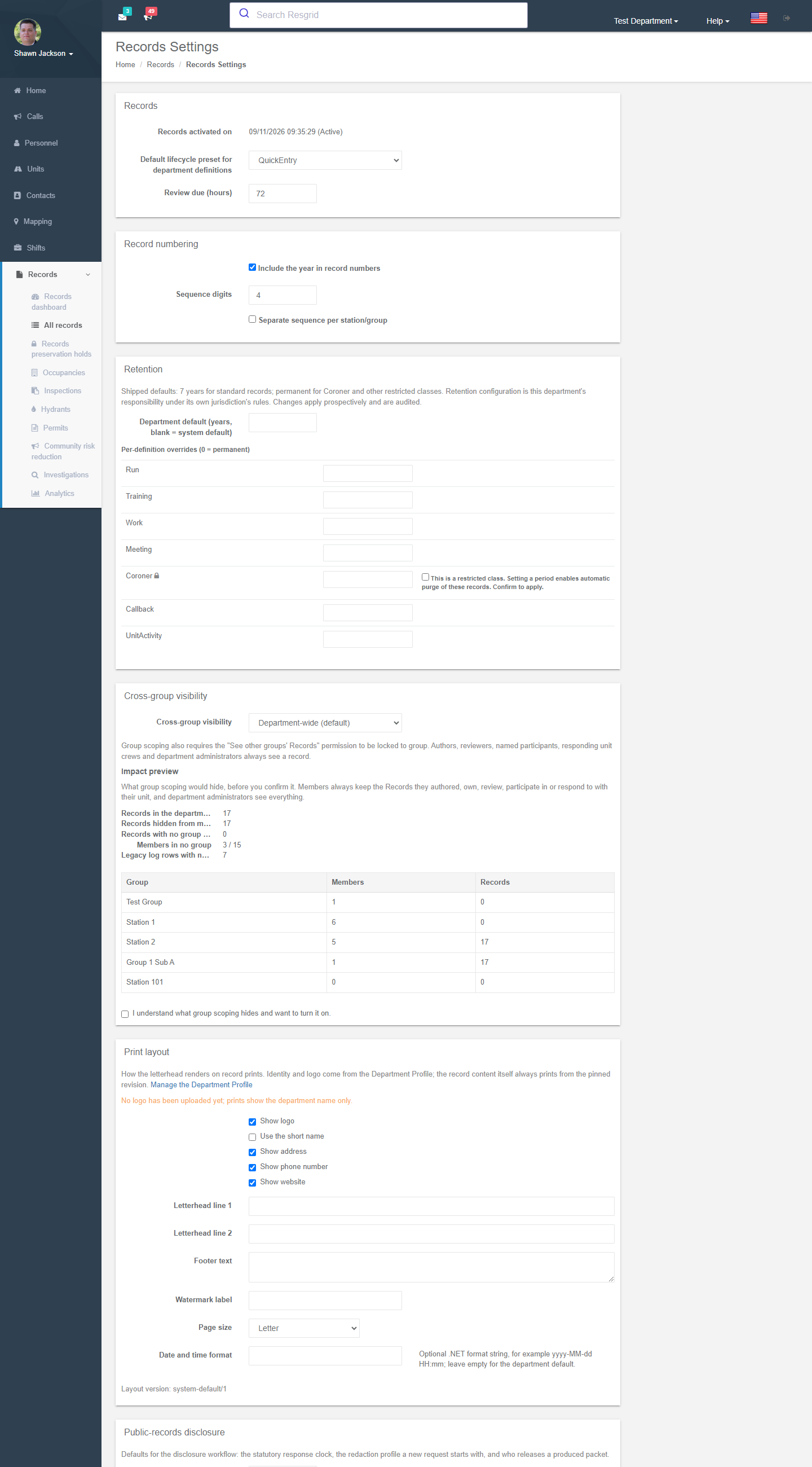
Lifecycle and review
| Setting | Meaning |
|---|---|
| Default lifecycle preset for department definitions | Quick entry, Review required or Approval / acknowledgement — the default new definitions start with. Locked types keep their own preset unless changed on the definition. |
| Review due (hours) | How long a reviewer has before the record shows as overdue on the dashboard and accountability report. |
Numbering
| Setting | Meaning |
|---|---|
| Include the year in record numbers | RUN-2026-000123 vs RUN-000123. |
| Sequence digits | Zero-padding width. |
| Separate sequence per station/group | Each station numbers its own records. |
Per-definition prefixes and per-incident sequences are set on the definition.
Retention
Shipped defaults: 7 years for standard records; permanent for Coroner and other restricted classes. Retention is your department's responsibility under your jurisdiction's rules.
| Setting | Meaning |
|---|---|
| Department default (years) | Blank = system default. |
| Per-definition overrides | 0 = permanent. Setting a period on a restricted class asks for confirmation because it enables automatic purge. |
Records under a legal hold are never purged.
Cross-group visibility
| Setting | Meaning |
|---|---|
| Department-wide (default) | Every member with record view sees every record. |
| Group-scoped | Members see records anchored to their own station/group. Also requires the See other groups' Records permission to be locked to group. Authors, owners, reviewers, named participants, responding unit crews and department administrators always see a record. |
Turning on group scoping shows an impact preview — records that would be hidden from members of no group, records with no group anchor (which stay department-wide), members in no group — and requires confirmation.
Search
Shows whether the search index is online, the number of indexed records and whether narrative text is included. The worker rebuilds the index when the protection policy or catalog version changes. Narrative search is withdrawn when the department is enrolled in Advanced Data Protection.
Print layout
How the letterhead renders on record prints. Identity and logo come from the Department Profile.
| Setting | Meaning |
|---|---|
| Show logo / Use the short name / Show address / phone / website | Letterhead content. |
| Letterhead line 1 / 2, Footer text, Watermark label | Free text (e.g. CONFIDENTIAL). |
| Page size, Date and time format | Optional .NET format string such as yyyy-MM-dd HH:mm. |
Every save is a new layout version stamped in the provenance footer of every print. Per-definition layouts can override this.
NERIS settings
Covered in NERIS incident reports: entity ID, environment, credentials, enable / auto-submit, protected egress acknowledgement and the call-type crosswalk.
Public-records disclosure
| Setting | Meaning |
|---|---|
| Statutory response clock (days) | 1–365; the default due date for a new request. |
| Default redaction profile | Standard, No personal identifiers, Full disclosure. |
| Release approver | A member, or any department administrator. |
Technical reference
| Item | Value |
|---|---|
| Route | /User/Records/Settings |
| Model | RecordsDepartmentSettings (department setting 74 holds retention overrides; settings 70–77 belong to the Records settings screen) |
| Related | /User/IncidentReports/Settings (NERIS), /User/Department/Profile (letterhead identity) |