Records (RMS) — Overview
Records is Resgrid's records management system. It replaces the older Logs module and grows well beyond it: typed operational records (run, training, work, meeting …), NERIS incident reporting for US fire departments, department-designed forms, fire-prevention records (occupancies, inspections, hydrants, permits, community risk reduction), restricted investigation cases, quality review, analytics, legal holds and public-records disclosure — all with immutable revision history and audit trails.
Who it is for
| If you are… | Records gives you… |
|---|---|
| A fire department (US) | NERIS incident reports started straight from the dispatched call, run/training/work records, hydrants, occupancies and inspections, CRR activity, investigations, accreditation analytics. |
| A fire department outside the US | Everything above except NERIS submission (reports can still be authored and kept locally), plus templates in French, and jurisdiction profiles for Canada. |
| EMS | Run records, training and meeting records, controlled-substance evidence capture, unit activity, quality review of finalized records. |
| SAR / CERT / emergency management | Mission summaries, segment debriefs, clue reports, damage assessments, EOC shift logs, ESF status reports, ICS forms (202–225), mutual-aid deployments. |
| Security, delivery, transit, field service, industrial | Patrol logs, incident reports, delivery-run and route end-of-day summaries, job completion, shift handover, near-miss reports — from the template library or your own designer-built definitions. |
Where to find it
When Records is enabled the left menu shows Records in place of Logs (never both). It expands into:
| Menu item | Page |
|---|---|
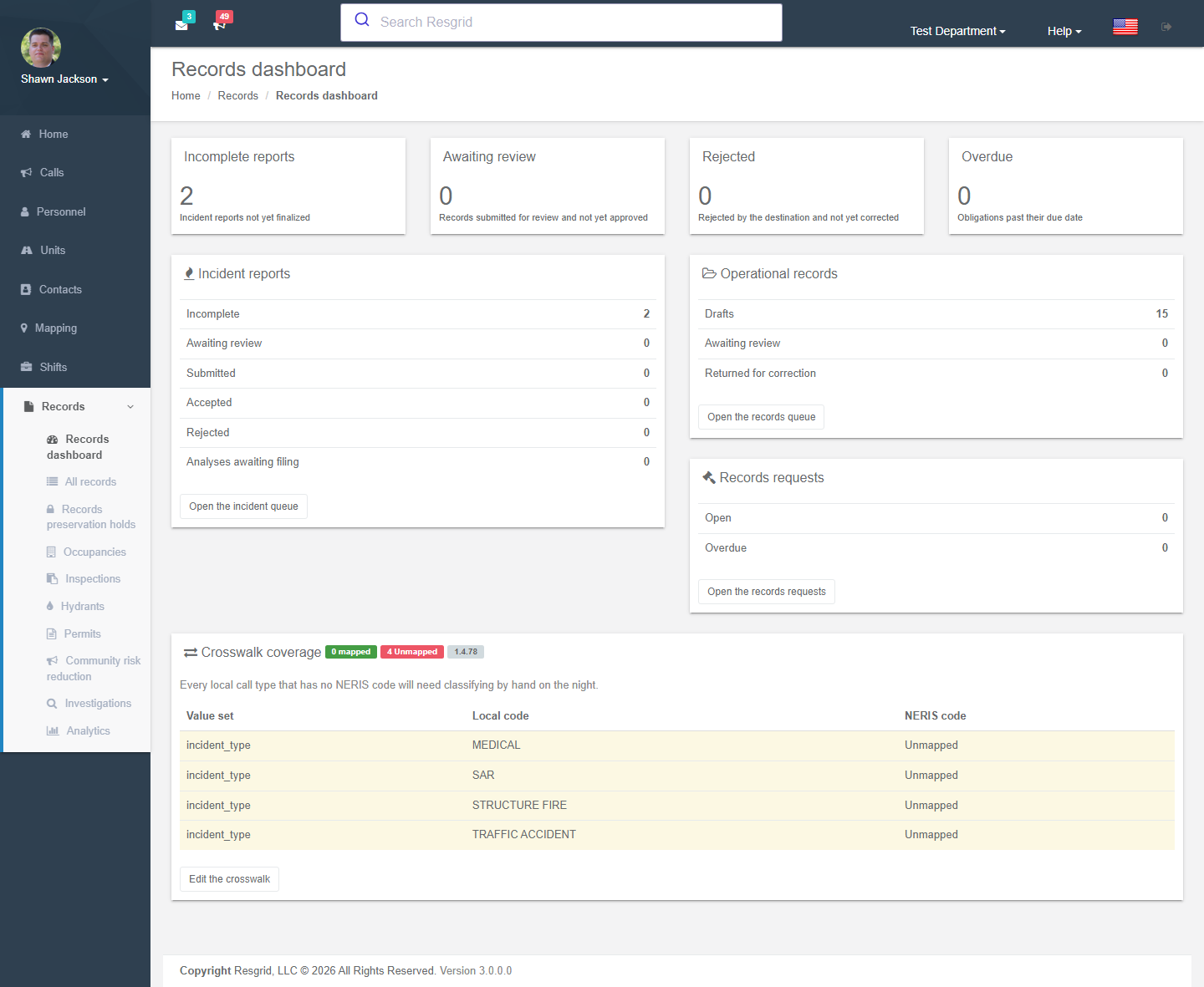
| Records dashboard | Queues that need attention: incomplete incident reports, awaiting review, rejected by NERIS, overdue obligations, open records requests, crosswalk coverage. |
| All records | The searchable, filterable work queue of every record you may see, plus New Record. |
| Legal holds | Preservation holds (visible with the Manage legal holds permission). |
| Occupancies / Inspections / Hydrants / Permits / Community risk reduction | Prevention module pages (each behind its own feature flag). |
| Investigations | Restricted case files (members only). |
| Analytics | Response performance, workload, executive, accreditation, readiness and community-risk dashboards. |
From All records the toolbar offers Reports (export this list, saved reports, analytics, accountability, quality review) and Manage (records requests, deployments, definitions, report exports, release health, field rollout, settings).
Turning it on: activation
Records ships off. Two steps switch a department over:
- Feature flag —
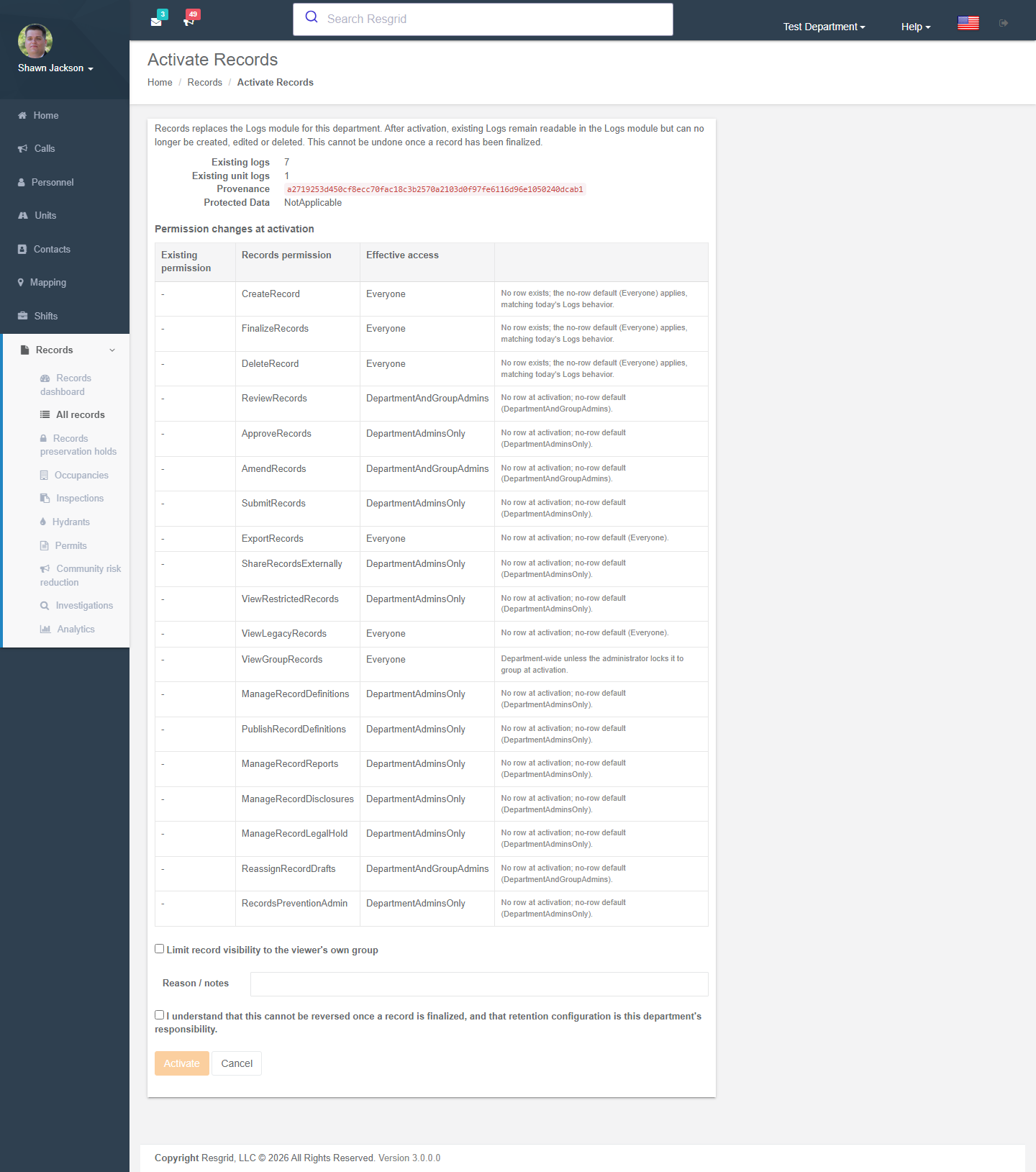
Records.Systemmust be enabled for the department (hosted customers: ask Resgrid support; self-hosted:Resgrid.Console --FeatureFlags --Key=Records.System --DepartmentId=N --On). Prevention, investigations, quality review and analytics each have their own flag (Records.Prevention.*,Records.Investigations,Records.QualityReview,Records.Analytics). - Activate — a department administrator opens Records → Activate Records, reviews how existing Logs permissions map to Records permissions, optionally locks See other groups' Records to the viewer's own group, enters a reason and acknowledges that activation cannot be reversed once a record is finalized.
After activation:
- Existing Logs and Unit Logs stay readable in the Logs module (list, search, detail, attachments, print, export) but can no longer be created, edited or deleted anywhere — web, apps, API or workflows.
- New records are created only in Records. Nothing is dual-written.
- Records does not import legacy logs; historical reporting spans both modules.
Rollback is an operator runbook, not a toggle. It is only clean while no record has been finalized. Once a record is finalized, attested, amended or submitted the department stays on Records; problems are fixed forward (retire a definition, amend a record) or by restoring the whole department from backup.
Key concepts
| Concept | Meaning |
|---|---|
| Definition | The form a record follows: sections, fields, rules, numbering, lifecycle preset, reviewers/approvers, retention, classification. Locked system definitions (Run, Training, Work, Meeting, Coroner, Callback, Unit Activity, NERIS incident report) cannot be redesigned but can be extended with User Defined Fields. Department definitions are yours to design from templates or from scratch. |
| Record | One filled-in instance of a definition. Has a record number, state, owner, author, participants, units, call link, attachments and revision history. |
| Lifecycle preset | Quick entry (Draft → Finalized), Review required (Draft → Ready for review → Finalized, with a Returned loop), Approval / acknowledgement (adds an Approved step by someone other than the author). |
| Revision | An immutable, checksummed snapshot written at finalize, amend and void. Prints and exports always come from a pinned revision. |
| Amendment | The only way to change a finalized record. The prior revision is kept verbatim and the diff is viewable. |
| Void | Marks a finalized record as invalid (with reason). History is retained. |
| Restricted section / field | Content that only members with View restricted records (or case membership) can see. Coroner and investigation classes are restricted by default. |
| Group scope | Optionally limits visibility to the viewer's own station/group. Authors, owners, reviewers, named participants, responding unit crews and department administrators always see a record. |
Record states
Draft ─► Ready for review ─► Approved ─► Finalized ─► Amended
  ▲            │                                  │
  └── Returned ┘                                  └► Voided
Draft ─► Cancelled
NERIS reports additionally: Submitted → Accepted / Rejected → Corrected
- Draft is the only state that autosaves and merges concurrent edits.
- Returned re-opens as Draft on the next save.
- Finalize writes a revision and (if the definition requires it) an author attestation.
- Cancelled abandons an unfinished record and releases its number.
Pages in this section
- Dashboard & work queue — finding, filtering, bulk actions, exports.
- Authoring records — creating, editing, finalizing, amending, attachments, evidence.
- NERIS incident reports — the US national incident reporting standard.
- Definitions & templates — designing your own forms.
- Prevention: occupancies & pre-plans · Inspections · Hydrants · Permits · Community risk reduction
- Investigations — restricted case files with chain of custody.
- Analytics · Quality review · Accountability
- Saved reports & exports — CSV/JSON, saved reports, report exports for agencies.
- Deployments & connectors — mutual-aid orders your department fills.
- Legal holds & records requests
- Records settings — numbering, retention, group visibility, print layout, NERIS, disclosure defaults.
Permissions
Records has its own permission set under Department → Security & Permissions (each can be Everyone, Department admins, Department + group admins, or Admins + selected roles):
| Permission | Purpose |
|---|---|
| Create records · Delete records | Author drafts; delete unfinished records. |
| Review records · Approve records · Finalize records · Amend records | Lifecycle transitions. Approvers may not approve their own record. |
| Submit records | Send NERIS reports. |
| Export records · Share records externally | CSV/JSON/PDF exports; packets emailed outside the department. |
| View restricted records | Restricted sections, Coroner class, investigation cases (with membership). |
| View legacy records | The read-only Logs module after activation. |
| See other groups' records | Cross-group visibility when group scoping is on. |
| Manage record definitions · Publish record definitions | The designer. |
| Manage record reports | Saved reports and report exports. |
| Manage record disclosures · Manage legal holds | Public-records workflow and preservation holds. |
| Reassign record drafts | Move an unfinished record to another owner. |
| Prevention administration | Occupancies, programs, code sets, hydrants, permit types, CRR. |
Technical reference
| Item | Value |
|---|---|
| Controllers | RecordsController, RecordDefinitionsController, IncidentReportsController, IncidentAnalysisController, RecordDocumentsController, RecordEvidenceController, RecordLegalHoldsController, DisclosuresController, RecordOccupanciesController, RecordInspectionsController, RecordHydrantsController, RecordPermitsController, RecordCrrController, RecordInvestigationsController, RecordsAnalyticsController, RecordsQualityController, RecordSavedReportsController, RecordsExportTemplatesController, RecordDeploymentsController, RecordDeploymentConnectorsController, RecordsHealthController, RecordsInventoryController, RecordSubmissionsController |
| Feature flags | Records.System, Records.Field.{Responder,Unit,IncidentCommand,Dispatch}, Records.Prevention.{Occupancy,Inspections,Hydrants,Permits,Crr}, Records.Investigations, Records.QualityReview, Records.Analytics |
| Cutover fact | RmsDepartmentCutover (activation is append-only; not a department setting) |
| Permissions | PermissionTypes 50–67 and 69 (CreateRecord … ReassignRecordDrafts, RecordsPreventionAdmin) |
| Definition keys | system.run, system.training, system.work, system.meeting, system.coroner, system.callback, system.unit-activity, system.neris-incident; department keys may not start with system. |
| Workflow events | RecordCreated, RecordFinalized, RecordAmended, RecordVoided (+ LogAdded compatibility projection during the transition window) |
| API | api/v4/Records/*, api/v4/RecordDefinitions/*, api/v4/IncidentReports/*, api/v4/RecordExportTemplates/* — used by the Field Records surfaces in the Responder, Unit, Incident Command and Dispatch apps |
| Search | Records are indexed by the unified search worker; narrative search is withdrawn when the department is enrolled in Advanced Data Protection. |