Personnel
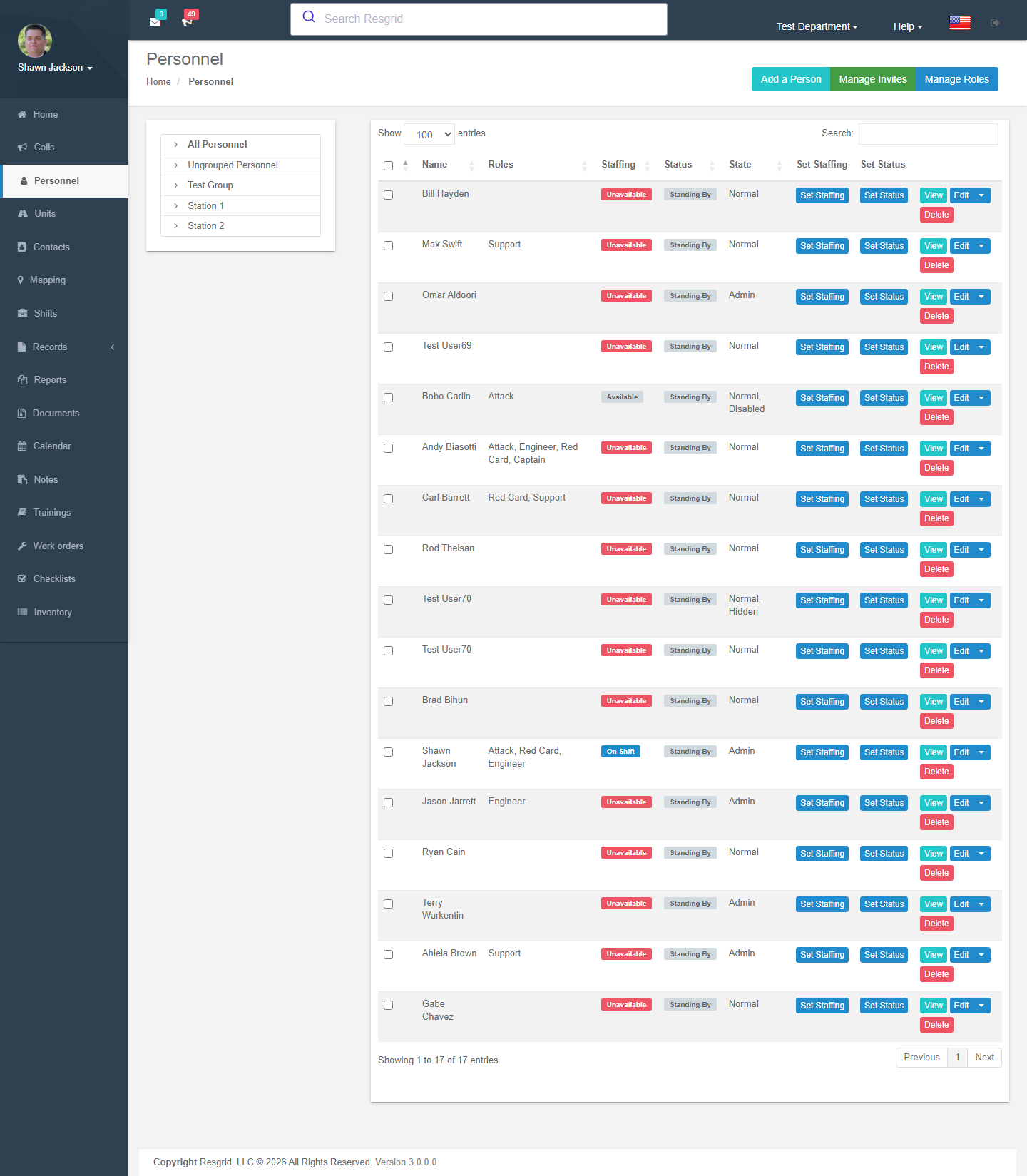
The Personnel page is your roster: every member of the department with their current status (Standing by, Responding, On scene …), staffing level (Available, Unavailable, On shift …), station, roles and contact details. From here you add members, edit their details, set their status, and manage roles and ranks.
Where to find it
Left menu → Personnel. The page lists members grouped by station/group (or sorted by first/last name — see Department Settings → Sorting). Use the group tree on the left to filter, the search box to find someone, and the checkboxes to set status or set staffing for several people at once.
Each row shows name, status, staffing, roles and ID number, with buttons to View, Edit (via the profile page), Events and Delete. Hidden members are only shown to administrators.
Adding people
Two ways:
- Add a Person — create one account now.
- Manage Invites — send email invitations; the person creates their own login and lands in your department (see Department Settings → Invites).
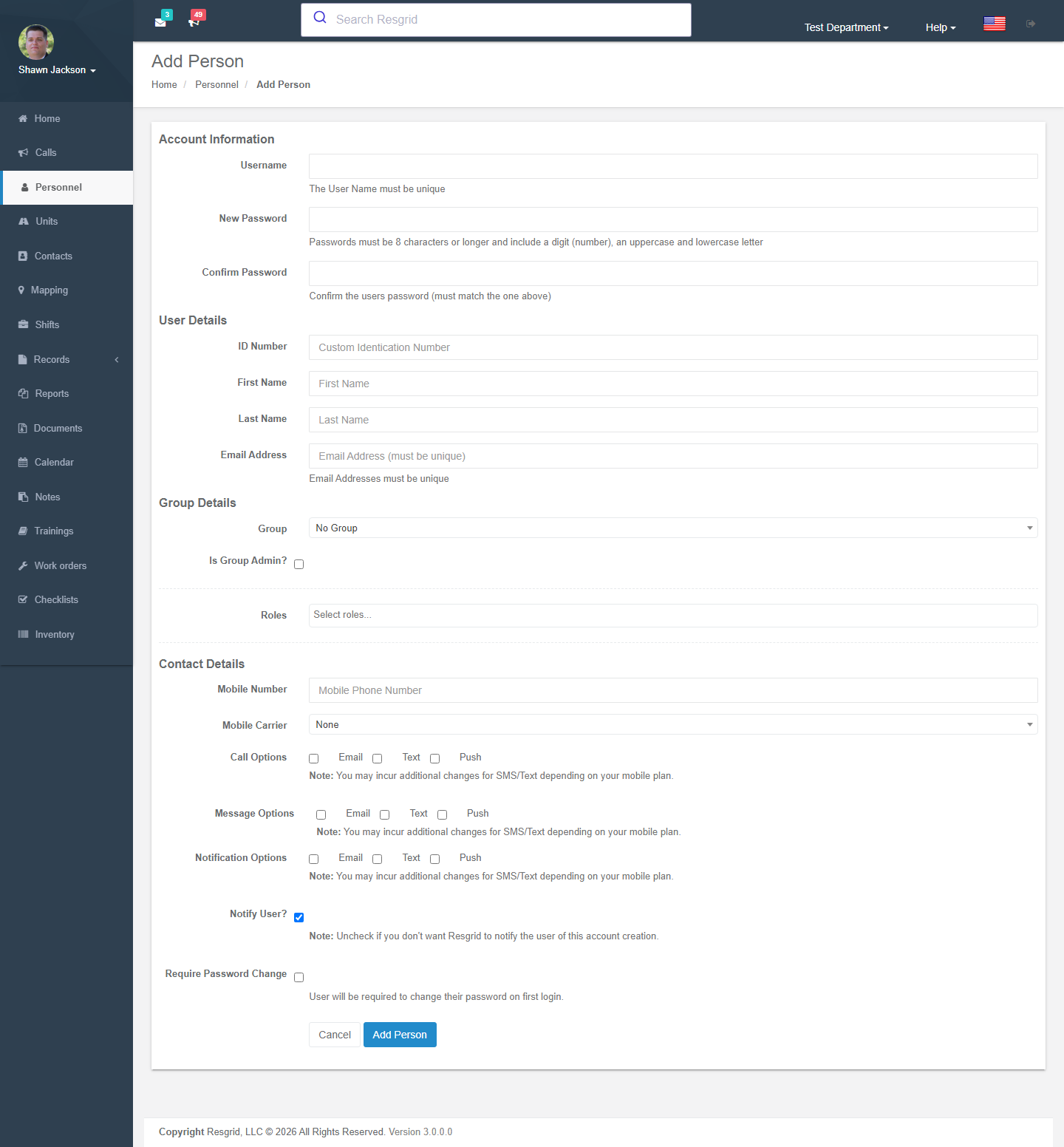
| Field | Notes |
|---|---|
| First / Last name | Required. |
| Email address | Required and unique across all of Resgrid. If the address already exists in another department the existing account is added to your department with its profile settings; the person switches departments from Your Departments. |
| Username / Password | Username unique; password ≥ 8 characters with a digit, an uppercase and a lowercase letter. Require password change forces a new password at first login. |
| ID number | Your own badge / employee number. |
| Mobile number / carrier | For SMS. Carrier is needed for email-to-SMS gateways; UK numbers must match the carrier's prefix rules. |
| Group | Station or group; Is group admin? grants group-level administration. |
| Roles | Tick the roles the person holds. |
| Notify user | Send the welcome email with login details. |
New accounts start with every contact method pending verification; the member verifies email and phone from their profile before dispatches and messages are sent to those channels (contact verification). Adding is blocked when the plan's personnel limit is reached.
Viewing and editing a person
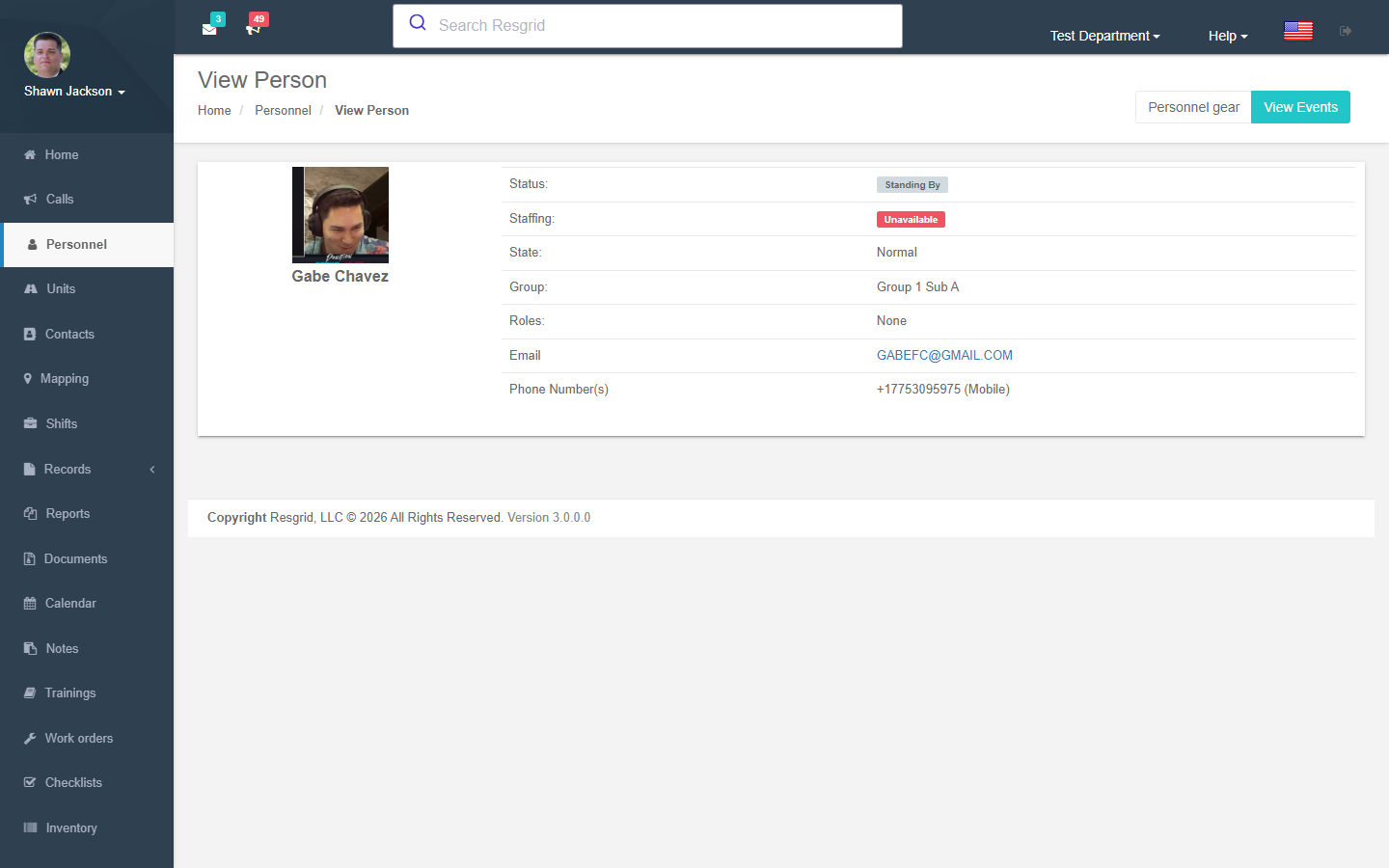
View shows the profile, group, roles, department flags (admin, disabled, hidden), current staffing and status, certifications (with expiry, verification and credits), events and — where enabled — the equipment issued to them. Edit (or the person's profile page) changes:
| Section | Fields |
|---|---|
| Account | Name, email, username, password reset, language, time zone. |
| Contact details | Mobile, home and work numbers, mobile carrier, home and mailing addresses (home address is used for proximity / ETA). |
| Department | Group, group admin, roles, administrator, disabled (cannot log in), hidden (kept for history but not shown on lists). |
| Notification options | Which channels (push, SMS, email, voice) the person receives calls, messages, notifications and chat on. |
| Call / message options | Per-priority call alerting, quiet hours, message digest settings. |
Status and staffing
From the personnel list (or the Dashboard) you can set a member's status and staffing with an optional note and, for statuses that need one, a destination (station or call). Bulk-select rows to update many at once. Members set their own from the apps.
Events
Events lists every status, staffing and location change for the person; Generate report prints it. Administrators can clear all statuses for a person (used when a test account has polluted reports).
Removing someone
Delete removes the member from the department. Resgrid recommends disabling instead of deleting so history, logs and reports stay intact; underlying data is retained, so clear personal details first if you must delete. A member who still owns unfinished Records must have them reassigned first. Deleted members can be reactivated by adding them again with the same email.
Roles
Manage Roles (/User/Personnel/Roles). A role is a qualification, position or team membership you dispatch by and report on: Firefighter, EMT, Paramedic, Driver/Operator, Officer, Chief, Team Leader, K9 Handler, Safety Officer, Security Officer, Dispatcher.
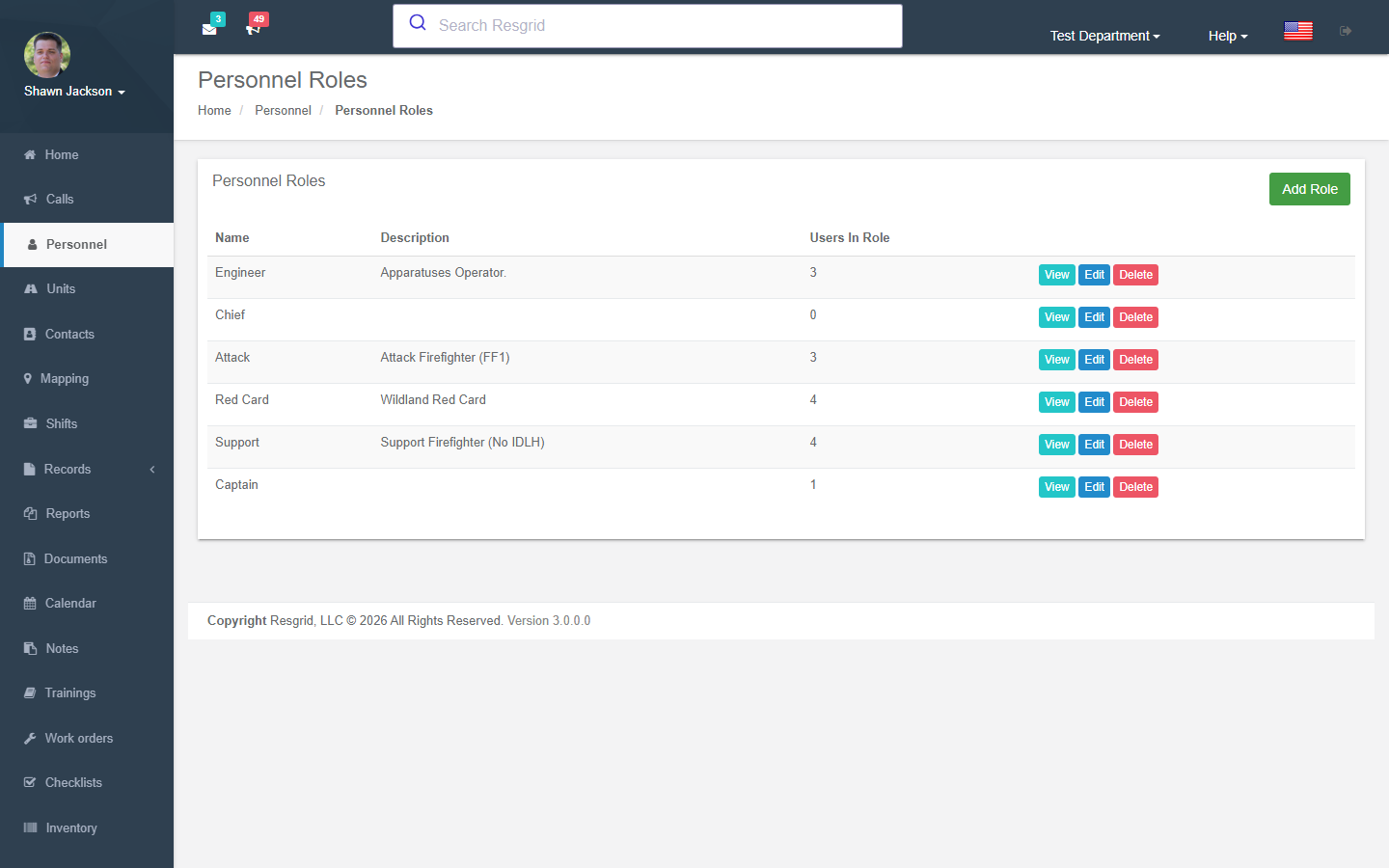
- Add Role — name, description and initial members.
- Edit / View Role — members in role; Delete removes the role (assignments are dropped).
- Required certifications — which certification types a member must hold for the role, with any-of groups and a grace period; enforcement (off / warn / enforce) is set under Certifications → Settings.
Roles are used by call dispatch (dispatch to a role), run cards (role requirements), notifications (low-availability alerts), shifts (role quotas), checklists and work orders (assignment), certification requirements, deployment seats, security permissions (Admins + selected roles) and reports.
Ranks
Personnel Ranks are display titles (Chief, Captain, Lieutenant, Firefighter) shown with names and in the apps; unlike roles they carry no dispatch meaning.
Setup examples
| Department | Roles to create | Tips |
|---|---|---|
| Volunteer fire | Firefighter, Interior firefighter, Driver/Operator, Officer, Chief, EMT | Use group admin for station captains; hide inactive members instead of deleting. |
| Career fire | By rank and qualification: Engineer, Paramedic, Hazmat tech, Rescue tech | Import via SCIM if you have an HR directory. |
| EMS | EMT, AEMT, Paramedic, Supervisor, Dispatcher | Certifications with expiry dates on each person. |
| SAR | Ground team, Team leader, K9 handler, Technical rope, Swiftwater, Medical, Drone pilot | Roles are what you dispatch by. |
| Emergency management | EOC manager, Operations, Planning, Logistics, Finance, ESF-1 … ESF-15 leads, PIO | One group per EOC section. |
| CERT | CERT member, Team leader, Program coordinator | Keep contact verification strict — many volunteers. |
| Security | Security officer, Supervisor, Dispatcher, Site lead | Group per client site; hidden members for former contractors. |
| Industrial ERT | Fire brigade, Hazmat, Confined space, First aid, Incident commander | Certifications for every qualification with expiry reminders. |
Technical reference
| Item | Value |
|---|---|
| Controller | PersonnelController; profile editing in HomeController.EditUserProfile |
| Routes | /User/Personnel/{Index,AddPerson,ViewPerson,DeletePerson,ViewEvents,Roles,AddRole,EditRole,ViewRole,DeleteRole} (?userId= / ?roleId=) |
| Policies | Personnel_View/Create/Delete, Role_View/Create/Update/Delete + CanUserViewUser, CanUserRemoveUser, CanUserEditRole |
| Permissions | AddPersonnel, RemovePersonnel, ViewPersonalInfo (PII), ViewGroupUsers; department settings CanGroupAdminsAddUsers / CanGroupAdminsRemoveUsers |
| Data endpoints | GetPersonnelForGrid, GetPersonnelForCallGrid?callLat=&callLong= (with ETA), GetPersonnelList, GetPersonnelListPaged, GetRoles, GetMembersForRole?id=, GetPersonnelEvents?userId=, SetActionForUser, SetStaffingForUser, SetUserActionForMultiple, SetUserStaffingForMultiple |
| Events | UserCreatedEvent, UserAssignedToGroupEvent, PersonnelRoleChangedEvent, UserStaffingEvent, UserStatusEvent, AuditEvent |
| Plan limits | CanUserAddNewUser — cached 14 days; see Subscription & Billing |
| Protected data | Contact details and personal info are ADP-protected fields |