Dispatch & Calls
Calls are the incidents, jobs, events and tasks your people respond to. Dispatching a call tells the right people and units about it — by push notification, text, email and voice — tracks who is responding and who is on scene, collects notes, photos and files, and closes with a disposition that feeds your records and reports.
Where to find it
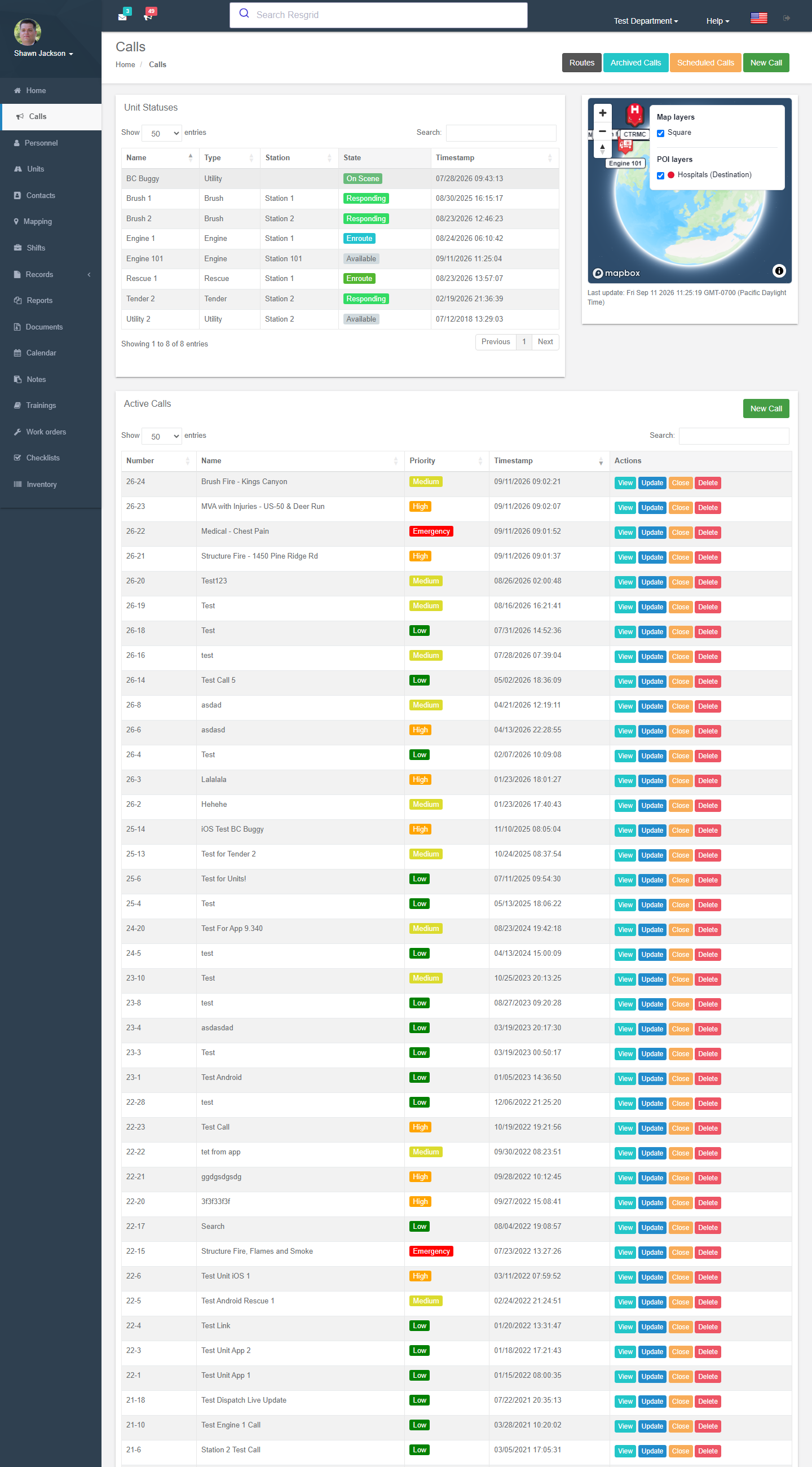
Left menu → Calls. The Calls page shows:
- Unit statuses — every unit with its current state and when it changed.
- Active calls — open calls with number, name, priority and time, plus View, Update and Close buttons.
- A map of active calls and units.
- Buttons for Routes, Archived calls, Scheduled calls and New Call.
Creating a call
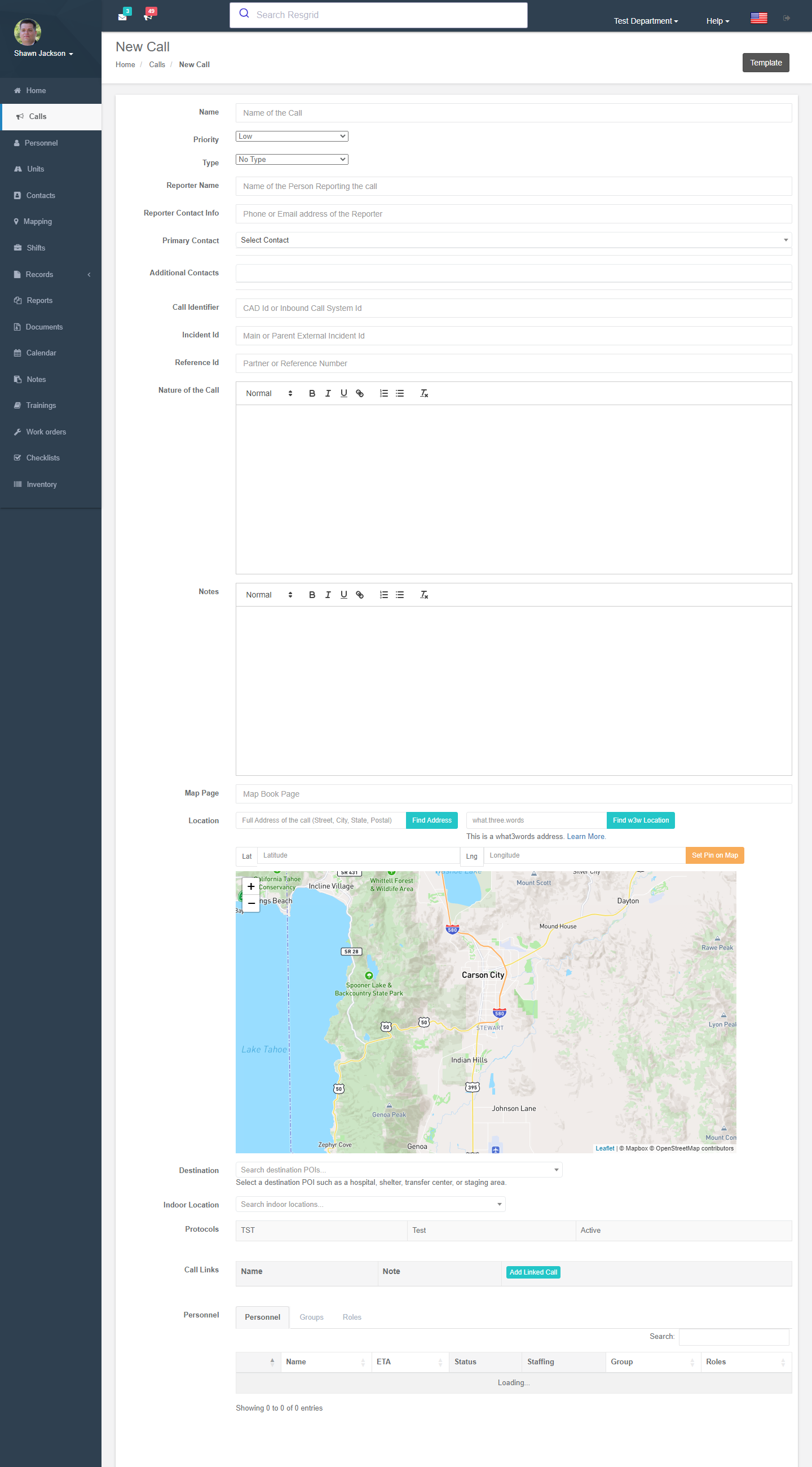
New Call (the same form is used by the Dispatch app and by email/SMS import).
| Field | What to enter |
|---|---|
| Name | Short title — this is the headline in every notification (Structure Fire - 1450 Pine Ridge Rd). |
| Priority | Low, Medium, High, Emergency or your custom priorities. Priority decides the notification sound, colour and whether the call overrides quiet hours in the apps. |
| Type | Fire, Medical, Rescue … from your call types. Type drives protocols, run cards, NERIS crosswalk and reporting. |
| Reporter name / contact info | Who called it in. |
| Primary / additional contacts | Link Contacts (a premises, a client, a company). Contacts with alert notes pop up a warning. |
| Call identifier / Incident Id / Reference Id | External CAD, parent incident and partner numbers for cross-referencing. |
| Nature of the call | The dispatch text; rich text supported. |
| Notes | Additional notes. |
| Map page | Map-book reference. |
| Location | Type an address and Find Address, enter a what3words address, enter latitude/longitude, or Set pin on map. Reverse geocoding fills the address from a pin. |
| Destination | A point of interest such as a hospital, shelter, transfer centre or staging area (from Mapping → POIs). |
| Indoor location | A zone from an indoor map. |
| Protocols | Matching dispatch protocols are listed; answer their questions to attach guidance. |
| Call links | Link related calls. |
| Personnel / Groups / Roles / Units tabs | Who to dispatch (see below). |
| Call template | Load a quick template to pre-fill the form. |
| Check-in timers | Enable accountability timers for this call. |
| Schedule dispatch | Delay the dispatch to a future time (at least 15 minutes ahead) — the call appears under Scheduled calls until then. |
| Custom fields | Any User Defined Fields configured for calls. |
Who gets dispatched
Tick any combination of:
| Target | Effect |
|---|---|
| Personnel | Named members. The grid shows ETA to the call, current status, staffing and roles. |
| Groups | Every member of a station or group. With Dispatch shift instead of group on (Department Settings), only members signed up for today's shift are dispatched. |
| Roles | Every member holding a role (e.g. Driver, Paramedic). |
| Units | Apparatus and their crews. |
If Run Cards are enabled, the recommendation for the call's priority/type is pre-filled here (or dispatched automatically).
Press Create Call. Notifications go out immediately through the queue: push to the apps, SMS, email and voice according to each member's notification preferences and contact verification status. Notification text is generic when the department is enrolled in Advanced Data Protection.
Working an active call
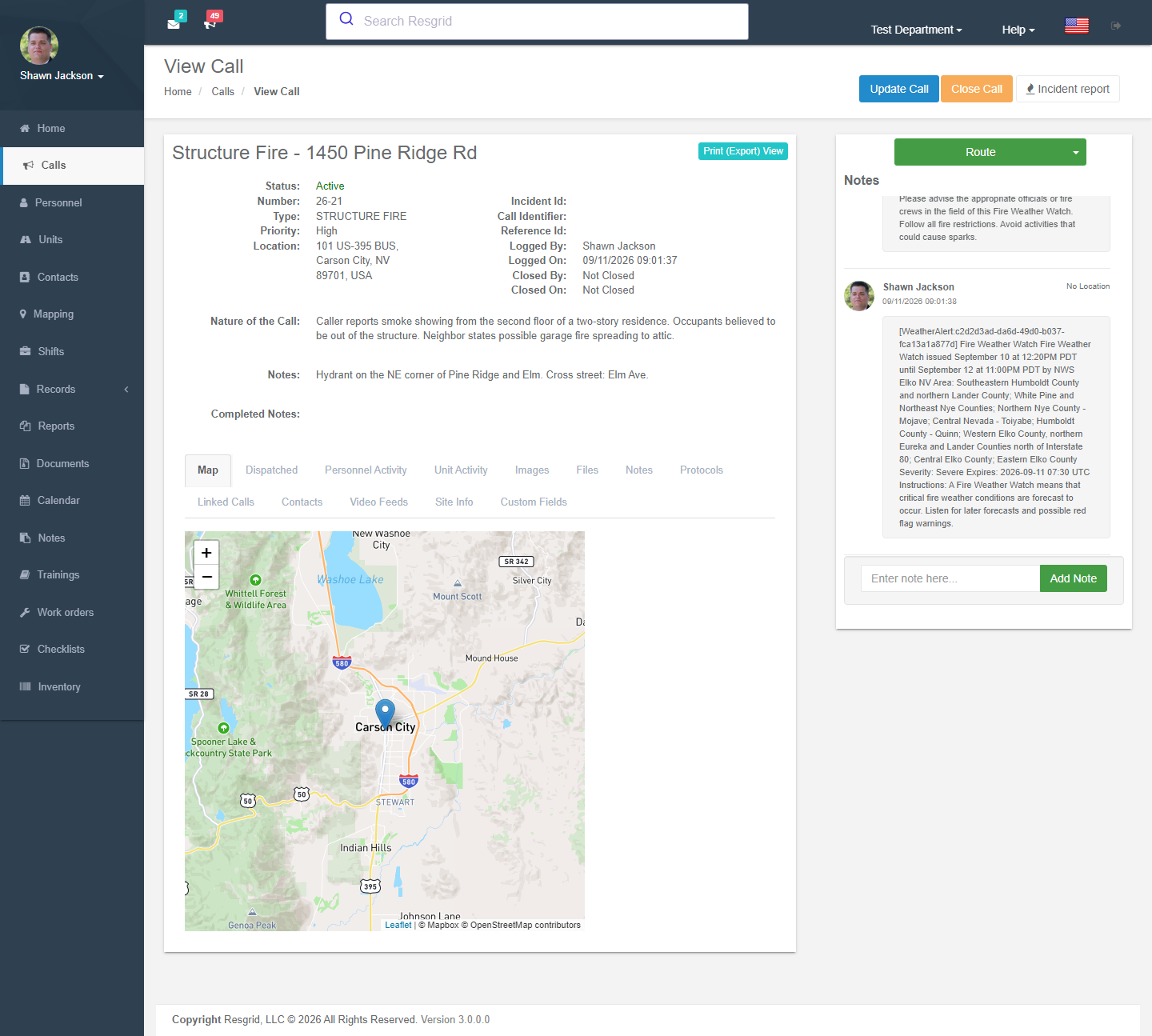
View opens the call page.
| Panel | What you can do |
|---|---|
| Call details | Everything entered above, with the dispatch audio if the call came from a radio/TTS source. |
| Map | Call location, responding personnel and units live, route lines. |
| Dispatched personnel / units | Who was dispatched, their current status and timestamps (responding, on scene …). |
| Notes | Add notes (with your location if allowed); flag a note for follow-up with a reason. |
| Images and files | Attach photos, documents, audio and video up to 10 MB; flag inappropriate items for moderation. |
| Check-in timers | PAR / rehab / IC / hazmat countdowns with Check In buttons and history. |
| Incident report | Start the NERIS incident report or a Run record. |
| Export | Printable call export, PDF, and a shareable anonymous export link. |
Update changes any field, adds or removes dispatch targets (only the differences are applied) and can rebroadcast the notification. Close asks for a close state (Completed, Cancelled, Unfounded, False alarm …) and closing notes. Closed calls move to Archived calls and can be re-opened.
Delete soft-deletes a call with a reason (it can be restored by support).
Archived and scheduled calls
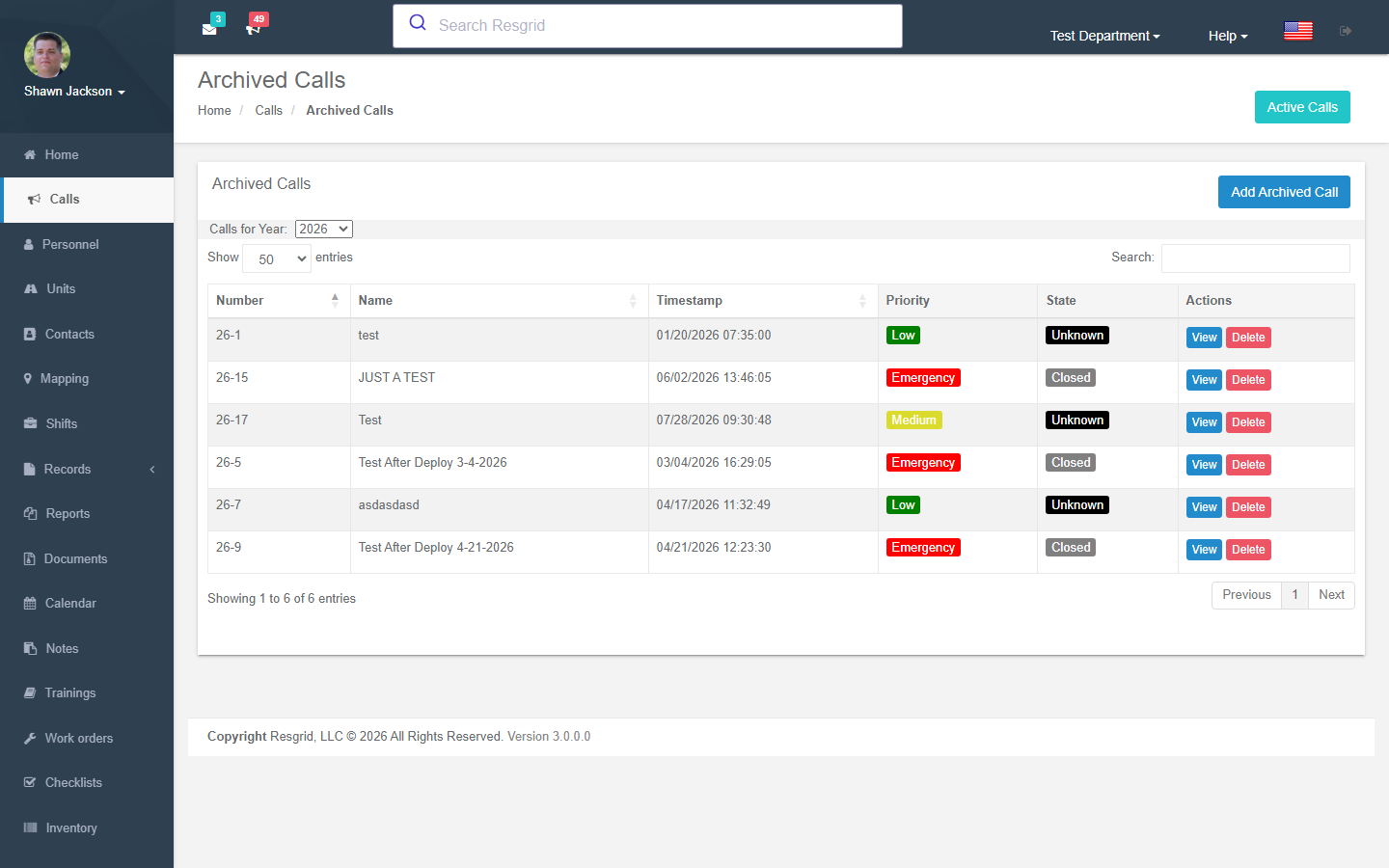
- Archived calls — closed calls by year, with view and export. Add archived call creates a historical call with a custom date and pre-set closed state (optionally recalculating the year's call numbers) — useful when importing history or logging a call that happened outside Resgrid.
- Scheduled calls — calls waiting for their scheduled dispatch time.
Other ways calls arrive
| Source | How to set it up |
|---|---|
| Send or forward CAD pages to your department's dispatch import address (Call import settings); choose the parser format for your CAD. | |
| SMS / text | Text to the department number (Text messaging). |
| Dispatch app | Same form on tablet or desktop. |
| API | api/v4/Calls/SaveCall with an API key or OAuth token. |
| Workflows / Assistant | Workflow actions and the chat Assistant can create calls when allowed. |
| Voice | Automated voice dispatch reads the call out over the phone or radio TTS. |
Setup examples
| Department | Recommended call configuration |
|---|---|
| Volunteer fire | Priorities Low/Medium/High/Emergency; types Fire, Medical, MVA, Rescue, Alarm, Public assist; dispatch to Groups (stations) with Dispatch shift instead of group off; email import from county CAD; run cards for structure fires. |
| Career fire / combination | Run cards with auto-dispatch; closest-unit mode; check-in timers (PAR every 20 min) on Fire types; NERIS crosswalk for every type. |
| EMS | Types by determinant (ALS/BLS/IFT); dispatch to Units; destination POIs for hospitals; ADP enrolled. |
| SAR | Types Search, Rescue, Recovery, Training; dispatch to Roles (Team leader, K9, Technical rescue); what3words locations; long check-in timers for field teams. |
| Emergency management | Types Activation, Weather, Shelter, Resource request; dispatch to Roles (ESF leads) and Groups (EOC sections); scheduled calls for planned activations. |
| Security / facilities | Types Alarm, Patrol request, Escort, Medical, Incident; contacts for client sites with alert notes and gate codes; indoor locations. |
| Delivery / transit | Types Delivery, Pickup, Breakdown, Route deviation; dispatch to Units (vehicles); destination POIs; link calls to Routes. |
Technical reference
| Item | Value |
|---|---|
| Controller | DispatchController |
| Routes | /User/Dispatch/{Dashboard,NewCall,ViewCall,UpdateCall,CloseCall,DeleteCall,ReOpenCall,ArchivedCalls,AddArchivedCall,ScheduledCalls,CallData,CallExport,CallExportEx,CallExportPdf,GetCallDispatchAudio} (?callId=) |
| Policies | Call_View, Call_Create, Call_Update, Call_Delete + IAuthorizationService.CanUser{Create,Edit,Close,Delete}CallAsync |
| Permissions | CreateCall, DeleteCall, CloseCall, AddCallData |
| Events | CallAddedEvent, CallUpdatedEvent, CallClosedEvent; broadcast via IQueueService.EnqueueCallBroadcastAsync (push/SMS/email/voice) |
| Data endpoints | GetActiveCallsList, GetArchivedCallsList?year=, GetScheduledCallsList, GetCallNotes, GetPersonnelForCall, GetAllDispatchesForCall, GetMapDataForCall, GetCallTypes, GetCallPriorities, GetCallsForSelectList, GetCoordinatesFromW3W, GetAlertNotesForContact, GetDispatchRecommendation, CallsYTD, CallsTypesInRange, CallsStatesInRange |
| Attachments | 10 MB; images jpg/jpeg/png/gif/bmp; documents pdf/doc/docx/ppt/pptx/xls/xlsx/txt; audio mp3/m4a/ogg/wav; video mp4/m4v/mov/wmv/avi/mpg |
| Soft delete | IsDeleted, DeletedOn, DeletedByUserId, DeletedReason |
| Protected data | Name, nature, notes, address and attachments are ADP-protected fields |
| API | api/v4/Calls/* |