Security & Permissions
Department menu → Security and Permissions is where administrators decide who can do what: create calls, add people, see phone numbers, see locations on the map, manage records, adjust inventory … It also hosts the audit log, 2FA enforcement, the department security policy, SSO / SCIM and Advanced Data Protection.
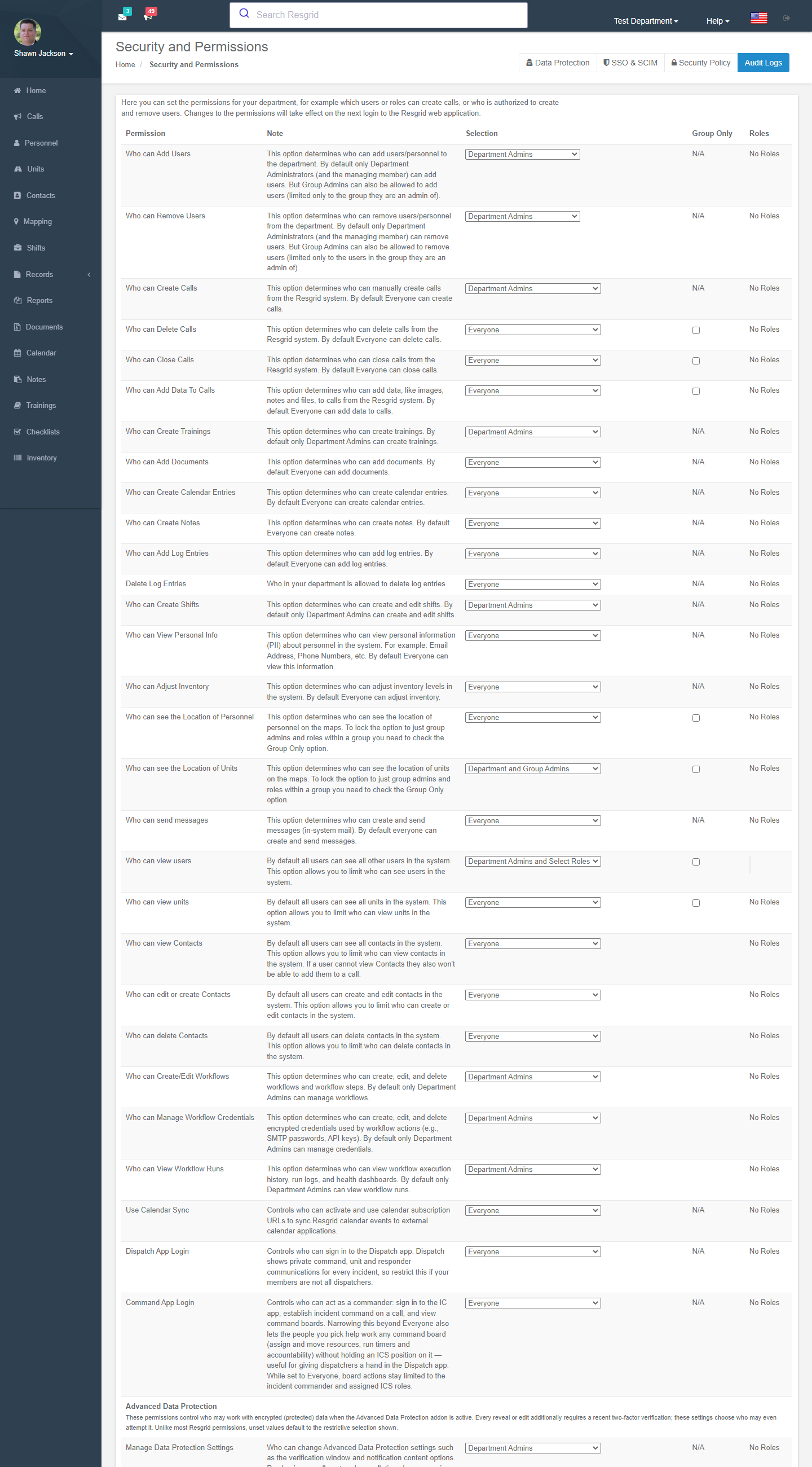
Permission levels
Every permission is set to one of four levels. Changes take effect at the member's next login.
| Level | Who is allowed |
|---|---|
| Everyone | All department members. |
| Department admins | Department administrators and the managing user. |
| Department + group admins | Also group/station administrators — usually limited to their own group (e.g. adding users to their group only). |
| Admins + selected roles | Administrators plus members holding the roles you tick. |
Some visibility permissions have a Group only option that restricts what a member sees to their own group.
The permissions
People, calls and everyday modules
| Permission | Default | Controls |
|---|---|---|
| Who can add users / remove users | Dept admins | Adding and removing personnel; group admins are limited to their group. |
| Who can create / delete / close calls | Everyone | Manual call creation, deletion and closing. |
| Who can add data to calls | Everyone | Notes, images and files on calls. |
| Who can create trainings | Dept admins | Training module authoring. |
| Who can add documents / create calendar entries / create notes | Everyone | Content creation in those modules. |
| Who can add log entries / delete log entries | Everyone / Dept admins | Legacy Logs module (until Records activation). |
| Who can create shifts | Dept admins | Shift creation and editing. |
| Who can view personal info | Everyone | Email addresses, phone numbers and other PII of other members. |
| Who can see the location of personnel / units | Everyone | Map markers and app locations; use Group only to limit to the viewer's group. |
| Who can send messages | Everyone | In-system mail. |
| Who can view users / view units | Everyone | Restrict the roster and unit list to the viewer's group. |
| Who can view / edit / delete contacts | Everyone | The Contacts module (members who cannot view contacts cannot attach them to calls). |
| Use calendar sync | Everyone | Subscribe to the department calendar from an external calendar app. |
| Dispatch app login / Command app login | Everyone | Who may sign in to the Dispatch and Incident Command apps. |
Workflows
| Permission | Default |
|---|---|
| Create / edit workflows | Dept admins |
| Manage workflow credentials | Dept admins |
| View workflow runs | Dept admins |
Inventory, checklists, work orders
| Permission | Default |
|---|---|
| Adjust inventory | Everyone |
| Transfer inventory / Issue and return inventory | Same as Adjust inventory |
| Manage controlled substances | Dept admins |
| Manage checklists / View checklist results | Dept admins |
| Manage work orders / View other members' work orders | Dept admins |
Records
| Permission | Default |
|---|---|
| Create records · Void or cancel records · Review · Approve · Finalize · Amend finalized · Submit externally · Print and export · Share | Varies (see Records → Permissions) |
| View restricted sections · View legacy logs · View records from other groups | |
| Manage record definitions · Publish record definitions · Manage record reports · Manage record disclosures · Manage legal holds · Reassign draft records · Manage prevention data | Dept admins |
Workforce & Business Ops
All default to department administrators. See the Workforce & Business Ops overview.
| Permission | Controls |
|---|---|
| Manage invoicing / View invoicing | Create, edit, send and void invoices, record payments, rate cards and billing profiles / read-only invoices, aging and PDFs. |
| Manage certifications / View certifications / Manage certification setup | Other members' certification records, credits and unit records / the expiry dashboard / types, role requirements and settings. Members always see their own records. |
| Manage deployments / Approve time reports | Deployments, rosters, equipment, expenses, files and status; see every deployment / approve and void submitted daily time reports. Rostered members always see their own deployments and file time. |
| Manage bids / Manage contracts | Bids and the deployment wizard / service contracts, document requirements and compliance documents. |
| Manage Cal OES MARS reimbursement | Agency, F-5, annual rates, agreements, handoff, observed statuses, invoice approval and payment reconciliation. Rostered members prepare their own F-42 and expense drafts without it. |
| View internal costs | Aggregate field-cost summaries, resource cost profiles and usage readings (never a person's rate). |
| Manage workforce and compensation / View workforce compensation | Employer, establishments, workers, employments, compensation profiles, work entries and pay-fact imports / read-only. Values also need a Protected Data Grant. |
| Manage California pay data reporting / Export California pay data reports | The CRD report wizard and demographic records / freezing a run and downloading its files. Members always answer their own demographic response. |
Advanced Data Protection
| Permission | Purpose |
|---|---|
| Manage data protection settings · View / edit protected call data · View protected personnel / contact / operational data · Export protected data · Configure protected data delivery · Emergency break-glass access | See Advanced Data Protection. |
Two-factor enforcement
Require 2FA for admins: Disabled, Department admins + managing user, or … + group admins. You cannot enable it until you and the managing user both have 2FA on your own accounts. Affected members are sent to the setup page at next login.
Audit logs
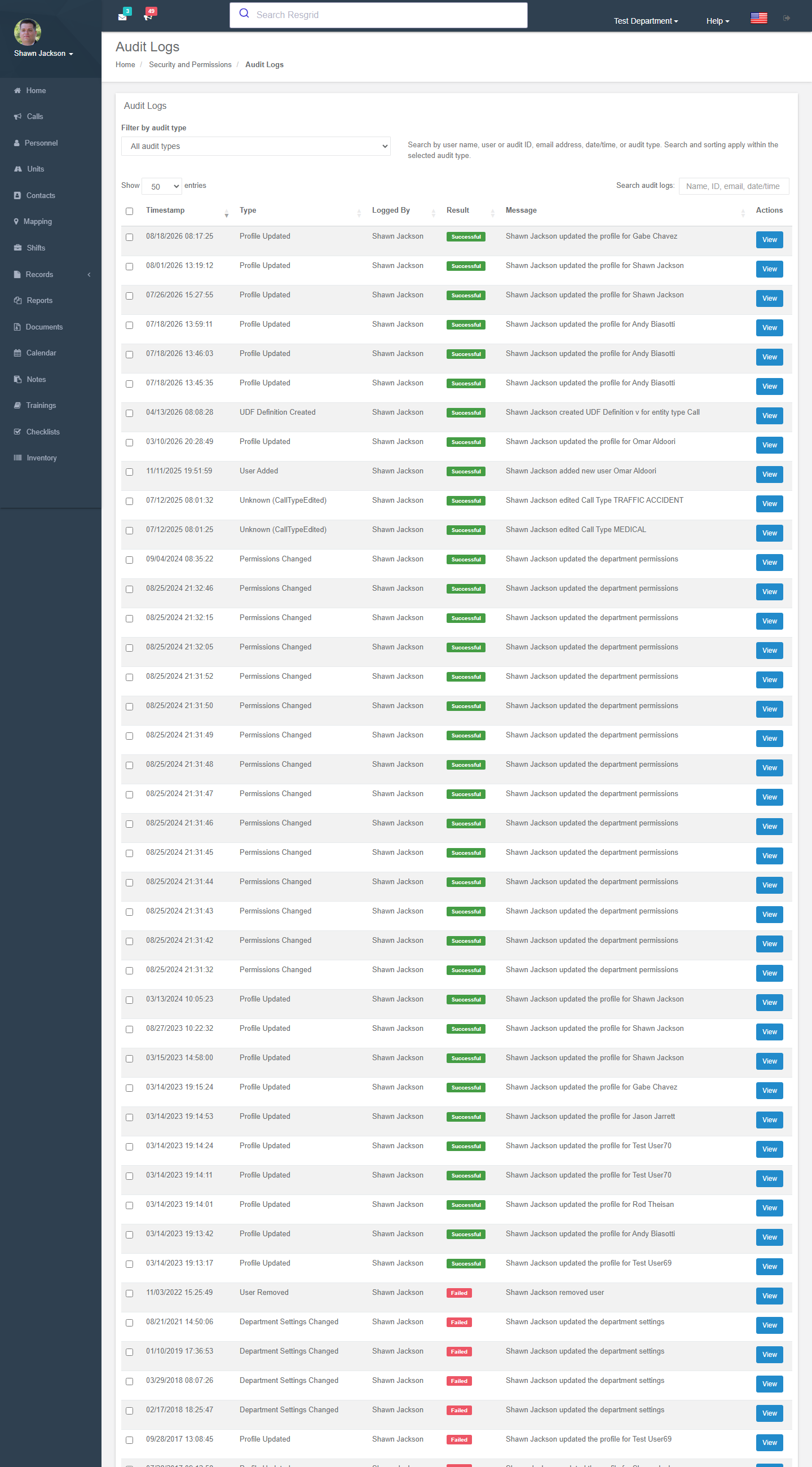
Audit Logs lists every significant operation: timestamp, type (DepartmentSettingsChanged, CallAdded, PersonnelRemoved, PermissionChanged …), a description, the acting member, IP address and user agent. Open an entry to see the before / after snapshots.
Department security policy
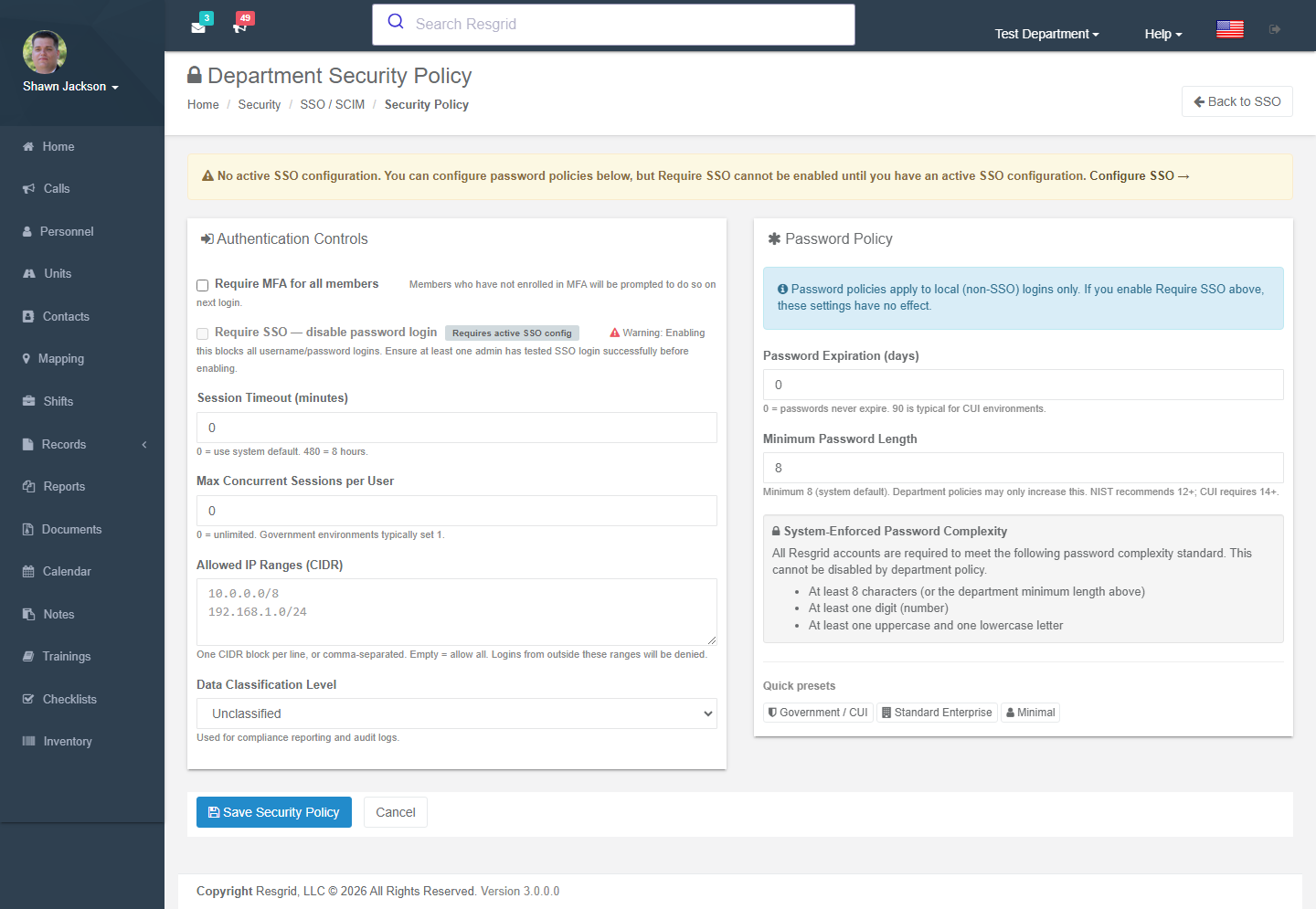
/User/Security/SecurityPolicy — compliance controls for the whole department. Quick presets: Government / CUI, Standard enterprise, Minimal.
| Setting | Notes |
|---|---|
| Require MFA for all members | Members without MFA are prompted to enrol at next login. |
| Require SSO — disable password login | Needs an active SSO configuration and at least one admin who has tested SSO login. |
| Session timeout (minutes) | 0 = system default; 480 = 8 h. |
| Max concurrent sessions per user | 0 = unlimited; government environments typically use 1. |
| Allowed IP ranges (CIDR) | Logins from outside are denied. Empty = allow all. |
| Data classification level | Unclassified / CUI / Confidential — for compliance reporting and audit logs. |
| Password expiration (days) / minimum length | Local logins only. Minimum 8; NIST recommends 12+; CUI requires 14+. Complexity (upper, digit, special) is always enforced. |
SSO and SCIM
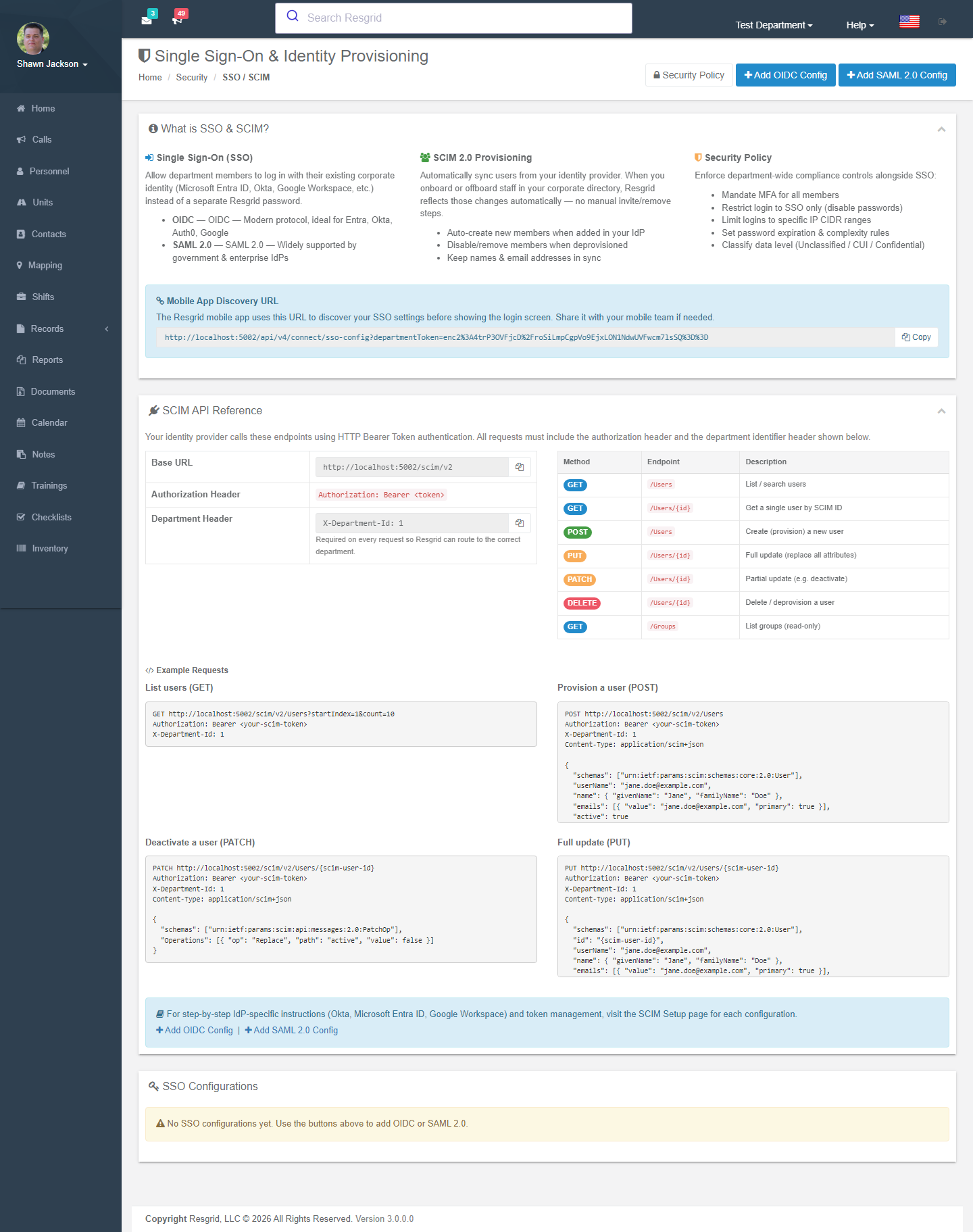
/User/Security/Sso — add OIDC (Entra ID, Okta, Auth0, Google) or SAML 2.0 configurations, enable SCIM 2.0 provisioning (auto-create, auto-disable, keep names/emails in sync) and copy the mobile app discovery URL. Full guides: SSO overview, SSO setup, SCIM provisioning.
Setup examples
| Department | Recommended permission changes |
|---|---|
| Volunteer fire | Create calls → Admins + Officers; Delete calls → Dept admins; View personal info → Everyone (members need each other's numbers); 2FA for admins. |
| Career fire / EMS | Create/close calls → Admins + Dispatcher role; View personal info → Admins + Officers; personnel locations Group only; MFA for all; session timeout 720. |
| SAR / CERT | Create calls → Team leaders; Add documents → Everyone; View unit locations → Everyone. |
| Emergency management | Create calls → EOC manager + Operations role; Manage workflows → IT role; data classification CUI; IP ranges for the EOC network if desired. |
| Security company | View users / units → Group only (clients must not see each other); View contacts → Admins + Site leads; SSO with the corporate IdP; Require SSO. |
| Industrial | Government/CUI preset if regulated; Manage controlled substances → Safety role; audit log reviewed monthly. |
Technical reference
| Item | Value |
|---|---|
| Controller | SecurityController (Index, Audits, ViewAudit, Sso, SsoNew, SsoEdit, ScimSetup, SecurityPolicy) |
| Actions | SetPermission?type=&level=, SetPermissionData?type= (role ids), GetRolesForPermission?type=, GetAuditLogsList |
| Model | Permission (PermissionType, Action 0–3, LockToGroup, Data = role ids); PermissionTypes enum; AuditLog |
| Cache | Permission changes raise SecurityRefreshEvent to invalidate the authorization matrix; Resgrid.Console --SecurityRefresh refreshes it manually |
| Policies | Everything here requires IsUserDepartmentAdmin() |