Record Definitions & Templates
A definition describes a form your department fills out: its sections and fields, the rules that show or require fields, how records are numbered, who reviews or approves, how long records are kept, and which apps may author them. Publishing freezes a version; every record pins the version it was written on.
Records → Manage → Definitions (requires Manage record definitions).
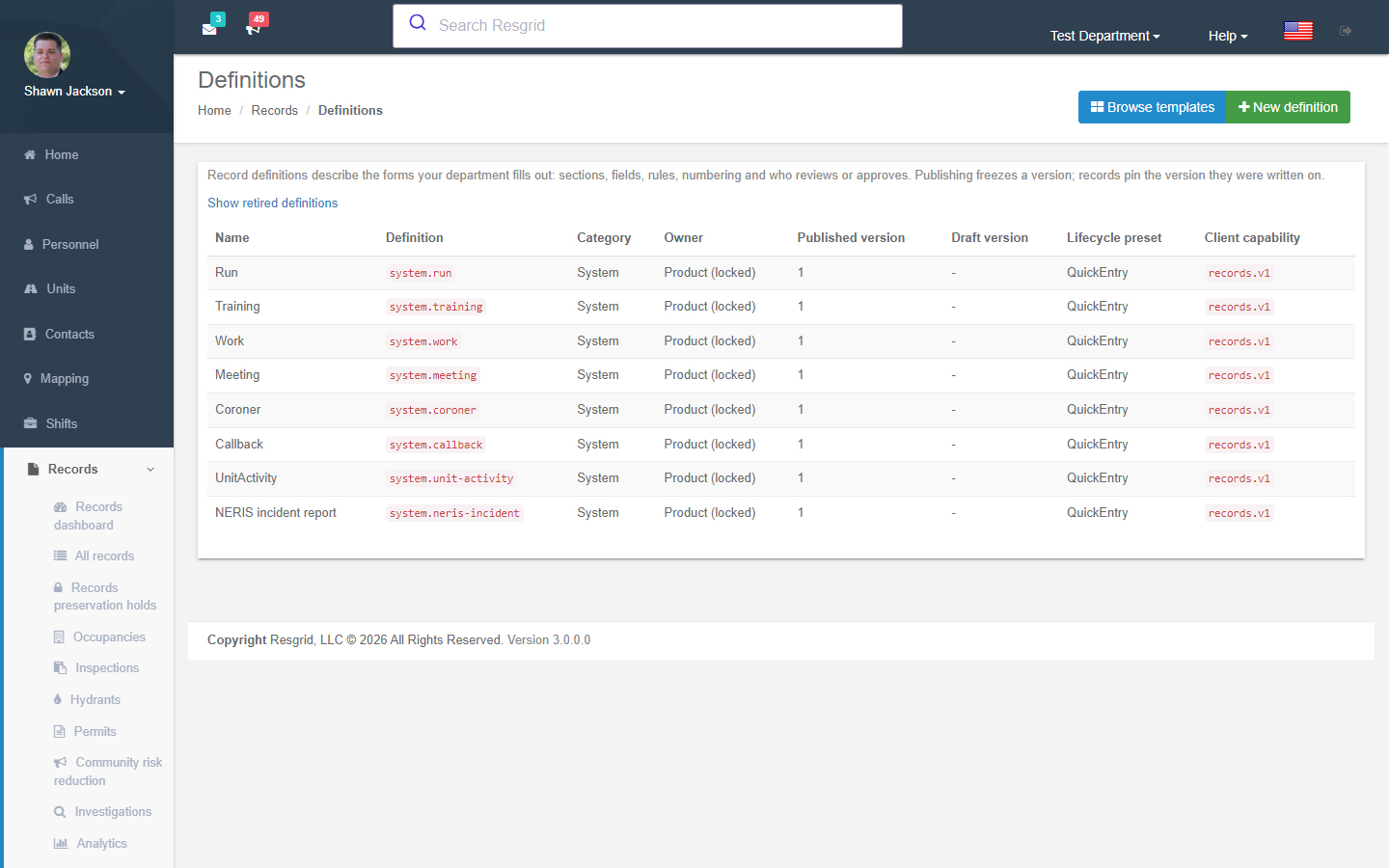
Locked vs department definitions
| Locked (system) definitions | Department definitions | |
|---|---|---|
| Examples | Run, Training, Work, Meeting, Coroner, Callback, Unit activity, NERIS incident | Security patrol log, SAR clue report, EOC shift log, ICS 214, your own inspection form |
| Who designs | Resgrid (product) | Your department |
| What you can change | Lifecycle preset, reviewer/approver roles, due hours, numbering, retention, client surfaces, print layout; extend with User Defined Fields | Everything |
| Export behaviour | Standardized exports never include department fields | Included in department exports and saved reports |
Creating a definition
New definition offers three starting points:
- Start from template — browse the template packs (below), preview sections and fields, choose the jurisdiction profile (
generic,us,ca) and locale, and Use this template. - Clone existing definition — copy one of your own definitions (or a locked one's layout) under a new key.
- Blank definition — start from an empty schema.
The key (lower-case letters, digits, dots and dashes; may not start with system.) cannot change after creation — apps, exports and workflows depend on it.
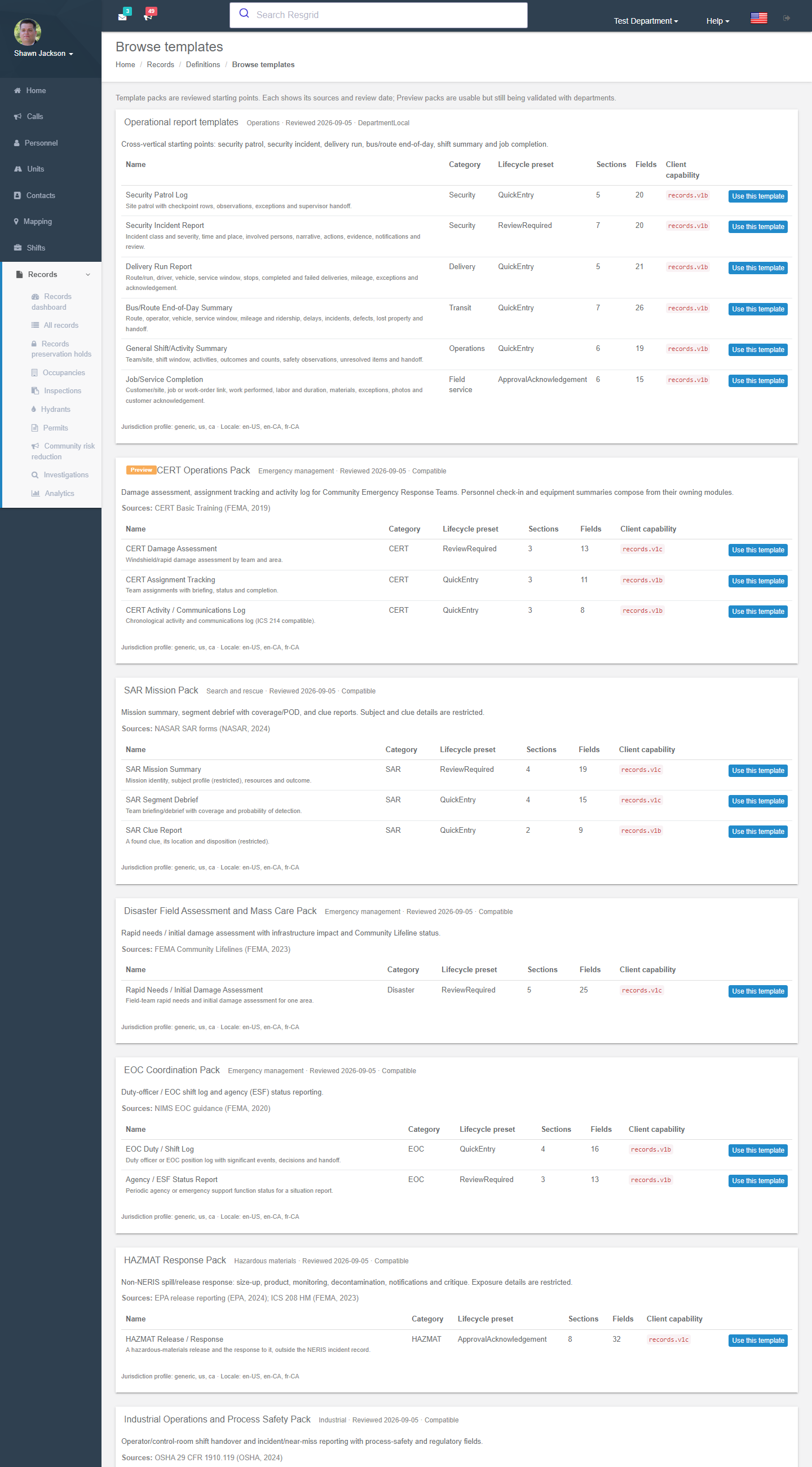
Template packs
| Pack | Templates | Category |
|---|---|---|
| Operational report templates | Security Patrol Log · Security Incident Report · Delivery Run Report · Bus/Route End-of-Day Summary · General Shift/Activity Summary · Job/Service Completion | Security, Delivery, Transit, Operations, Field service |
| CERT Operations Pack | CERT Damage Assessment · CERT Assignment Tracking · CERT Activity / Communications Log | CERT |
| SAR Mission Pack | SAR Mission Summary · SAR Segment Debrief (coverage / POD) · SAR Clue Report | SAR |
| Disaster Field Assessment and Mass Care Pack | Rapid Needs / Initial Damage Assessment (infrastructure impact, Community Lifelines) | Disaster |
| EOC Coordination Pack | EOC Duty / Shift Log · Agency / ESF Status Report | EOC |
| HAZMAT Response Pack | HAZMAT Release / Response (size-up, product, monitoring, decon, notifications, critique) | HAZMAT |
| Industrial Operations and Process Safety Pack | Operator / Control-Room Shift Handover · Incident / Near Miss | Industrial |
| Exercise, Drill and AAR/IP Pack | After-Action Report / Improvement Plan (links to Work Orders, Checklists, training) | Exercise |
| Mutual Aid and Deployment Pack | Deployment (External Order) | Mutual aid |
| Incident Support (ICS Logistics, Finance and Administration) | ICS 202, 203, 204, 205, 205A, 206, 207, 208, 209, 210, 211, 213, 213RR, 214, 215, 215A, 217A, 218, 219, 220, 221, 225, 260; OF-286, OF-288, OF-294, OF-296, OF-297, OF-315; SF-261; Incident Action Plan package; ICS Canada variants | Incident support / Incident business |
Templates marked Preview are usable but still being validated with departments. Each template shows its sources and review date; after you create from one, the editor shows differences from the template as it evolves.
The definition editor
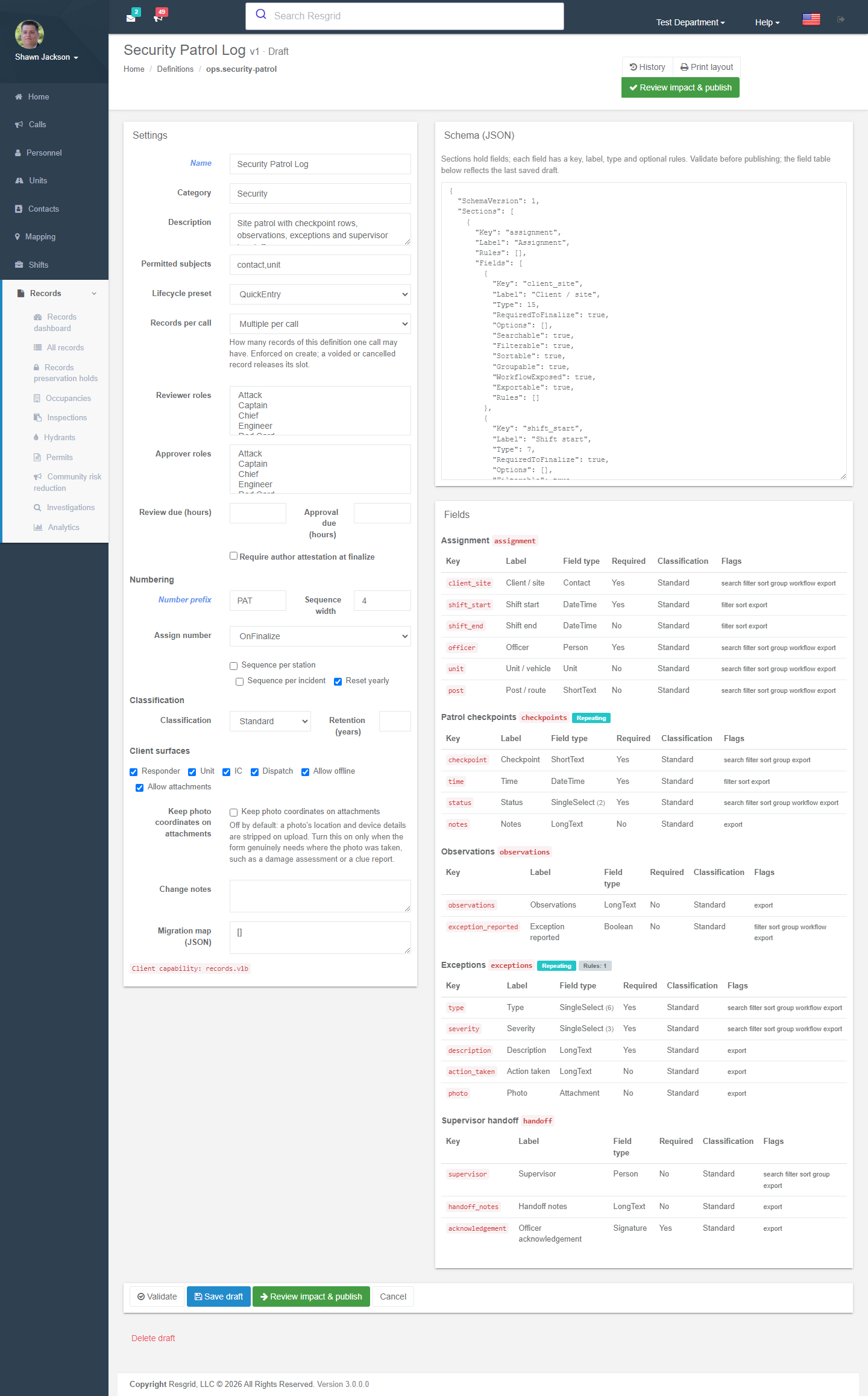
Settings
| Setting | Meaning |
|---|---|
| Name / Category / Description / Owner | Display metadata. |
| Lifecycle preset | Quick entry, Review required, Approval / acknowledgement. |
| Reviewer roles / Approver roles | Personnel roles allowed to review / approve. Approvers may not approve their own records. |
| Review due (hours) / Approval due (hours) | Drive the overdue queue and reminders. |
| Require author attestation at finalize | Adds the attestation statement. |
| Numbering | Prefix, sequence width, when the number is assigned, sequence per station, sequence per incident, reset yearly. |
| Records per call | Multiple per call, One authoritative per call, or One per subject per call. |
| Permitted subjects | What a record may be about (contact, unit, call, person …). |
| Classification / Retention (years) | Restricted classes default to permanent retention; 0 = permanent. |
| Client surfaces / Allow offline / Allow attachments | Which apps (Responder, Unit, Incident Command, Dispatch) may author it, whether offline drafts are allowed. |
| Keep photo coordinates on attachments | Off by default; turn on only for damage assessments, clue reports and similar. |
| Migration map (JSON) | How values move from an older version to this one. |
Schema
The schema is a JSON document of sections, each holding fields with a key, label, type and optional rules. The Fields table below the editor reflects the last saved draft.
| Field types | ShortText, LongText, Number, Boolean, Date, DateTime, Select, MultiSelect, Person, Unit, Contact, Address, Coordinates, Attachment, Signature, Reference |
|---|---|
| Section kinds | Plain sections and repeating row groups (checkpoints, involved persons, violations …) with a row limit |
| Rules | Show when, Require when, value ranges, restricted classification per field |
Validate checks the schema; Save draft stores it; Review impact & publish shows what publishing affects — open drafts on the current version, finalized records on earlier versions, breaking changes and client readiness — before Publish. Published versions are read-only; Open new draft starts the next version. Migrate open drafts moves drafts to the newer version (unmapped values are dropped).
History, compare and retire
- History lists every version with state, published date and change notes; Compare shows the diff between two versions.
- Retire stops new records; existing records stay readable.
Print layout
Print layout (per definition) orders, renames or hides sections and fields for print and PDF, adds page breaks, places the signature block (at the end / inline / hidden) and attachment list (table / list / hidden), and can override the department letterhead for this definition. Every save is a new layout version stamped in the print footer.
Setup examples
| Department type | Definitions to create |
|---|---|
| Fire | Keep the locked types; add UDFs to Run (e.g. Mutual aid given/received, Water used). Add After-Action Report for major incidents. |
| EMS | Run + Unit activity for operations; Controlled Substance Discrepancy (blank, Approval preset, restricted). |
| SAR | SAR Mission Pack (all three), Exercise AAR, ICS 214 for team members, ICS 211 for check-in. |
| Emergency management / EOC | EOC Duty / Shift Log (Quick entry), Agency / ESF Status Report (Review required), Rapid Needs Assessment, ICS 209, 213RR, 260. |
| Incident management team | The whole Incident Support pack; number ICS forms per incident. |
| Security company | Security Patrol Log (Quick entry, prefix PAT, sequence per site) and Security Incident Report (Review required, restricted involved-persons rows). |
| Delivery / transit / field service | Delivery Run Report, Bus/Route End-of-Day, Job/Service Completion; permitted subjects contact and unit. |
| Industrial | Shift Handover (Quick entry, one per unit per shift) and Incident / Near Miss (Approval preset, HSE role as approver). |
Technical reference
| Item | Value |
|---|---|
| Routes | /User/RecordDefinitions/{Index,Templates,Create,Edit,Impact,History,Layout} |
| Model | RmsDefinition / RmsDefinitionVersion (schema JSON), RmsTemplatePack, jurisdiction profiles seeded by M0162 |
| Services | IRecordDefinitionsService, IRecordTemplatePacksService |
| Permissions | ManageRecordDefinitions (62), PublishRecordDefinitions (63) |
| API | api/v4/RecordDefinitions/* — the apps download the published catalog; Catalog requests refused on the rollout page usually means an app version below the definition's minimum |