Contacts
Contacts are the people and organizations outside your department that you deal with on calls and in business: property owners and key-holders, businesses and facilities, mutual-aid agencies, vendors, patients' next of kin, customers you invoice. A contact carries addresses, phone numbers, social links, notes (including alert notes that pop up when the contact is attached to a call), a pre-incident plan with premise hazards, site files (floor plans, photos, drawings), and — with the Business Ops add-on — a billing profile and its invoices.
Left menu → Contacts. Categories are managed from the page; contact note types under Department → Types. Suppliers in Inventory purchasing, occupancies in Records, customers in Invoicing and bids/contracts in Contractor Billing all point at contacts.
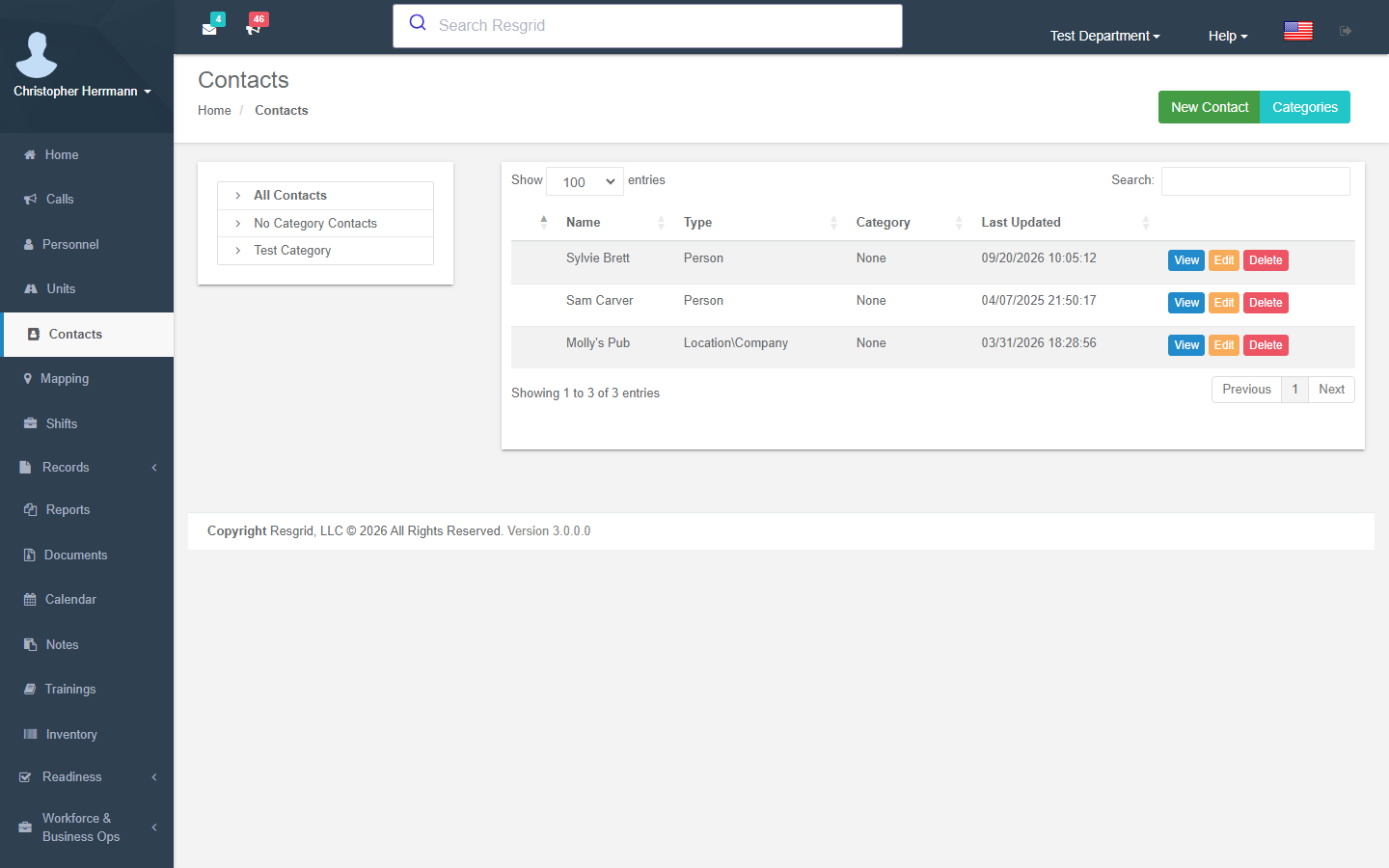
The contact list
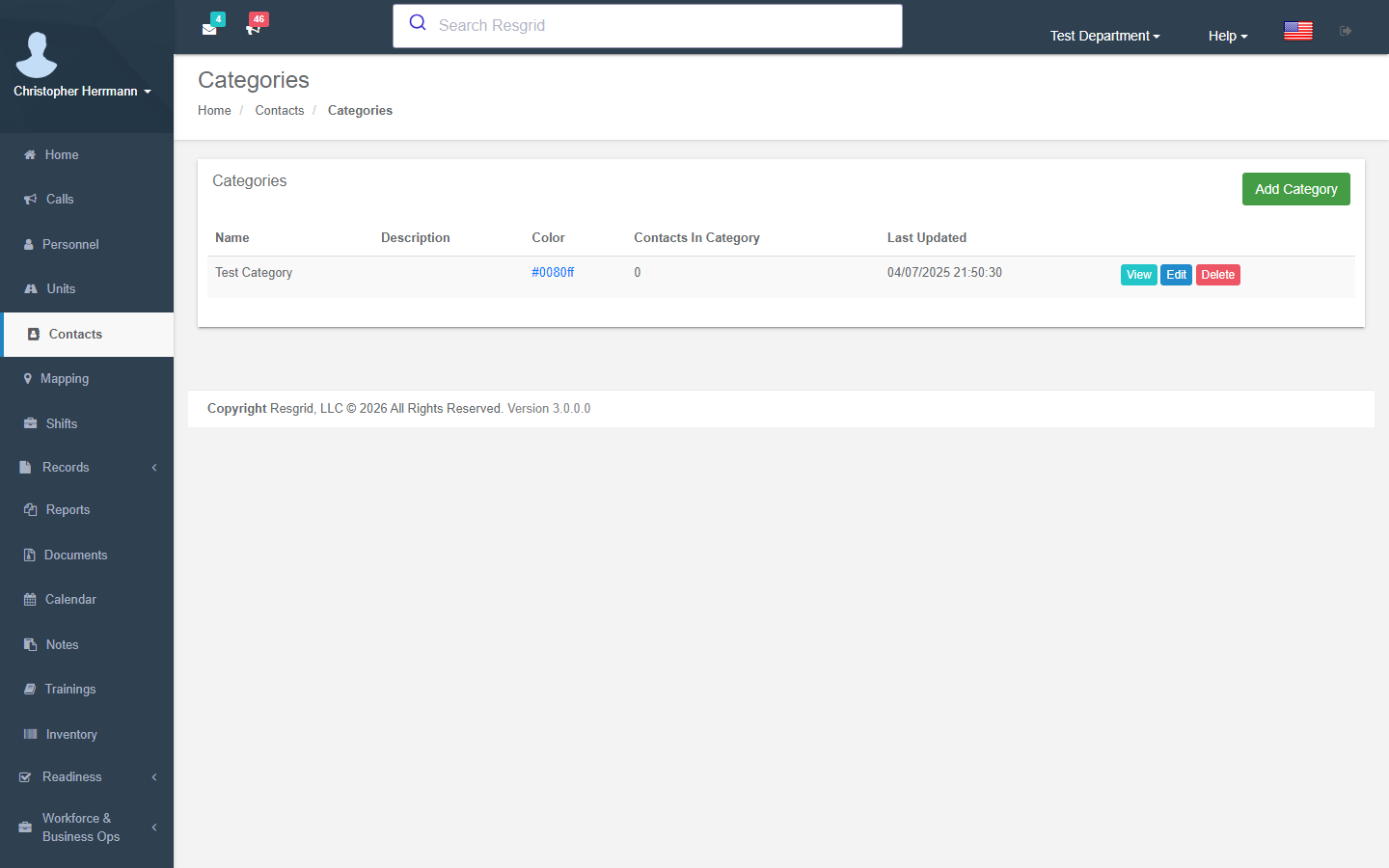
The list is a tree: All Contacts, No Category and one node per category. Categories carry a colour, a map icon and Display on map so key premises show on the map. A category with contacts cannot be deleted — reassign them first.
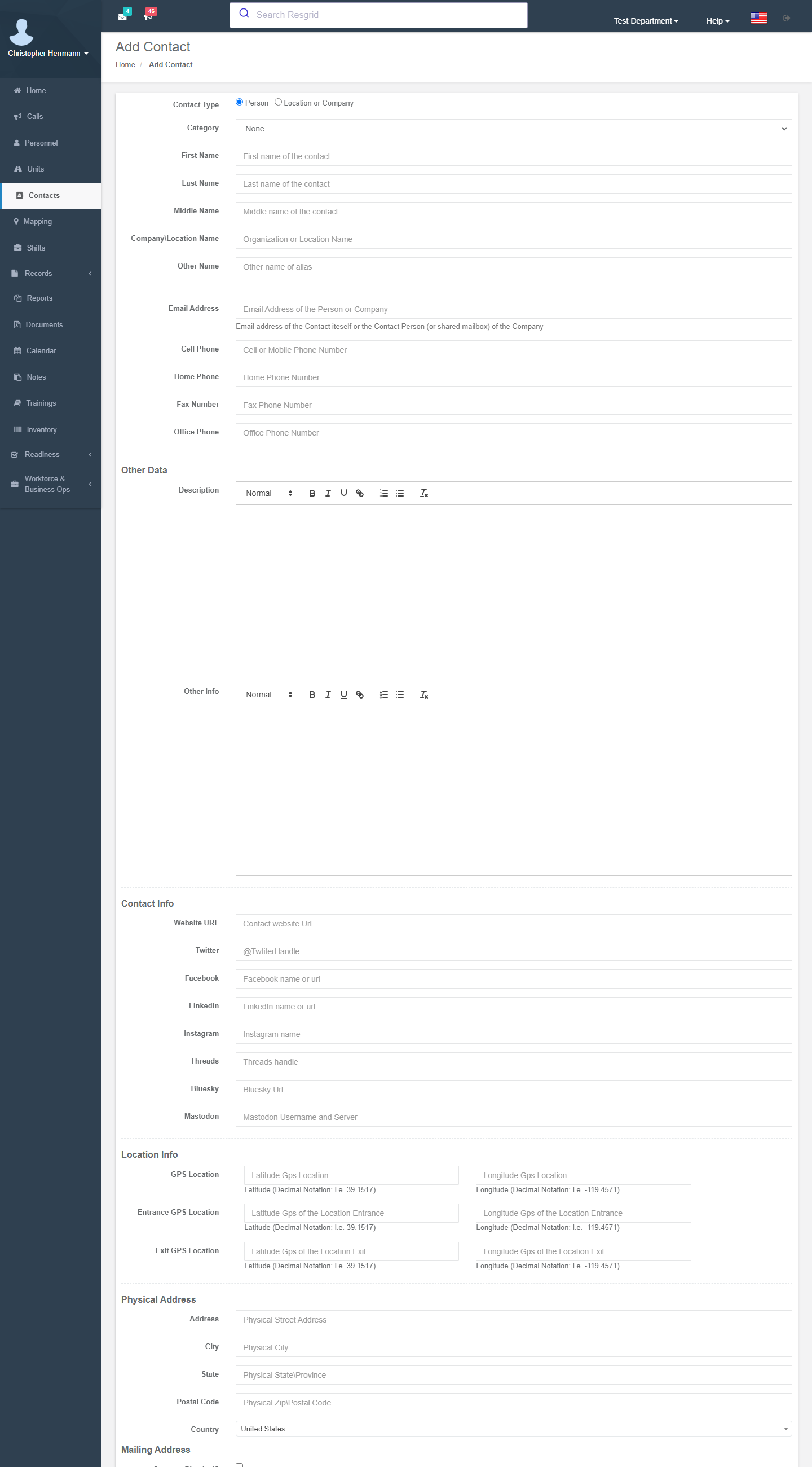
Adding and editing a contact
Add Contact (permission Who can edit contacts):
| Group | Fields |
|---|---|
| Type | Person (first, middle, last, other name) or Location or Company (company / location name). Category. |
| Contact info | E-mail, cell, home, fax and office phone; website; Twitter, Facebook, LinkedIn, Instagram, Threads, Bluesky, Mastodon. |
| Other data | Description and other info. |
| Location info | GPS location, entrance GPS and exit GPS (decimal notation) — the map and the apps use them for premises. |
| Physical address and Mailing address (or same as physical) | Street, city, state / province, postal code, country. |
| Custom fields | User Defined Fields of type Contact. |
Every create, edit and delete writes an audit event with before / after snapshots. A contact that has any non-void invoice cannot be deleted.
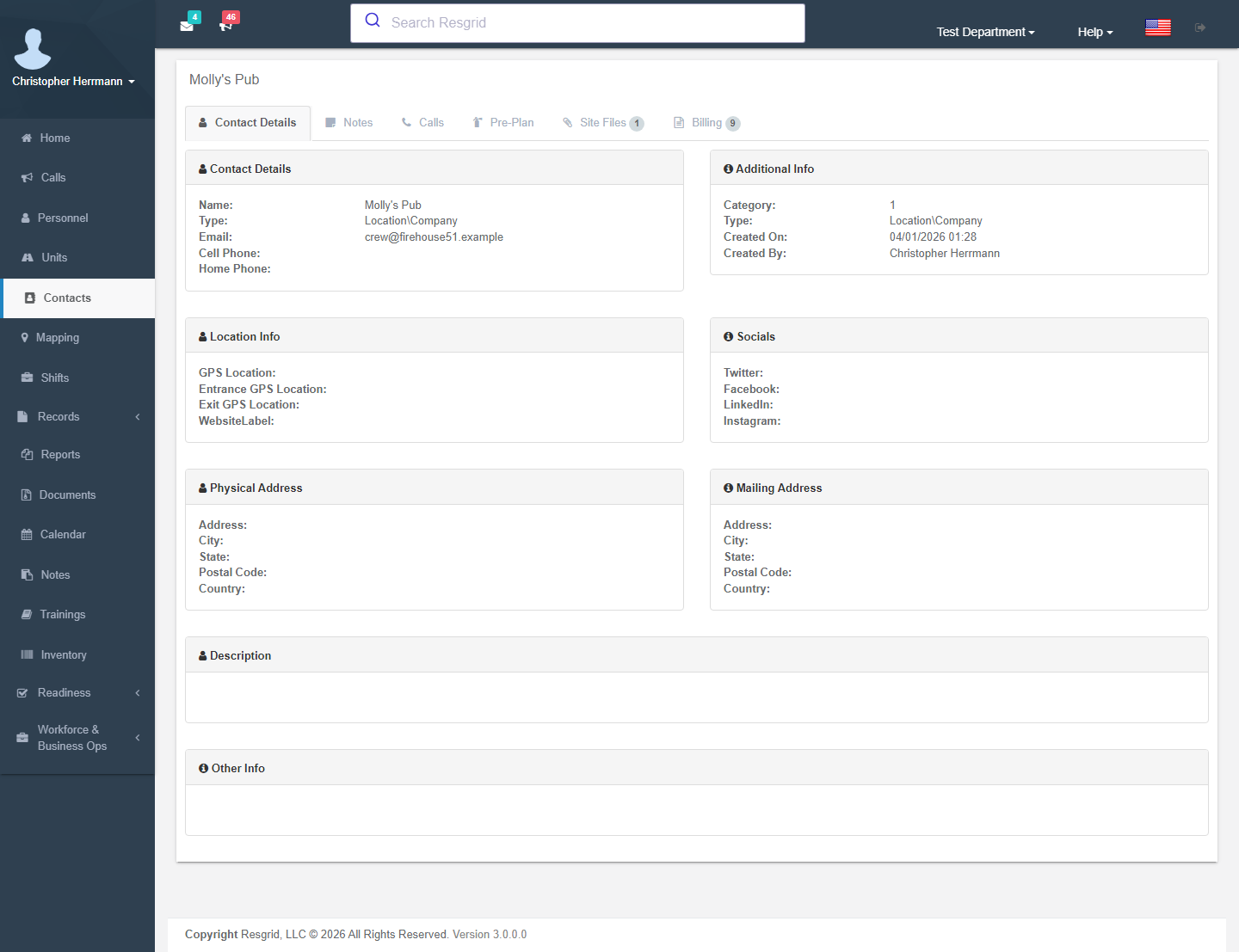
The contact page
| Tab | What it holds |
|---|---|
| Contact Details | Everything above, created / updated stamps. |
| Notes | Notes with a type (colour-coded), optional expiry and the alert flag — alert notes are highlighted and shown to dispatchers when the contact is added to a call. Search and filter. |
| Calls | Every call linked to this contact with priority and type. |
| Pre-Plan | The pre-incident plan summary and premise hazards; Create / Edit Pre-Plan. A banner warns when the review date has passed. |
| Site Files | Uploaded floor plans, photos and drawings; Manage Files. |
| Billing | The billing profile summary and the customer's invoices (Business Ops add-on) — Set up billing profile, New invoice, All invoices for this customer. |
| Routes | Route stops that reference this contact (delivery / transit / patrol routes). |
Pre-incident plan (NFPA 1620)
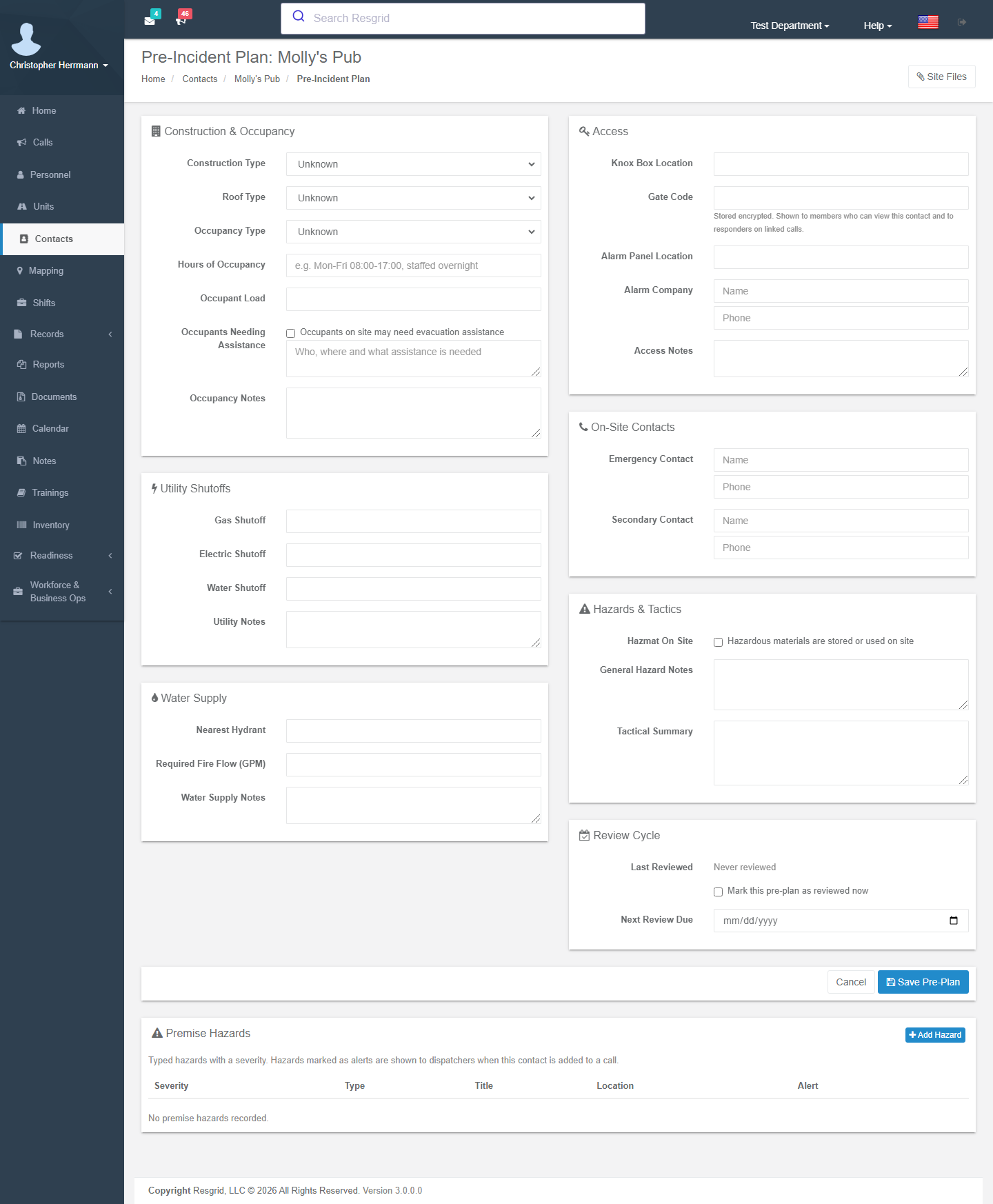
Contact → Pre-Plan → Create Pre-Plan. The plan follows the NFPA 1620 sections and is what responders see on the call's Site Info tab in the apps.
| Section | Fields |
|---|---|
| Construction & occupancy | Construction type (Type I fire-resistive … Type V wood frame, manufactured), roof type (flat, gable, hip, bowstring truss, lightweight truss …), occupancy type (residential, assembly, business, educational, factory, high hazard, institutional, mercantile, storage …), hours of occupancy, occupant load, occupants needing assistance with notes, occupancy notes. |
| Utility shutoffs | Gas, electric and water shutoff locations, utility notes. |
| Water supply | Nearest hydrant, required fire flow (GPM), notes. |
| Access | Knox box location, gate code (stored encrypted; shown to members who can view the contact and to responders on linked calls), alarm panel location, alarm company and phone, access notes. |
| On-site contacts | Emergency and secondary contact name and phone. |
| Hazards & tactics | Hazmat on site, general hazard notes, tactical summary. |
| Review cycle | Last reviewed, Mark this pre-plan as reviewed now, next review due. |
Premise hazards are typed rows — General, Hazmat, Structural, Electrical, Biological, Animal, Occupant, Other — with a severity (Info, Caution, Danger), title, location, description, GPS and Alert dispatchers when this contact is added to a call (the hazard appears in the dispatch alert modal).
Once a department enables Records occupancies, pre-plans are maintained there and this page becomes read-only with an Open occupancy link. The contact page still shows the summary and hazards.
Pre-plan text, gate code and site files are Advanced Data Protection fields when the department is enrolled.
Site files
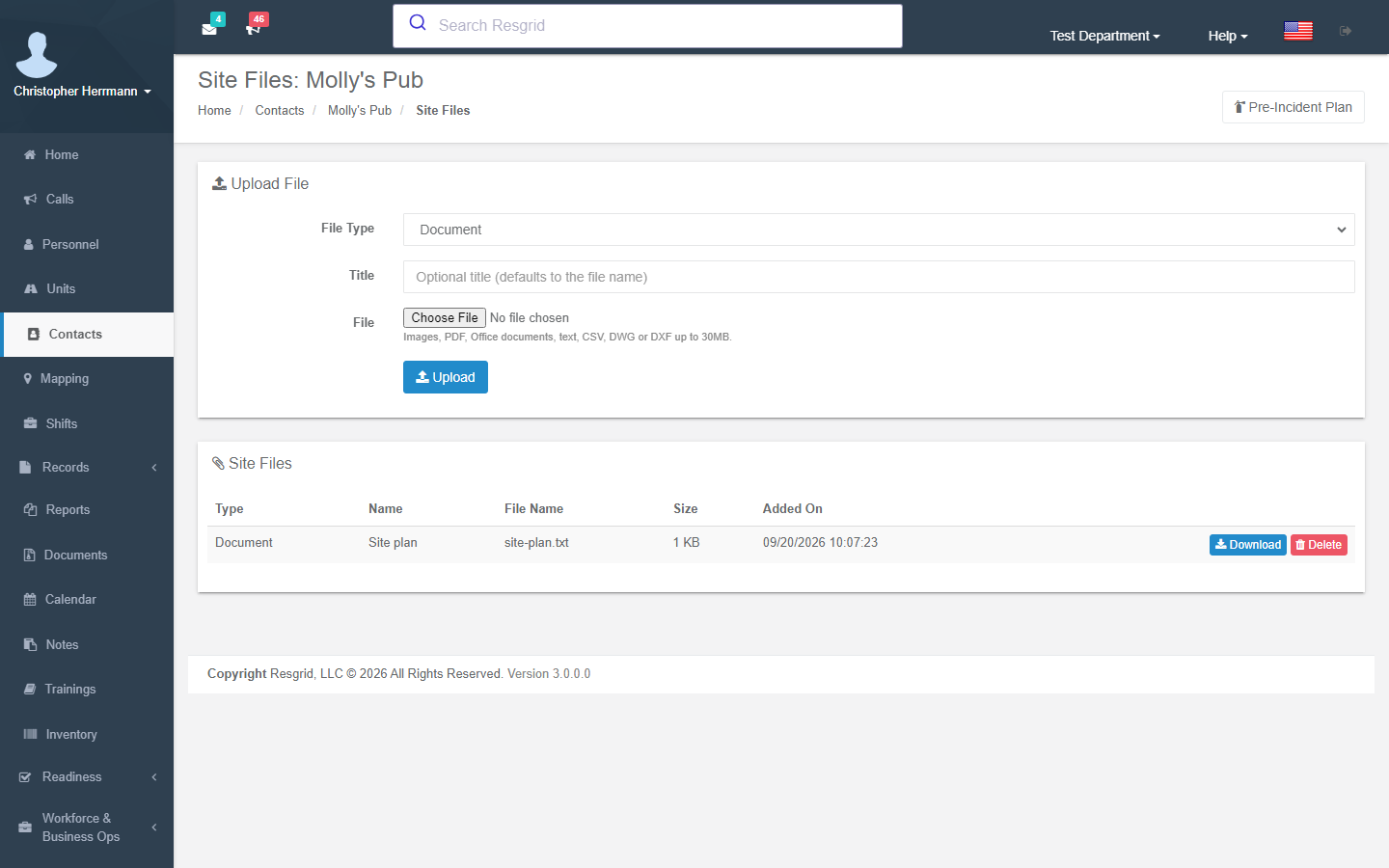
Contact → Site Files → Upload File: file type (Document, Pre-plan, Floor plan, Site photo, Site drawing, Other), optional title and the file — images, PDF, Office documents, text, CSV, DWG / DXF up to 30 MB. Files download from the contact page and from the call's Site Info tab in the apps.
Billing
With the Business Ops add-on the Billing tab holds the customer's billing profile — billing e-mail, terms, default discount, rate card, rate schedule, tax treatment — and lists the invoices. Bids and contracts are addressed to the same contact.
Call integration
Dispatchers attach a contact (and additional contacts) to a call; the call shows the contact's alert notes and alert hazards in the dispatch alert, and the apps show the pre-plan on the Site Info tab. Records uses GetCallSiteInfo to prefill occupancy, water and hazmat facts on incident reports.
Setup examples
| Department type | How to set it up |
|---|---|
| Fire | Categories: Key holders, Businesses, Mutual aid, Vendors, Customers; pre-plans for target hazards with hazards marked Alert; site files with floor plans; billing profiles for cost-recovery customers. |
| EMS | Categories: Facilities (nursing homes with charge-nurse numbers), Hospitals, Frequent patients (ADP enrolled), Customers (event organizers, facilities you bill). |
| SAR | Categories: Agencies (sheriff, park service), Landowners, Helicopter providers, Subjects (restricted). |
| Emergency management | Categories: ESF partners, Shelter operators (with pre-plans and occupant loads), Utilities, Media; distribution lists built from contacts. |
| Security | Categories: Clients (with billing profiles and contracts), Site contacts, Alarm companies, Police liaison; per-client visibility via group scoping; gate codes and alarm panels in the pre-plan. |
| Delivery / transit | Customers and stops as contacts; link to route stops; billing profiles for invoiced customers. |
| Industrial | Plant areas as Location contacts with pre-plans (shutoffs, hazmat), contractors as companies. |
Technical reference
| Item | Value |
|---|---|
| Routes | /User/Contacts/{Index,Add,View,Edit,Delete,Categories,AddCategory,EditCategory,ViewCategory,Preplan,Attachments}?contactId=; AddNote, SaveHazard, DeleteHazard, UploadAttachment, DeleteAttachment, GetContactAttachment, GetNotesJson, GetCallsJson, GetHazardsJson |
| Model | Contact, ContactNote, ContactCategory, ContactPreplan (NFPA 1620 fields, ContactPreplanHazard), ContactAttachment (ContactAttachmentTypes), CustomerBillingProfile |
| Permissions | Who can view / edit / delete contacts, View protected contact data |
| Data protection | Contact details, pre-plan text, gate code and site files are ADP catalog fields (ProtectedFieldCatalog.ContactPreplansCatalogVersion) |
| API | api/v4/Contacts/* (+ *Preplan, *Hazard), ContactFiles, Calls/GetCallSiteInfo |
| Interactions | Dispatch (alert notes / hazards, Site Info), Records occupancies (pre-plan ownership), Inventory suppliers, Invoicing / bids / contracts (customer), Routes (stops) |