Types & Configuration
Types are the pick-lists the rest of Resgrid is built on: unit types (Engine, Ambulance, Patrol car), call types (Fire, Medical, Alarm), call priorities (with colours, sounds and dispatch behaviour), certification types, document categories, note categories, contact note types and the personnel status list ordering. Set them up early — dispatch, run cards, NERIS crosswalks, custom statuses and reports all refer to them.
Department menu → Types.
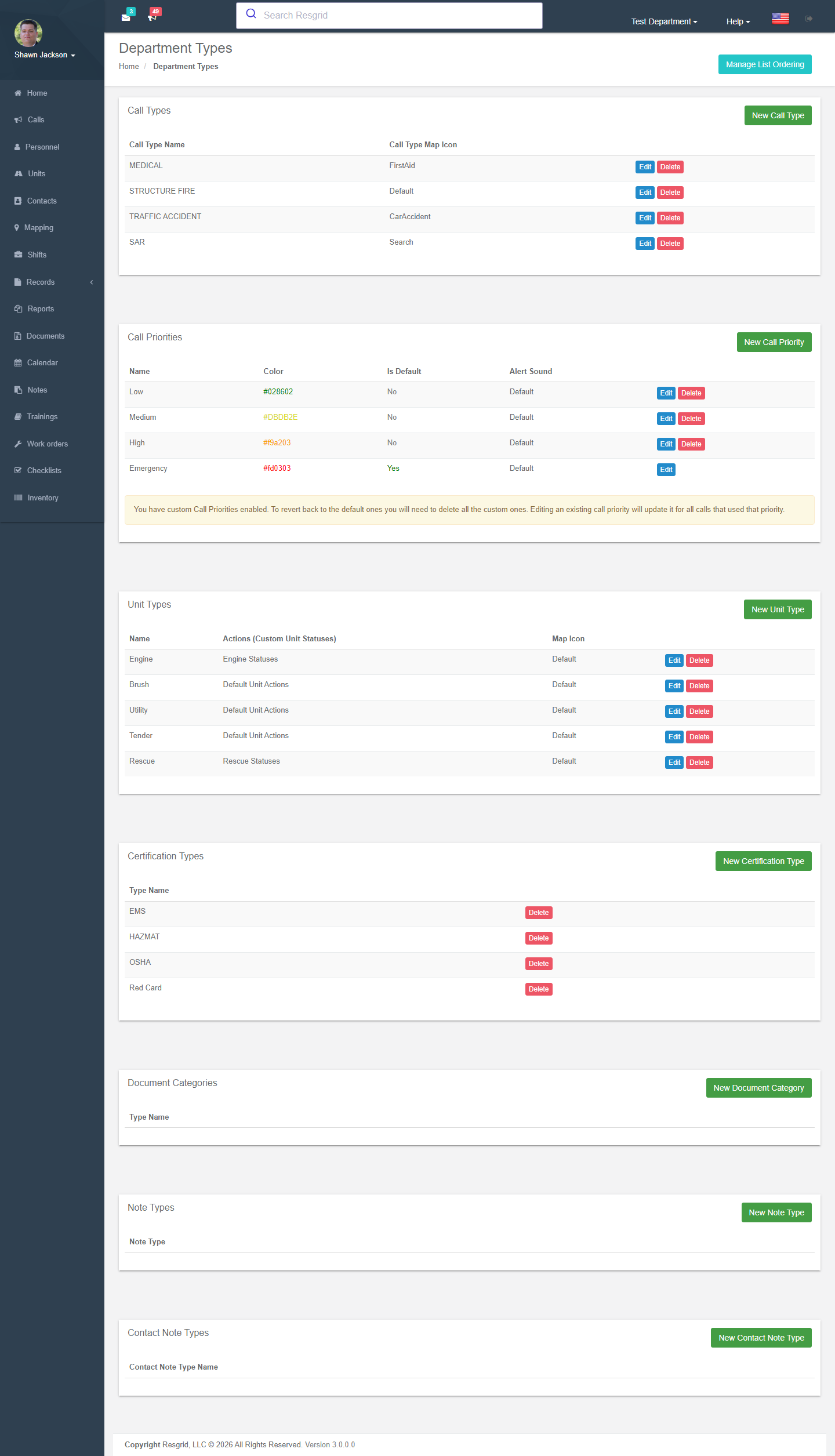
Unit Types
Define categories for units (Engine, Ladder, Ambulance, etc.):
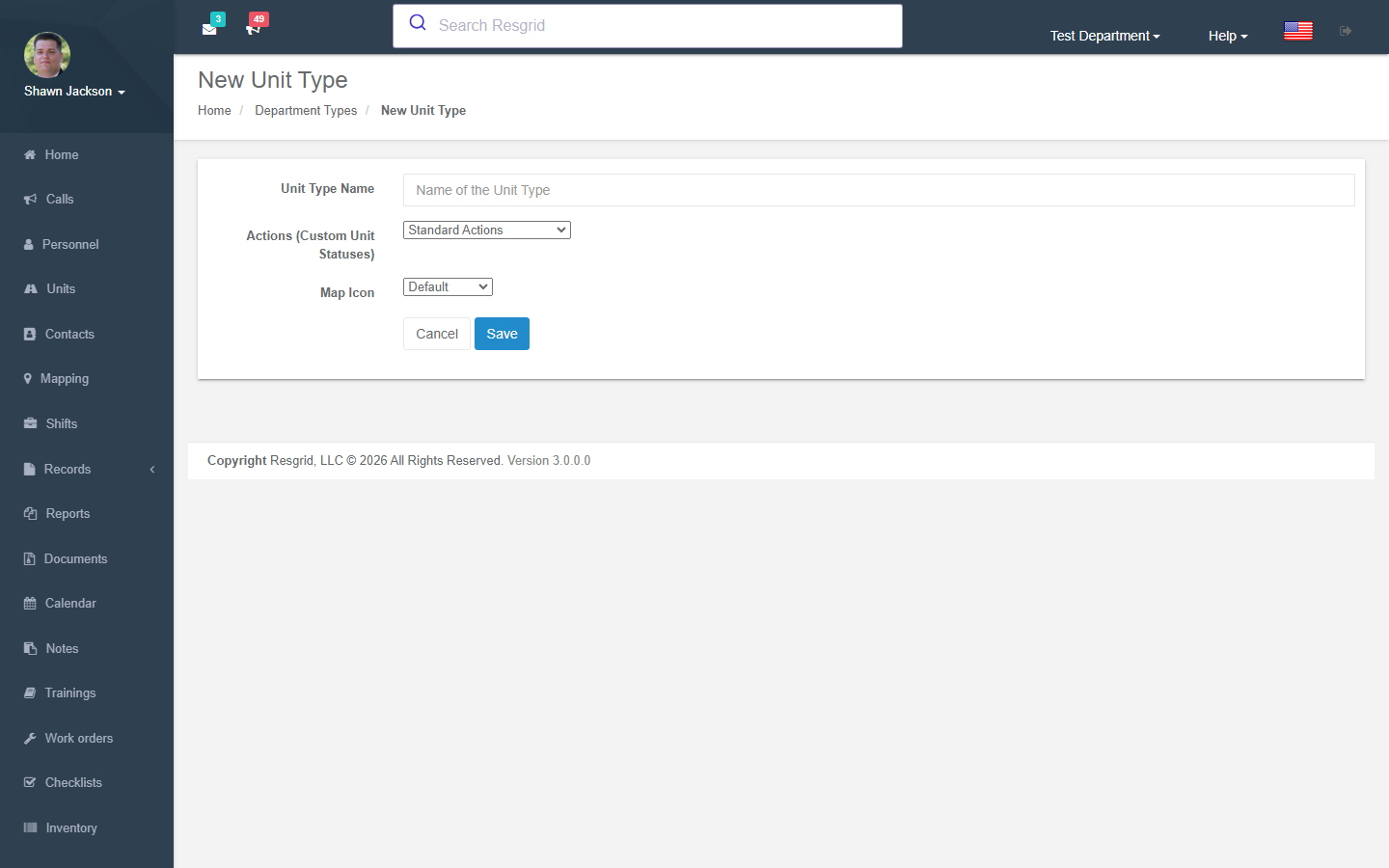
| Field | Description |
|---|---|
| Type Name | Unit type name (required, unique) |
| Custom State ID | Associate with a custom unit state set |
| Map Icon Type | Icon used on maps |
Operations
- Create —
Department_Update+CanUserAddUnitTypeAsync - Edit —
Department_Update+CanUserEditUnitTypeAsync; validates no duplicate names - Delete —
Department_Update+ authorization check
All operations fire audit events with before/after snapshots.
Call Types
Define incident categories (Fire, EMS, MVA, etc.):
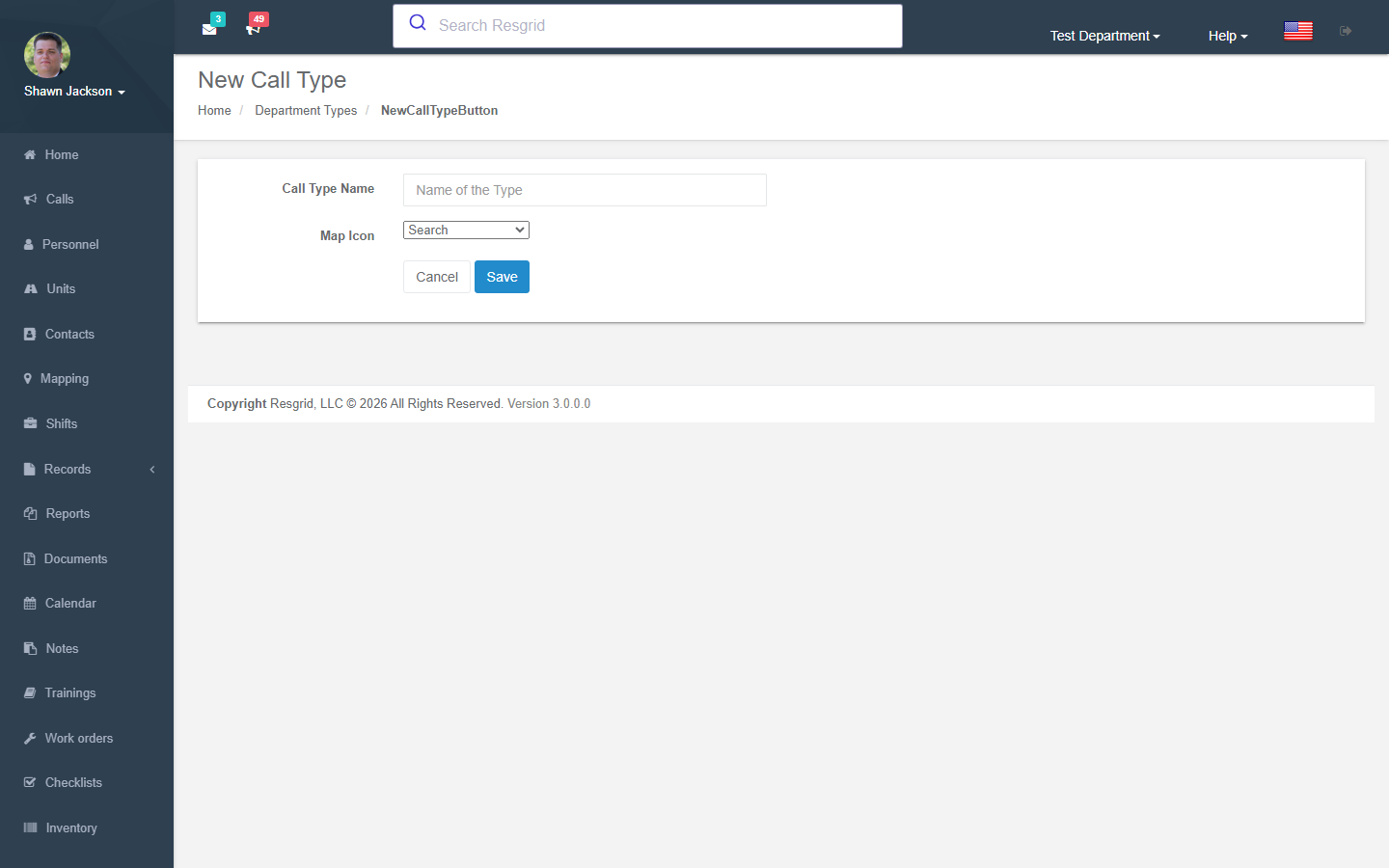
| Field | Description |
|---|---|
| Type Name | Call type name (required) |
| Map Icon Type | Icon used on maps |
Operations
- Create —
Department_Update+CanUserAddCallTypeAsync - Edit —
Department_Update+CanUserModifyCallTypeAsync - Delete —
Department_Update+ authorization check
Call Priorities
Define urgency levels for calls with visual and audio indicators:
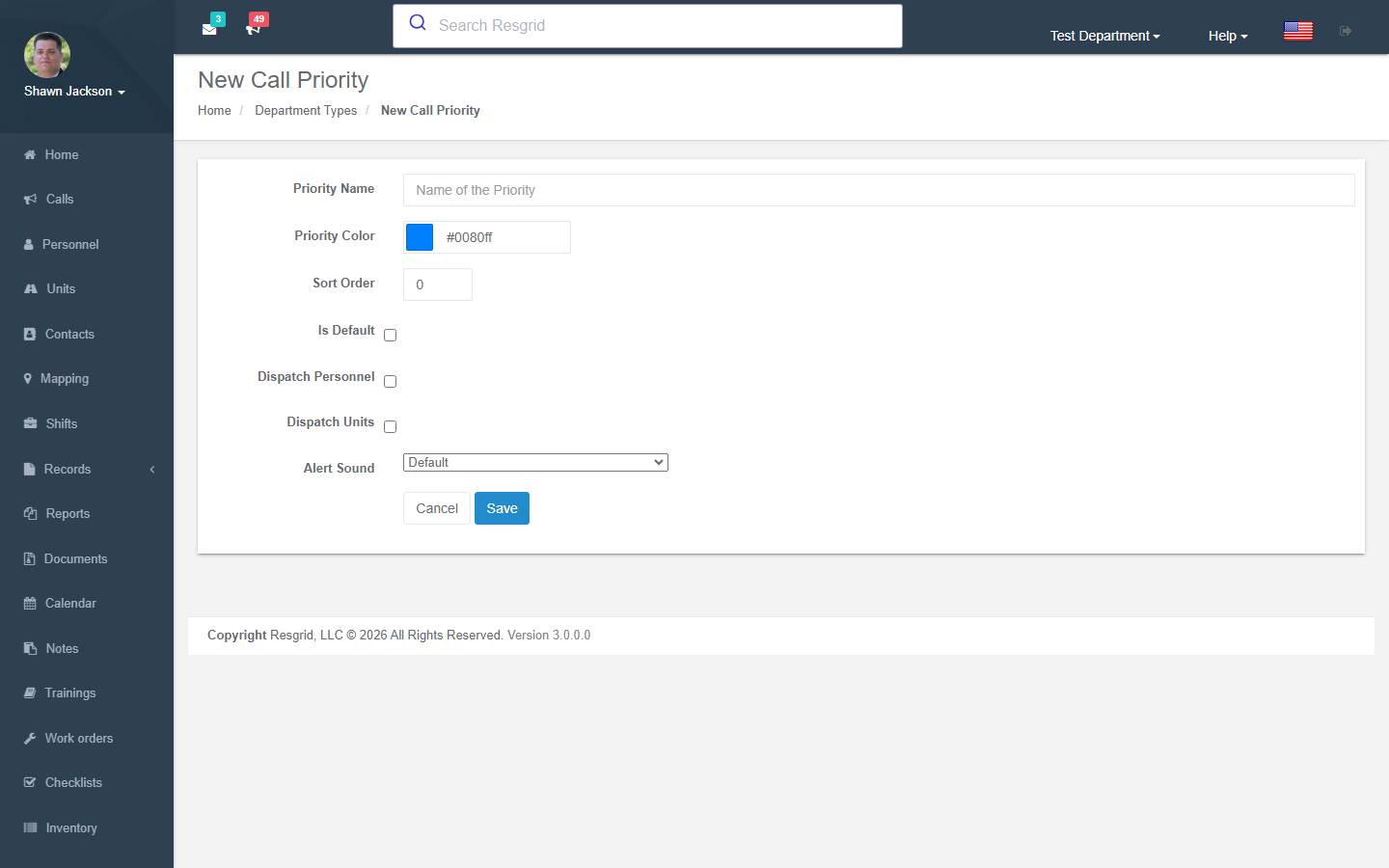
| Field | Description |
|---|---|
| Priority Name | Display name (required, unique) |
| Color | Priority color (hex) |
| Is Default | Default priority (only one allowed) |
| Dispatch Personnel | Whether to auto-dispatch personnel |
| Dispatch Units | Whether to auto-dispatch units |
| Force Notify All | Force notification to all personnel |
| Tone | Alert tone selection |
| Alert Sound | WAV file upload (≤1 MB) |
Push notification and iOS push sound upload features are currently disabled (code commented out).
Operations
- Create — Validates single-default rule and name uniqueness
- Edit — Same validations
- Delete — Soft-deletes (
IsDeleted = true)
Certification Types
Define categories for personnel certifications (EMT-B, Paramedic, Firefighter I, etc.):
| Field | Description |
|---|---|
| Type Name | Certification type name (required, unique) |
The Manage typed catalog button opens the full Certifications module, where each type also gets a stable code, category, person/unit scope, default validity, verification and credit-hour rules, and where you can add 90+ common credentials from the template gallery. Types created here appear in that catalog too; open them there to add the code, scope and rules.
Document Categories
Categorize department documents:
| Field | Description |
|---|---|
| Category Name | Document category name (required, unique) |
Note Categories
Categorize department notes:
| Field | Description |
|---|---|
| Category Name | Note category name (required, unique) |
Contact Note Types
Categorize notes on external contacts with color coding:
| Field | Description |
|---|---|
| Type Name | Note type name (required, unique) |
| Color | Display color for the note type |
Operations
- Create, Edit (with
CanUserEditContactNoteTypeAsync), and Delete
Personnel Status List Ordering
Configure the sort order of personnel statuses in the dashboard view:
- Define which statuses appear in the list
- Set the display order (weight-based)
- Add or remove statuses from the ordered list
Common Patterns
Validation
All types validate:
- Name is not empty
- Name is unique within the department (no duplicates)
Audit Trail
Every create, edit, and delete operation fires an AuditEvent with:
- Audit log type (e.g.,
UnitTypeAdded,CallTypeEdited,CertificationTypeRemoved) - Before/after JSON snapshots for edits
- IP address and user agent
Two-Layer Authorization
All operations use:
- ASP.NET
[Authorize(Policy = "Department_Update")]attribute - Resgrid's
IAuthorizationServicefor fine-grained checks
Setup examples
| Department type | How to set it up |
|---|---|
| Volunteer / career fire | Unit types: Engine, Ladder/Truck, Rescue, Tender, Brush, Command, Utility. Call types: Structure fire, Vehicle fire, Brush/wildland, Alarm, MVA, Medical, Hazmat, Public assist, Water rescue. Priorities: Low, Medium, High, Emergency (Emergency = full alert sound, overrides quiet hours). Certifications: FF1, FF2, Driver/Operator, EMT, Officer 1. |
| EMS | Unit types: ALS, BLS, Supervisor, Wheelchair van. Call types by nature (Cardiac, Trauma, Respiratory, IFT, Standby). Priorities Echo/Delta/Charlie/Bravo/Alpha/Omega if you follow MPDS. Certifications: EMT, AEMT, Paramedic, CPR, ACLS, PALS. |
| SAR | Unit types: Ground team, K9 team, Technical team, UTV, Drone. Call types: Missing person, Overdue hiker, Rescue, Recovery, Evidence search, Mutual aid, Training. Certifications: SARTECH II, Wilderness first aid, Rope tech. |
| Emergency management | Unit types: EOC section, MCV, Trailer. Call types: Activation, Weather event, Resource request, Shelter opening, Exercise. Priorities: Monitoring, Partial activation, Full activation. |
| CERT | Unit types: CERT team; call types: Deployment, Training, Community event. |
| Security | Unit types: Patrol vehicle, Foot post, Bike; call types: Alarm, Suspicious activity, Escort, Medical, Fire alarm, Access control. Priorities: Routine, Urgent, Emergency. |
| Delivery / transit | Unit types: Van, Truck, Bus; call types: Delivery, Pickup, Breakdown, Accident, Passenger incident. Priorities by SLA. |
| Industrial ERT | Unit types: Fire brigade, Hazmat, Rescue, Medical; call types: Fire, Spill/release, Confined space, Medical, Evacuation, Drill; certifications for every OSHA/NFPA qualification. |
Technical reference
TypesController (+ Department/Types index page); routes /User/Types/{NewUnitType,EditUnitType,NewCallType,EditCallType,NewCallPriority,EditCallPriority,NewCertificationType,NewDocumentType,NewNoteType,NewContactNoteType,ListOrdering}; model UnitType, CallType, DepartmentCallPriority (colour, sound, IsDefault, Tone, DispatchPersonnel/Units), CertificationType, DocumentCategory, NoteCategory, ContactNoteType.
Interactions with Other Modules
| Module | Interaction |
|---|---|
| Units | Unit types categorize units |
| Dispatch | Call types and priorities used in call creation |
| Custom Statuses | Unit types reference custom state sets |
| Documents | Document categories used for filtering |
| Notes | Note categories used for filtering |
| Contacts | Contact note types used for note classification |
| Certifications | Certification types used in personnel profiles |
| Mapping | Map icon types for calls and units |
| Dashboard | Personnel status ordering affects status display |