Calendar
The Calendar holds trainings, meetings, public events, maintenance days, deadlines — anything with a date. Members can RSVP / sign up, get reminders, see it in the apps, and subscribe from their phone or Outlook calendar. Scheduled checklist checks and shifts can be overlaid.
Left menu → Calendar. Event types (with colours) are managed under Manage Types; calendar sync is described in Calendar sync.
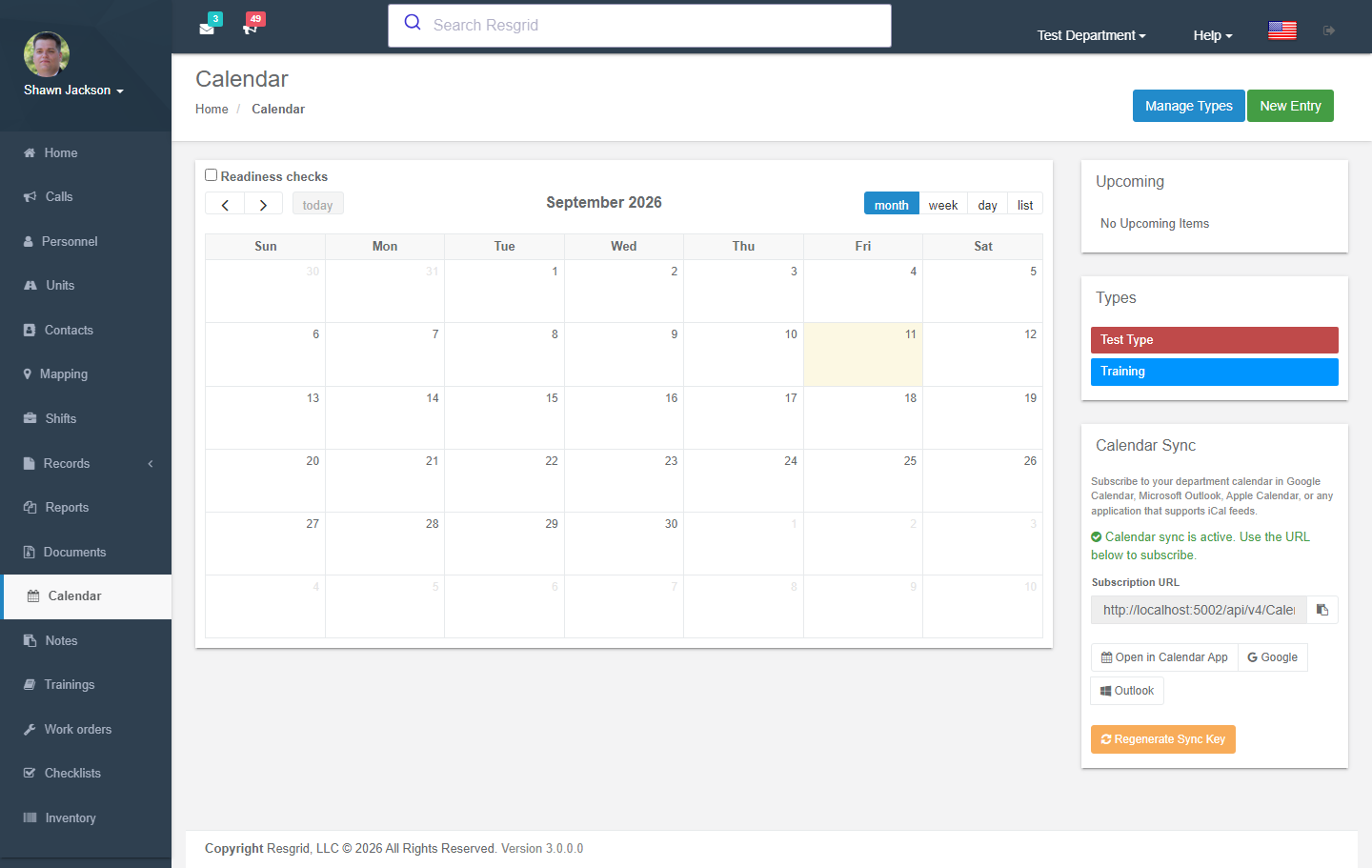
Calendar View
Authorization: Schedule_View policy
The main calendar view displays:
- All department calendar events in a FullCalendar v6 interface
- Color-coded by event type
- IANA timezone conversion for proper display
- All-day events rendered as banners across their full date span
- Multi-day events displayed continuously across all applicable days
- Upcoming items list
- Calendar sync subscription panel (see Calendar Sync below)
Creating Events
Authorization: Schedule_Create policy
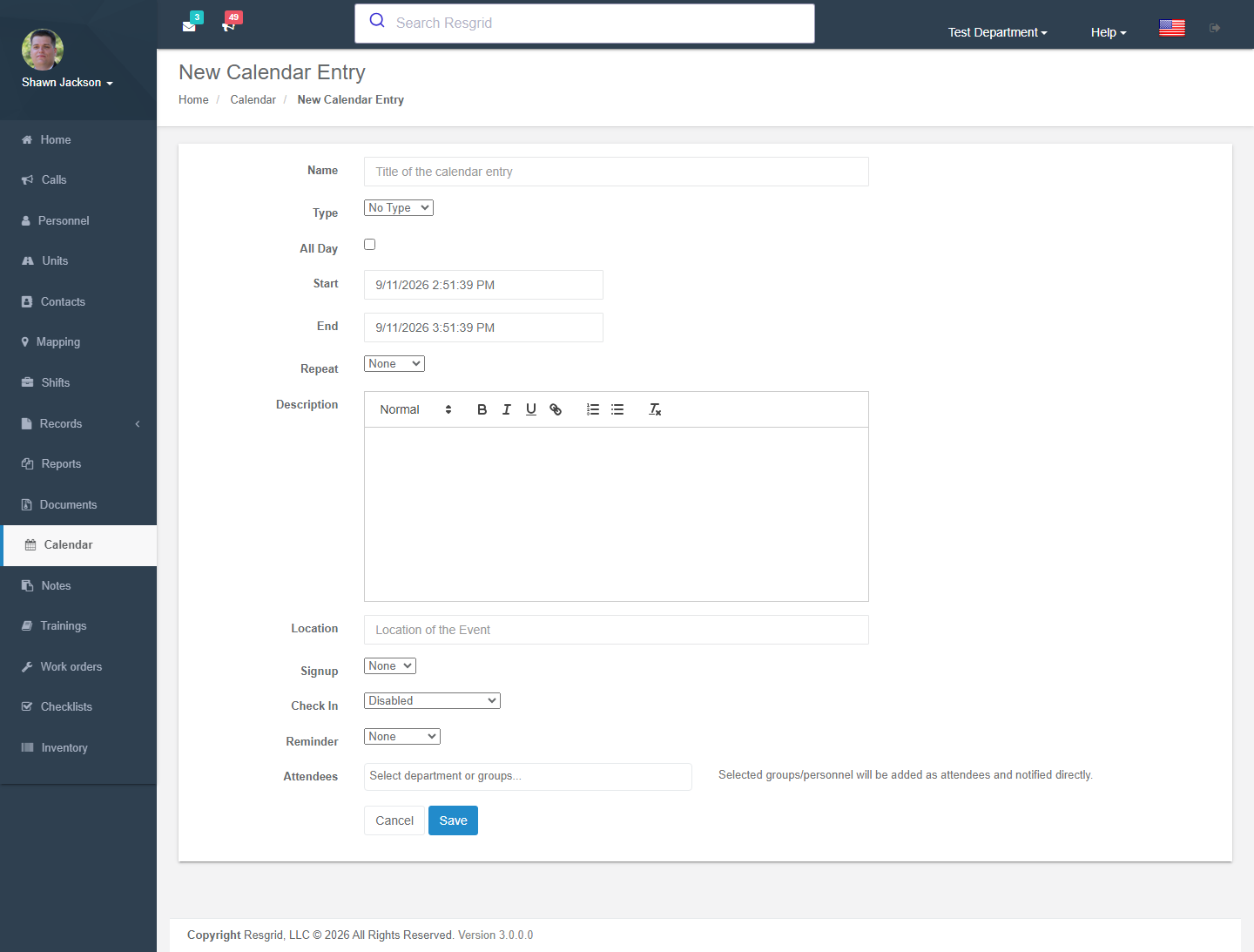
Event Fields
| Field | Required | Description |
|---|---|---|
| Title | Yes | Event name |
| Description | No | Event description (HTML supported, sanitized on display) |
| All Day | No | When checked, the event spans full days and time pickers are hidden |
| Start Date/Time | Yes | Event start (defaults to now + 3 hours). Date-only when All Day is checked |
| End Date/Time | Yes | Event end (defaults to now + 4 hours). Date-only when All Day is checked |
| Location | No | Event location (geocodable for map display) |
| Item Type | No | Event category/type |
| Entities | No | Target department or specific groups |
All-Day Events
When the All Day checkbox is checked:
- The date/time pickers switch to date-only mode (time selection is hidden)
- The service layer automatically normalizes times: Start is set to midnight (00:00:00) and End is set to 23:59:59.9999999 of the selected end date
- You only need to pick the start and end dates — valid times are filled in automatically
- On the calendar view and event detail page, all-day events display "All Day" instead of specific times
Multi-Day Events
Events that span more than one day (where the start date differs from the end date) are multi-day events:
- On the calendar view, multi-day events render as a continuous banner across all days in the range
- On the event detail page, a date range is displayed (e.g., "Apr 20 – Apr 22") instead of a single date
- Multi-day events can be either all-day or time-specific
- The API response includes an
IsMultiDayflag for programmatic detection
Validation
- Start date must be before end date
- For all-day events, start and end may be the same date (single all-day event)
- Recurrence end date validated if recurrence is set
Recurrence
Events can recur on these schedules:
- Weekly — Repeats every week
- Monthly — Repeats every month
- Yearly — Repeats every year
Recurring events have a recurrence end date. Recurrence children inherit the All Day flag and receive the same midnight/end-of-day time normalization when applicable.
Notifications
Event creation triggers a notification delivery to relevant personnel. Fires CalendarEventAddedEvent.
Editing Events
Authorization: Schedule_Update policy + CanUserModifyCalendarEntry runtime check
Only department admins and the original event creator can modify events. The same all-day normalization is applied when updating events.
Fires CalendarEventUpdatedEvent.
Deleting Events
Authorization: Schedule_Delete policy
Single Event Deletion
Deletes a single calendar item after department ownership validation.
Recurring Event Deletion
The DeleteAllCalendarItems action deletes a calendar item and all its recurrences. Requires CanUserModifyCalendarEntry check.
RSVP / Signup
Authorization: Schedule_View policy
Personnel can RSVP to events:
- Sign up with an optional note
- RSVP type set to
CalendarItemAttendeeTypes.RSVP
Removing RSVP
The RemoveFromEvent action removes an attendee from a calendar event.
Calendar Types
Calendar item types provide categorization and color coding.
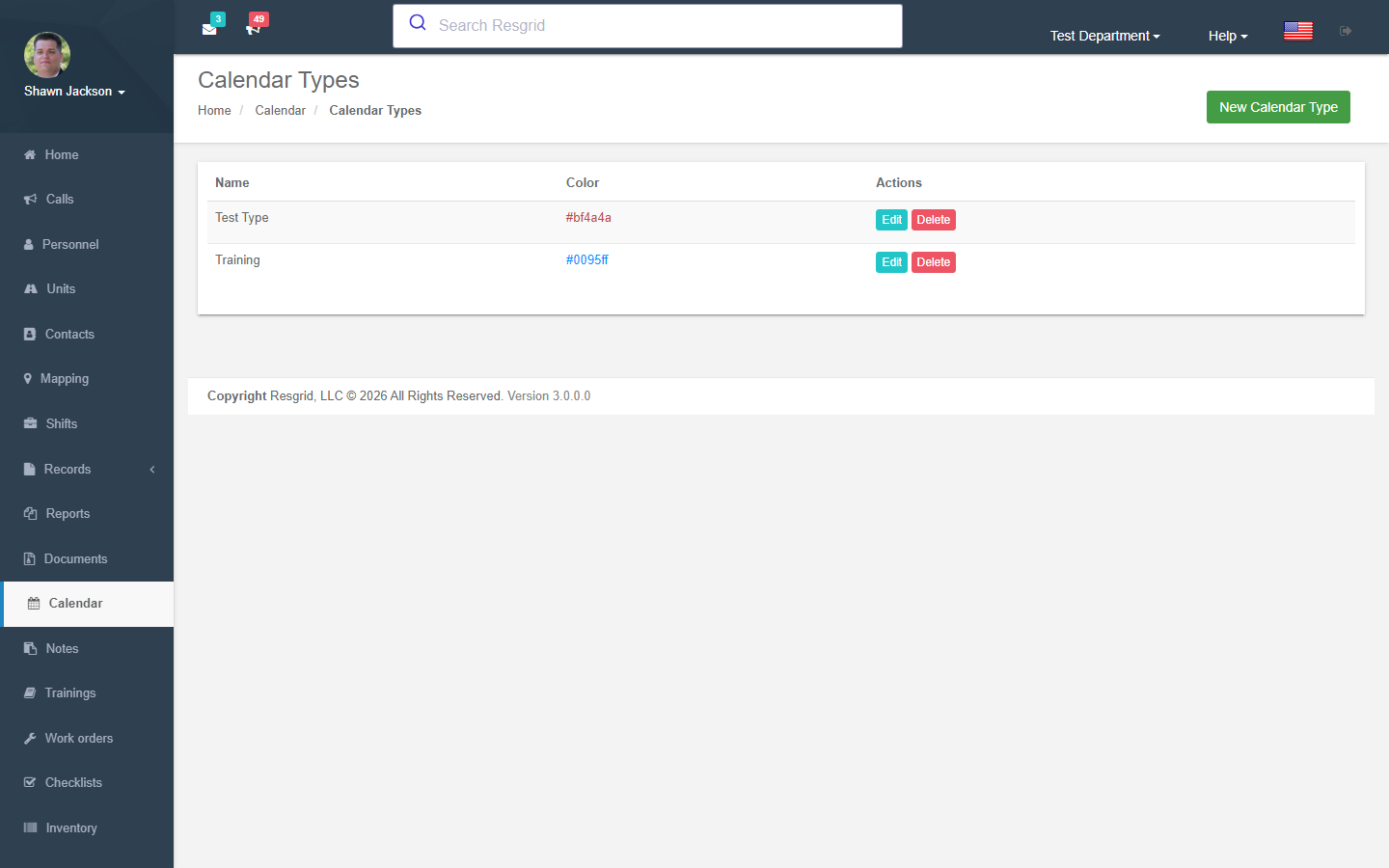
Managing Types
| Action | Authorization | Description |
|---|---|---|
| View Types | Schedule_View | List all item types |
| Create Type | Schedule_Create | New type (validates name uniqueness) |
| Edit Type | Schedule_Create | Modify type (validates department ownership) |
| Delete Type | Schedule_Create | Remove type (validates department ownership) |
Calendar Sync
The calendar sync feature allows personnel to subscribe to their department calendar from external calendar applications such as Google Calendar, Microsoft Outlook, and Apple Calendar using standard iCal (.ics) feeds.
How Calendar Sync Works
- Activate — Each user generates a unique, encrypted subscription URL by clicking "Activate Calendar Sync" on the calendar page
- Subscribe — Copy the subscription URL into your calendar application, or use the quick-add links for Google Calendar, Outlook, or Apple Calendar
- Auto-Update — The external calendar application periodically fetches the latest events from the feed URL
The subscription URL contains an encrypted token that embeds your department ID, user ID, and a unique sync key. No additional authentication is required when the calendar application fetches the feed.
Activating Calendar Sync
Navigate to the Calendar page. In the right sidebar below the Types section, you will find the Calendar Sync panel:
- If sync is not yet activated, click Activate Calendar Sync to generate your subscription URL
- If sync is already active, the subscription URL is displayed along with:
- A Copy to Clipboard button
- An Open in Calendar App link (uses
webcal://protocol for one-click subscription) - Quick-add links for Google Calendar and Microsoft Outlook
- A Regenerate Sync Key button to invalidate the current URL and create a new one
The Open in Calendar App button uses the webcal:// protocol, which most calendar applications recognize automatically. Clicking it will prompt your default calendar app to add the subscription.
Regenerating the Sync Key
If you believe your subscription URL has been compromised, click Regenerate Sync Key. This immediately invalidates the old URL — any calendar application using the previous URL will no longer receive updates and must be re-subscribed with the new URL.
Regenerating the sync key invalidates all previously issued subscription URLs for your account. You will need to update the subscription in every external calendar application that was using the old URL.
Downloading Individual Events
On the event detail page, a Download .ics button allows you to download a single calendar event as an .ics file. This file can be opened in any calendar application to add that specific event.
Calendar Sync Configuration
Calendar sync can be enabled or disabled system-wide via the CalendarConfig.ICalFeedEnabled configuration flag. When disabled, the feed endpoint returns an error and the sync panel is hidden.
| Config Setting | Default | Description |
|---|---|---|
ICalFeedEnabled | true | Enable or disable the external iCal feed endpoint |
ICalProductId | -//Resgrid//Calendar//EN | PRODID value used in generated iCal files |
ICalFeedCacheDurationMinutes | 15 | How long (in minutes) a feed response can be cached by the subscribing client |
Setup examples
| Department type | How to set it up |
|---|---|
| Volunteer fire | Types: Training (blue), Business meeting (green), Public event (orange), Work detail; RSVP on trainings so instructors know numbers; reminder 24 h before. |
| EMS | Types: CE class, Skills check, Vehicle service; signup sheets for CE sessions with limited seats. |
| SAR | Types: Training, Callout debrief, Fitness; sign-up sheets for multi-day exercises. |
| Emergency management | Types: Exercise, Public outreach, EOC briefing; share the iCal feed with partner agencies. |
| Security / business | Types: Site visit, Client meeting, Toolbox talk; lock creation to supervisors via permissions. |
Technical reference
CalendarController; routes /User/Calendar/{Index,New,Edit,View,SignupSheet,Types,NewType,EditType,EditCheckIn}; permission CreateCalendarEntry, UseCalendarSync; events CalendarEventAddedEvent, CalendarEventUpdatedEvent; iCal feed api/v4/Calendar/* (see Calendar export API).
Calendar Data Formats
FullCalendar v6 Format
The GetV2CalendarEntriesForCal endpoint returns events in FullCalendar v6-compatible JSON format:
- Start/end times in ISO format
allDayboolean flag for all-day events- For all-day events,
endis set to the day after the last event day (FullCalendar uses exclusive end dates for all-day events) - Type-based background colors
- URL links to event detail pages
- Admin/creator flags for edit permissions
Calendar Items JSON
The GetDepartmentCalendarItems endpoint returns all items with:
- Time zone-converted timestamps
- Recurrence parent validity check
IsAdminOrCreatorflag for permissionsIsMultiDayflag indicating whether the event spans multiple days
iCal Export & Feed
The system generates standard iCalendar (RFC 5545) output using the Ical.Net library.
Single Event Export
Download a single calendar event as a .ics file containing one VEVENT.
Department Calendar Feed
The subscription feed returns all department calendar events as a single .ics file with multiple VEVENT entries:
- Each event (including materialized recurrence instances) is a separate
VEVENT— noRRULEis used since recurrences are pre-expanded - All-day events use
VALUE=DATEformat forDTSTART/DTEND - Multi-day all-day events set
DTENDto one day after the last event day (iCal standard: exclusive end date) - Event title maps to
SUMMARY, description toDESCRIPTION, location toLOCATION - Reminders map to
VALARMcomponents with the appropriate trigger duration - Attendees (if populated) map to
ATTENDEEproperties PRODIDis set from the system configuration
Map Integration
The GetMapDataForItem endpoint geocodes a calendar item's location and returns lat/lon coordinates for map display.
Data Endpoints
| Endpoint | Purpose |
|---|---|
GetDepartmentCalendarItems | All calendar items as JSON |
GetV2CalendarEntriesForCal | FullCalendar v6 format events |
GetDepartmentCalendarItemTypes | Item types (includes "None" default) |
GetDepartmentEnitites | Department + groups as entities for targeting |
GetMapDataForItem | Geocoded coordinates for event location |
ActivateCalendarSync | Generate a calendar sync subscription URL |
RegenerateCalendarSync | Regenerate the sync key (invalidates old URL) |
Interactions with Other Modules
| Module | Interaction |
|---|---|
| Groups | Events can target specific groups |
| Department | Timezone affects all time displays |
| Mapping | Event locations can be geocoded and displayed on maps |
| Notifications | Event creation/update triggers notifications |
| Department Settings | Module can be enabled/disabled |
| User Profile | Stores the calendar sync token for iCal feed subscriptions |
| Encryption | Subscription URL tokens are encrypted for security |