Work Orders & Maintenance
Work Orders track repairs, inspections and preventive maintenance for your apparatus, stations, facilities and equipment — from the moment somebody reports a problem to the moment an authorized person verifies the fix and (where needed) releases a safety hold. It sits alongside Checklists (which find the problems) and Inventory (which holds the parts and serialized assets).
Work Orders and the preventive-maintenance engine are part of the paid Readiness Pro add-on. History always remains readable; creating new work requires an active Readiness Pro subscription and the Maintenance module enabled under Department Settings → Module Settings. Subscribe from Work Orders → Readiness Pro or Department → Subscription & Billing.
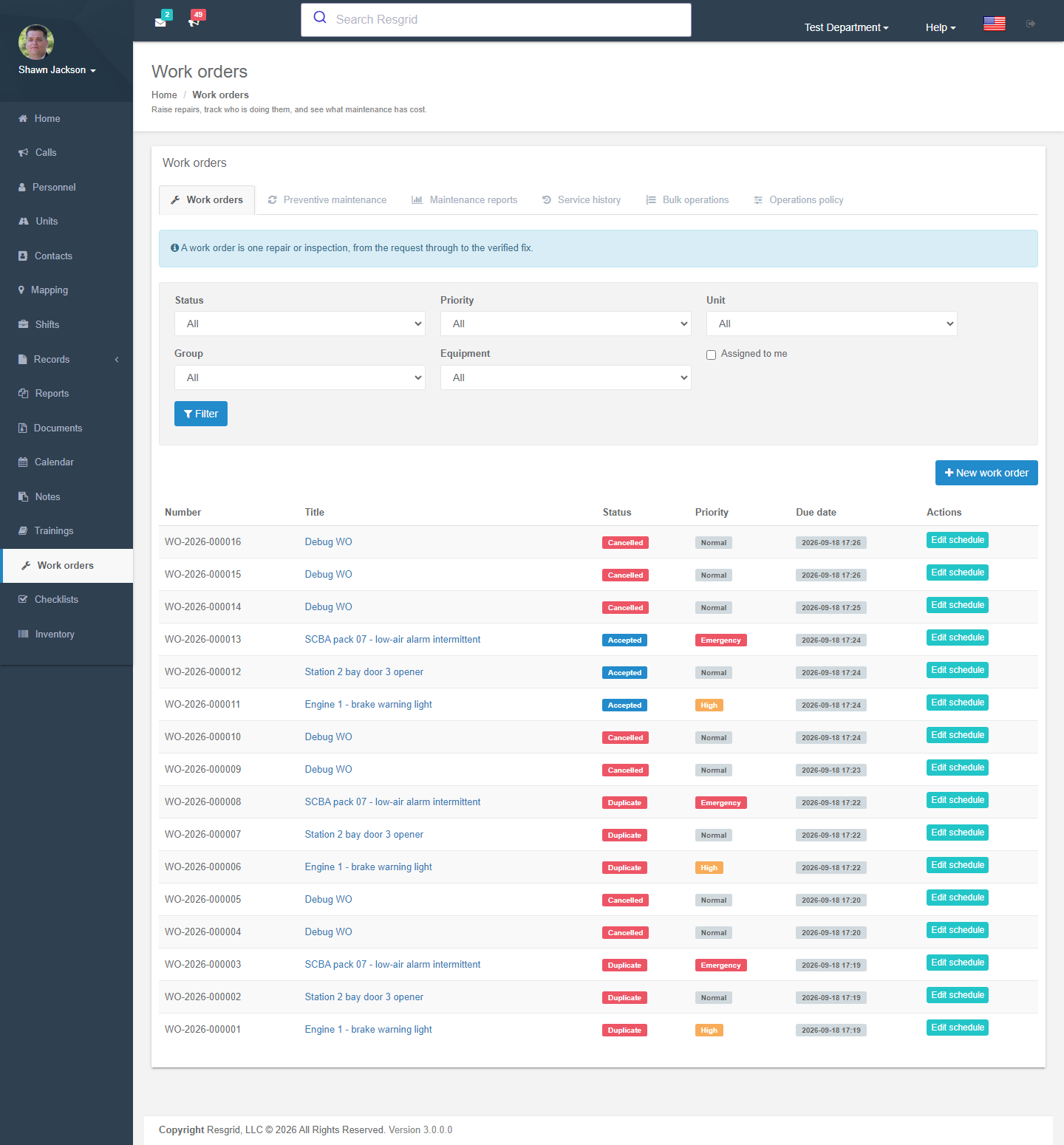
Where to find it
Left menu → Work Orders. The landing page is the filterable list. The toolbar links to New work order, Preventive maintenance (recurring schedules), Operations policy, Bulk operations, Maintenance reports and Service history.
Filters: status, priority, type, target (unit / group / equipment), Assigned to me.
Lifecycle of a work order
Requested → Accepted → Assigned → In progress → Completed → Closed
                 ↘ Rejected / Duplicate / Cancelled          ↕ On hold
| Status | Meaning |
|---|---|
| Requested | Somebody submitted a request. Anyone with department membership can request. |
| Accepted | A manager triaged it and agreed it is real work. Acceptance stops the response clock. |
| Assigned | Given to a specific member or personnel role. The assignee must Accept assignment before work can start. |
| In progress | Work is being done. Labor, parts and files are usually added here. |
| On hold | Waiting for parts, vendor, weather, approval … |
| Completed | The technician says the work is done and confirms all task steps are complete. Completion stops the repair clock. |
| Closed | Verified. Safety-critical work must be verified by a different authorized person. |
| Rejected / Duplicate / Cancelled | Terminal states. Duplicate records the canonical work-order ID. |
Every status change asks for a reason and is written to the Activity timeline.
Creating a work order
Work Orders → New work order is a four-step form.
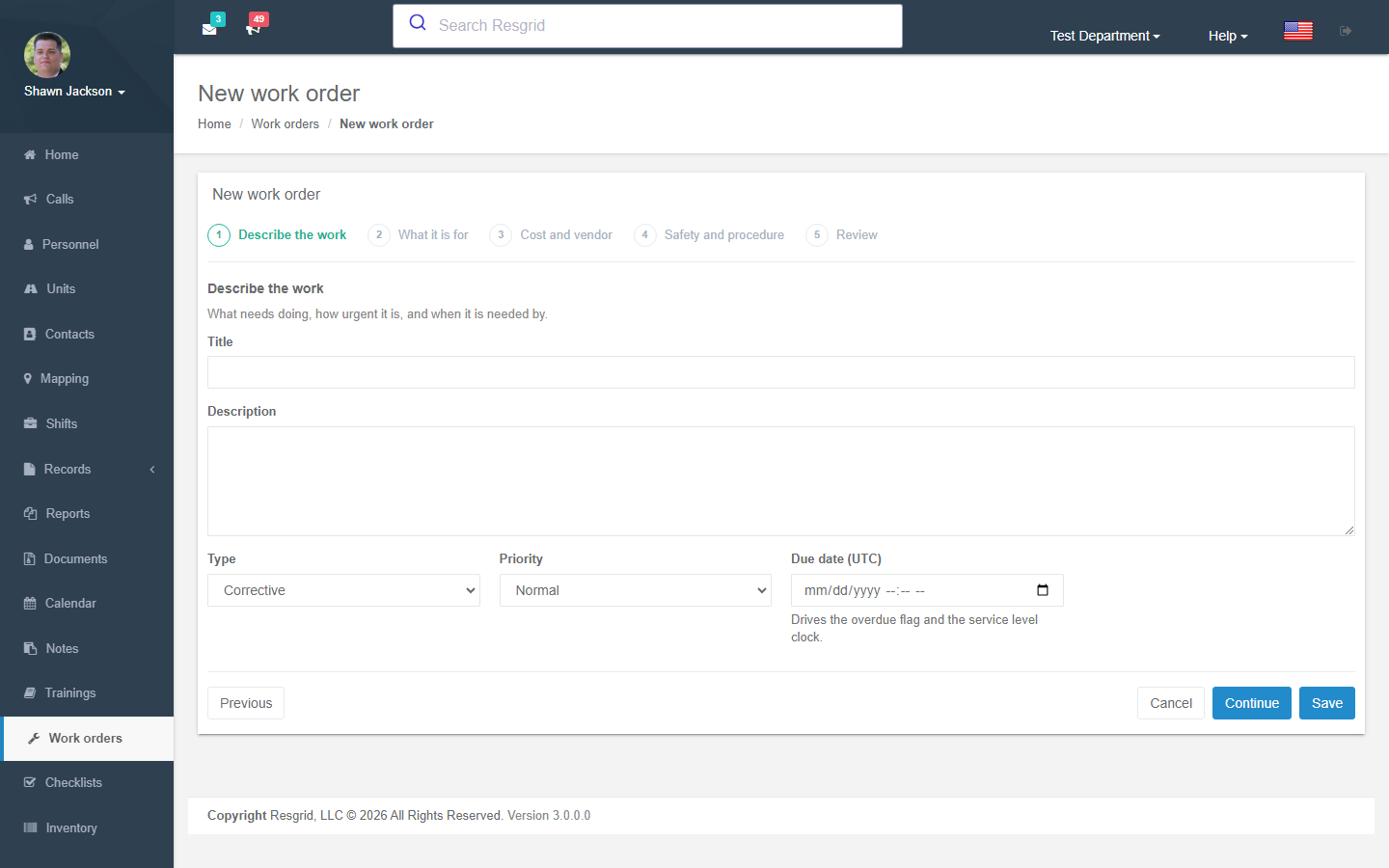
1 · Describe the work
| Field | Notes |
|---|---|
| Title / Description | What needs doing. Be specific — this is what the technician reads. |
| Type | Corrective, Preventive, Inspection, Facility, Other. |
| Priority | Low, Normal, High, Emergency. Priority drives the service-level clocks (see Operations policy). |
| Due date | Drives the overdue flag and escalation. |
2 · What it is for
| Field | Notes |
|---|---|
| Maintenance target | A Unit (apparatus), a Group / station, or a serialized Equipment asset from Inventory. |
| Site, building or location | Free text: Station 2 bay 3, Roof, north side. |
3 · Cost and vendor
| Field | Notes |
|---|---|
| Estimated cost / Approved cost / Currency / Cost center | Used by the spending-approval policy and the cost reports. |
| Vendor details / Warranty reference | Who is doing outside work and whether it is under warranty. |
4 · Safety and procedure
| Field | Notes |
|---|---|
| Safety-critical work | Requires independent verification before closure and enables safety holds. |
| Hazardous work | Requires procedure reference, version, permit, isolation reference and qualified-personnel details before work can start. |
| Task steps | The checklist the technician works down. All steps must be confirmed before Completed. |
Resgrid records procedure and isolation references; it does not perform physical isolation (lock-out / tag-out) or authorize return to service. Your written safety procedures still govern.
Working a work order
The detail page has tabs for Activity, Comments, Labor, Parts, Files, Safety holds and (Readiness Pro operations) Spending approvals, Vendor charges and Parts allocation.
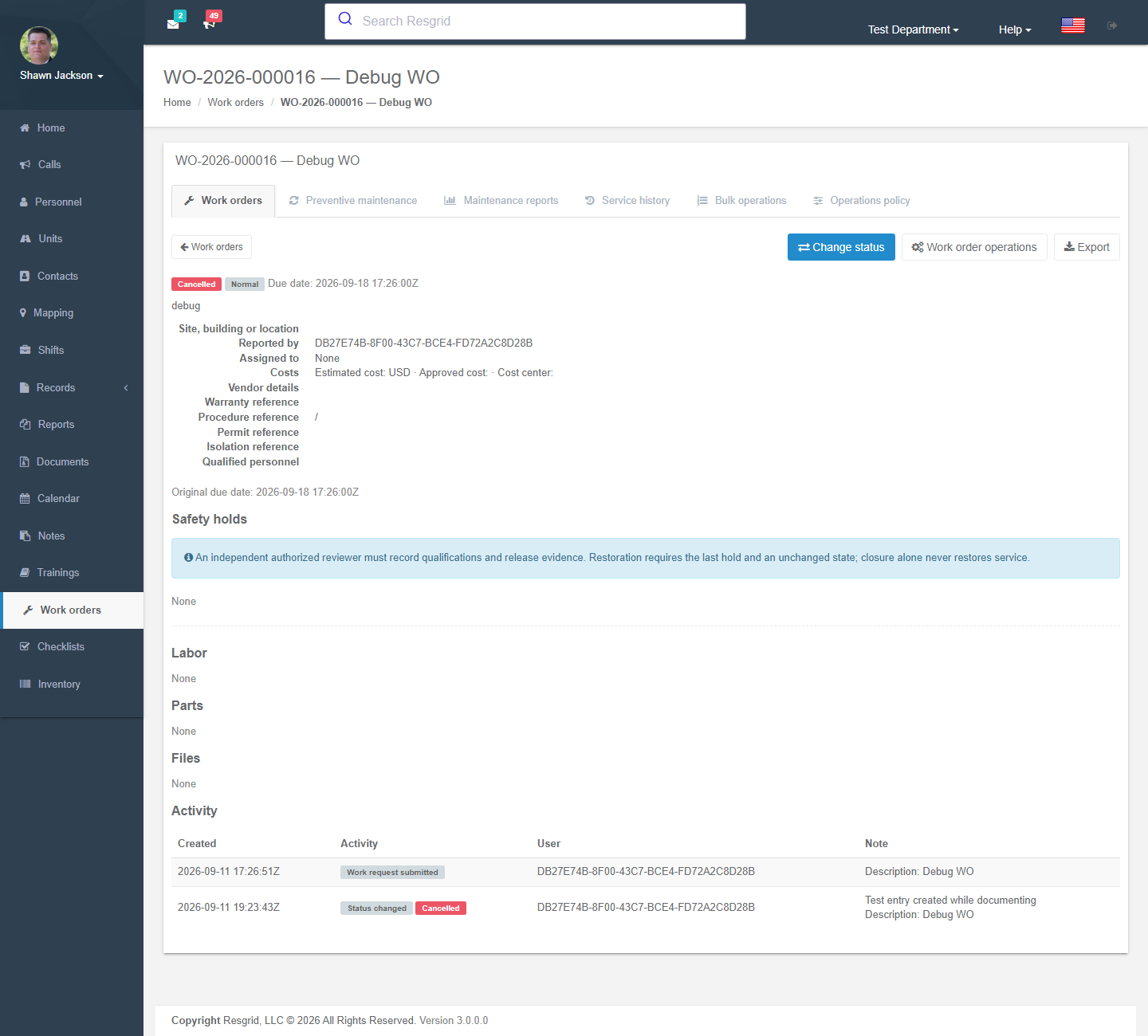
- Labor — work date, hours, hourly rate, note. The person defaults to the current user.
- Parts — either free-text parts (recorded for cost only; Inventory stock is not changed) or Inventory-linked parts (item, source stock location, lot). Inventory parts use ledger costs and, for controlled stock, still require an independent witness in Inventory.
- Files — PDF, PNG or JPEG up to 10 MB, virus-scanned. Files can be withdrawn but never deleted.
- Resolution / Cause / Verification and test evidence / Verified by — filled in at completion and closure.
- Export produces a printable record with the revision reference.
Safety holds
When a work order places a unit out of service or equipment out for repair (manually via Apply safety hold, or automatically from a failed checklist), the unit's status is changed and the hold is recorded. Releasing a hold requires an independent authorized reviewer who records their qualification and release evidence. Closing a work order never restores service by itself — the hold must be released, and the previous state is only restored if it is unchanged and no other holds remain.
Parts allocation (Readiness Pro operations)
Reserve stock → issue it to a work location → consume it, or return unused parts to the source. Reserved and issued balances cannot be used by other orders. Only consumption is charged as a parts expense. Outstanding reservations must be released before the order can be completed.
Preventive maintenance (recurrences)
Work Orders → Preventive maintenance → New preventive schedule creates a schedule that generates work orders automatically.
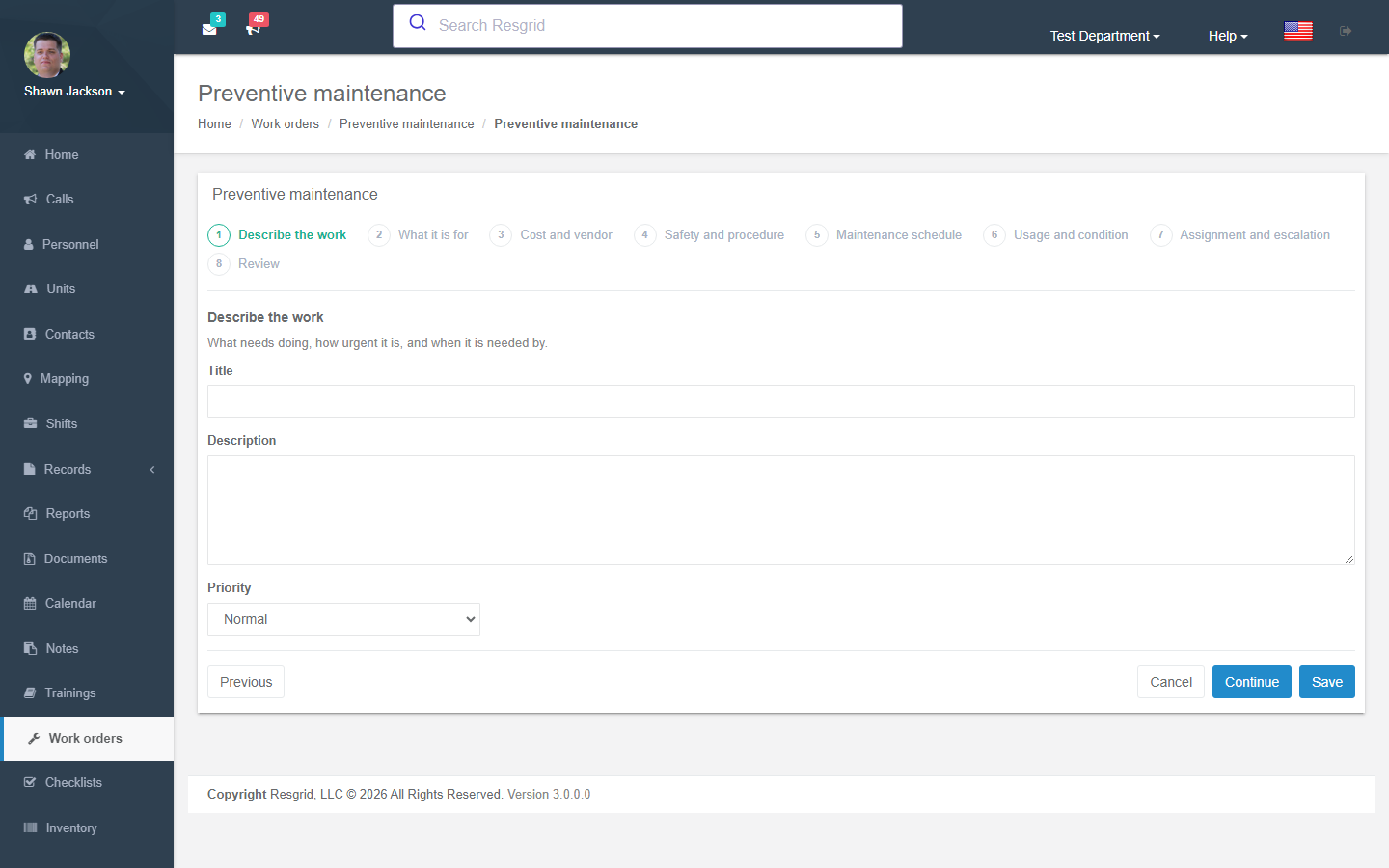
| Trigger | Options |
|---|---|
| Calendar frequency | None, Daily, Weekly, Monthly, Quarterly, Yearly, with first due date and local time, time zone, optional service window (e.g. only on weekdays 08:00–16:00) and blackout dates. |
| Meter trigger | Operating hours, operating cycles, miles or kilometres, with an interval and baseline. Record readings from the schedule page (Record reading) or let the Unit app / API feed them. A meter reset (replacement) is an audited action with a required reason. |
| Condition trigger | A threshold on a recorded measurement (at or above / at or below), e.g. tyre tread depth, battery voltage, pressure. |
| Lead time in days | Create the work order this many days before it is due. |
| Completion-based | Measure the next interval from verified closure instead of from the previous due date. |
| Assignment and escalation | Who the generated order goes to; escalate after N overdue minutes to an escalation role. |
Calendar, meter and condition triggers use whichever is reached first. One pending order is allowed per schedule; cancelling a generated order pauses the schedule for review. Use Approve deferral to move a due date with an audited reason rather than editing it.
Operations policy
Work Orders → Operations policy (administrators) sets department-wide rules:
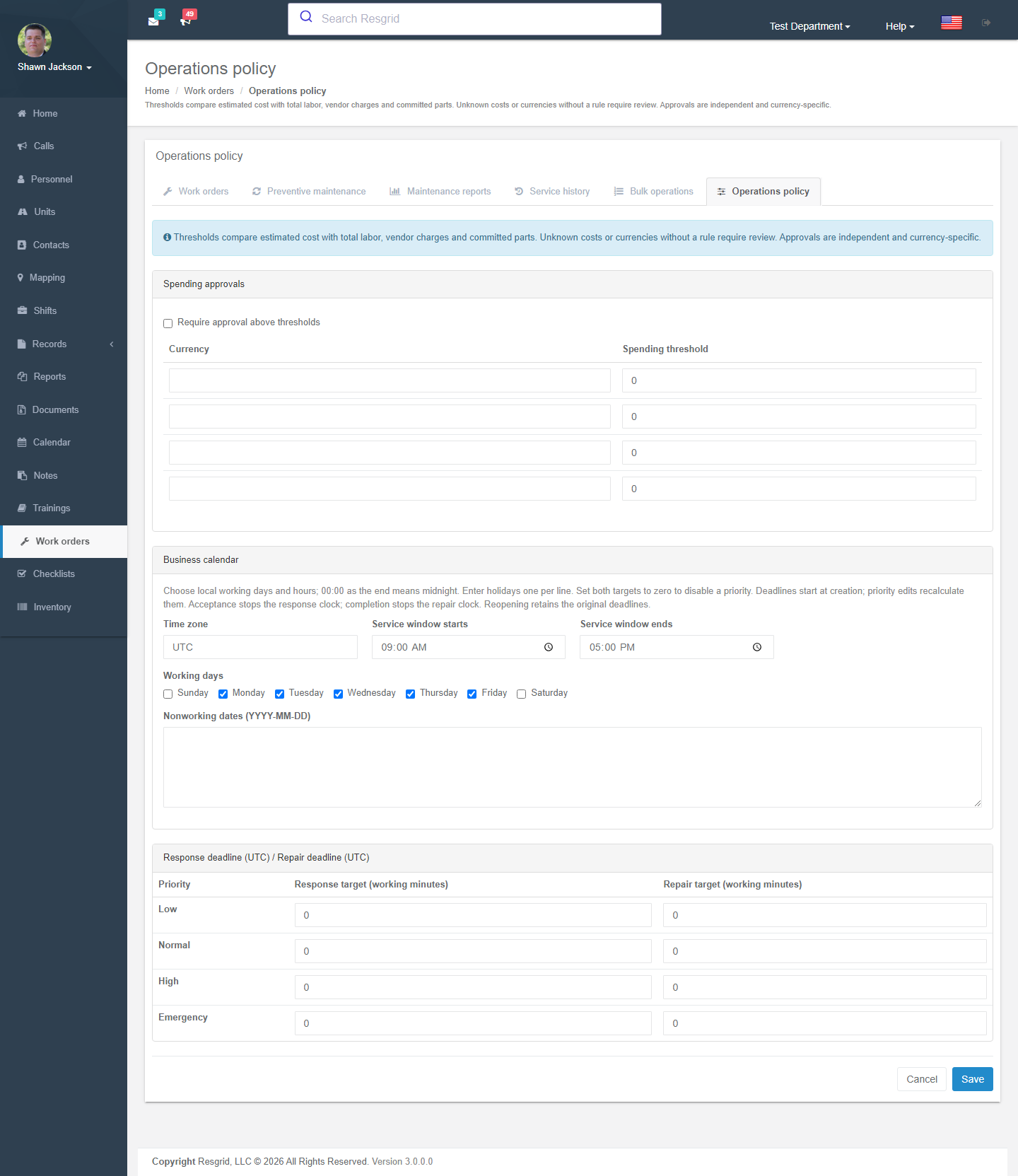
| Section | What it controls |
|---|---|
| Spending approvals | Require independent approval when estimated cost, or the running total of labor + vendor charges + committed parts, exceeds a threshold (per currency). The requester can never approve their own request. |
| Business calendar | Working days, hours and holidays used for the service-level clocks. |
| Service targets | Per-priority response target and repair target in working minutes. Deadlines start at creation; acceptance stops the response clock; completion stops the repair clock. Set both to zero to disable a priority. |
Bulk operations and import
- Bulk operations — preview up to 200 rows of assignment or status changes, then apply the valid rows. Each row is applied independently; errors stay visible and successful rows are not duplicated on retry.
- Import work orders — paste CSV using the downloaded template (keep the column names; numeric
type0–4,priority0–3, UTC dates such as2026-09-09T12:00:00Z).
Reports and history
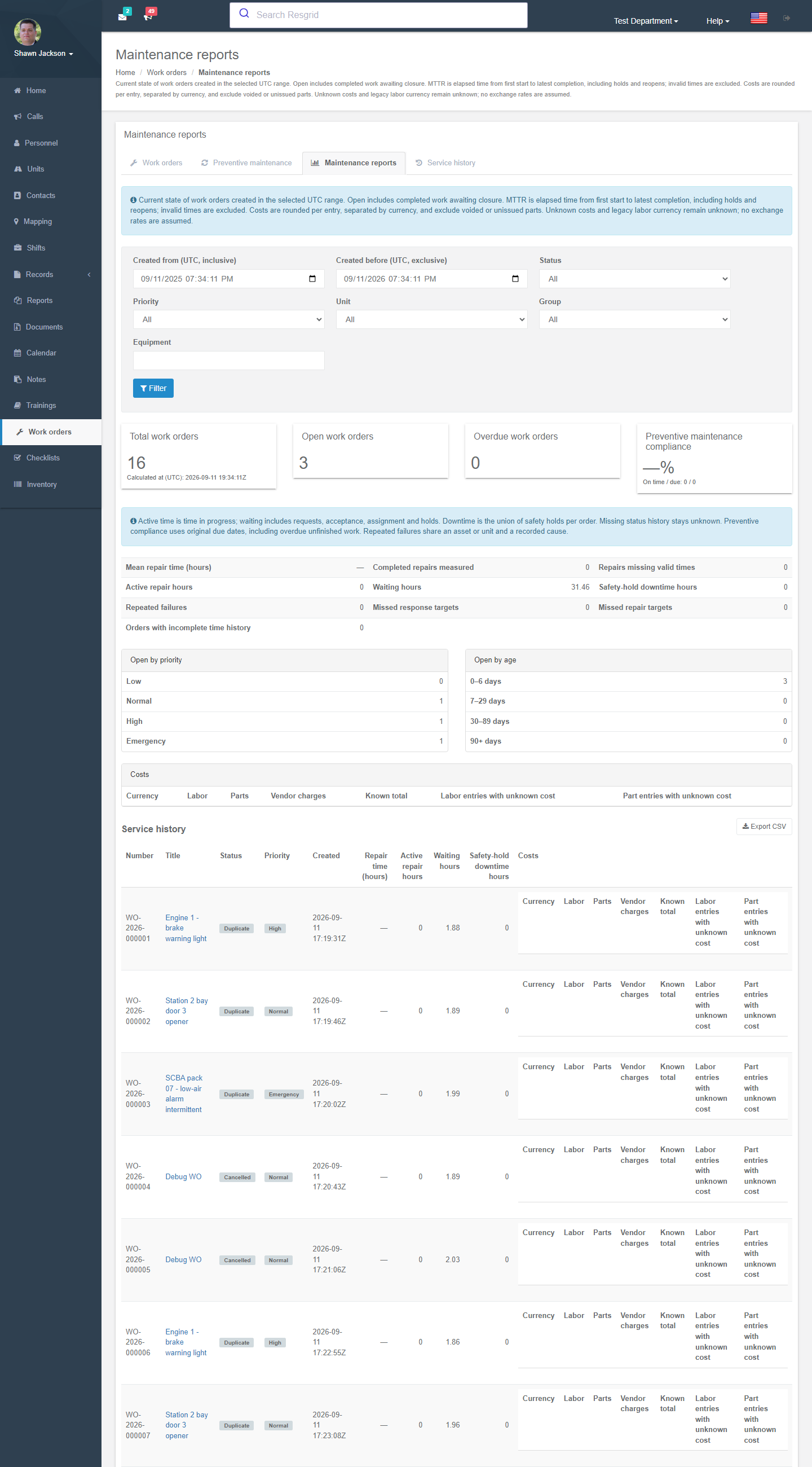
- Maintenance reports — for a UTC date range (up to 366 days): total / open / overdue orders, open by priority and age bucket, mean repair time, active vs waiting vs downtime hours, preventive-maintenance compliance, repeated failures, missed response / repair targets, and costs by currency. Export CSV.
- Service history — one row per order and currency, all-time unless filtered.
- A work-order snapshot is also included in the Checklists Readiness packet for a call.
Permissions
| Permission | Default | Grants |
|---|---|---|
| Manage work orders | Department admins | Triage, assign, change status, verify, apply/release holds, edit policy, run bulk operations. |
| View other members' work orders | Department admins | See work orders raised by others in the permitted group or department. Requesters always see their own. |
Spending approvals and safety-hold releases additionally require the approver to be a different person from the requester / completer.
Setup examples
| Department type | How to use it |
|---|---|
| Fire (any size) | Preventive schedules per apparatus: annual pump test (calendar), oil change every 250 engine hours (meter), ladder inspection yearly. Enable Create a work order on failure on the daily apparatus checklist so a bad brake light becomes a ticket automatically. |
| EMS | Ambulance mileage-based service (meter, miles), stretcher and monitor preventive inspections (equipment target), Hazardous work off, spending approval above $500 with the operations manager as approver. |
| SAR / wildland | ATV/UTV hour-meter service, rope and hardware retirement schedules (condition trigger on inspection count), chainsaw service. |
| Emergency management | Generator monthly run (calendar) and annual load test, radio cache inspection, trailer registration/inspection. |
| Security / facilities | Facility type work orders for door, camera and lighting faults raised from patrol checklists; business calendar Monday–Friday with response targets; vendor charges for outsourced repairs. |
| Industrial ERT / plant | Hazardous work and Safety-critical used routinely; permit, isolation and qualified-personnel fields mandatory; independent verification and safety-hold release enforced by policy. |
Technical reference
| Item | Value |
|---|---|
| Controller | WorkOrdersController (partials WorkOrderMaintenanceController, WorkOrderOperationsController, WorkOrderReportingController) |
| Routes | /User/WorkOrders/{Index,New,Detail,Edit,Evidence,Recurrences,NewRecurrence,EditRecurrence,Recurrence,Operations,Policy,Bulk,ImportTemplate,Reports,History}, /User/ReadinessProBilling/Index |
| Feature flag | Maintenance.WorkOrders (seeded off by M0189) and an active Readiness Pro addon payment (PlanAddonTypes.ReadinessPro) — see ReadinessAccessService.CanUseMaintenanceAsync |
| Module switch | DepartmentModuleSettings.MaintenanceDisabled |
| Permissions | PermissionTypes.ManageWorkOrders (114), PermissionTypes.ViewAllWorkOrders (115) |
| Workflow events | WorkOrderCreated, WorkOrderStatusChanged, WorkOrderAssigned, WorkOrderRecurrenceChanged, WorkOrderThresholdReached, WorkOrderOverdue, WorkOrderSafetyHoldApplied, WorkOrderSafetyHoldReleased, WorkOrderDeferred, WorkOrderPartChanged, WorkOrderApprovalChanged, WorkOrderSlaBreached, WorkOrderVendorChargeChanged, WorkOrderPolicyChanged |
| Protected data | Work-order text and files are protected-data classified when the department is enrolled in ADP. |