Contractor Billing
Contractor billing turns the approved daily time reports of a billable deployment into a customer invoice: one line per billing day per person, unit and equipment item, priced from the rate schedule bands, with premiums, per diems, mileage and billable expenses, the contract's discount and the customer's tax — plus a packet (invoice PDF, time-report PDFs, receipts, compliance documents) ready for the agency's accounts-payable inbox.
Business Ops add-on with Invoicing.ContractorBilling. Lives on the deployment page's Billing tab (administrators and holders of Manage deployments).
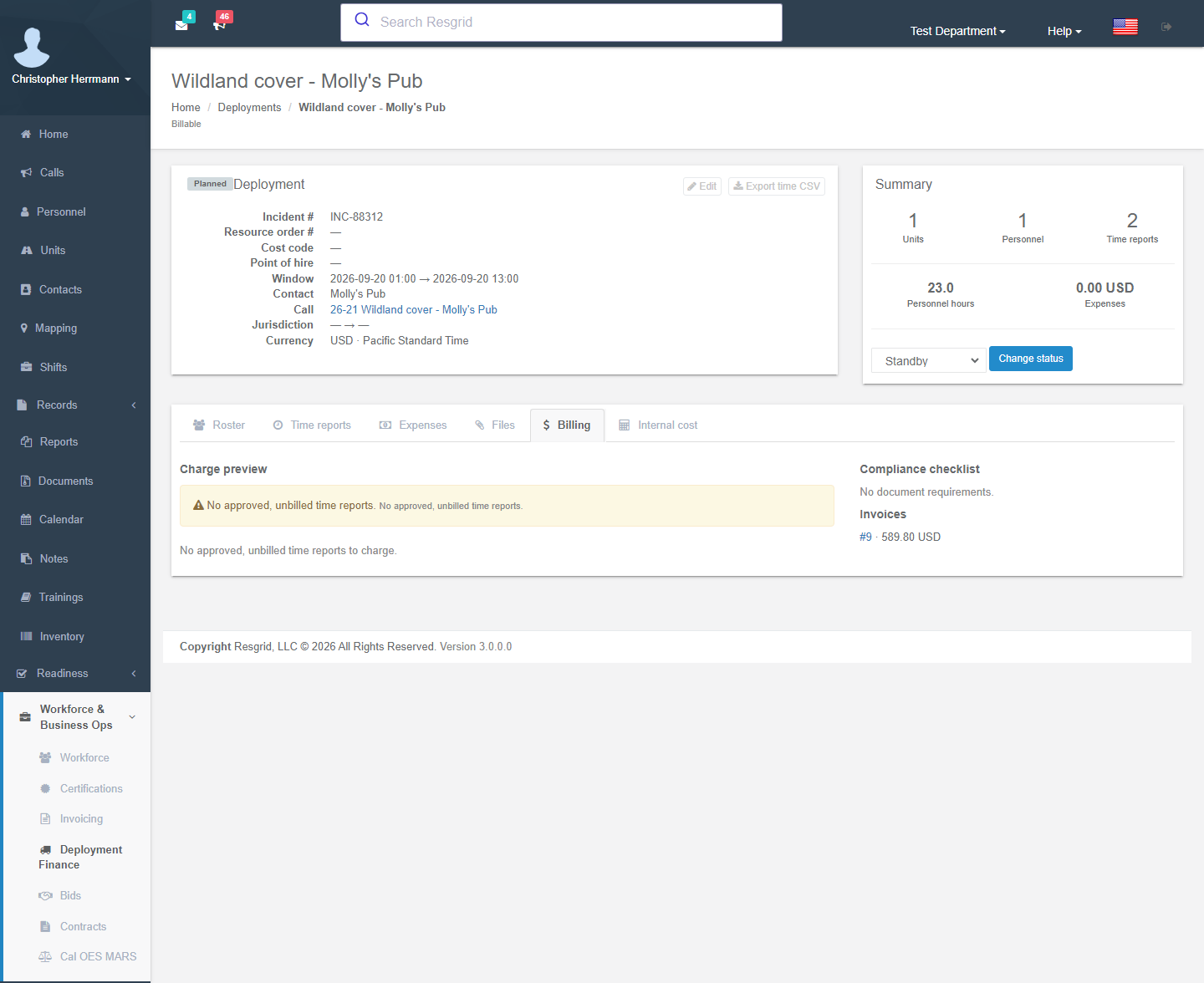
The billing tab
| Panel | What it shows |
|---|---|
| Charge preview | Every approved, unbilled time report through the through date, expanded into charge lines: date, description (subject, band, DTR number), quantity, rate, amount; then subtotal, discount and total before tax. Subjects the engine cannot price are listed with the reason — No personnel rate entry for certification 'X', No crew or vehicle rate entry is pinned to this unit — so you fix the roster or schedule before billing. |
| Compliance checklist | The contract's document requirements for this deployment and whether each is satisfied (current compliance document, uploaded attachment) or missing; optional rows are marked. |
| Invoices | Invoices already generated from this deployment. |
| Generate invoice | Creates a draft invoice from the preview; the billed time reports move to Billed and each invoice line remembers its time report. Review, edit and send it from Invoicing like any other invoice. |
Generate as often as you like — weekly billing on a long assignment is normal; each run only takes the reports not yet billed.
How the engine prices a day
For each approved time report and each subject on it:
- Rounding — the day's minutes are rounded up to the policy increment.
- Entry — a person bills under the rate entry whose certification code matches their roster row; a unit bills under the crew family entry whose size equals the seats actually filled that day (a partial crew takes the nearest lower size); vehicles and equipment bill under the entry pinned to their roster row.
- Bands — Deployment hours are split across the entry's Deployment / Overtime 1 / Overtime 2 thresholds (consecutive hours or daily total, per the policy). Standby bills at the standby band. Travel bills flat at the deployment rate and never earns overtime unless the policy is portal to portal; the travel cap still applies. A No clear 8 report starts the next day in the overtime band when the policy carries it over.
- Minimums — the daily guarantee, cancellation minimum and unsafe stand-down hours lift the day's deployment hours; the lift bills at the deployment band. On a cancellation day people always get the full day; vehicles and equipment only if the policy says so.
- Adders — each premium assigned to a person adds its per-band amount per hour; out-of-province deployments add the per-person daily band; vehicles add mileage above the free units per day and subtract agency-supplied fuel at the per-litre rate.
- Expenses — expenses marked Billable pass through at cost (with receipts in the packet); per diems outside their meal window are warned, not blocked.
- Discount and tax — the contract's discount (else the billing profile's) and the profile's tax rate or components are applied on the invoice.
Every figure comes from a table you can see — there is no hidden formula.
The invoice and packet
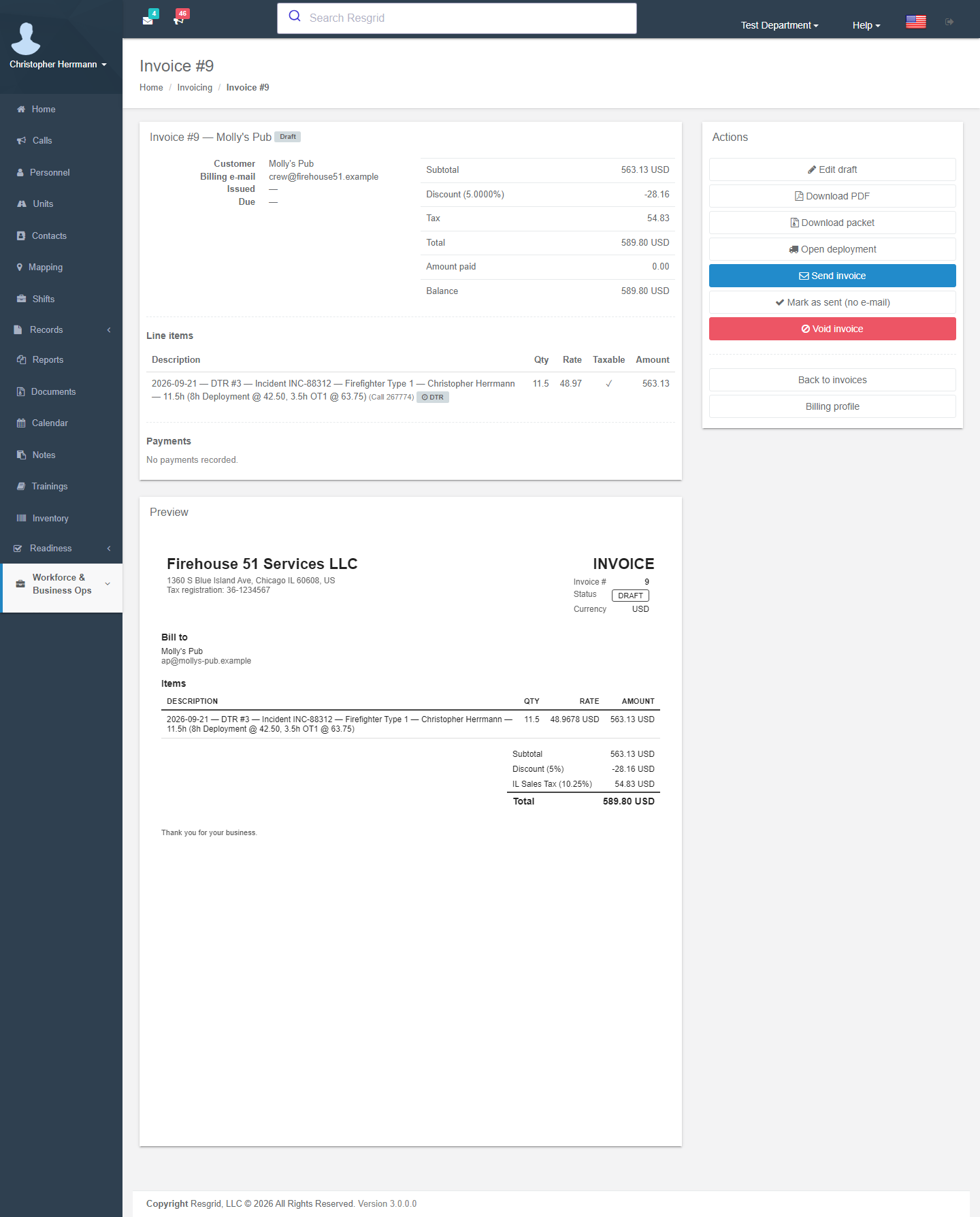
The generated invoice shows Billed from this daily time report on each line, Open deployment and Download packet. Send with packet e-mails the invoice PDF with the DTR PDFs, receipts and the compliance documents the contract requires at Invoice submission as one zip, to the contract's invoice submission e-mail by default.
The deployment-finance reminder digest tells administrators about approved time unbilled for more than 21 days.
Setup checklist
- Rate schedule with entries for every certification code, crew size, vehicle and equipment you deploy.
- Contract (or billing-profile default schedule) for the customer, with document requirements.
- Compliance documents current.
- Deployment in Billable mode with the roster carrying certification codes and pinned entries (the wizard does this for you).
- Daily time reports submitted by the crew and approved by someone with Approve time reports.
- Billing tab → check the preview → Generate invoice → send with packet.
Setup examples
| Organization | Billing rhythm |
|---|---|
| Wildland contractor | Weekly: approve the week's DTRs on Friday, generate the invoice, send with packet to the agency AP mailbox; reconcile the Billed reports against the agency's payment. |
| Fire protection company | Monthly per municipality: one deployment per contract year, invoice through the last day of the month. |
| Security company | Per event: approve DTRs after the event, generate one invoice, online pay link on. |
| Private ambulance | Per event or per month for recurring standby. |
Technical reference
| Item | Value |
|---|---|
| Routes | /User/Deployments/View?tab=billing; POST GenerateInvoice; /User/Invoicing/Packet, SendPacket |
| Services | IContractorBillingEngine (PreviewAsync, GenerateInvoiceAsync → LinkInvoiceToDeploymentAsync + MarkTimeReportsBilledAsync, packet zip), pure ContractorChargeCalculator (rounding, band split, minimums, premiums, per diems, mileage/fuel, expenses) |
| Model | ContractorChargeSet / ContractorChargeLine; Invoice.DeploymentId, InvoiceLineItem.CallId / DeploymentTimeReportId |
| Permission | Manage deployments (118) plus the contractor-billing entitlement; approvals need Approve time reports (119) |
| Worker | 32 unbilled-time reminder digest (daily) |
| API | api/v4/Deployments/GetDeploymentCharges, GenerateDeploymentInvoice |