Intake Channels
Intake channels turn requests from outside your department into pending calls: an email to an address you choose, a text or phone call to your Private Inbound Dispatch Number, a message in a Slack, Microsoft Teams, Telegram, Discord, Google Chat or WhatsApp chat, or a request from another system through a signed webhook. A hospital transfer line, an alarm company, a facilities help desk or a community chat can all send work to your dispatchers this way.
Intake never dispatches anyone by itself. Every message becomes a pending call that waits for a dispatcher to review it, choose who to send it to and dispatch it. With the dispatcher desk turned on, those pending calls are offered to the dispatchers on duty.
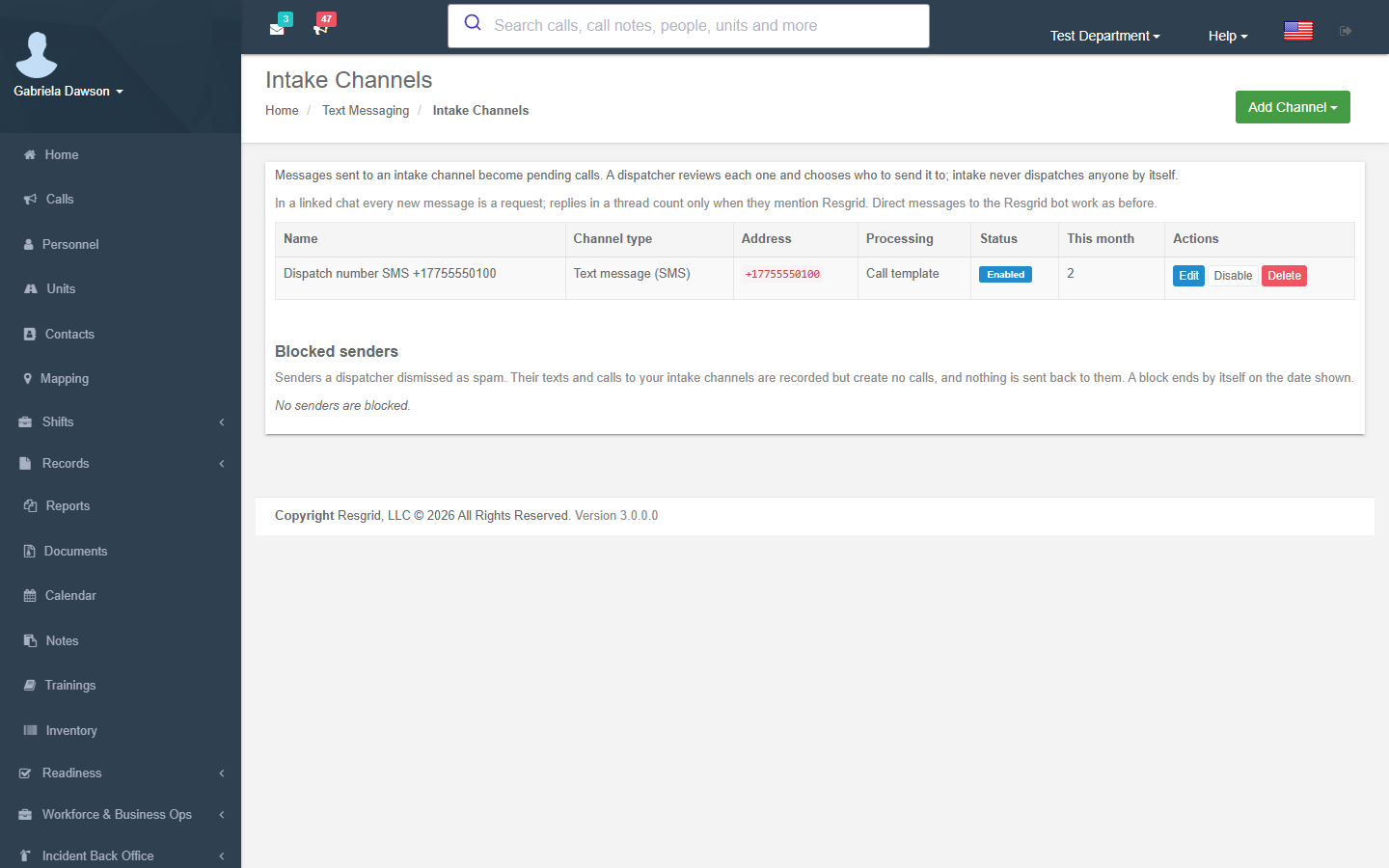
Where to find it
Department menu → Intake Channels (department admins), or Manage Intake Channels on Department menu → Text Messaging.
Intake channels are being turned on for departments in stages. Until they are on for yours, the page says Intake channels are not turned on for your department yet. You can set channels up now; they start creating calls once the feature is turned on., and the menu entry may be missing: use the link on Text Messaging.
How intake works
- Someone sends a message to the channel's address (an email address, a number, a linked chat, the webhook URL).
- Resgrid checks the channel is Enabled, the sender is allowed (Allowed senders) and not blocked, and the sender has not gone over the hourly limit.
- A pending call is created straight away from the message, named for the channel (via Email: Hospital transfer line), with the channel's Default priority and Default call type. Nothing is lost if Enhanced AI is down or not purchased.
- With Processing set to Enhanced AI, Enhanced AI then reads the message and fills in the call's type, address, priority and a summary (Enhanced AI intake).
- With Reply to the sender on, the sender gets a short receipt with the call number. Texts are answered from the main Resgrid number.
- A dispatcher reviews the pending call on Calls → Pending calls, in the Dispatch app, or as an offer on the dispatcher desk, and dispatches, edits or closes it.
The call's page shows where it came from in a banner (via Text message (SMS): Dispatch number SMS +17755550100), and the pending calls list adds the same label.
Channel types
| Type | Address to enter |
|---|---|
| The part before the @. Email sent to that name at your installation's dispatch domain becomes a pending call. It must differ from your department's dispatch email address (which keeps its own import and email call mode). | |
| Signed webhook | Nothing to type: Resgrid creates the webhook URL and signing secret when you save. Any system that can send a signed HTTPS request can create calls. See Webhook channels. |
| Slack | Workspace ID/channel ID, for example T012ABCDE/C034FGHIJ. Invite the Resgrid app to the channel with /invite @Resgrid, then copy the channel ID from the channel details and the workspace ID from About this workspace. |
| Microsoft Teams | Tenant ID/channel ID. Add the Resgrid app to the team and use Get link to channel: the channel ID is the 19:…@thread.tacv2 part and the tenant ID is the tenantId value. Mention @Resgrid in the channel to send a request. |
| Telegram | The chat ID; group IDs are negative, for example -1001234567890. Add the Resgrid bot to the group. With privacy mode on, start a request with /intake or mention the bot. |
| Discord | The channel ID (turn on Developer Mode, right-click the channel, Copy Channel ID). Add the Resgrid app to the server and use /resgrid in the channel. |
| Google Chat | The space name from the space URL, for example spaces/AAAAbCdEfGh. Add the Resgrid app to the space and mention it to send a request. |
| The WhatsApp sender number in international format. Resgrid support registers the sender on Resgrid's Twilio account. | |
| Text message (SMS) | Your Private Inbound Dispatch Number in international format, for example +17755550100. The number creates this channel for you when you turn on texts on it. |
| Phone call (voice) | Your Private Inbound Dispatch Number. Callers who are not members are taken through spoken questions by voice intake. The number creates this channel for you when you turn on voice intake. |
Chat channels: in a linked chat, every new message is a request. Replies in a thread count only when they mention Resgrid. Direct messages to the Resgrid bot work as before.
Adding or editing a channel
Add Channel lists the channel types. Each channel has:
| Field | What to enter |
|---|---|
| Name | Shown on the pending calls this channel creates, for example Hospital transfer line. |
| Address | As in Channel types. An address another channel (or any department's dispatch email address) already uses is refused. |
| Processing | Call template reads the message with one of your call email formats, picked under Template (Generic by default). Enhanced AI saves the message as a pending call, then fills in the call type, address, priority and a summary (needs the Enhanced AI add-on with AI intake). Phone call channels always use Enhanced AI. |
| Allowed senders | Comma-separated: phone numbers (with * wildcards), email addresses or @domains, or platform user IDs. Leave blank to accept anyone who can reach the address. At most 200 entries. |
| Default priority | The priority of the calls it creates, or Department default. |
| Default call type | The call type of the calls it creates, or None. |
| Reply to the sender | Sends a short receipt with the call number. Texts are answered from the main Resgrid number. Not for phone calls. |
| Enabled | Turn the channel off without deleting it. |
The list shows each channel's type, address, processing, status and how many messages it took This month, with Edit, Enable / Disable and Delete (Delete this intake channel? Messages sent to its address will no longer create calls.).
Webhook channels
After saving a Signed webhook channel, its Webhook URL link opens the webhook details:
- the URL (
…/api/v4/Intake/Webhook/<token>); - the Signing secret, shown only once (Copy the secret now… rotate it if it is lost). Rotate Secret creates a new one; the old one stops working at once. Without a secret every request is refused;
- how to sign: header
X-Resgrid-Signature: t=<unix seconds>,v1=<hex HMAC-SHA256 of "t.body" using the secret>; requests more than 300 seconds old are refused; - the body: JSON with
message(required),subject,sender,externalId(a repeat with the same ID never creates a second call),address,latitudeandlongitude.
A webhook accepts up to 60 requests a minute and bodies up to 64 KB.
Enhanced AI intake
With Processing set to Enhanced AI (and the Enhanced AI add-on with AI intake), Enhanced AI reads each message after its pending call is saved:
- It fills in the call type, address, priority and a short summary from the message. The dispatcher sees them on the pending call and can change anything.
- It never dispatches and never changes who the call goes to.
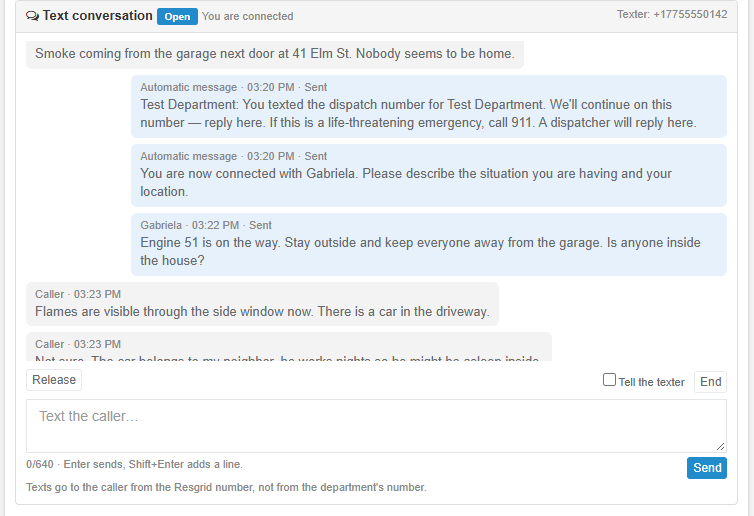
- On a text conversation to your Private Inbound Dispatch Number, it can also ask the texter questions, one per text and at most 8, until a dispatcher connects (Text conversations). It never promises a response or an arrival time, and tells the texter to call the emergency number when something is life-threatening.
- On a phone call to your number, voice intake asks the caller four questions and turns the answers into the pending call (needs AI voice intake).
- A confident reading that the message is not an incident (spam, advertising, a wrong number, a test) labels the call Enhanced AI: likely not an incident (Spam screening). The label never changes a call field.
Enhanced AI for intake runs on Resgrid's own self-hosted model. Departments enrolled in Advanced Data Protection are skipped: their intake calls are still created, just not read by AI.
Without the add-on, choose Call template: the call is built from the message with your template format, and the dispatcher fills in the rest.
Text conversations
A text to your Private Inbound Dispatch Number does more than create a pending call: it opens a text conversation with the texter, continued from the main Resgrid number. Enhanced AI or a dispatcher talks with them while the call is being worked, and everything they write is added to the call's notes. See Private Inbound Dispatch Number → Text conversations.
Spam screening
Public numbers attract spam texts, robocalls and wrong numbers. Spam screening keeps them from becoming work for your dispatchers.
Dismiss as spam
A pending call from an intake channel shows Dismiss as spam in its banner on the call's page (and in the Dispatch app's Pending Calls), for anyone who may close the call. With Also block the sender for 30 days ticked (the default):
- the call is Cancelled; nobody was dispatched and nobody is notified;
- its text conversation is closed without texting the sender;
- the sender is blocked for 30 days (The call was dismissed as spam and the sender is blocked.). A sender who withheld their number cannot be blocked (The caller withheld their number, so they could not be blocked.).
A call that is no longer pending cannot be dismissed this way: close it as usual.
Blocked senders
The Blocked senders list at the bottom of Intake Channels shows each blocked sender, the channel type, who blocked them, when, and Until (the date the block ends by itself, or Until lifted), with View call for the dismissed call. Senders a dispatcher dismissed as spam. Their texts and calls to your intake channels are recorded but create no calls, and nothing is sent back to them. A block ends by itself on the date shown.
- A blocked phone number covers both texts and calls.
- Blocks end after 30 days because phone numbers are reassigned. Dismissing the same sender again renews the block; it never shortens one.
- Unblock lifts a block at once (Their messages will create pending calls again.).
- Members are never held back by the list, and if the list cannot be read, messages are let through so a real request is never lost.
- Blocked messages do not count toward your monthly limits.
Automatic screening
| Check | What happens |
|---|---|
| Per-sender limit | On public phone lines (texts, phone calls and WhatsApp channels with no Allowed senders), one sender can create at most 3 calls an hour. Past that, a new message is added as a note to their newest open intake call, with no reply. With none open it still makes a call, labeled Repeat sender: over the hourly limit, with no welcome text, no conversation and no acknowledgement. Email, chat and webhook channels (alarm panels and CAD bridges send many incidents from one address) are never limited. |
| Not a phone number | A text from a short code or an alphanumeric sender ID is refused: no call, no conversation, no reply. |
| Press 1 to continue | A caller who is not a member first hears To leave a request for the dispatcher, press 1 now. Most auto-dialers never press 1, so they create no call and do not use up your monthly voice intake. See Voice intake. |
| Enhanced AI label | With Enhanced AI processing, a confident reading that the message is not an incident labels the call Enhanced AI: likely not an incident. Later texts in the conversation can clear it again. |
Screened calls on the desk
A pending call with any screening label (Enhanced AI: likely not an incident, Repeat sender: over the hourly limit) is never offered on the dispatcher desk: no push, no countdown. It waits in the desk's Waiting queue for a dispatcher to take, and the label shows on the pending call so they can dismiss it as spam or work it.
Setup examples
| Organization | How to set it up |
|---|---|
| EMS (interfacility transfers) | Email channel Hospital transfer line (transfers@…), Allowed senders @hospital.org, Default call type IFT, Enhanced AI processing so the pickup address and priority are filled in; Reply to the sender on so the hospital gets the call number. |
| Fire (alarm company) | Signed webhook channel for the monitoring company's system, Default call type Alarm, Call template processing; their externalId stops repeat alarms creating duplicate calls. |
| Security / facilities | Microsoft Teams channel Facilities requests in the client's team; Default priority Low; dispatchers pick the requests up from Pending calls. |
| Search and rescue | Telegram group of partner agencies; members start a request with /intake; Enhanced AI to pull the location out of the message. |
| Community / CERT | Private Inbound Dispatch Number with texts on, so residents can text non-emergency requests; spam screening defaults; dismiss junk as spam. |
| Emergency management | Email channel for partner agencies' resource requests; Slack channel for the EOC's volunteer coordinators. |
Technical reference
| Item | Value |
|---|---|
| Pages | IntakeChannelsController (policy Department_Update): GET /User/IntakeChannels/Index, GET/POST Edit?id=&type=, GET Webhook?id=, POST RotateSecret, POST SetEnabled, POST Delete, POST Unblock; POST DismissAsSpam (callId, blockSender; Call_Update and CanUserCloseCallAsync); GET CallSources?callIds= (Call_View). Views Views/IntakeChannels/{Index,Edit,Webhook}; the View Call banner and _IntakeConversation panel |
| Strings | Resgrid.Localization.Areas.User.Department.IntakeChannels, Resgrid.Localization.Areas.User.Dispatch.IntakeConversation |
| Types and modes | IntakeChannelTypes 1 Sms, 2 Email, 3 WhatsApp, 4 Slack, 5 Teams, 6 Telegram, 7 Discord, 8 GoogleChat, 9 Webhook, 10 Voice; IntakeProcessingModes 1 Template, 2 EnhancedAi; CallSources 6 Intake, 7 VoiceIntake |
| Storage | M0323 IntakeChannels, IntakeMessages (audit and idempotency, kept MessageRetentionDays 90), VoiceIntakeSessions (kept 48 h); M0325 IntakeConversations, IntakeConversationMessages; M0326 IntakeBlockedSenders. No foreign keys; purged with the department |
| Config | IntakeConfig (RESGRID:IntakeConfig:<Field>): Enabled, MaxMessageLength 4000, MaxWebhookBodyBytes 65536, WebhookTimestampToleranceSeconds 300, WebhookRequestsPerMinute 60, MaxCallsPerSenderPerHour 3 (0 = off), SpamBlockDays 30 (0 = until lifted), VoiceGateEnabled true, VoiceGateTimeoutSeconds 8, conversation settings (see Private Inbound Dispatch Number) |
| Flags | Intake.Channels (per-department rollout), Intake.DedicatedNumber, Ai.Intake, Ai.VoiceIntake (prerequisite Ai.Enhanced) |
| AI | Every intake creates the pending call first, then queues enrichment on the aidispatchtriage queue (AiDispatchQueueItem.Channel 4 IntakeSms, 5 IntakeEmail, 6 IntakeChat, 7 IntakeWebhook, 8 IntakeVoice); self-hosted model only; ADP departments skipped. LikelyNotIncident from a confident isDispatch false (prompt ai-dispatch-enrich-v3) |
| Screening | IIntakeScreeningService; IntakeMessageStates.SenderBlocked 8 (not counted toward volume), AddedToCall 9; refusal SenderNotPhoneNumber; screenings LikelyNotIncident, RepeatSender, DismissedAsSpam; withheld caller IDs (ANONYMOUS, RESTRICTED …) never blocked or limited as one sender. Desk: screened calls held, event HeldForReview 19 |
| v4 API | POST api/v4/Intake/Webhook/{token} (signed); POST api/v4/IntakeScreening/DismissAsSpam { CallId, BlockSender }; CallResultData.IntakeScreening on Calls/GetCall, GetActiveCalls, GetPendingCalls, GetCalls; api/v4/IntakeConversations/* (see Private Inbound Dispatch Number) |
| Worker | 80 IntakeMaintenance: message and session purges, idle conversation close, expired block purge, number lapse and release |
| Admin Assist | Capabilities in the intake catalog link here (/web-app/intake-channels/overview/) |