Private Inbound Dispatch Number
The Private Inbound Dispatch Number add-on gives your department its own phone number, chosen by you, for the public and partner agencies to text and call:
- Texts to it become pending calls for a dispatcher to review, and open a text conversation with the texter that Enhanced AI or a dispatcher carries on.
- Phone calls from people who are not members go through voice intake: spoken questions whose answers become a pending call (needs Enhanced AI).
- Members who call the number reach the usual voice menu.
- Inbound only. The number receives texts and calls. Every reply comes from the main Resgrid number, so your department needs no text-message registration of its own.
| Price | Where |
|---|---|
| US$15 per month (Stripe) | US and Canadian numbers. |
| €20 per month (Paddle) | A number in your department's country, where available. |
The add-on is billed monthly per department, even on an annual plan, and needs an active paid entity plan. Like every other intake, it never dispatches anyone by itself: a dispatcher reviews and sends each call.
Where to find it
- Department menu → Private Inbound Dispatch Number (department admins), once it is offered to your department.
- The Private inbound dispatch number box on Department menu → Text Messaging, with Manage private inbound dispatch number, whatever the menu shows.
- The add-on's card on Subscription and Billing, which opens the add-on's billing page.
Buying and lifecycle
Buying the add-on
The Add-on box at the top of the page says where your department stands:
| The page says | What to do |
|---|---|
| Your department holds the Private Inbound Dispatch Number add-on. | Choose a number (below). Manage the add-on opens its billing page. |
| Buy the Private Inbound Dispatch Number add-on to choose and provision a number. | The price is shown with Buy Private Inbound Dispatch Number. Checkout runs on Stripe or Paddle and brings you back to this page. Only the department's managing member can buy (Only your department's managing member can buy or cancel add-ons.). |
| The Private Inbound Dispatch Number add-on is available with an active entity plan. | Change your plan first: View plans opens the Subscription page. |
| The Private Inbound Dispatch Number add-on is not available for your department yet. | It has not been offered to your department yet. |
Choosing a number
Once the add-on is active, Choose a number searches the phone carrier:
| Filter | Use it for |
|---|---|
| Country | Only the countries offered to your department. |
| Area code | United States and Canada. |
| Contains | Digits the number should include; * matches any digit. |
| State / province, City, Postal code | Narrow to a place (United States and Canada). |
| Near the department's address, Within N miles | Numbers close to your department (needs the department's address or map center). |
Results list each Number, its Location and Number type (Local number or Mobile number). Every result can receive both texts and calls. Provision asks Provision +1… as your department's number?; the purchase takes a moment (Refresh this page in a minute.), then … is now your department's number. If the carrier cannot provide it, choose another.
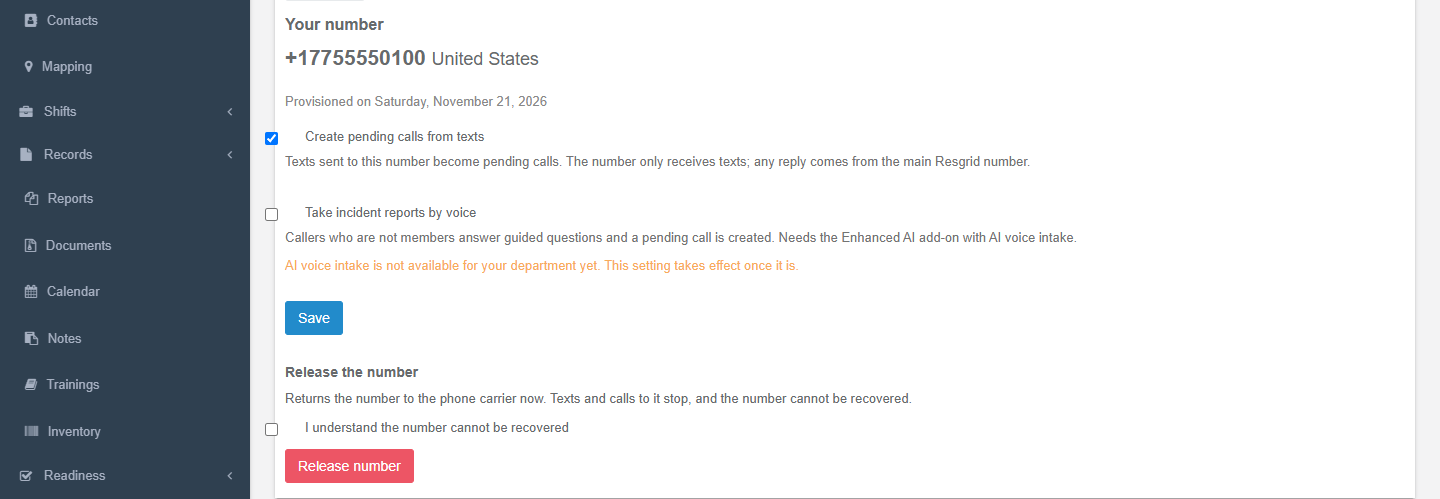
Your number
Under Your number:
| Setting | What it does |
|---|---|
| Create pending calls from texts | Texts sent to this number become pending calls (and text conversations). The number only receives texts; any reply comes from the main Resgrid number. |
| Take incident reports by voice | Callers who are not members answer guided questions and a pending call is created (Voice intake). Needs the Enhanced AI add-on with AI voice intake; without it the page says AI voice intake is not available for your department yet. This setting takes effect once it is. |
Press Save. Turning texts or voice on creates the matching intake channel (Dispatch number SMS +1…, Dispatch number voice +1…) on Intake Channels, where you can set its default priority and call type and its Allowed senders. Processing is only the SMS channel's to choose: it starts on Call template, and Enhanced AI lets Enhanced AI read the texts and talk with texters. The voice channel always uses Enhanced AI, which is what takes the caller through the questions.
Release the number returns it to the carrier at once. Texts and calls stop and the number cannot be recovered: tick I understand the number cannot be recovered and press Release number.
If payment stops
The number is held while your department pays for the add-on and keeps an active paid plan. Cancelling the plan also cancels paid add-ons. When payment stops (the add-on or plan is cancelled or unpaid):
- The same day: the department's administrators are warned (in-app notification and email, push when enabled), and the page shows Payment for this number has stopped, with the dates below.
- After 3 days (a grace period for renewal invoices and card retries): texts and calls to the number stop. The page says Number on hold. Texters get a short note from the main Resgrid number, and callers hear This number is no longer in service for the department.
- 15, 5 and 1 days before release: the administrators are warned again. The page lists which warnings were sent.
- 30 days after payment stopped: the number is released to the carrier.
Paying again before the release keeps the number: Put the number back in service on the page brings it back. Release it now releases a held number straight away.
Monthly limits
Each department can take up to 2,000 texts and 100 voice intake calls a calendar month on its number. Over the text limit, texts still create calls and your administrators are alerted. Over the voice limit, callers hear This line takes text messages. Please text this number. Blocked senders and robocalls that never press 1 do not count.
Text conversations
When someone texts your number:
- A pending call is created straight away, and a text conversation opens with the texter (one open conversation per texter).
- The welcome is sent from the main Resgrid number: (department name): You texted the dispatch number for (department name). We'll continue on this number — reply here. If this is a life-threatening emergency, call 911. When nobody automated will answer, it adds A dispatcher will reply here. The welcome takes the place of the channel's Reply to the sender receipt.
- The texter replies to the main Resgrid number. For 24 hours after the last message, their texts reach the conversation, ahead of member text commands. A second text to your number while the conversation is open joins it too.
- Who answers:
| Who | When |
|---|---|
| Enhanced AI (The AI assistant is asking the texter questions) | The SMS channel's Processing is Enhanced AI and your department has AI intake. It asks one question per text, at most 8, then says dispatch has your information. A dispatcher may text you here. It never promises a response or an arrival time. |
| Nobody yet (Waiting for a dispatcher to reply) | Call template processing, no Enhanced AI, or the AI has finished its questions. |
| A dispatcher (Connected with the dispatcher's name) | A dispatcher takes the conversation, on the call's page or on the dispatcher desk. The texter gets You are now connected with (first name). Please describe the situation you are having and your location. and Enhanced AI goes quiet. |
- It ends when a dispatcher ends it, the texter texts STOP (they are opted out and nothing more can be sent), the call is closed, or nobody writes for 4 hours. The pending call stays.
Every text in the conversation is added to the call's notes (Text from caller: …, Text to caller (Dana): …), and Enhanced AI re-reads the conversation to keep the call's details current.
On the call's page
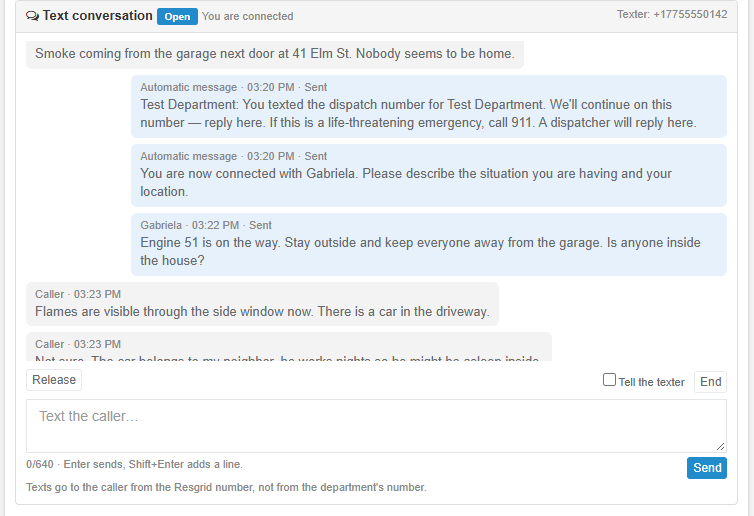
View Call and Update Call show a Text conversation panel on calls that have one:
- the state (Open or Ended, with the reason: The texter opted out, No messages for a while, The call was closed), who is answering, and the texter's number;
- every message, labeled Caller, AI assistant, Automatic message or Dispatcher, with Sending, Sent or Not delivered;
- Take conversation connects you (Another dispatcher is connected to this conversation. Take it over? when someone else has it); Release hands it back; End closes it (End this text conversation? The call stays open.), with Tell the texter to send a closing text;
- a send box (Text the caller…, up to 640 characters; Enter sends, Shift+Enter adds a line.). Texts go to the caller from the Resgrid number, not from the department's number.
The panel works with or without the dispatcher desk; taking or releasing a conversation here also moves it on the desk.
On the dispatcher desk
With the dispatcher desk routing Text messages, each new conversation is offered to an on-duty dispatcher as a Text message item linked to its pending call. The dispatcher works it in the Dispatch app: Accept connects them, the reply box texts the texter, Return to queue hands it back, and Complete ends it with Tell the texter on or off. See Dispatch app → Dispatcher desk.
Voice intake
When Take incident reports by voice is on and your department has AI voice intake:
- Members who call the number reach the usual voice menu.
- Everyone else first hears Thank you for calling. To leave a request for the dispatcher, press 1 now. Callers who do not press 1 within 8 seconds hear We did not hear a request. Please call back or text this number. and the call ends.
- After pressing 1, the caller hears This automated line records your request, and a dispatcher will review it. If this is a life-threatening emergency, hang up and dial 911. and answers four questions:
- Please tell us the emergency or request, then pause.
- Please say the address or location, including the city.
- Please say your name.
- Please say or key in the best number to call you back on, then press pound. To use the number you are calling from, press star.
- Each question is asked again if nothing usable was heard. The caller hears Your request has been recorded and a dispatcher will review it.
- A pending call is created from the answers, and Enhanced AI fills in the call's type, priority and address for a dispatcher to review.
When voice intake is off or not available, or the monthly voice limit is used up, callers who are not members hear This line takes text messages. Please text this number. Blocked callers hear This line cannot take your call.
Calls to your department's text-to-call number are different: with the dispatcher desk taking Phone calls, a dispatcher answers them live (Dispatcher desk → Phone calls).
Spam screening
The number is public, so it gets spam screening:
- Dismiss as spam on a pending call from the number cancels it, ends its conversation without texting the sender, and blocks the sender's number (texts and calls) for 30 days.
- Press 1 keeps robocalls out of voice intake and off your monthly limit.
- 3 calls an hour per sender: more texts from the same number are added as notes to their open call.
- Texts from short codes and alphanumeric senders are refused.
- Enhanced AI labels likely spam Enhanced AI: likely not an incident, and the dispatcher desk never offers a labeled call (it waits for a dispatcher to take it).
Setup examples
| Organization | How to set it up |
|---|---|
| Volunteer fire | A local number for non-emergency texts (burn permits, smoke reports). Texts on, voice off; SMS channel on Call template; the duty officer takes conversations from the call's page. |
| Multi-agency dispatch center | One number for partner agencies and the public's non-emergency texts; SMS channel on Enhanced AI so the assistant collects the location before a dispatcher connects; the dispatcher desk offers every conversation to the dispatchers on duty. |
| Campus security | A number printed on parking permits and residence hall doors for students to text; Allowed senders blank; dispatchers on the desk answer; dismiss pranks as spam. |
| Emergency management | A number for residents to report damage after a storm; texts and voice intake on, so callers without a smartphone can leave a report by voice; Enhanced AI fills in the addresses. |
| Search and rescue | A number for overdue-hiker reports from families and trailhead signs; voice intake on; the on-call coordinator takes the conversation. |
Technical reference
| Item | Value |
|---|---|
| Pages | DedicatedNumberController (policy Department_Update): GET /User/DedicatedNumber/Index (search: country, areaCode, contains, region, city, postalCode, near the department), POST Provision (phoneNumber), POST UpdateIntake (smsIntakeEnabled, voiceIntakeEnabled), POST Release (departmentPhoneNumberId, confirmRelease), POST Reactivate. DedicatedNumberBillingController (Index, Checkout with returnTo 0 billing page / 1 number page). IntakeConversationsController: GET Thread?callId= (Call_View), POST Connect (conversationId, takeOver), Send, Release, Close (reason, notify) (Call_Update) |
| Strings | Resgrid.Localization.Areas.User.Department.DedicatedNumber, .Dispatch.IntakeConversation, add-on card in .Addons.Addons. The product name stays Private Inbound Dispatch Number in English in every language; code identifiers keep DedicatedNumber |
| Add-on | PlanAddonTypes.DedicatedNumber = 7 (PlanAddons row 3b1c7f0e-5d2a-4c86-9a4e-7f2d1e6b8c40). DedicatedNumberAddonConfig: StripeMonthlyAmount 15 (USD), PaddleMonthlyAmount 20 (EUR), StripeCountries US,CA, PaddleCountries (operator-configured, each needs a Twilio regulatory bundle in RegulatoryBundles), MonthlyVoiceIntakeLimit 100, MonthlySmsIntakeLimit 2000, LapseDelayHours 72, ReleaseGraceDays 30, ReleaseWarningDays 15,5,1, ProvisioningTimeoutMinutes 30. Needs an active paid entity plan; cancelling the entity plan cancels paid add-ons |
| Storage | M0323 DepartmentPhoneNumbers (DepartmentPhoneNumberStatuses), DedicatedNumberBillingAccounts; M0325 DepartmentPhoneNumbers.ReleaseWarningsSent (flags 1 stopped, 2/4/8 the warning stages), LastReleaseWarningOn, IntakeConversations, IntakeConversationMessages (delivery log only; message text lives in call notes) |
| Conversations | IntakeConfig.ConversationsEnabled true, EmergencyNumber 911, ConversationReplyWindowHours 24, ConversationIdleCloseMinutes 240, ConversationMaxAssistantTurns 8, ConversationMaxOutboundLength 640. Replies go from NumberProviderConfig.TwilioResgridNumber. IntakeConversationStates 1 Open, 2 Closed; IntakeConversationHandlers 1 Assistant, 2 Unassisted, 3 Dispatcher; IntakeConversationAuthors 1–4; IntakeConversationMessageStatuses 1–4. Realtime EventingTypes 21 IntakeConversationUpdated (hub intakeConversationUpdated(callId, {conversationId, state, handler})). Desk seam IIntakeConversationRouter (DispatcherIntakeConversationRouter) |
| Voice | VoiceIntakeSteps 0 Greeting, 1 Nature, 2 Location, 3 CallerName, 4 Callback, 5 Completed, 6 Abandoned; prompts in TwilioVoicePromptCatalog (Piper TTS); speech via Twilio <Gather input="speech"> (VoiceSpeechModel phone_call, VoiceMaxRetries 2); gate api/Twilio/VoiceIntakeGate (VoiceGateEnabled, VoiceGateTimeoutSeconds 8); sessions kept 48 h. Flag Ai.VoiceIntake |
| v4 API | api/v4/IntakeConversations: GET GetForCall?callId= (Call_View; the texter's number is masked without Call_Update), POST Connect {ConversationId, TakeOver?}, POST Send {ConversationId, Text}, POST Release {ConversationId}, POST Close {ConversationId, Reason?, Notify?} (Call_Update). POST api/v4/IntakeScreening/DismissAsSpam |
| Worker | 80 IntakeMaintenance: idle conversation close, lapse (after 72 h) and release (after 30 days) with the admin warnings, provisioning timeouts, purges |
| Flags | Intake.DedicatedNumber (menu entry, add-on card and checkout), Intake.Channels, Ai.Intake, Ai.VoiceIntake |
| Admin Assist | Links here (/web-app/intake-channels/dedicated-number/, #voice-intake) |