Recorder
In record mode Relay joins one of your Resgrid PTT channels, or all of them, and saves every transmission as its own WAV file, on disk, in S3-compatible storage or both. For each one it writes a row to a metadata log: who talked, on which channel, when, and for how long. Use it for compliance, after-action reviews and training.
The recorder runs on every Relay build (desktop app, console on Windows, Linux and macOS, Docker). It is a voice mode, so it needs the RefreshToken grant (Connect to Resgrid) and your department's Push To Talk add-on.
Each channel the recorder listens to occupies one of your department's PTT voice seats while it is connected. With Channel all and Respect the department's concurrent voice-seat limit on, the recorder records as many channels as it has seats for, and logs an error naming the first channel it couldn't join (that one and the ones after it aren't recorded).
Set it up
In the desktop app
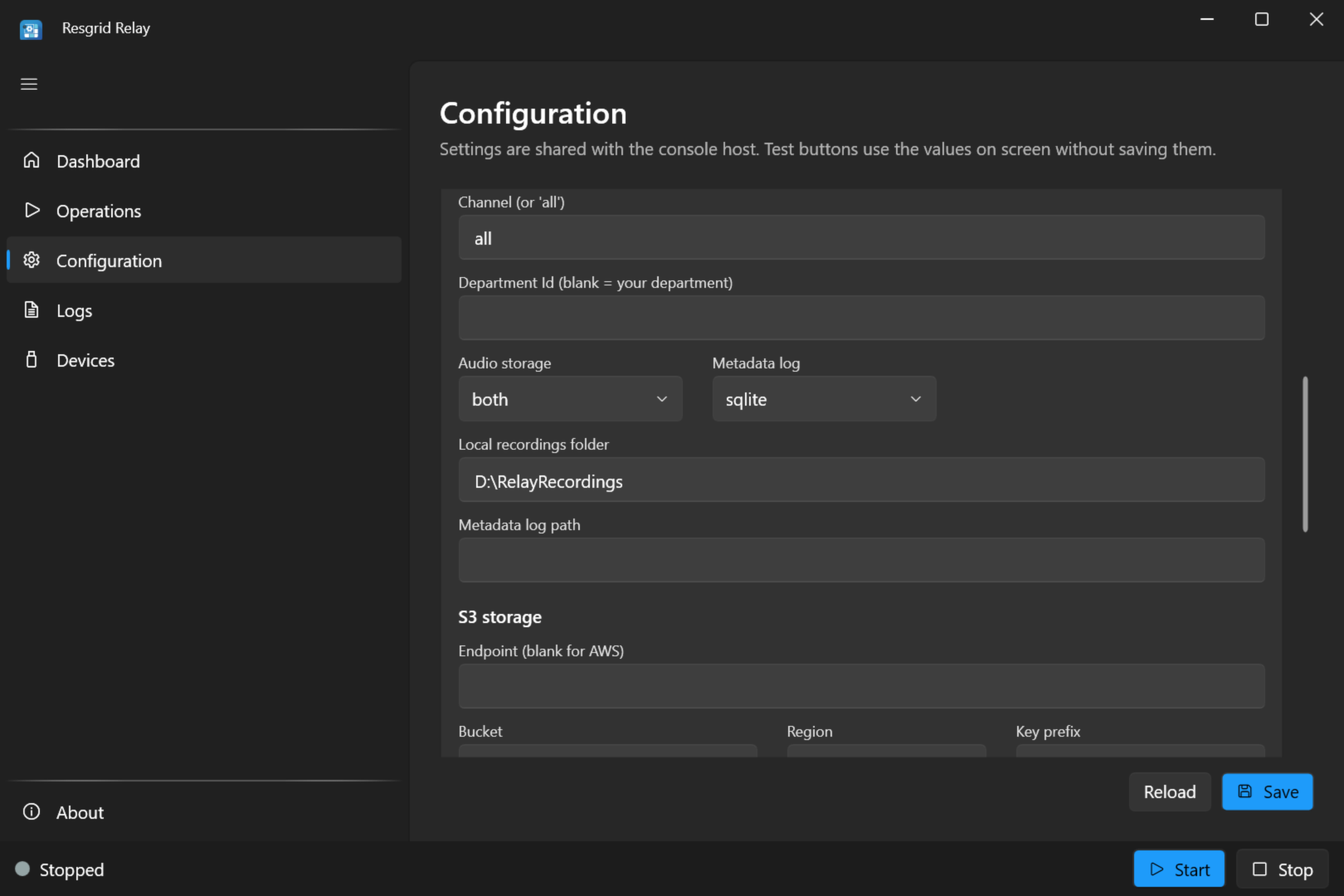
Open Configuration › Recorder:
| Setting | Value |
|---|---|
| Channel (or 'all') | all (the default) records every channel in your department. Or a channel's name or id. |
| Department Id | Leave blank: your department. |
| Audio storage | local (a folder), s3 (S3-compatible storage) or both. |
| Metadata log | jsonl (a JSON Lines text file), sqlite (a SQLite database) or none. |
| Local recordings folder | Where WAV files go. Blank: a recordings folder next to the Relay program. |
| Metadata log path | The log file. Blank: transmissions.jsonl (or transmissions.db) in the recordings folder. |
| S3 storage | See S3-compatible storage. |
Save, then start Recorder on the Operations screen and turn on Auto-start. Its Dashboard tile counts Transmissions.
Set the recordings folder to a drive with room to grow: a folder in the program folder is fine for a test, not for a year of recordings.
In appsettings.json or relay.user.json
{
  "Mode": "record",
  "Recorder": {
    "Channel": "all",
    "Store": "local",
    "LocalPath": "D:\\Recordings\\Resgrid",
    "Log": "jsonl"
  }
}
With environment variables (Linux, Docker)
RESGRID__RELAY__Mode=record
RESGRID__RELAY__Recorder__Channel=all
RESGRID__RELAY__Recorder__Store=local
RESGRID__RELAY__Recorder__LocalPath=/var/lib/resgrid-relay/recordings   # Docker: /app/recordings
RESGRID__RELAY__Recorder__Log=jsonl
The systemd unit already points Recorder__LocalPath at /var/lib/resgrid-relay/recordings, the one writable folder it allows. If you record elsewhere, add the path to the unit's ReadWritePaths=. In Docker, recordings go to /app/recordings: mount a volume or host folder there.
What a transmission is
The recorder splits each talker's audio into transmissions:
- A transmission starts when someone starts talking, and ends after
Recorder:Segmentation:HangMs(1.5 seconds) without audio. - One longer than
Recorder:Segmentation:MaxSegmentSeconds(5 minutes) continues in a new file. - One with less than
Recorder:Segmentation:MinActiveMs(250 ms) of audio, a stray key-up, is dropped. - Audio quieter than
Recorder:Segmentation:SilenceFloorDbfs(−50 dBFS) counts as silence.
Two people talking at once are recorded as two transmissions. These values have no field on the screen; set them in the settings file or environment variables if you need to (see the settings reference).
The files
Each transmission is a WAV file (16-bit PCM, 48 kHz, mono; about 5.8 MB per minute of speech), named after the channel, the start time in UTC, the talker and a short id:
<recordings folder>/2026/11/22/Fireground_1_20261122T140512Z_Jane_Smith_3f9a1c2e.wav
Files go into a year/month/day folder (UTC). In S3 the key is <prefix>/2026/11/22/<file name>, with the prefix relay-recordings by default.
If a recording can't be uploaded (S3 unreachable, the bucket refusing the write), Relay keeps it in failed-uploads inside the recordings folder, so an outage costs an upload, not the audio. Move those files into place once the problem is fixed.
That fallback needs a writable recordings folder. failed-uploads is on the same filesystem, so when the recordings disk is full or read-only nothing can be kept there and the transmission is lost: watch the free space, restore capacity as soon as the Logs screen reports a write failure, and treat the recordings from that period as missing.
Relay never deletes recordings. Plan for the disk space, and set retention to match your records policy: an S3 lifecycle rule, or a scheduled clean-up of old day folders.
The metadata log
With jsonl, each transmission adds one line to transmissions.jsonl:
{"id":"3f9a1c2e...","channelId":"...","channelName":"Fireground 1","roomName":"...","participantIdentity":"...","participantName":"Jane Smith","trackSid":"...","startUtc":"2026-11-22T14:05:12.410Z","endUtc":"2026-11-22T14:05:19.020Z","durationMs":6610,"sampleRate":48000,"channels":1,"codec":"pcm_s16le","samples":317280,"locations":[{"kind":"local","location":"D:\\Recordings\\Resgrid\\2026\\11\\22\\Fireground_1_20261122T140512Z_Jane_Smith_3f9a1c2e.wav","sizeBytes":634604}]}
| Field | Meaning |
|---|---|
id | The transmission's id (also in the file name). |
channelId, channelName, roomName | The PTT channel. |
participantIdentity, participantName | Who talked. |
trackSid | The talker's audio track. |
startUtc, endUtc, durationMs | When, and how long. |
sampleRate, channels, codec, samples | The audio format. |
locations | Where the WAV was stored: one entry per store (kind, location, sizeBytes). |
The file is append-only and easy to search (grep, jq, a spreadsheet import). With sqlite, the same fields go into a transmissions table in transmissions.db, for querying with any SQLite tool.
S3-compatible storage
Set Audio storage to s3 (cloud only) or both (a local copy as well), and fill in the S3 settings:
| Setting | AWS S3 | MinIO, RustFS, Wasabi and other S3-compatible stores |
|---|---|---|
| Endpoint | Blank | The store's URL, for example https://minio.example.org:9000 |
| Bucket | Your bucket | Your bucket |
| Region | The bucket's region, for example us-east-1 | As the store requires |
| Key prefix | relay-recordings by default | Same |
| Use HTTPS | On | On, unless the store is plain HTTP on a private network |
| Path-style addressing | Off | On for MinIO and most S3-compatible stores |
| Access key, Secret key | An access key allowed to write objects to the bucket | Same |
Tick Reveal secrets (in the Resgrid API section) to enter the keys. The pre-flight check wants a bucket when S3 is chosen.
With environment variables: RESGRID__RELAY__Recorder__Store=s3, RESGRID__RELAY__Recorder__S3__Bucket, __S3__Region, __S3__Endpoint, __S3__AccessKey, __S3__SecretKey, __S3__Prefix, __S3__ForcePathStyle and __S3__UseSsl.
Recording the radio side
A recorder joined to a channel records everyone heard on it, including a radio bridge on that channel. To record a radio bridge's traffic without running a separate recorder, turn on Record the channel and the radio side while bridging in the radio bridge settings: the bridge then uses these Recorder settings to save both directions, the radio side as Radio (channel name).
Stopping cleanly
When the recorder stops (Stop in the app, Ctrl+C, systemctl stop, docker stop), it finishes the transmissions in progress and stores them before it exits, waiting up to 10 seconds for uploads. Stop it the normal way rather than killing the process.
Privacy
Recordings and the log contain your members' voices and names. Keep the recordings folder and bucket private, and the S3 keys secret. Under the systemd unit, the files Relay writes are readable by the resgrid account only.