Optional features and upgrades
Every resgrid-setup deployment (single server, Windows laptop, Kubernetes and the Incident Command Kit) uses the same two mechanisms after the first install:
- an optional features menu that switches Resgrid modules such as Records, Unified search and Chat on or off for the whole server, together with any settings or extra services they need;
- re-running setup as the way to upgrade and repair an install. It is safe to run any time and never deletes data.
Optional features
Resgrid ships several modules behind feature flags that are off on a new server. Setup asks about each one at the end of the first install, and you can change them later:
| Deployment | Command |
|---|---|
Single server (master) | ./setup.sh features |
Windows laptop (laptop) | .\resgrid.ps1 features |
Kubernetes (multi) | ./setup.sh features |
Incident Command Kit (rick) | ./rick.sh features (on rick1) |
Each feature is one question, even when it needs many flags:
==> Optional features
    Resgrid ships some modules switched off. Answer y to turn a feature on for
    every department on this server, n to turn it off; Enter takes the answer
    in brackets. Run this again any time with: ./setup.sh features

  [1/10] Records (RMS)  (now: off)
        Incident and field records (replaces Logs), records in the Responder, Unit and Dispatch apps,
        prevention (occupancy, inspections, hydrants, permits, community risk reduction),
        investigations, quality review and records analytics.
        After switching it on, a department administrator activates Records in the department settings.
        Turn on Records (RMS)? (y/n) [n]: y

  [2/10] Unified search  (now: off)
        Search across calls, personnel, units, contacts and records, plus the command palette.
        Uses Resgrid's built-in search index, stored in the RustFS object store.
        Turn on Unified search? (y/n) [y]: y
...
    Not available on self-hosted servers (Resgrid subscription add-ons): Enhanced AI, Workforce and
    Business Operations, Incident Back Office, Maintenance and work orders (Readiness Pro), Advanced
    Data Protection, Resgrid-operated services (managed migration, Stripe Connect payments)
==> Records (RMS): on
==> Unified search: on
The default answer is the current state, or "y" when a feature you just turned on suggests it (Records suggests Unified search; Department import suggests virus scanning).
The features
| Feature | What setup switches and configures |
|---|---|
| Records (RMS) | All 13 Records.* flags: incident and field records, records in the Responder, Unit and Dispatch apps, prevention (occupancy, inspections, hydrants, permits, community risk reduction), investigations, quality review, analytics. A department administrator then activates Records in the department settings. |
| Unified search | Search.Unified, and RESGRID__SearchConfig__* so the search index is kept in the bundled RustFS object store (bucket resgrid-search). The worker builds each department's index within a few minutes. |
| Chat | Chat.System: department channels, direct messages and incident chat in the web and mobile apps. |
| Run cards | Run cards, station-based dispatching, closest-unit response, move-up recommendations and conditional run cards. |
| Checklists | Unit, station and inventory checklists. |
| Deployments | Out-of-area deployments: rosters, daily time reports, expenses, attachments. |
| Setup wizard and admin guidance | Guided department setup, the setup report and administrator recommendations. |
| Department import and migration | Imports of personnel, units, stations, contacts, inventory, history and records from spreadsheets and other CAD/RMS systems. |
| Attachment virus scanning | Starts a ClamAV service (about 1.5 GB of RAM) and turns on RESGRID__AttachmentScanningConfig__Enabled. ClamAV brings its signatures with it, so scanning also works offline. |
| Text-message commands (Twilio) | Routes inbound SMS through the Resgrid chatbot; setup asks for the Twilio account SID, auth token and number. Needs internet access and a public API address. |
Resgrid's paid add-ons (Enhanced AI, Workforce and Business Operations, Incident Back Office, Readiness Pro work orders, Advanced Data Protection) depend on Resgrid's hosted billing service. Setup lists them but doesn't offer them on self-hosted servers.
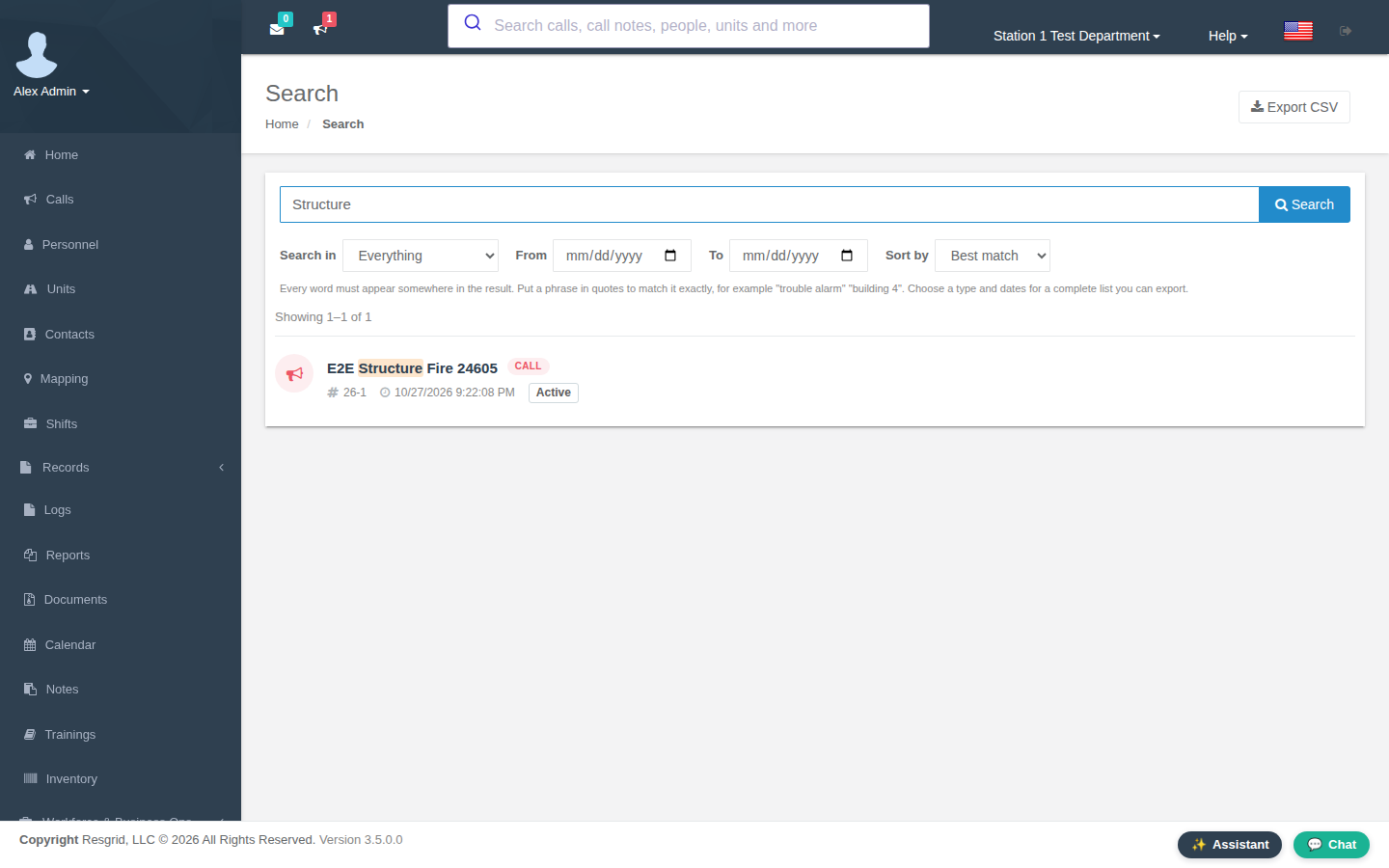
A feature is switched for every department on the server (the featureflags table of the resgrid database). Setup clears Resgrid's flag cache in Redis, so the change shows on the next page load; new menu entries such as Records and Chat appear in the web app, and the search box in the header searches everything:
Without questions
Give the features that should be on; every other feature is switched off:
RESGRID_FEATURES=records,search,chat ./setup.sh features # or: all, none
On the laptop: .\setup.ps1 -Features records,search,chat. The same variable works on the first install (RESGRID_FEATURES=records,search ./setup.sh), which is handy for automated or repeated installs. --all (-All on the laptop) also offers individual flags that no feature in the catalog covers, for testing new Core features.
What setup remembers
Setup keeps two entries in .env (deploy/generated/resgrid.env on Kubernetes):
RESGRID_FEATURES: the features you turned on;RESGRID_FEATURES_OFFERED: the features it has asked you about.
When setup runs again (an upgrade, see below) it uses them to:
- ask only about features that are new in that version. With nothing new it asks one question, "Change the optional features?", which defaults to no;
- switch your features fully back on when their flags are off or only partly on. That happens after restoring an older database, or when a new Resgrid version adds a flag to a feature you use (new flags start off).
Upgrade and repair
Running setup again is the upgrade. Back up first, then:
| Deployment | Upgrade |
|---|---|
| Single server | cd ~/resgrid && ./setup.sh upgrade, or the install one-liner curl -fsSL https://raw.githubusercontent.com/Resgrid/resgrid-setup/master/setup.sh \| bash |
| Windows laptop | .\resgrid.ps1 upgrade |
| Kubernetes | ./setup.sh upgrade |
| Incident Command Kit | ./rick.sh upgrade on rick1 (with internet) |
upgrade gets the newest setup files (git pull, or the archive download without git; a newer setup script takes over from the old one) and then runs setup again. Without internet, RESGRID_NO_PULL=1 ./setup.sh (.\setup.ps1 -NoPull) repairs the configuration and restarts with the images already present.
On an existing install setup never replaces a value you set, never rotates a secret your data depends on and never deletes data. It:
- backs up the settings file (
.env.backup-<date>); - adds the settings introduced since you installed. New secrets get random values; everything else gets the template default, with the example node addresses replaced by yours on the kit;
- fills in required values that are empty and fixes values known to break (old container addresses,
BypassSslChecks=true, a placeholder events secret); - recreates generated files that are missing: local certificate authority, OpenID Connect certificates, the kit's DNS file, the Kubernetes ingress certificate;
- keeps the data of older versions (next section);
- pulls the new images, starts new services, removes retired ones and restarts. The worker migrates the database schema;
- asks about new optional features and re-applies yours.
After pulling a new version, always run setup rather than only docker compose up -d, so these steps happen. Rolling back after a database migration means restoring the backup that matches the older images.
Each deployment also repairs what is specific to it:
- Kubernetes: the bucket job runs again on every apply, so new storage buckets are created. StatefulSet pods that never became ready under an older definition are restarted; Kubernetes doesn't replace those on its own. The optional services listed in
RESGRID_OPTIONALare applied, and the ones setup applied before but that are no longer listed are removed. - Incident Command Kit:
rolloutcopies the configuration to every node over SSH, starts the nodes in order (data, infra, app, edge) and waits for the database before asking about features.syncnever touches a node'sdocker-data/,backups/orbundle/folders.
Upgrading an install created before October 2026
Older versions of resgrid-setup tracked .env in git, used NGINX_* setting names and fixed container IP addresses, and stored PostgreSQL data in other places. Upgrade them the same way; setup recognizes the old layout:
- the tracked
.envis set aside duringgit pulland put back; NGINX_RESGRID_WEB_URLand the otherNGINX_*settings becomeRESGRID_WEB_HOST,RESGRID_API_HOST,RESGRID_EVENTS_HOSTandRESGRID_TLS, and container IP addresses become service names;- on the Incident Command Kit, the three-node settings (web, infra, database) are mapped onto the four roles: the old web node runs edge and app, so every address stays valid;
- your data is copied into the new PostgreSQL 18 database, once and only while the new database is empty, so nothing is overwritten:
- single server: the
docker-data/sqlfolder of installs up to April 2025 (PostgreSQL 17). The copy uses that version's image, so it needs internet access; - a database container of the old stack is stopped and its data directory saved first: to
backups/legacy-pgdata-*.taron a server, or as the imageresgrid-legacy-db:<id>on the laptop; - Incident Command Kit: the database container of the three-node kit, on the data node;
- single server: the
- the original data isn't changed, and a dump is kept in
backups/legacy-db-*.sql.gz. SetRESGRID_MIGRATE_LEGACY_DB=0to skip the copy; - old containers under a different project name are stopped, not removed, so their ports are free. Remove them once the new version works.
Maintaining the feature list
This section is for people who maintain resgrid-setup or a fork of it. The questions come from one file, features/catalog.ini, shared by all four branches. lib/features.sh (and scripts/features.ps1 on the laptop) read it, so adding, regrouping or retiring a feature is an edit to the catalog only:
[records]
title=Records (RMS)
about=Incident and field records (replaces Logs), records in the Responder, Unit and Dispatch apps,
about=prevention (occupancy, inspections, hydrants, permits, community risk reduction),
about=investigations, quality review and records analytics.
category=Records
recommends=search

[scanning]
title=Attachment virus scanning (ClamAV)
about=Scans uploaded files with ClamAV, in an extra container that needs about 1.5 GB of RAM.
profile=clamav
setting=RESGRID__AttachmentScanningConfig__Enabled=true
off=RESGRID__AttachmentScanningConfig__Enabled=false
| Key | Meaning |
|---|---|
title=, about= | The question and its explanation (about= may repeat, one line each) |
flags= | Flag keys, separated by spaces |
category=, exclude= | Every flag in a category, including flags Core adds later, except the keys listed |
requires= | Sections switched on together with this one |
recommends= | Sections offered with "y" as the default once this one is on |
setting=KEY=value | Written to the settings file when the feature is turned on; {OTHER_KEY} copies another setting's value |
off=KEY=value | Written when the feature is turned off |
ask=KEY\|question\|default | A value setup asks for when the feature is turned on |
profile= | Optional service that runs while the feature is on: a Compose profile, or a file in deploy/optional/ on Kubernetes |
online=yes | Shown as needing internet access |
available=no | A hosted-only add-on: listed, never switched |
Setup reads the flags from the database, so the catalog keeps working when Core changes. Flags that no longer exist are skipped, and a section with no flags in the database isn't shown. When Core retires a feature for good, delete its section, and setup stops asking about it. ./setup.sh features --all lists flags that no section covers, which shows what a new Core version added.